

WowInvoice is worth considering if you want to automate WooCommerce invoices and other order documents without managing separate tools for every document type.
It is an all-in-one WooCommerce order document solution that automates professional document creation with flexible customization and built-in support for EU VAT requirements.
Alongside PDF invoices, WowInvoice supports packing slips, delivery notes, picklists, shipping labels, credit notes, and UBL/XML invoices.
Its free version covers essential invoicing and document needs, while Pro extends its capabilities for more advanced fulfillment and refund workflows.
But does your store need everything WowInvoice offers?
In this review, we’ll examine its features, practical workflows, usability, Free vs Pro differences, and limitations to help you decide.
Editorial disclosure: WowInvoice is a WPXPO product, and this review is published by WPXPO. The assessment draws on product documentation, official workflow tutorials, and publicly available product information.
What Can You Do With WowInvoice?
WowInvoice is a WooCommerce PDF invoice and order document plugin designed to automate document generation, manage customization, and make essential documents available to customers and store teams.
Its primary value is bringing these activities together rather than requiring merchants to configure each document workflow independently.
Generate and Send PDF Invoices Automatically
WowInvoice can automatically generate PDF invoices when an order reaches selected WooCommerce statuses.
For example, a merchant can configure invoices to be generated when an order is marked as Processing or Completed, depending on the store’s invoicing process.
Merchants can also:
- Attach PDF invoices to selected WooCommerce emails.
- Allow customers to download invoices from their My Account pages.
- Display invoice download options based on selected order statuses.
- Configure custom invoice numbers, prefixes, suffixes, and numbering formats.
- Include relevant order, customer, product, and store information.
This reduces the need to manually prepare and send individual invoices as orders come in.
Customize Professional Order Documents
WowInvoice includes a visual document builder with configurable templates and live previews.
Merchants can customize information such as their business identity, logo, addresses, tax details, invoice numbers, product tables, totals, and footer notes.
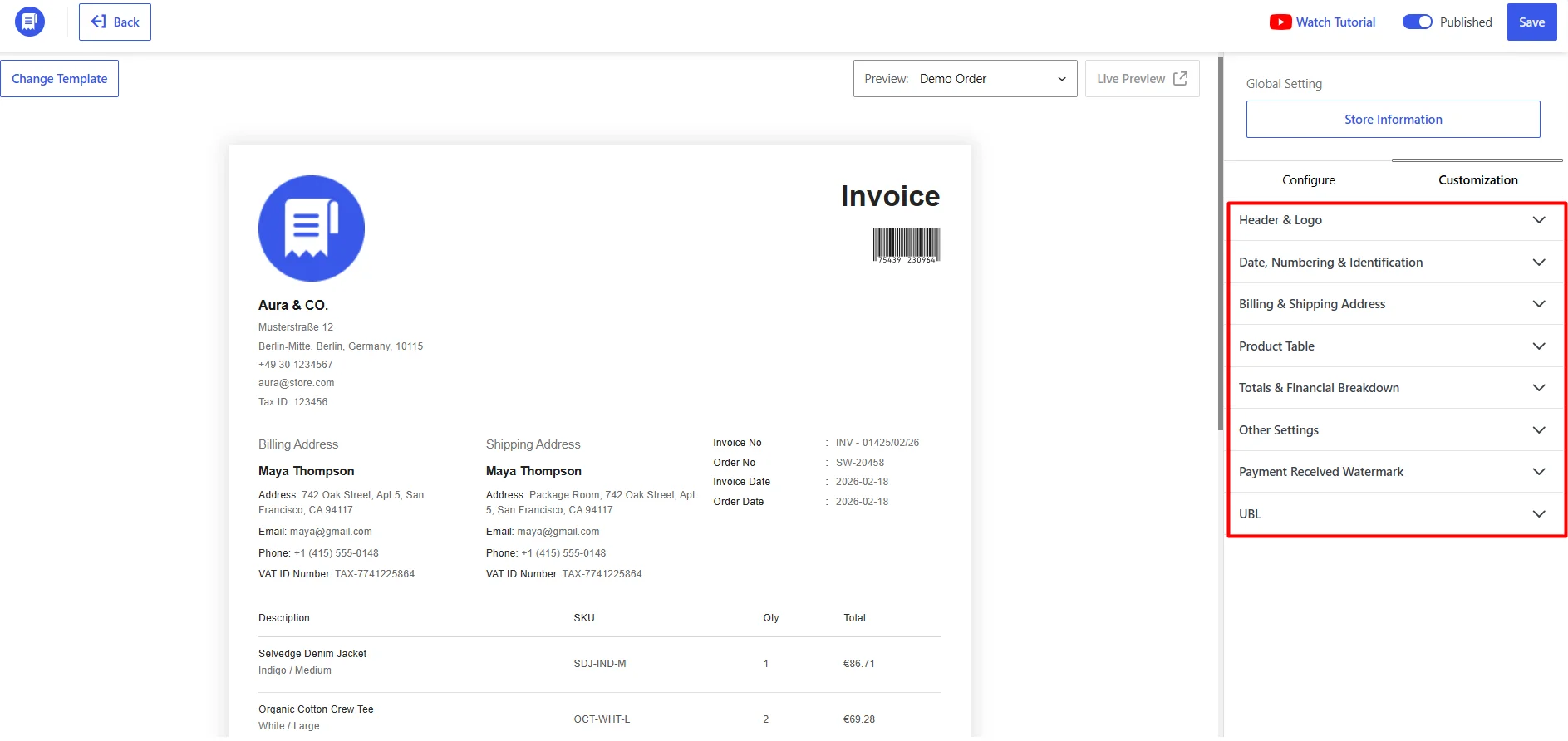
For instance, a store can create an invoice displaying its company details, VAT identification, customer information, and a product-level tax breakdown.
The builder also allows merchants to preview documents using specific WooCommerce orders before publishing their configurations.
An important advantage is shared store information. Once merchants configure their business identity, address, and relevant company details, WowInvoice can reuse them across supported document types.
This helps maintain consistency between invoices, packing slips, delivery notes, and other documents.
Manage Essential Documents Beyond Invoices
WowInvoice goes beyond PDF invoicing by bringing multiple WooCommerce order documents into one place.
Alongside invoices, it supports packing slips, delivery notes, picklists, shipping labels, and credit notes. Each serves a different purpose, from preparing and shipping orders to documenting refunds and adjustments.
WowInvoice also supports UBL/XML invoices for structured electronic invoicing and provides built-in settings for VAT-related documentation.
Merchants can configure and customize these documents individually while maintaining consistent business information across them.
This makes WowInvoice useful for managing documentation throughout the order lifecycle, from invoicing and fulfillment to delivery and after-sales processes.
Advanced WooCommerce Document Workflows That Make WowInvoice Worth Considering
Beyond PDF invoicing, WowInvoice helps merchants manage documents for order fulfillment, bulk processing, refunds, and VAT-related requirements.
1. Manage Order Fulfillment with Picklists, Packing Slips, Delivery Notes, and Shipping Labels
WowInvoice supports four essential documents for different stages of WooCommerce order fulfillment:
- Picklists: Help warehouse staff collect the correct products and quantities before packing.
- Packing slips: List the items included in a package so staff can verify orders before dispatch.
- Shipping labels: Display recipient addresses and shipping information for identifying shipments.
- Delivery notes: Accompany shipments with details of the delivered products and quantities, helping customers verify what they’ve received.
Merchants can customize these documents with relevant order details, product information, and layouts using dedicated builders.
For example, WowInvoice can automatically email picklists to warehouse staff based on selected order statuses. Merchants can then prepare packing slips and shipping labels for dispatch and include delivery notes for customers to check received items.
However, generating shipping label documents does not include purchasing carrier postage or booking shipments.
2. Export WooCommerce Order Documents in Bulk
WowInvoice’s Bulk Export feature allows merchants to download multiple order documents without opening orders individually.
Merchants can select the document type and filter orders using criteria such as date ranges and customers. Only configured and published document types are available for export.
This is useful for preparing invoice records, processing fulfillment paperwork, or collecting documents for a specific period.
3. Handle Refund Documentation with Credit Notes
WowInvoice can generate credit notes to document refunds and order adjustments.
Merchants can configure automatic credit note generation based on selected order statuses, such as Refunded. They can also customize numbering, financial breakdowns, email attachments, and customer download options.
For example, after processing a refund, a store can provide a credit note showing the relevant items, taxes, and adjusted amount.
Since credit note requirements vary by jurisdiction, merchants should verify that their configuration meets applicable accounting and tax rules.
4. Generate UBL/XML Invoices and Support EU VAT Documentation
WowInvoice supports structured UBL/XML invoices and provides built-in settings for VAT-related documentation.
Merchants can display company tax details and customer VAT or tax identification numbers on invoices. Customer VAT numbers can be collected through a configurable checkout field or retrieved from supported plugins and order metadata.
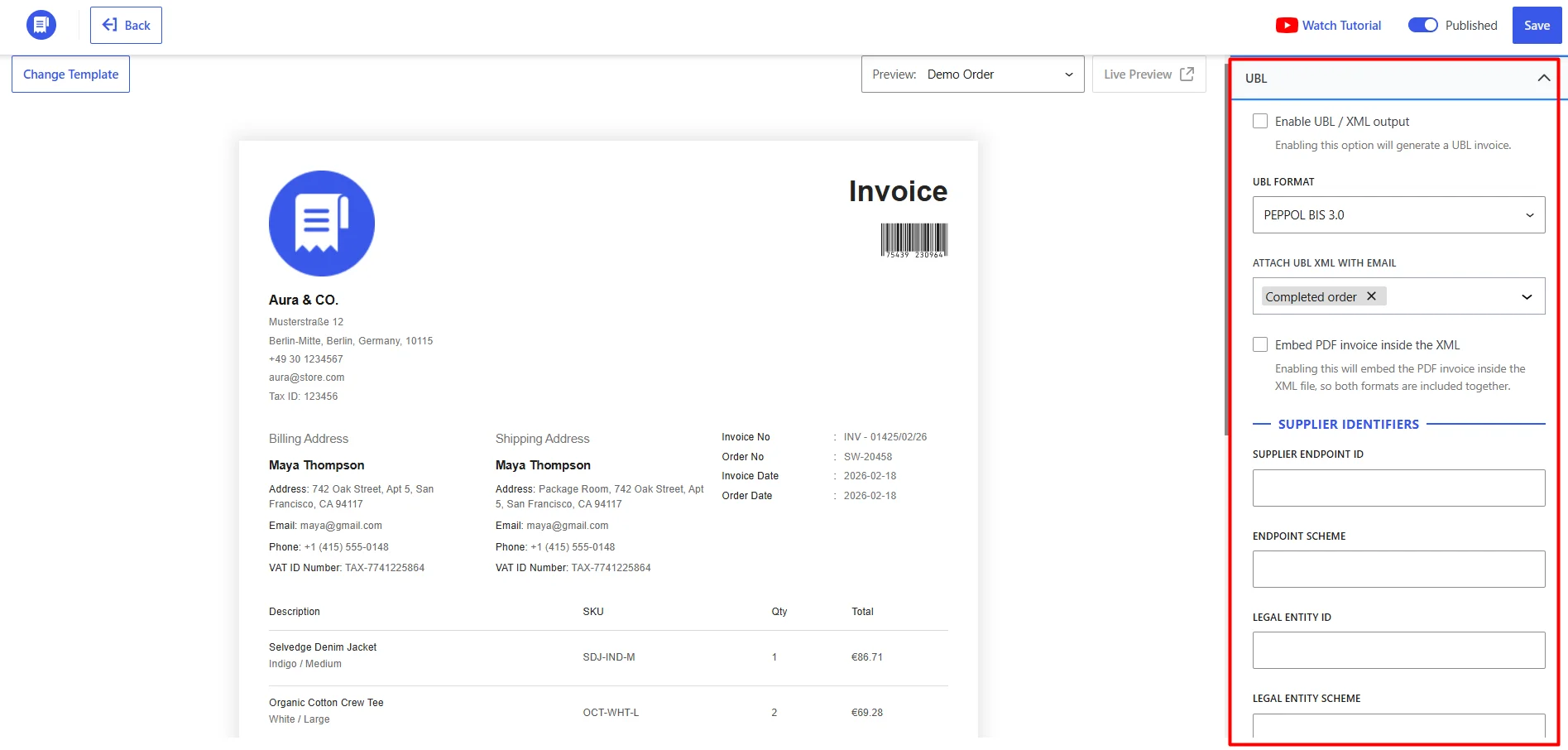
For example, an EU-facing B2B store can collect a buyer’s VAT number during checkout and display it on the generated invoice.
UBL/XML support helps with structured electronic invoicing, but it does not automatically guarantee compliance with country-specific formats, VAT validation requirements, or government submission systems.
Merchants should verify the requirements applicable to their business.
How Easy Is WowInvoice to Set Up and Manage?
WowInvoice organizes document management within the WooCommerce administration interface.
After installing and activating the plugin, merchants can access its document dashboard and configure the document types they need.
A typical setup follows these steps:
- Select a document type, such as Invoice or Packing Slip.
- Enter or review the store’s identity, address, and tax information.
- Choose the layout and applicable document settings.
- Configure generation conditions, email attachments, and customer downloads where supported.
- Customize the document using the visual builder.
- Preview the result using an existing order.
- Publish the configuration and save the changes.
The document builder provides a preview alongside configuration and customization controls, making it possible to inspect changes before using a document in actual order workflows.
Merchants can also control which details appear on documents, including product SKUs, customer addresses, order notes, and other supported metadata.
The setup is relatively straightforward to follow in the official tutorials, although stores with specialized tax requirements or multiple fulfillment processes may need more careful configuration.
The main consideration is that each document type has its own purpose and settings. Merchants should test invoice generation, order-status triggers, and email attachments with sample orders before relying on them operationally.
WowInvoice Free vs Pro: Which Should You Choose?
WowInvoice offers a free version for essential WooCommerce invoicing and order documentation, with Pro extending the available fulfillment and refund-document workflows.
The distinction is particularly important because merchants do not need Pro simply to generate PDF invoices or use UBL/XML invoice functionality.
| Document type | Free | Pro |
|---|---|---|
| PDF Invoice | Yes | Yes |
| Packing Slip | Yes | Yes |
| Delivery Note | Yes | Yes |
| UBL/XML Invoice | Yes | Yes |
| Picklist | No | Yes |
| Shipping Label | No | Yes |
| Credit Note | No | Yes |
If you’re evaluating alternatives, see our WowInvoice vs WebToffee PDF Invoices comparison for a feature-by-feature breakdown.
When Is WowInvoice Free Enough?
WowInvoice Free is suitable for stores that primarily need PDF invoices, packing slips, delivery notes, and UBL/XML invoicing.
It provides a starting point for automating essential documents and customizing them for everyday WooCommerce orders.
For example, a small store may only need to generate invoices automatically, attach PDFs to order emails, and prepare packing slips for fulfillment.
However, access to a document type doesn’t necessarily include every customization or automation option.
Merchants should also consider their requirements for VAT information, partial-payment details, bulk exporting, and document customization before choosing Free.
When Is WowInvoice Pro Worth It?
WowInvoice Pro offers more than three additional document types. It also extends the functionality available within existing documents.
Beyond picklists, shipping labels, and credit notes, merchants should evaluate Pro for advanced requirements involving:
- Payment information: Showing deposit payments, remaining balances, and other partial-payment details.
- VAT and tax documentation: Configuring customer VAT information and related invoice fields.
- Document automation: More specific email attachment settings and bulk document processing.
- Advanced customization: Displaying custom order, customer, or product metadata, barcodes, and additional document information such as notes and footer content.
For example, a store accepting deposits may need invoices that clearly display the initial payment and outstanding balance.
Another business may prioritize bulk exports and detailed order metadata without needing additional document types.
Some of these functions also have Free-level capabilities, so the relevant distinction is the specific control or configuration available in each version.
Pro is worth considering when your store requires advanced document types or settings that the free version does not provide.
For current pricing and licensing options, visit the WowInvoice website.
WowInvoice Pros, Cons and Limitations
WowInvoice combines customer-facing invoicing and operational order documents in one WooCommerce plugin. However, its usefulness depends on your store’s document requirements.
Pros
- All-in-one document management: Supports invoices, packing slips, delivery notes, fulfillment documents, credit notes, and UBL/XML invoices within one product.
- Automated document generation: Reduces repetitive work through configurable order-status triggers and document delivery options.
- Flexible customization: Provides document previews and control over layouts, numbering, customer information, product details, and business identity.
- Useful free functionality: PDF invoices, packing slips, delivery notes, and UBL/XML invoices are available without a Pro license.
- VAT-related configuration: Includes support for displaying customer VAT numbers, company tax information, and other relevant invoice fields.
- Broader operational coverage with Pro: Adds document types for warehouse picking, shipping preparation, and credit-note workflows.
Cons and Limitations
- Some document types require Pro: Picklists, shipping labels, and credit notes are not available in the free version.
- Multiple workflows require configuration: Different document types, generation statuses, notification recipients, and download rules must be set up correctly.
- Tax compliance requires verification: VAT fields and UBL/XML support do not guarantee compliance with every country’s legal or technical requirements.
- Not a complete accounting or shipping platform: Document generation does not replace bookkeeping, tax filing, carrier integration, or other specialist systems.
- Advanced customization may require technical knowledge: Stores using custom metadata or specialized document requirements may need to identify and configure the correct WooCommerce data fields.
Final Verdict: Who Should Buy WowInvoice?
WowInvoice is worth considering for WooCommerce stores that need an all-in-one, automated order document solution with flexible customization and built-in support for EU VAT requirements.
It is particularly suitable for:
- Small WooCommerce stores that need automated PDF invoices, packing slips, and delivery notes.
- Growing online businesses that want customizable documents and consistent business information across customer and order records.
- Stores with fulfillment teams that require additional picking and shipping documents.
- Businesses handling frequent refunds that need configurable credit note documentation.
- EU-facing merchants that need VAT-related invoice fields and UBL/XML invoice capabilities, subject to their local compliance requirements.
If your store only requires basic invoicing and related documents, WowInvoice Free may already cover your requirements.
If you also need picklists, shipping labels, credit notes, and more advanced document workflows, WowInvoice Pro is worth evaluating.
Stores looking for a full accounting platform, carrier-shipping automation, or jurisdiction-specific e-invoicing submission should assess whether additional tools are required.
Ultimately, WowInvoice’s value comes from connecting essential WooCommerce document creation, customization, automation, and order-processing workflows within one solution.
Explore WowInvoice to review its capabilities and determine which version fits your store.


