

Choosing between WowInvoice and WebToffee comes down to what your WooCommerce store needs beyond basic PDF invoicing.
Both plugins generate PDF invoices, packing slips and UBL/XML invoices. They also support invoice customization, order-related email attachments and customer downloads.
The differences become more noticeable when you need shipping documents, credit notes, advanced customization, or a particular licensing model.
The short answer: WowInvoice is worth considering if you want invoice, fulfillment and refund documents managed within one product, with annual and lifetime licensing options.
WebToffee is a strong alternative, especially for stores that need its free shipping documents, specialized add-ons, or the capabilities of its all-in-one suite.
This comparison covers both free and paid options to help you make the right decision.
Editorial disclosure: This comparison combines WowInvoice product experience with WebToffee’s hands-on evaluation and current official product documentation.
WowInvoice vs WebToffee: Quick Comparison
Before comparing individual features, it’s important to understand WebToffee’s product structure.
WebToffee offers a free invoice plugin, individual premium extensions and an all-in-one PDF Invoice and Packing Slips Suite. WowInvoice offers Free and Pro versions within the same product family.
| Feature | WowInvoice | WebToffee |
|---|---|---|
| PDF invoices | Free | Free |
| Packing slips | Free | Free |
| Delivery notes | Free | Free |
| Shipping labels | Pro | Free (basic), advanced paid options |
| Dispatch labels | Not established as a separate document type | Free |
| Picklists | Pro | Separate paid extension |
| Credit notes | Pro | Paid add-on |
| UBL/XML invoices | Free | Free |
| Custom invoice numbering | Supported | Supported |
| Invoice email attachments | Supported | Supported |
| Customer invoice downloads | Supported | Supported |
| Visual customization | Built-in document configuration and templates | Basic templates; additional paid customization options |
| Bulk document operations | Supported in pro version | Supported; advanced exports in paid offerings |
| Dropbox invoice backup | Not established as a built-in capability | Available in all-in-one suite |
| Lifetime licensing | Available | No lifetime option advertised for compared products |
The important takeaway is that both plugins cover common invoicing requirements. Their differences involve document availability, customization depth, automation options and what you need to purchase for a particular workflow.
1. Invoice and Order Document Management
A WooCommerce store may need more than an invoice. Picking products, packing orders, preparing shipments and processing refunds often require different documents.
What Documents Can You Create with WowInvoice?
WowInvoice supports seven document types to manage WooCommerce invoicing, order fulfillment and refunds from one place:
- PDF Invoices: Generate invoices with order, payment and tax details.
- Packing Slips: List the products and quantities included in each order.
- Delivery Notes: Provide order and delivery details for shipments.
- UBL/XML Invoices: Generate structured, machine-readable electronic invoices.
- Picklists: Help warehouse staff identify and collect products for orders.
- Shipping Labels: Create labels with shipping and recipient information.
- Credit Notes: Document refunds and adjustments to previous invoices.
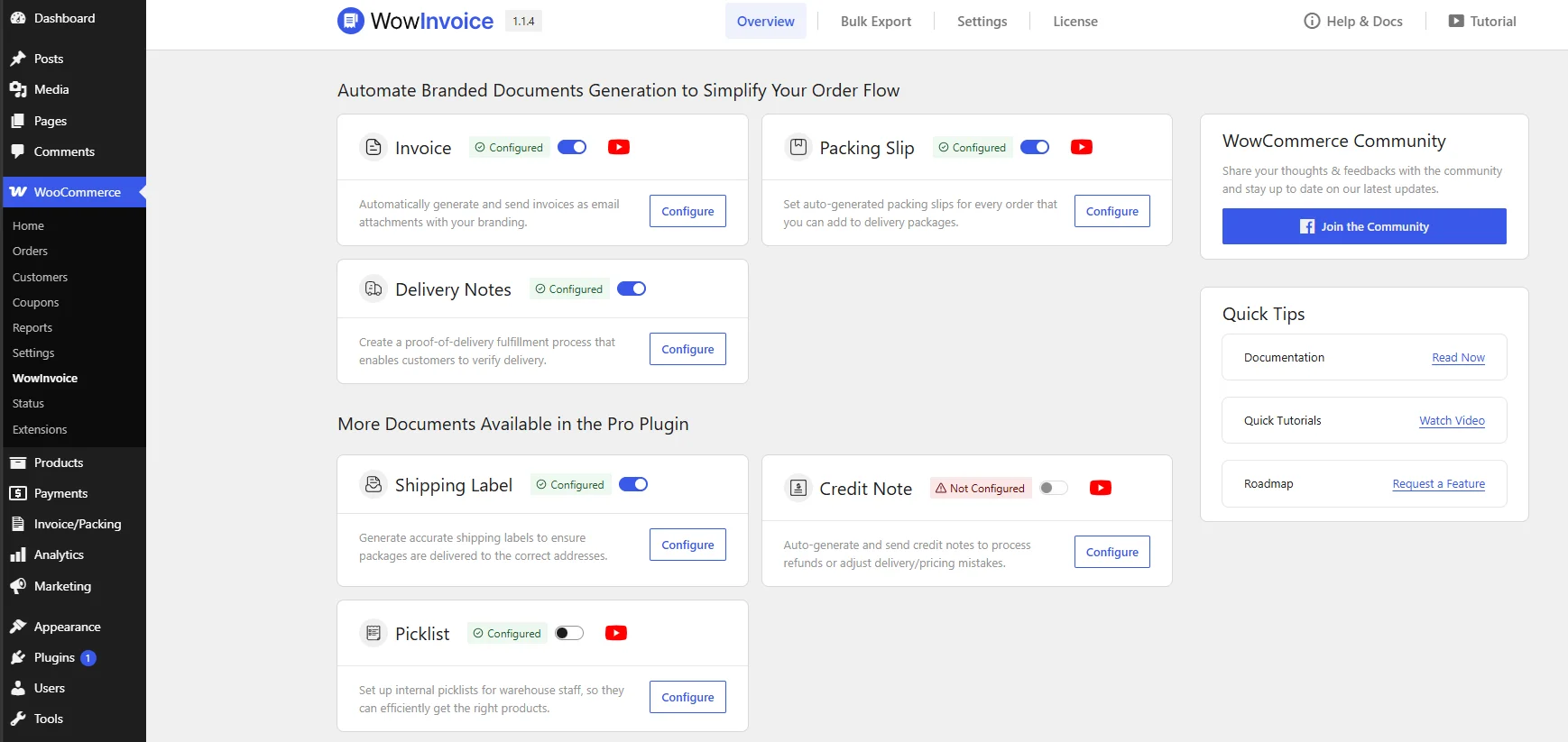
Together, these documents cover the essential stages of order processing, from invoicing and picking to shipping and refunds.
The advantage is having these document configurations within one product rather than choosing a separate premium extension for each requirement.
What Documents Can You Create with WebToffee?
WebToffee supports multiple WooCommerce document types across its product offerings:
- PDF Invoices: Generate invoices with order, payment and tax details.
- Packing Slips: List the products and quantities included in orders.
- Delivery Notes: Provide order and delivery information for shipments.
- UBL/XML Invoices: Generate structured electronic invoices.
- Picklists: Help warehouse staff collect products for order fulfillment.
- Shipping Labels: Create labels with shipping and recipient information.
- Dispatch Labels: Display essential order and shipping details for dispatch.
- Credit Notes: Document refunds and invoice adjustments.
- Address Labels: Generate labels for billing, shipping and return addresses.
- Proforma Invoices: Create preliminary invoices before finalizing transactions.
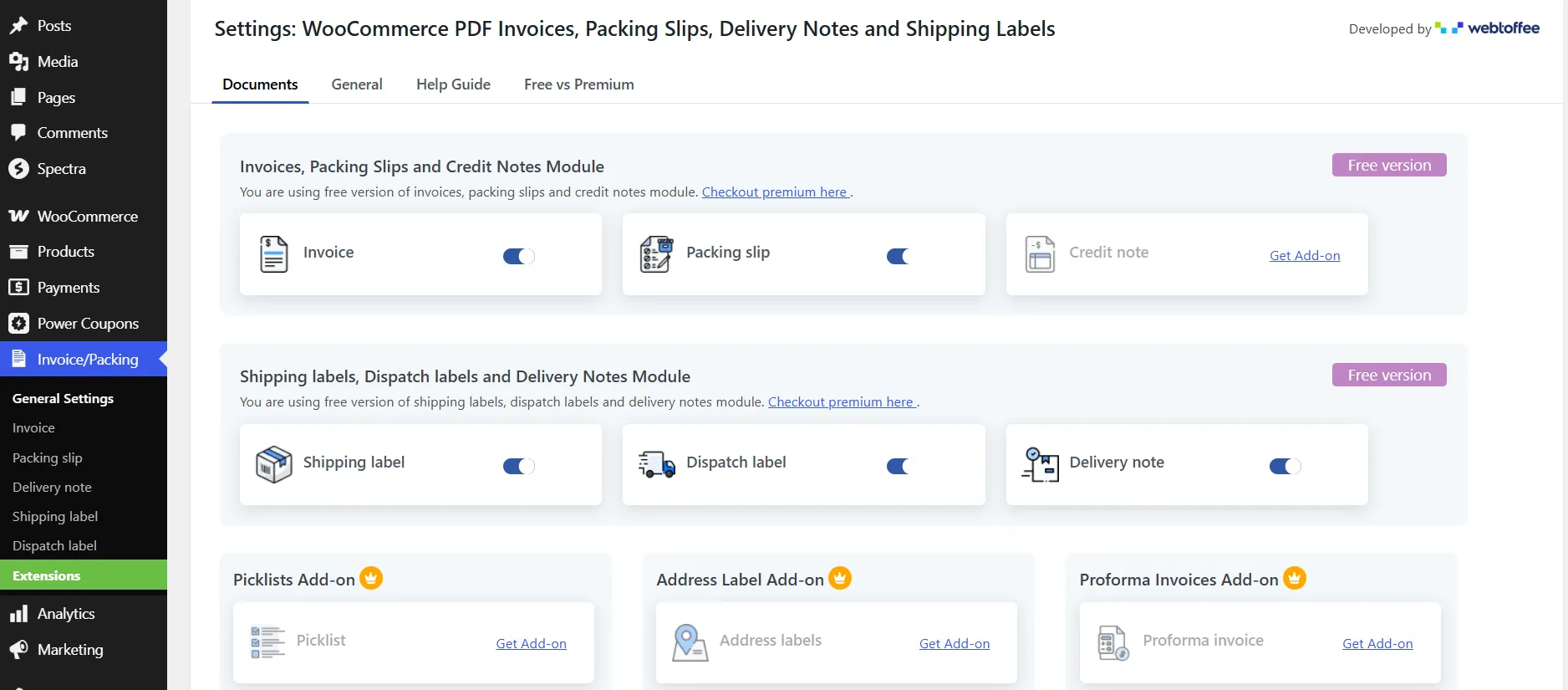
However, these documents are distributed across different WebToffee products. Its free plugin covers essential invoicing and shipping documents, while specialized premium extensions offer additional document types and functionality.
WebToffee also sells an Invoice Bundle containing five premium products and a separate All-in-one PDF Invoice and Packing Slips Suite that combines the document types within a single extension.
2. Invoice Templates and Customization
Your invoice should show the information customers and accounting teams need, while maintaining consistent business branding.
Both plugins allow document customization, but their approaches differ.
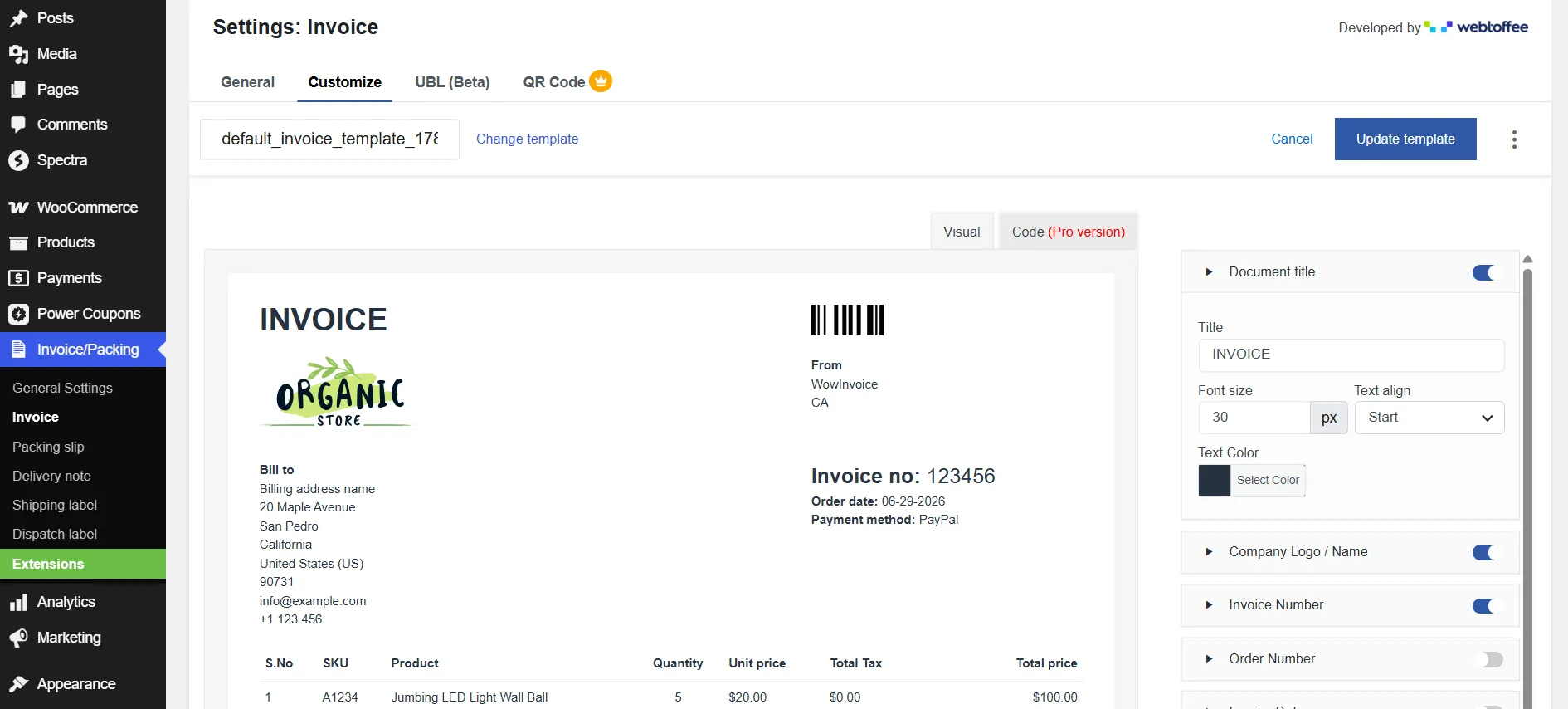
Customizing documents in WowInvoice
WowInvoice includes premade document templates and a configuration interface for changing invoice content and appearance.
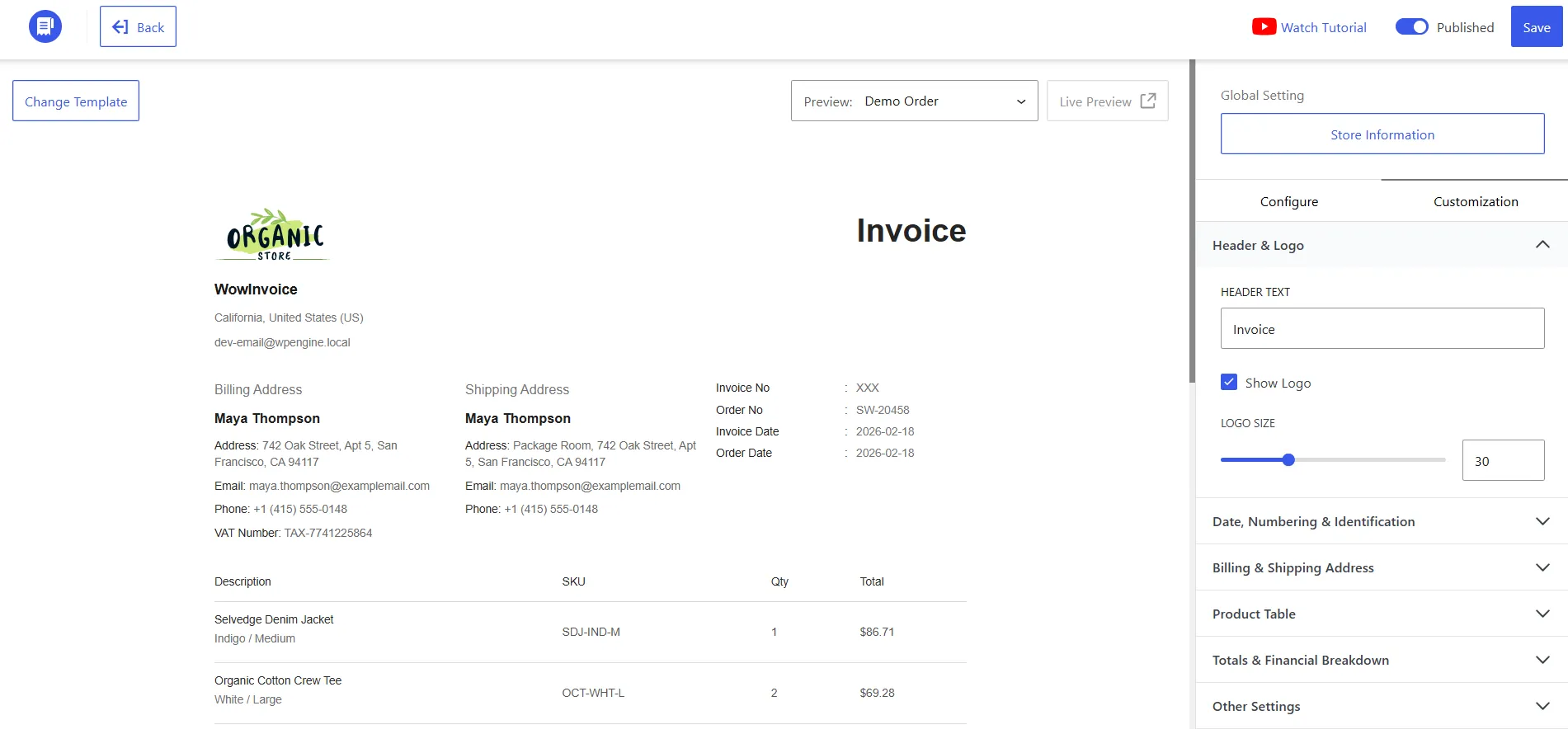
You can configure elements such as:
- Store logo, business identity and contact details.
- Customer billing and shipping information.
- Product table fields and column labels.
- Tax, discount and shipping breakdowns.
- Invoice numbering with prefixes, suffixes and minimum length.
- Barcodes, QR codes, notes and terms.
- Payment-received watermarks.
You can also preview documents using previous order data before finalizing their configuration.
A useful aspect is that core business information can be configured centrally and reused across supported document types.
Customizing documents in WebToffee
WebToffee Free provides invoice templates and basic customization options. You can add business details, logos, invoice numbers and relevant information.
However, customization depends on the document type and installed extension.
WebToffee offers a dedicated paid Customizer add-on with drag-and-drop visual editing and code-editing options.
This gives merchants who require more extensive control over document layouts another option.
3. Invoice Automation and Bulk Management
Generating documents manually becomes inefficient as your store processes more orders.
Fortunately, both plugins can automate important parts of the invoicing process.
WowInvoice automation
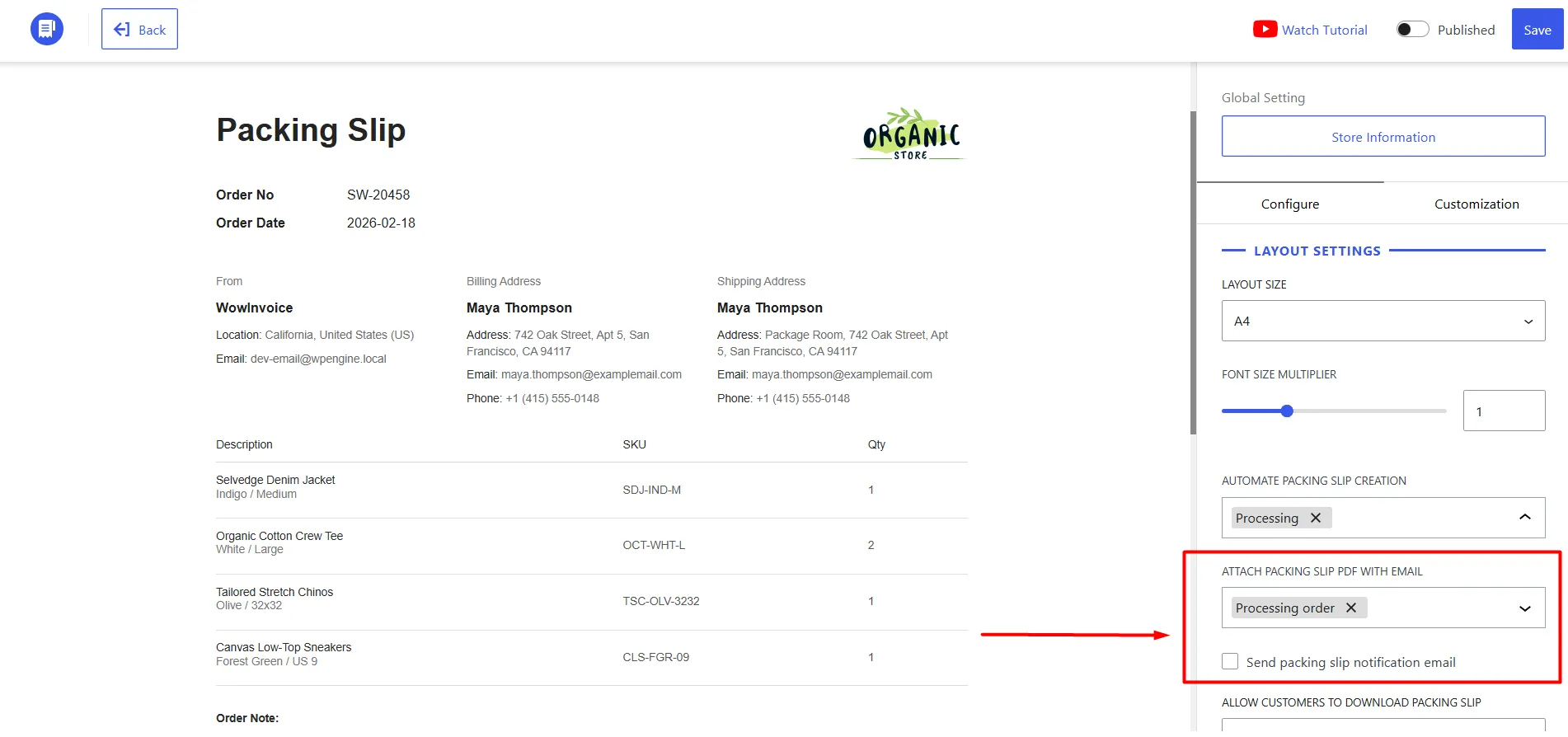
WowInvoice allows merchants to configure invoice generation and attachments around WooCommerce order statuses.
You can also enable customer invoice downloads through their My Account pages, manage invoice numbering and perform bulk document operations.
With Pro, additional document types become available for fulfillment and refund workflows.
For example, a store can prepare its invoice configuration once, generate documents as orders reach the relevant statuses and make those records available to customers without manually creating a PDF for every purchase.
WebToffee automation
WebToffee also supports automated invoice generation, email attachments, invoice downloads and bulk printing.
Its premium invoicing product supports credit-note generation for refunds and advanced bulk exports.
WebToffee additionally offers capabilities that may influence the purchasing decision, including PrintNode-based remote printing through its premium invoicing offering and automatic Dropbox backups through the all-in-one suite.
These are meaningful considerations for businesses that require automated printing or external invoice storage.
4. VAT Support and UBL/XML Electronic Invoicing
If your store sells to customers who require tax invoices or structured electronic documents, the plugins’ invoicing formats deserve closer attention.
WowInvoice
WowInvoice supports UBL/XML invoice generation in its Free version.
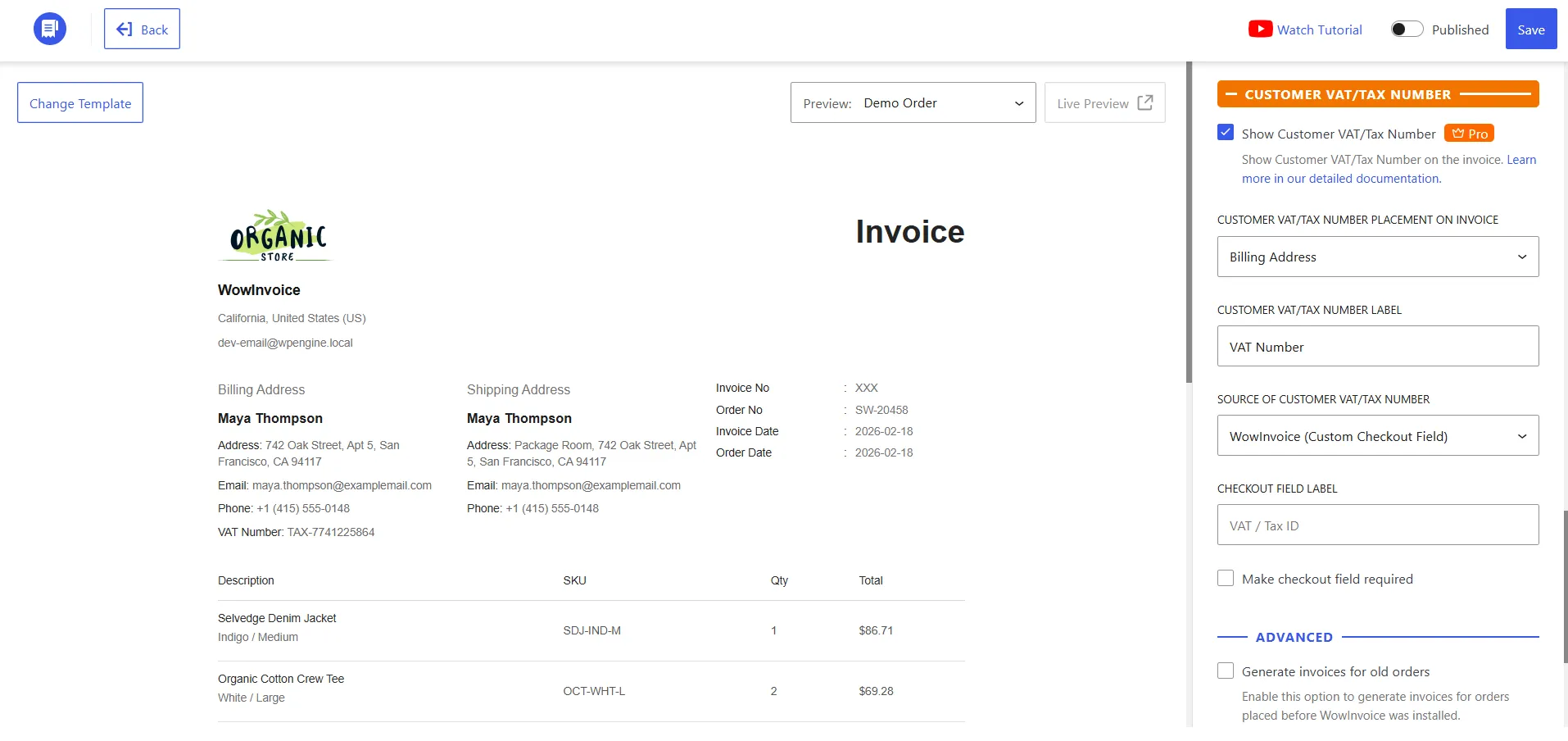
It also allows merchants to configure business tax information and display customer VAT or tax identification numbers on invoice documents.
Customer VAT details can be collected through supported checkout fields or retrieved from compatible WooCommerce VAT plugins.
For example, a B2B store can collect a customer’s VAT identification number and display it on the invoice alongside the applicable order and tax details.
WowInvoice’s documentation also describes UBL configuration options, supported formats and supplier identification fields.
WebToffee
WebToffee Free supports UBL/XML invoices as well. Its official documentation includes UBL settings, format selection, tax-class mapping and XML email attachments.
WebToffee’s paid products also provide additional tax information fields and document customization options.
Its all-in-one suite advertises multiple regional UBL/XML formats and VAT, GST and ABN-related fields.
Does this guarantee legal compliance?
No.
Generating a UBL/XML invoice or including a VAT number does not automatically satisfy every country’s electronic invoicing requirements.
You may also need to verify the correct document schema, tax calculations, customer identification data, validation requirements and submission or transmission process.
Both plugins provide useful invoice-generation capabilities, but merchants should confirm their requirements under the applicable tax and electronic invoicing rules.
5. WowInvoice vs WebToffee Pricing: Which Offers Better Value?
Pricing is particularly important because both products have free versions, but their paid licensing structures differ.
Paid license comparison
The following are published regular prices in USD, excluding temporary discounts.
| Licensing option | WowInvoice Pro | WebToffee |
|---|---|---|
| One site, annual | $69/year | $69/year (standard premium invoice product) |
| Up to five sites, annual | $149/year for unlimited sites | $99/year for five sites |
| Up to 25 sites, annual | $149/year for unlimited sites | $199/year for 25 sites |
| All-in-one suite | Included document types in WowInvoice Pro | $149/year starting published price |
| One site, lifetime | $299 | No equivalent lifetime option advertised |
| Unlimited sites, lifetime | $599 | No equivalent lifetime option advertised |
Temporary promotions may change the checkout price.
Which Offers Better Long-Term Value?
The overall cost depends on the number of stores, required document types and licensing period.
| Scenario | WowInvoice | WebToffee |
|---|---|---|
| Single store | $69/year | $69/year |
| 5/25 stores | $149/year (unlimited sites) | $99/year (5 sites), 199/year (25 sites) |
| Unlimited lifetime | $599 one-time | No equivalent lifetime plan |
These prices require some context:
- For basic invoicing: WebToffee’s $99 five-site annual plan costs less than WowInvoice’s $149 unlimited-site plan, but the licenses have different site limits.
- For advanced documents: If you need picklists, credit notes and shipping documents, compare WowInvoice Pro against WebToffee’s relevant extensions or all-in-one suite rather than its standard invoice plugin.
- For lifetime licensing: WowInvoice offers a one-time payment with lifetime updates and support. However, its $599 unlimited lifetime plan costs more upfront than three years of WebToffee’s 99five-siteplan(297), although their capabilities and site limits differ.
Ultimately, the better financial value depends on the complete feature set your store needs and how long you plan to use the plugin, not simply the lowest advertised price.
For current discounts and licensing terms, check the pricing page.
Who Should Choose WowInvoice or WebToffee?
There is no single winner for every WooCommerce store.
| Your requirement | Better starting point | Why |
|---|---|---|
| Free PDF invoices, packing slips and delivery notes | Either plugin | Both provide these essentials |
| Free basic shipping labels | WebToffee Free | Shipping labels are available without Pro |
| Free UBL/XML invoicing | Either plugin | Both support UBL/XML generation |
| Picklists, credit notes and shipping documents together | Compare WowInvoice Pro and WebToffee Suite | Both cover a broader order-document workflow |
| Automatic Dropbox backups | WebToffee Suite | Built-in backup functionality is advertised |
| Specialized remote printing | WebToffee premium offering | PrintNode integration is documented |
| Unlimited-site annual licensing | WowInvoice Pro | Its advertised annual plan covers unlimited sites |
| One-time lifetime licensing | WowInvoice Pro | Lifetime plans are available |
Choose WowInvoice when…
You want invoices, delivery documents, picklists, shipping labels and credit notes managed through one product.
WowInvoice is also worth considering when you operate multiple WooCommerce stores or prefer a lifetime license rather than recurring annual payments.
Its Free version may already be sufficient if your store primarily needs PDF invoices, packing slips, delivery notes and UBL/XML files.
Choose WebToffee when…
You need basic invoice and shipping-document functionality without immediately purchasing a premium license.
WebToffee is also worth evaluating if you need its specialized paid extensions, remote-printing capabilities, or the Dropbox backup functionality included with its all-in-one suite.
Its modular product range allows merchants to purchase particular additional capabilities, although that can require more licensing comparisons as their requirements expand.
Final Verdict
WowInvoice and WebToffee are both credible WooCommerce PDF invoicing solutions.
WowInvoice is a strong choice for merchants who want broad order-document management with annual or lifetime licensing options. Its Free version supports essential invoicing and UBL/XML documents, while Pro extends the workflow to picklists, shipping labels and credit notes.
WebToffee is an equally legitimate option, particularly for users who value its free shipping-document support, specialized premium extensions, remote printing, or all-in-one suite.
The decision should depend on which documents your store actually needs, how those documents are generated and delivered and the total cost of the required licenses.
If WowInvoice matches your workflow, explore WowInvoice’s features and pricing or start with its free WordPress plugin before upgrading.
Frequently Asked Questions
Do WowInvoice and WebToffee both support electronic invoices?
Yes. Both support UBL/XML generation. However, electronic invoice generation should not be confused with automatic transmission to tax authorities or guaranteed jurisdiction-specific compliance.
Can I migrate from WebToffee to WowInvoice?
Yes. WowInvoice can generate or regenerate PDF invoices for existing WooCommerce orders, including orders placed before installing WowInvoice. You don’t need to recreate those orders manually.
Does WowInvoice completely replace every WebToffee add-on?
WowInvoice combines invoicing, packing slips, delivery notes, picklists, shipping labels, credit notes and UBL/XML invoices in a single plugin. You can manage these document types without installing separate extensions.
WebToffee offers individual premium extensions for different document requirements, as well as a separate all-in-one suite. WowInvoice can replace several of those document workflows.
