A WooCommerce measurement price calculator allows stores to calculate product prices dynamically based on customer-provided measurements such as length, width, area, or quantity.
This is essential for products sold by dimensions rather than fixed prices, including flooring, fabric, banners, curtains, and construction materials.
In this guide, we explain what measurement pricing is, when and why your store may need it, and how you can implement a measurement price calculator in WooCommerce using formula-based product options.
When and Why Stores Need a Measurement Pricing Calculator
Not all WooCommerce stores need measurement-based pricing. It is essential for businesses selling products where the cost depends on size, area, or quantity.
It ensures accurate pricing, reduces manual work, and improves the customer experience by showing real-time costs changing based on the customers’ input.
Industries That Commonly Use Measurement Pricing
Certain industries rely heavily on measurement-based pricing because their products are sold per unit of size or dimension rather than as a fixed item.
Examples include:
- Flooring and tiles: sells based on quantity and area
- Carpets and rugs: sells based on area and material types
- Custom curtains and blinds: sells based on size and types
- Printed banners and signage: sells based on the color count and the number of words/characters used in printing
- Fabric and textile products: sells based on material type, order size and quantity
- Construction materials: based on weight, quantity and order size
These products require dynamic pricing to match the customer’s specific measurements and preferences.
Signs Your Store Needs a Measurement Price Calculator
Your store may benefit from a measurement price calculator if you encounter situations like:
- Customers frequently request quotes based on product size or dimensions
Manually calculating prices for each request can be time-consuming and prone to errors. - Products sold per square foot, meter, or other units of measurement
Standard WooCommerce pricing cannot automatically calculate totals based on these units. - Many custom orders that vary in size or quantity
Each order may have unique requirements, making fixed pricing insufficient. - Too many product variations make fixed pricing impractical
Creating separate variations for every possible size or combination quickly becomes unmanageable. - Pricing that depends on multiple inputs from customers
A formula-based approach is necessary to calculate totals accurately when the price depends on a combination of selections.
These are the signs or symptoms of needing a formula-based pricing system. You have to develop such a feature in your store if you are already facing such situations.
Why Measurement Pricing Improves Customer Experience
Implementing measurement pricing offers clear benefits for customers and store operations:
✅ Instant pricing: Customers see accurate costs immediately.
This removes the need to wait for manual calculations or quotes, speeding up their buying decision.
✅ No manual quotes: Reduces delays and errors.
Store owners no longer need to calculate prices individually, which saves time and prevents mistakes.
✅ Fewer abandoned carts: Transparent pricing encourages faster purchases.
When customers know the exact cost upfront, they are more likely to complete the checkout process.
✅ Clear, transparent pricing logic: Builds trust and reduces confusion.
Customers can understand how the price is determined, which increases confidence in the store and reduces disputes.
Common pricing models for made-to-measure items
Measurement-based products typically follow one of three pricing approaches:
- Price per unit area: Cost is based on the product’s size (e.g., square footage of wall painting)
- Price based on quantity: Total price depends on the number of units ordered (e.g., fabric rolls, tiles)
- Price depending on other input fields: Uses formulas incorporating multiple customer inputs such as width, height, and material type (e.g., curtains, banners, custom boxes)
These models help stores calculate accurate prices without creating excessive variations.
Limitations of Native WooCommerce in Custom Pricing Calculation
While WooCommerce is a flexible eCommerce platform, it has limitations when it comes to measurement-based pricing:
👉 Cannot calculate price from customer input
By default, WooCommerce does not allow pricing products dynamically based on measurements such as length, width, or area.
👉 No formula-based pricing
You cannot create custom formulas to combine multiple inputs or calculate complex prices automatically.
👉 Limited support for per-unit pricing
WooCommerce only supports fixed prices per product or variation, so products sold by square foot, meter, or volume require manual calculation or workarounds.
👉 Variation complexity
Because of these limitations, stores that sell made-to-measure or customized products cannot easily calculate accurate prices on their own.
Without additional tools or plugins, pricing either requires manual calculations or creating many separate product variations, which is time-consuming and error-prone.
These limitations make it difficult for stores with made-to-measure or customized products to provide accurate pricing without additional tools.
Choosing the Best Measurement Price Calculator Plugin
When you need measurement‑based pricing in WooCommerce, there are two main directions you can take:
- Add‑on plugins that let you add custom fields and calculate product prices based on those field inputs. These are ideal if you want product personalization + dynamic pricing logic.
- Dedicated measurement price calculator plugins focused purely on pricing by measurements (length, area, volume, etc.). These are best if your primary need is measurement pricing without product personalization fields.
Below are two comparison tables showing key capabilities for both plugin types.
⭐ Comparison table: Add‑On Plugins with Formula‑Based Pricing (Best for Personalization)
| Plugin | Formula & Pricing Support | Custom Input Fields | Formula Complexity | Notes |
|---|---|---|---|---|
| Barn2 WooCommerce Product Options | Strong – 10+ built‑in functions + full math operator set + custom function support | 16+ input types, including number, checkbox, text, swatches | High | Lets you build complex pricing calculators tied to product options and formulas without needing code. |
| Studio Wombat Advanced Product Fields | Powerful | 18+ field types, including number & dropdown | High | Provides formula pricing as part of general product fields; formulas are easier to set up with combo fields. |
| WowAddons (Advanced Formula Field) | Moderate – 8 functions + basic arithmetic and logical operators | 15 fields, including number, text, select, conditional fields | Medium | Flexible logic tied to product input fields; excellent option for personalized pricing calculators. |
| WooCommerce Custom Product Addons | Basic | Several field types with pricing options | Low–Medium | Lets you calculate price using simple math (e.g., multiply entered value by price), but without advanced logic functions. |
What this plugin group is best for:
✔ Product personalization with measurement‑based pricing
✔ Dynamic price updates as customers enter their own values
✔ Complex formulas tied to customer input fields
Read more: Comprehensive comparison between Advanced Product Fields & WowAddons
⭐ Comparison Table: Dedicated Measurement Price Calculator Plugins
| Plugin | Measurement Types | Pricing Rules | Variable Product Support | Notes |
|---|---|---|---|---|
| Measurement Price Calculator for WooCommerce (SkyVerge) | Length, area, volume, weight | Yes | Yes | Designed specifically for sale by measurements like area, weight, or volume. |
| Flexible Quantity – Measurement Price Calculator (WPDesk) | Basic measurement units | Limited | Basic | Focuses on measurement‑based pricing and quantities. |
| Stylish Cost Calculator – Quote & Price Estimator | Supports dimensions | Yes | Yes | Combines price estimation and measurement pricing tools. |
| Price Calculator for WooCommerce (Addify) | Length, area, volume, weight, box | Yes | Yes | Supports measurement pricing rules with multiple measurement types. |
What this plugin group is best for:
✔ Stores focused exclusively on measurement‑based pricing
✔ Pricing based on units like area, volume, or weight
✔ Real‑time price estimation tied to measurement inputs
How to Choose: Quick Decision Checklist
Use this guide to decide which direction fits your store’s needs:
| Choose an add‑on plugin if you want to | Choose a dedicated price calculator plugin if you want to |
|---|---|
| 👉 Add custom fields and options to products 👉 Use formulas tied to customer inputs 👉 Personalize product pricing based on multiple field inputs 👉 Keep pricing logic within the product customization workflow | 👉 Focus mainly on measurement pricing (area/length/volume/weight) 👉 Let customers enter sizes and get pricing instantly 👉 Work with measurement units without extensive product personalization 👉 Keep configuration centered on published measurement tools |
Read more: Comparison between WowAddons & WooCommerce Custom Product Addons
Popular WooCommerce Measurement Price Calculator Examples
Advanced formula fields are commonly used in WooCommerce stores that sell personalized or made-to-measure products. Instead of fixed pricing, these products calculate the final cost based on measurements, quantities, or customer inputs.
Below are a few practical examples showing how formula-based pricing works in real stores.
i. Custom Curtains: Pricing Based on Dimensions and Fabric Type
A curtain store sells made-to-measure curtains where customers enter the curtain dimensions and choose a fabric type. The final price is calculated based on the curtain area and the selected fabric price.
How does the pricing work?
A typical curtain store calculates the price based on the curtain area. To do that, the store first determines the total area of the curtain using the height and width entered by the customer.
Then comes the fabric type. Each fabric has a different price per square foot. Once the area and fabric price are known, a formula calculates the total cost automatically and displays the updated price on the product page.
Quick example:
| Width = 2 feet Height = 7 feet Fabric = Linen ($4.50/sq. ft.) | Area = 2 × 7 = 14 sq. ft. Price for Linen Curtain = $4.50 × 14 = $63 |
ii. Custom Printed Box: Pricing Based on Box Size and Print Coverage
Many packaging businesses sell custom printed boxes where customers can choose the box dimensions and decide which sides of the box will be printed.
Since printing adds additional cost, the final price depends on both the box surface area and the selected print coverage.
How does the pricing work?
First, the store calculates the total printable surface area of the box using the box dimensions. Customers usually provide the length, width, and height of the box.
Next, the customer selects the print coverage option, which determines how many sides of the box will be printed. For example, printing only the front & back sides costs less than printing all sides of the box.
A pricing formula then multiplies the calculated surface area by the printing cost per square unit and adjusts the price depending on the selected print coverage.
Quick example:
| Length = 20 centimeters Width = 6 centimeters Height = 30 centimeters Printing Cost = $0.02 per cm2 | Box Surface Area = 2 × (LW + LH + WH)= 2 × (120 + 600 + 180)= 2 × 216= 1800 cm2 |
Print Coverage Options:
- Front & Back → 33% of total surface area
- Top & Bottom → 33% of total surface area
- All sides → 100% of total surface area
Example calculation:
Selected Coverage = Front & Back (33%)
Printable Area = 1800 x .33 = 594 cm2
Printing Cost = 594 × $0.02 = $11.88
iii. Floor Tiles: Pricing Based on Room Area and Tile Size
Flooring stores often sell tiles based on the total area that needs to be covered. Instead of choosing a fixed number of tiles, customers first enter the room size, then select the tile size they prefer.
The final price is calculated based on how many tiles are required and the price of each tile size.
How does the pricing work?
First, the store calculates the total room area from the dimensions entered by the customer, usually in square feet.
Next, the customer selects a tile size. Different tile sizes have different prices and cover different areas.
The system then calculates how many tiles are needed to cover the room. Once the number of tiles is known, the formula multiplies it by the price per tile to determine the final cost.
Quick example:
| Room Width = 15 ft Room Length = 20 ft Selected Tile Size = 4 sq. ft. | Room Area = 15 × 20 = 300 sq. ft. Tiles Needed = 300 ÷ 4 = 75 tiles Tiles cost = 75 × $8 = $600 (10% system loss can be added) |
Available tile sizes:
- 1 sq. ft. tile → $1.80 per tile
- 4 sq. ft. tile → $8 per tile
- 9 sq. ft. tile → $20 per tile
iv. Engraving by Character: Pricing Based on Text Length and Font Type
Many stores offer custom engraving for products such as name plaques or metal plates. Instead of a fixed engraving fee, the price is often calculated based on the number of characters entered by the customer and the selected font style.
How does the pricing work?
First, the customer enters the engraving text. The system counts how many characters are included in the message.
Next, the customer selects a font type. Some fonts require more detailed engraving work, which may increase the cost per character.
A formula then calculates the total price by multiplying the number of characters by the price per character for the selected font.
Quick example:
| Engraving Text = “Arthur J. Davis”Number of Characters = 15Selected Font = Montserrat (Geometric Sans-Serif) | Price per Character = $0.40Cost to Engraving = 15 × $0.40 = $6.00 |
price updates automatically as the customer changes the text or selects a different font, allowing them to see the engraving cost instantly.
How to calculate price with a formula using a plugin: Step-by-Step guide
The examples above show how measurement-based pricing works in real stores. You can implement the same type of dynamic pricing in WooCommerce using a product options plugin that supports formula-based calculations.
One example is WowAddons, which includes an Advanced Formula Field that allows you to calculate prices using values from other product fields.
Below is a simple example showing how to build the engraving price calculator demonstrated earlier.
Step 1: Install and Activate the Plugin
Install and activate WowAddons on your WooCommerce store.
After activation, you will be able to add custom product fields and pricing formulas to the single product page.

Step 2: Add the Product Input Fields
Create the fields that customers will interact with on the product page.
For the engraving example, add:
Text Field – for the engraving message

Dropdown Field – for choosing the font style

Example font options:
- Montserrat (Geometric Sans-Serif)
- Playfair Display (Sophisticated Serif)
- Lato (Humanist Sans-Serif)
These fields will act as the input variables for the price calculation.
Step 3: Add the Advanced Formula Field
Next, add the Advanced Formula Field to calculate the engraving price.
This field will use a formula that multiplies:
✔️ the number of characters in the engraving text
✔️ the price per character based on the selected font
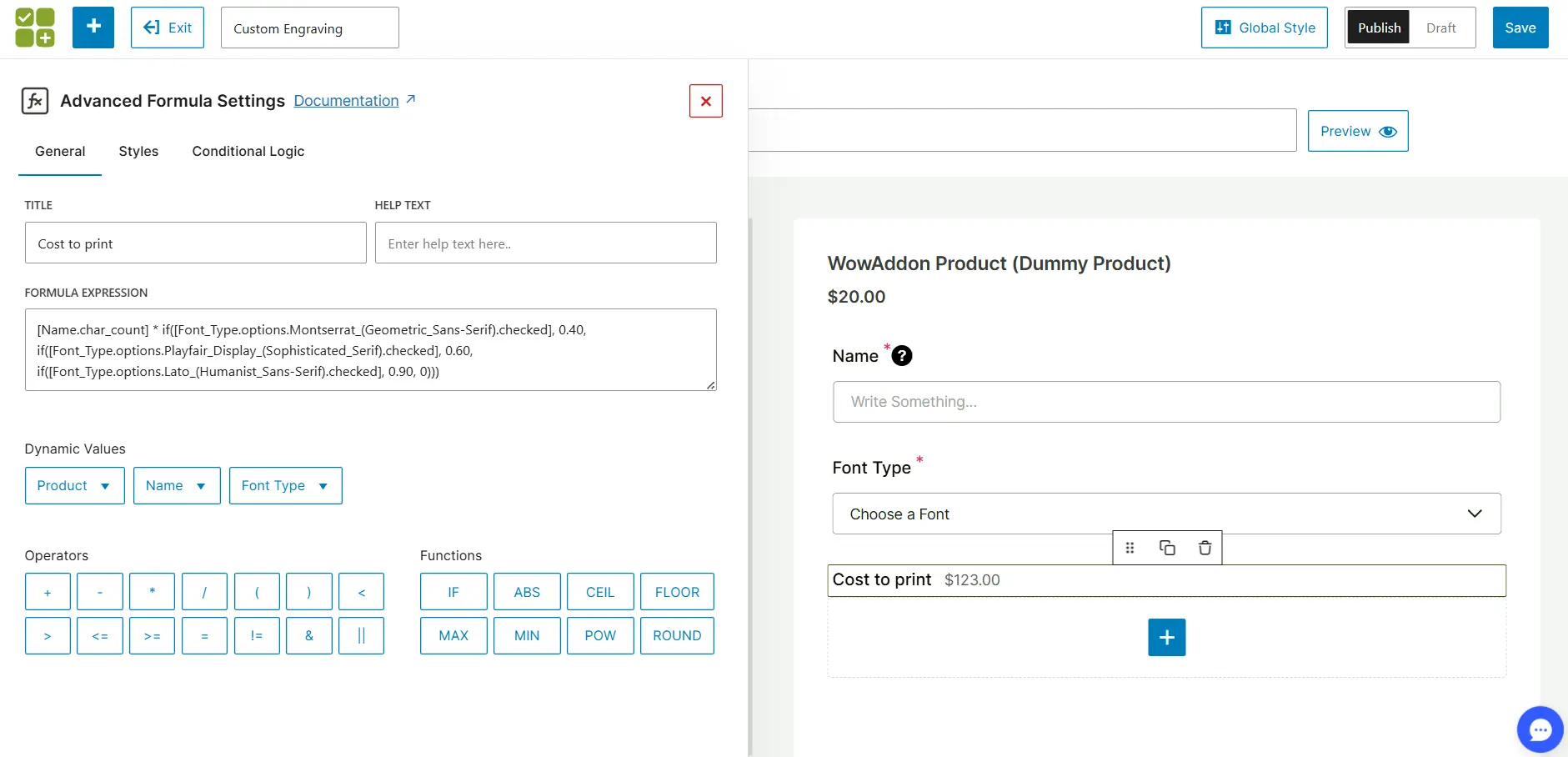
Example logic:
Total Price = Character Count × Font PriceThis formula runs instantly when the customer enters text or changes the font.
Step 4: Save, Publish, and Test
Once the fields and formula are configured, save the settings and publish for display in the single product page.
The product page will calculate the engraving cost dynamically when a customer:
- enters engraving text
- selects a font
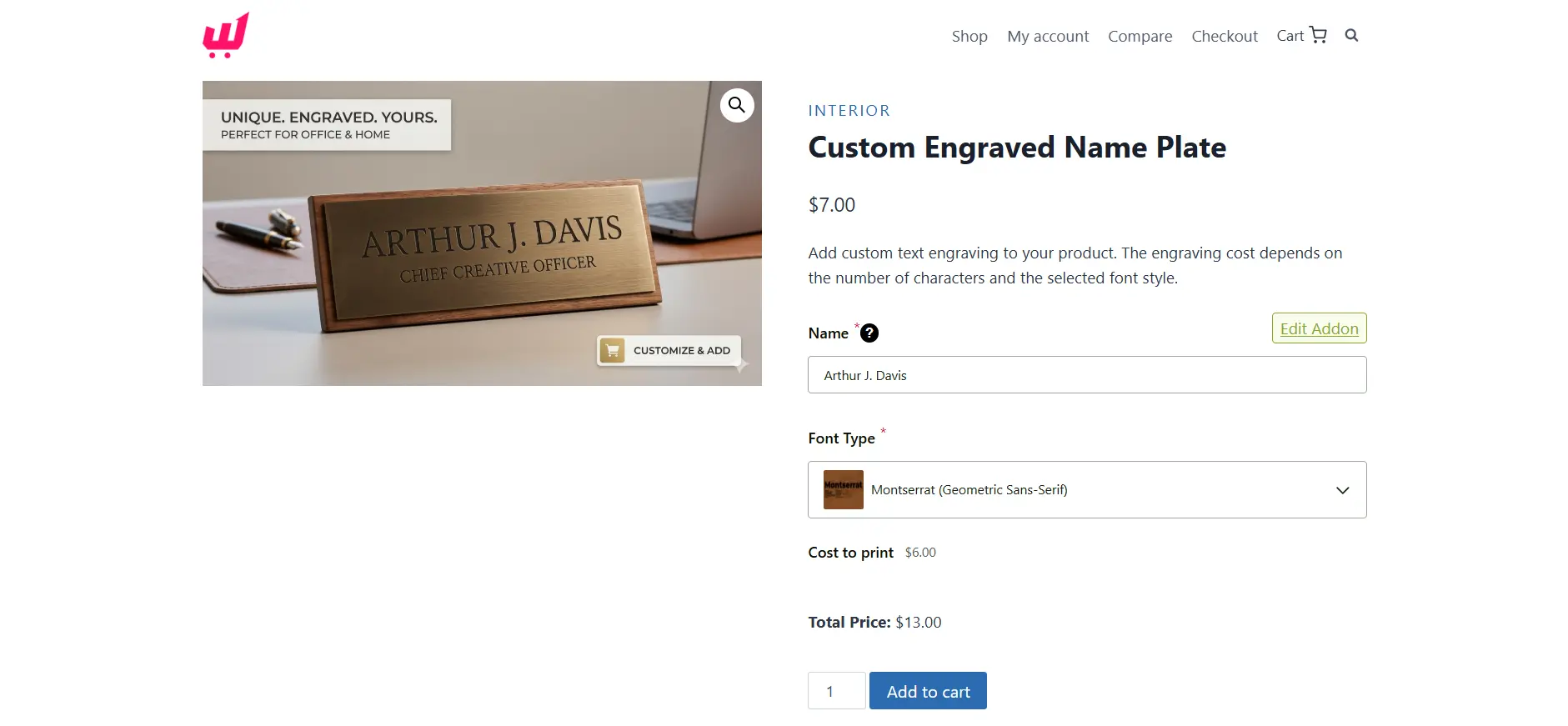
The price updates instantly without refreshing the page.
This same approach can be used to build many of the measurement-based pricing examples discussed earlier, such as custom curtains, floor tiles, or custom packaging.
Read more: WowAddons Powering Customization Across 5 Industries
FAQs
What is measurement-based pricing in WooCommerce?
Measurement-based pricing is a pricing method where product prices are calculated dynamically based on measurements such as length, width, area, volume, or quantity. The total cost is determined using customer inputs and a pricing formula.
Can WooCommerce calculate the price by square foot?
No, native WooCommerce cannot calculate prices automatically based on square footage or other measurements. WooCommerce products typically use fixed prices or variation-based pricing.
Stores usually use a plugin that supports dynamic pricing formulas and measurement inputs.
Do I need a plugin to create a measurement price calculator in WooCommerce?
Yes. To build a measurement price calculator, stores typically use a plugin that allows custom fields and pricing formulas. These tools enable WooCommerce to calculate prices dynamically based on measurements such as length, width, area, or quantity.
How do you build a product price calculator in WooCommerce?
A product price calculator is typically created by adding input fields for measurements and using a formula to calculate the total price.
The general process is:
1. Add measurement fields (width, height, quantity, etc.)
2. Define the pricing logic using a formula
3. Display the calculated price dynamically on the product page
This allows WooCommerce stores to automatically calculate prices based on customer inputs.
What industries need measurement pricing?
Measurement pricing is used in industries where products are sold based on size, area, or quantity.
Common examples include:
1. Flooring and tiles
2. Carpets and rugs
3. Custom curtains and blinds
4. Printed banners and signage
5. Fabric and textile products
6. Construction materials
These products often require dynamic pricing because the final cost depends on customer-provided measurements.
Final Thoughts
Measurement-based pricing is no longer a luxury; it’s a necessity for WooCommerce stores selling made-to-measure or personalized products. It ensures accurate pricing, faster customer decisions, and fewer errors in handling custom orders.
Using a plugin like WowAddons with an Advanced Formula Field makes implementing this functionality simple and flexible.
Whether you’re selling curtains, floor tiles, or engraved items, the same approach lets your store calculate prices dynamically and display them instantly to your customers.
By adopting formula-based pricing:
- Customers see real-time, transparent costs
- Store owners avoid manual calculations and pricing mistakes
- You can handle complex product personalization without exploding variations
It’s a practical step toward professional, scalable, and customer-friendly WooCommerce stores
And it can be implemented today with tools like WowAddons’ Advanced Formula Field.