Table rate shipping is a rule-based shipping method where delivery costs are calculated using predefined conditions such as weight, order total, quantity, and destination. Instead of charging a flat fee, it uses a table of rules to determine the exact shipping cost.
Unlike flat rate shipping, which charges the same amount for every order, table rate shipping allows store owners to create multiple pricing rules for different scenarios.
It is commonly used in WooCommerce and other e-commerce platforms to create flexible, profit-protected shipping strategies.
What Is Table Rate Shipping? (Quick Summary)
- It replaces one-size-fits-all flat rate pricing
- It calculates shipping based on predefined rules
- Rules can depend on weight, subtotal, quantity, or location
- Multiple shipping rates can apply per zone
Ready to say goodbye to shipping chaos? Let’s dive in! 👇
What does table rate shipping mean?
Table rate shipping in WooCommerce is a shipping method where costs are calculated using predefined rules stored in a rate table.
Instead of charging one flat fee, WooCommerce applies different shipping prices based on conditions like order weight, item quantity, destination, user role, or product type.
In simple terms, you define the rules once, and WooCommerce automatically selects the correct shipping cost at checkout.
How Does Table Rate Shipping Work?
Table rate shipping works by matching order details against rule-based conditions you configure in advance.
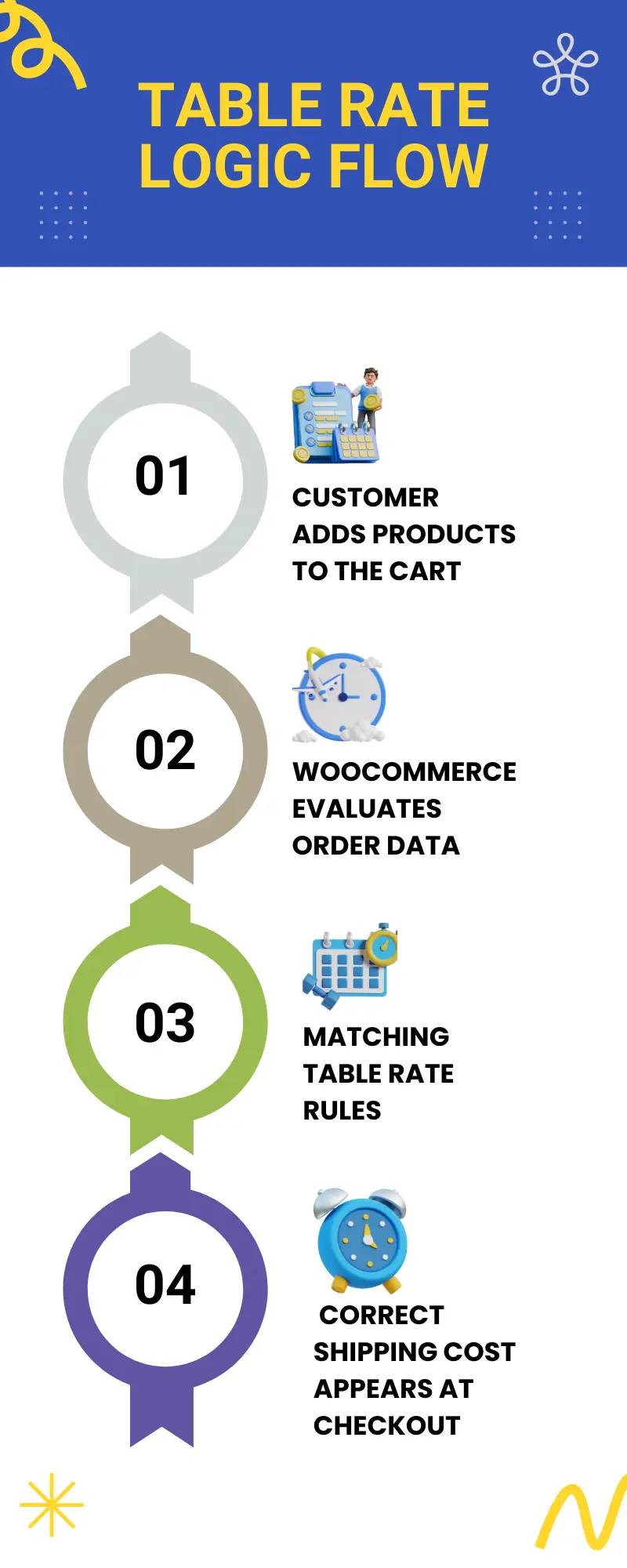
Here’s the basic logic flow:
- The customer adds products to the cart
- WooCommerce evaluates order data (weight, quantity, location, etc.)
- Matching table rate rules are applied
- The correct shipping cost appears at checkout
📌 Each rule acts like an “IF → THEN” condition
If the order matches the rule → apply the shipping rate.
Example:
| IF | THEN |
|---|---|
| Cart weight is 0–2 kg | charge $5 |
| The cart weight is 2–5 kg | charge $8 |
| The cart’s weight is 5–10 kg | charge $12 |
If the cart weighs 3.6 kg, WooCommerce automatically selects the $8 rate. No manual calculation needed.
Why this matters:
Accurate rule matching prevents undercharging heavy orders and overcharging light ones.
When Should You Use Table Rate Shipping?
Use it if:
- You sell products with varying weights
- You ship internationally
- You offer bulk pricing
- You want free shipping above a threshold
- You need profit margin protection
Why Table Rate Shipping is Better than Flat Rate
Table rate shipping is better than flat rate shipping because it adjusts costs dynamically based on order conditions instead of charging the same price for every order.
For WooCommerce stores with varied products, flat rate pricing often creates pricing inefficiencies.
In most real stores, different types of products may cost differently for shipping, and table rate shipping reflects that reality.
Limitations of Default WooCommerce Shipping Rules
WooCommerce’s built-in flat rate and other shipping rules are simple, but that simplicity becomes a problem as your store grows.
Common limitations include:
⚠️ One flat price applies to all orders, regardless of size or weight
⚠️ No native support for tiered pricing logic
⚠️ Limited flexibility for bulk, wholesale, or mixed carts
⚠️ Difficult to handle oversized or special products
As a result, stores often:
- Lose money on heavy orders
- Overcharge customers on small purchases
- Manually adjust shipping rates frequently
Table Rate Shipping vs Flat Rate Shipping
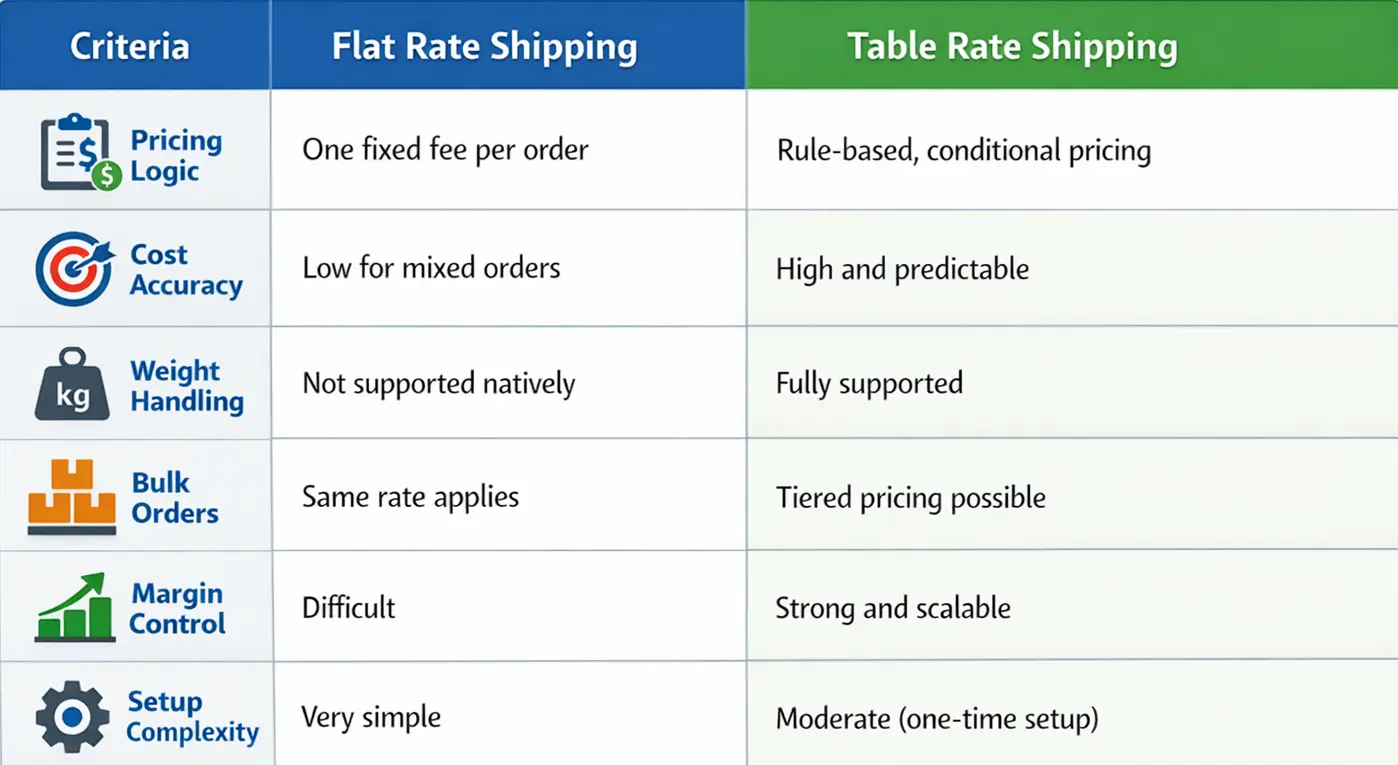
The difference becomes clear when you compare how both methods behave in real checkout scenarios.
| Criteria | Flat Rate Shipping | Table Rate Shipping |
|---|---|---|
| Pricing Logic | One fixed fee per order | Rule-based, conditional pricing |
| Cost Accuracy | Low for mixed orders | High and predictable |
| Weight Handling | Not supported natively | Fully supported |
| Bulk Orders | Same rate applies | Tiered pricing possible |
| Margin Control | Difficult | Strong and scalable |
| Setup Complexity | Very simple | Moderate (one-time setup) |
📌 Key takeaway:
Flat rate shipping is designed for simplicity. It works well when shipping costs are predictable, products are similar in size or weight, and ease of setup matters more than precision.
Table rate shipping, on the other hand, prioritizes accuracy and profitability. It adapts shipping fees to real order conditions, making it a better long-term solution for stores with varied products, growing catalogs, or tighter margin control.
Where Do Free Shipping and Local Pickup Fit In?
Free shipping and local pickup are useful, but they are not complete replacements for table rate logic.
👉 Free Shipping
Best used as a promotion (e.g., “Free shipping over $100”). On its own, it can quickly eat into margins if not controlled.
👉 Local Pickup
Ideal for physical or hybrid stores. It removes shipping costs entirely but applies only to specific customers.
In practice, most WooCommerce stores combine these methods with table rate shipping, not replace it.
For example:
- Table rate shipping for standard orders
- Free shipping above a cart threshold
- Local pickup for nearby customers
Flat rate and table rate are just two of several shipping methods for WooCommerce. Depending on your business model, options like free shipping, local pickup, or live carrier rates may also play a role in your overall shipping strategy.
If you want a complete breakdown of all WooCommerce shipping methods, how they work, and when to use each one, we’ve covered that in detail here:
What Are the Benefits of Using Table Rate Shipping in WooCommerce?
Table rate shipping gives WooCommerce stores precise control over shipping costs at scale. It adapts to different order types without requiring constant manual adjustments.
Almost 39% of online shoppers abandon their carts because extra costs like shipping are too high, according to Baymard Institute.
Key benefits include:
- More accurate shipping fees based on real order conditions
Table rate shipping calculates costs using actual order data instead of a fixed guess. This means customers see shipping fees that closely reflect the true fulfillment cost of their order. - Improved profit protection for heavy or bulk orders
Flat rates often fail when customers order heavier or larger quantities. With table rate shipping, you can increase shipping costs gradually as weight or quantity rises, helping prevent losses on bulk or oversized orders. - Fair pricing for customers across regions and order sizes
Shipping costs can vary widely by location and order composition. Table rate rules allow you to charge lower fees for nearby zones or small orders, while fairly adjusting rates for distant regions or complex shipments. - Better scalability as product catalogs grow
As your store adds more products, categories, or customer types, table rate shipping scales with you. You can extend existing rules or add new conditions without restructuring your entire shipping strategy.
This is especially valuable for:
✅ Stores with mixed product weights
✅ Wholesale or B2B pricing models
✅ Domestic + international shipping setups
Why it matters for conversions:
Unexpected shipping costs are a major cause of checkout abandonment. Table rate shipping reduces pricing surprises.
Pros of Table Rate Shipping
- More accurate shipping charges
- Better profit control
- Supports complex pricing rules
- Scales with large catalogs
Cons of Table Rate Shipping
- Requires setup time
- Can become complex
- Needs testing to avoid rule conflicts
Table Rate Shipping Use Cases & Examples (Real Store Scenarios)
Table rate shipping becomes truly valuable when you apply it to real store scenarios.
Below are practical examples that show how WooCommerce store owners use table rate logic to solve common shipping challenges.
These scenarios are difficult or impossible to implement using only WooCommerce’s default shipping rules.
Use Case 1: Combined Price + Weight-Based Shipping
Many stores ship products that vary significantly in both price and weight.
Scenario:
Imagine a WooCommerce store selling home décor. Some orders contain lightweight, high-value items like decorative lamps, while others include heavy, low-margin products such as stone planters.

With flat rate shipping, both orders are charged the same fee. The result? 👇
The store loses money on heavy shipments and overcharges customers buying lighter items.
By using table rate shipping, the store applies rules that evaluate both weight and order value together.
High-value, lightweight orders get lower shipping rates, while heavy, low-margin orders are priced accurately.
How table rate shipping helps:
You can create rules such as:
- Low weight + high order value → reduced shipping rate
- High weight + low order value → higher shipping rate
👉 This prevents margin loss on heavy orders while still rewarding high-value purchases.
Use Case 2: Quantity-Based Shipping with Free Shipping Thresholds
Bulk orders introduce a common dilemma: “Should shipping get cheaper or free as quantity increases?”
Scenario:
In my store, I noticed a recurring issue: customers ordering two items paid the same shipping as those ordering twenty. Bulk buyers felt overcharged, while shipping costs quietly ate into margins.
Flat rate shipping couldn’t scale with order size.
By switching to table rate shipping, I introduced quantity-based pricing tiers:
- Standard shipping for small orders
- Discounted rates for medium bulk orders
- Free shipping beyond a defined quantity threshold
According to a Shippo survey, 47% of consumers will spend more to meet the minimum requirement for free shipping.
How table rate shipping helps:
You can define rules such as:
- 1–5 items → standard shipping
- 6–20 items → discounted shipping
- 20+ items → free shipping
👉 This encourages larger orders while keeping shipping costs under control.
Use Case 3: User Role–Based Heavy Weight Shipping
Different customer types often place very different kinds of orders.
Scenario:
Jeremy was running a construction supply business and faced a recurring problem. Retail customers placed small, lightweight orders, but wholesale buyers regularly ordered heavy bulk items that cost far more to ship.
Using a single flat rate meant wholesale orders were often shipped at a loss.
With table rate shipping, the store introduced rules based on user role and order weight.
How table rate shipping helps:
You can create rules such as:
- Retail users + low weight → standard shipping
- Wholesale users + high weight → higher shipping rate
👉 This protects profit margins on bulk orders without penalizing regular customers.
Use Case 4: Location + Delivery Timing–Based Shipping
Shipping costs often change based on where and when an order is delivered.
Scenario:
Consider a local WooCommerce store offering regional deliveries. Shipping within the city is cheap on weekdays, but weekend deliveries and out-of-city locations cost more due to logistics and staffing.
WooCommerce’s default shipping zones can’t account for this nuance. Every order inside a zone is treated the same, regardless of when or where it’s delivered.
How table rate shipping helps:
Using location-based conditions, stores can:
- Apply different rates by city or region
- Add surcharges for weekend delivery
- Offer discounted weekday shipping
Use Case 5: Standard Shipping with Optional Expedited Delivery
Not all customers value shipping speed the same way.
Scenario:
Monica, managing a store that sells mobile accessories, noticed that customers had very different delivery expectations. Most were happy with standard shipping, but some wanted faster delivery, especially during holidays.
Offering only one shipping option forced the store to choose between speed and profitability.
With table rate shipping, she was able to introduce multiple delivery options with different price points.
How table rate shipping helps:
You can define rules such as:
- Standard delivery → lower shipping rate
- Expedited delivery → higher shipping rate
👉 This gives customers flexibility while allowing the store to charge appropriately for faster fulfillment.
What These Use Cases Prove
Across all examples, table rate shipping enables:
- Multi-condition pricing logic
- Predictable shipping costs
- Margin protection at scale
- Flexible promotions without manual overrides
📌 These are real-world requirements, not edge cases.
Popular Conditions Used in Table Rate Shipping
Table rate shipping works by applying shipping costs based on one or more predefined conditions. These conditions determine when a specific shipping rate should apply and why it’s charged.
In WooCommerce, most table rate shipping setups rely on a combination of the following condition types.
Weight-Based Shipping Rate
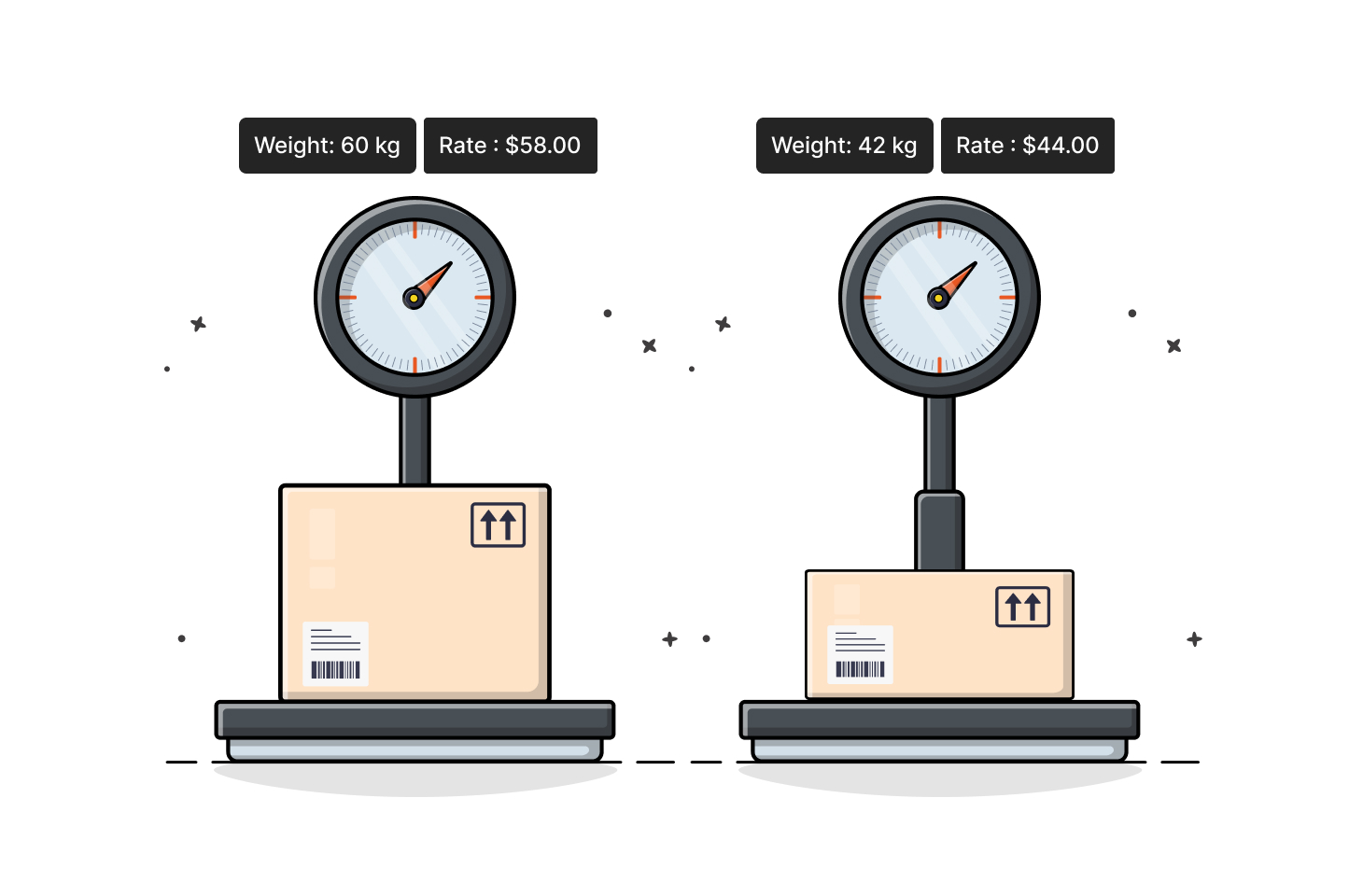
Weight-based table rate shipping calculates costs according to the total cart weight. As the order gets heavier, the shipping rate increases in predefined tiers.
This is the most commonly used condition because:
- Couriers and logistics are usually weight-driven
- Heavy items cost more to package and transport
- It protects margins on large or bulky orders
Typical use case:
- 0–2 kg → low rate
- 2–5 kg → medium rate
- 5+ kg → higher rate
👉 Weight-based shipping is ideal for stores selling physical goods with varying sizes and densities.
Quantity-Based Shipping Rates
Quantity-based shipping charges customers based on the number of items in the cart. Instead of weight, the total item count determines the shipping cost.
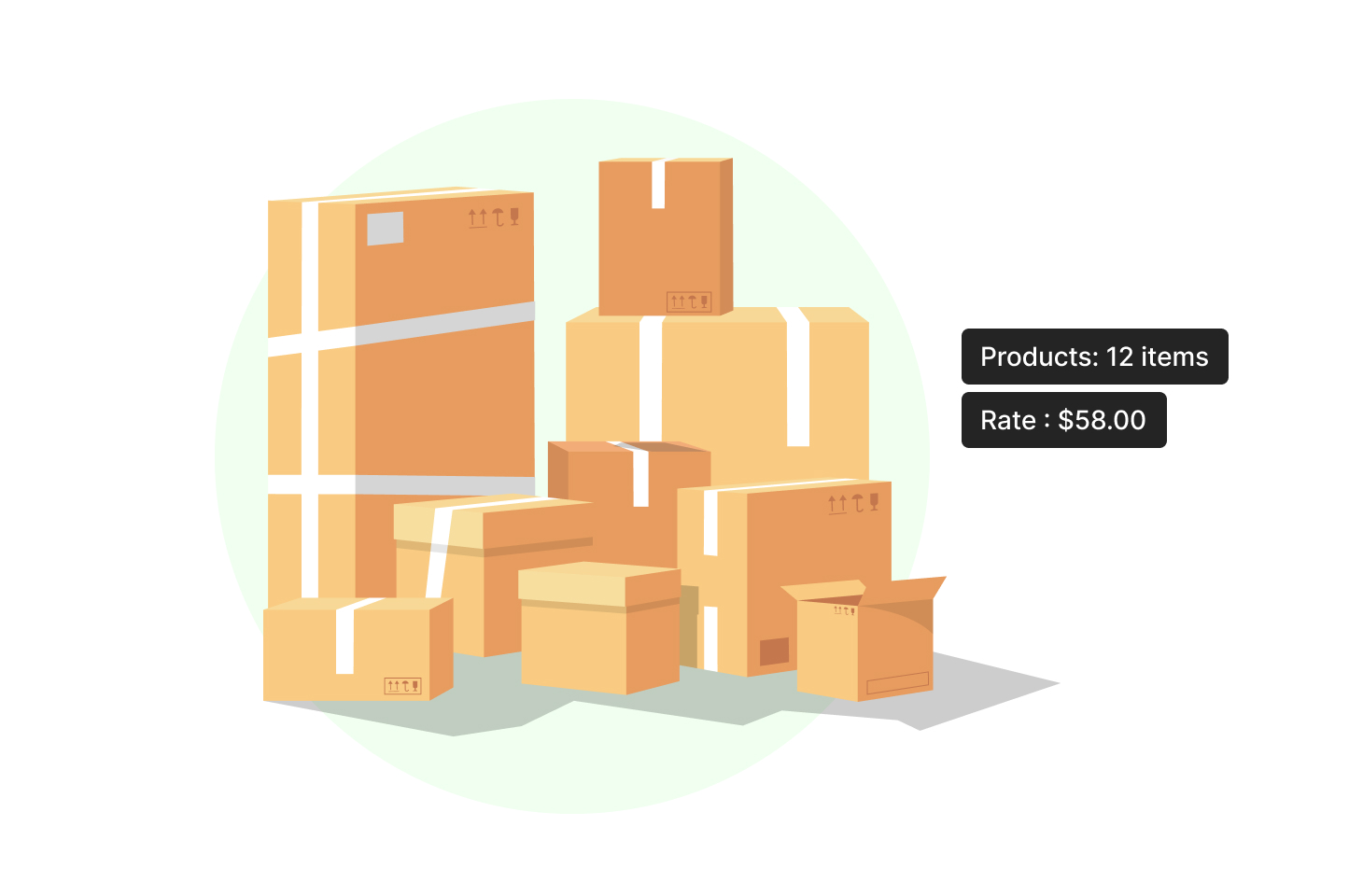
This works well when:
- Products have similar weight
- Packaging cost increases with item count
- Bulk orders need tiered pricing
Example scenario:
- 1–3 items → standard rate
- 4–10 items → discounted rate
- 10+ items → free or reduced shipping
👉 Quantity-based rules are especially useful for bulk, wholesale, and B2B WooCommerce stores.
Shipping Rates Based on Location
Location-based table rate shipping applies different costs depending on where the order is delivered. Rules can be defined by country, region, city, or shipping zone.
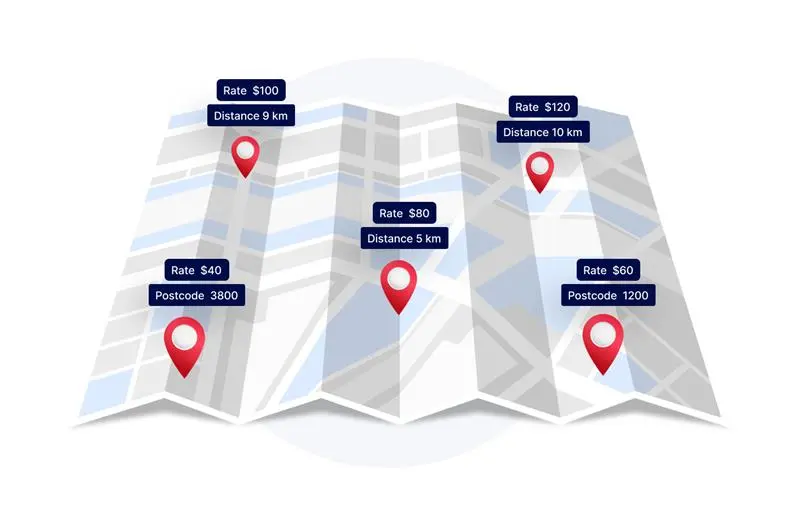
This condition is commonly used to:
- Differentiate domestic vs international rates
- Add surcharges for remote areas
- Offer local delivery pricing
Example scenario:
- Local city delivery → lower rate
- Same country (outside city) → standard rate
- International shipping → higher rate
👉 Location-based shipping is often combined with weight or quantity rules for better accuracy.
Shipping Rates by User Roles
User role–based table rate shipping allows different shipping rules for different customer types. Rates can change depending on whether the customer is a retail buyer, wholesaler, or logged-in member.
Common applications include:
- Lower shipping rates for wholesale users
- Special pricing for registered customers
- Restricted shipping methods for certain roles
Example scenario:
- Retail customers → standard shipping rate
- Wholesale users → discounted or bulk shipping rate
- Guest users → limited or higher-cost shipping options
👉 This condition is essential for B2B, wholesale, and membership-based WooCommerce stores.
Product and Category–Based Table Rate Shipping
Product- and category-based table rate shipping applies custom rules to specific products or groups of products. This is useful when certain items require special handling.
Typical examples include:
- Oversized or fragile products
- Hazardous or temperature-sensitive items
- Categories with higher fulfillment costs
Example scenario:
- Furniture category → higher shipping rate
- Accessories category → lower shipping rate
- Fragile products → handling surcharge added
👉 Category-based rules ensure specialized products are priced correctly without affecting the rest of the cart.
Choosing the Right Table Rate Shipping Plugin for WooCommerce
You can feel the necessity of a table rate shipping plugin once you reach the limitations of the WooCommerce default scope.
Plugins extend WooCommerce by adding conditional logic, tiered rating, and advanced controls that flat rate shipping simply cannot handle.
In reality, if your store has mixed products, bulk orders, or multiple customer types, native WooCommerce shipping won’t scale without help.
Factors to Consider When Choosing A Table Rate Shipping Plugin
Not all table rate shipping plugins work the same way. Choosing the right one depends on how complex your shipping logic needs to be.
When evaluating a plugin, look for:
☑️ Supported conditions: weight, quantity, location, user role, product/category
☑️ Rule flexibility: tiered rates, min/max thresholds, fallback rules
☑️ Performance impact: lightweight logic that doesn’t slow checkout
☑️ Compatibility: works with shipping zones, taxes, and VAT
☑️ Scalability: handles large rule tables without breaking
For growing WooCommerce stores, CSV import/export and rule prioritization are also valuable features.
A Redditor says,” Setting shipping rates based on the order total, weight, destination, etc. is complex because of the edge cases. There are a lot of them. And that’s why the UI is usually looks like a puzzle. Usually, merchants end up offering a free or a flat-rate shipping rates based on the shipping zone. Some merchants decide to go with the actual rates received from a carrier.”
Notable Table Rate Shipping Plugins for WooCommerce
Based on features, adoption, and real-world use cases, these are some of the most commonly used table rate shipping plugins for WooCommerce:
- WooCommerce Table Rate Shipping
- Basic rule-based pricing
- Limited flexibility
- Suitable for simple stores
- WowShipping – Weight-Based Table Rate Shipping
- 30+ advanced condition support (weight, role, product, zone)
- Optimized for complex rule sets
- Designed to scale with growing stores
- WooCommerce Advanced Shipping
- Strong conditional logic
- Lightweight and developer-friendly
- Good for custom setups
- Flexible Shipping by Octolize
- Popular free + paid options
- Weight- and cost-based rules
- CSV import support
- Table Rate Shipping by PluginHive
- Focused on tiered pricing
- Good carrier compatibility
- Suitable for SMB stores
📌 Key takeaway:
The best plugin isn’t about features alone. It’s about how well it matches your store’s shipping logic and growth plans.
We’ve compared the best table rate shipping plugins for WooCommerce, including free and premium options, use cases, and limitations, in a dedicated guide here:
How to Set Up Table Rate Shipping in WooCommerce
Setting up table rate shipping in WooCommerce generally follows the same high-level process, regardless of the plugin you choose. The key difference lies in how much control and flexibility you need.
Below is an overview of the most common approaches store owners take.
Approach 1: Using a Table Rate Shipping Plugin (Recommended)
This is the most practical and scalable way to implement table rate shipping in WooCommerce.
In general, the setup involves:
- Installing a table rate shipping plugin
- Selecting the shipping zones where table rates should apply
- Defining conditions (weight, quantity, location, role, product, etc.)
- Assigning shipping costs to each rule
- Testing rules at checkout to confirm correct rate selection
This approach works best for:
✅ Stores with mixed products or order sizes
✅ Wholesale or B2B setups
✅ Stores planning to scale shipping logic over time
👉 Detailed, step-by-step setup is covered in our dedicated guide
Approach 2: Using WooCommerce’s Default Shipping Options (Limited)
WooCommerce includes basic shipping features, but they offer very limited table rate functionality.
At a high level, this approach includes:
- Creating shipping zones
- Adding flat rates per zone
- Manually adjusting costs for different regions and shipping classes
⚠️ Important to note:
- True table rate logic (tiers, multiple conditions) is not supported natively
- Not suitable for complex or growing stores
This option works only for very simple shipping needs.
Approach 3: Using Custom Code or Advanced Customization (Not Beginner-Friendly)
Some stores attempt to implement table rate logic using custom code.
This usually involves:
- Writing conditional shipping logic in PHP
- Maintaining custom rules as products change
- Testing extensively after WooCommerce updates
⚠️ This approach is:
- Hard to maintain
- Error-prone
- Not recommended unless you have a dedicated development team
What Most WooCommerce Stores Do in Practice
In real-world setups, most stores:
- Use a table rate shipping plugin for flexibility
- Combine table rates with free shipping thresholds
- Enable local pickup as an optional method
This hybrid approach offers flexible control without complicating checkout.
Best Practices To Follow When Using Table Rate Shipping
Table rate shipping works best when rules are simple, predictable, and well-tested.
Most shipping issues in WooCommerce happen not because the table rate logic is wrong, but because it’s overcomplicated or poorly structured.
Follow these best practices to keep your shipping setup accurate and reliable.
✅ Keep Rules Simple and Purpose-Driven
Avoid creating too many overlapping conditions early on.
Instead:
- Start with one primary condition (weight or quantity)
- Add secondary conditions only when necessary
- Group similar products under shared rules
Simpler rules are easier to debug and less likely to conflict at checkout.
✅ Always Define a Fallback Shipping Rate
One of the most common mistakes is forgetting to set a fallback rule.
Best practice:
- Add a default shipping rate when no rule matches
- Use it as a safety net, not a primary method
This prevents the “no shipping methods available” error during checkout.
✅ Match Conditions to Realistic Shipping Costs
Shipping rules should reflect actual logistics, not assumptions.
Before finalizing rates:
- Review carrier pricing (weight brackets, zones)
- Consider the packaging and handling fee
- Account for oversized or fragile items separately
Table rate shipping is most effective when it mirrors real-world costs.
✅ Test Every Rule Before Going Live
Never assume a rule works just because it’s configured.
Always test:
- Light vs heavy carts
- Small vs bulk quantities
- Different locations and user roles
Use test orders to confirm the correct rate appears every time.
✅ Avoid Conflicting Rules Across Zones
When using multiple shipping zones or conditions:
- Ensure rules don’t overlap unintentionally
- Keep naming conventions clear
- Document why each rule exists
A clear rule structure makes long-term maintenance easier.
Common Challenges And Troubleshooting Steps You Should Follow
Woocommerce store owners often face several common and frustrating issues while using table rate shipping.
In most cases, the shipping method itself is working correctly. The problem usually lies in zone configuration, condition mismatches, or missing fallback logic.
Use the table below to quickly identify what’s going wrong and how to fix it.
Troubleshooting Guide: Table Rate Shipping Not Showing
| Issue | Probable Cause | How to Fix |
|---|---|---|
| The table rate shipping method was not added to the zone | Table rate shipping is not visible at checkout | Verify the customer’s country, state, and postcode match an active shipping zone |
| The shipping zone exists, but the table rate method does not appear | The method shows for some carts but not others | Ensure the table rate method is enabled inside the correct shipping zone |
| The method disappears when multiple products are added | Cart does not meet rule conditions (weight, quantity, price) | Review condition ranges and confirm cart values fall within defined limits |
| No shipping options available error | No fallback or default rule configured | Add a catch-all rule to ensure at least one rate always applies |
| Clear the cache and test in an incognito session | Conflicting rules across products or categories | Consolidate rules or align condition logic across product groups |
| Shipping shows for admins but not customers | User role condition restricting visibility | Check role-based rules and confirm customer roles are included |
| Location-based rates not triggering | Incorrect zip code or region format | Validate postcode ranges and formatting for the selected zone |
| Shipping works in test mode but not live | Caching or checkout session issues | Rates appear but the cost is incorrect |
| Method enabled but still hidden | Higher-priority shipping method overriding table rate | Review shipping method priority and disable conflicting methods |
| Rates appear, but the cost is incorrect | Condition hierarchy or calculation mode mismatch | Confirm rule order and calculation logic (per order vs per item) |
Why This Happens So Often:
Table rate shipping relies on strict condition matching. If even one parameter fails (zone, condition, role, or fallback), the method will not appear.
That’s why:
- Small configuration gaps cause big checkout issues
- Testing across multiple scenarios is critical
- Fallback rules are not optional; they’re essential
When Table Rate Shipping Is Not the Right Choice
While table rate shipping is powerful and flexible, it is not an ideal solution for every store. In some scenarios, using it can add unnecessary complexity or fail to address the core requirement.
Table rate shipping may not be the best fit when:
- Shipping costs depend on real-time carrier rates
If your store requires live rates from carriers like UPS, FedEx, or DHL, table rate rules cannot replace real-time API-based calculations. - Distance-based or route-optimized pricing is essential
Table rate shipping works on predefined conditions, not real-time distance, traffic, or route optimization between warehouses and customers. - Your pricing model is extremely simple
For stores offering a single flat fee, free shipping sitewide, or only local pickup, table rate shipping can be overkill. - Shipping logic depends on external data sources
Scenarios involving fuel surcharges, live inventory locations, or third-party logistics data are beyond the scope of table rate rules.
📌 Key Takeaway
Table rate shipping is ideal when:
- You need rule-based flexibility
- Pricing depends on cart logic
- You want predictable, controllable shipping costs
It is not ideal when:
- Pricing must be real-time
- Cost drivers are external or dimensional
- Simplicity outweighs configurability
Frequently Asked Questions About Table Rate Shipping
What are the best free Table Rate shipping plugins for WooCommerce in 2026?
There’s no single best plugin. The right choice depends on the type of shipping rules your store needs.
1. WooCommerce Table Rate Shipping – Best for very basic table rate setups with minimal conditions.
2. WowShipping – Ideal for advanced table rate logic, such as combined conditions, user roles, location-based rules, and scalable setups.
3. Flexible Shipping – Suitable for simple weight-based or cart total–based shipping rules.
What happens if no table rate matches an order?
If no rule applies, WooCommerce either hides the shipping method or falls back to another available method. Most plugins allow a fallback rate or default rule to prevent checkout issues.
Is table rate shipping better than flat rate shipping?
Table rate shipping is better when costs vary by weight, quantity, location, or cart value. Flat rate works only when shipping costs are predictable and uniform across orders.
Can table rate shipping work with free shipping rules?
Yes. Table rate shipping can coexist with free shipping thresholds, coupons, or conditional rules. WooCommerce evaluates methods based on eligibility, priority, and configuration.
Does table rate shipping slow down checkout?
No, when configured properly. Rule-based calculations are lightweight, and the performance impact is negligible unless extremely large rate tables are misconfigured.
Is table rate shipping suitable for B2B or wholesale stores?
Absolutely. Table rates are commonly used for role-based shipping, bulk quantity pricing, pallet rates, and regional wholesale logistics.
Can table rate shipping be combined with live carrier rates?
Yes. Many stores use table rates for domestic or bulk orders while keeping live carrier rates for express or international shipping.
How do I set up international table rates with tax and VAT included?
Most table rate shipping plugins support country-based conditions and tax-inclusive shipping rates. VAT handling depends on your WooCommerce tax settings and regional tax rules.
To enable this, define shipping rules by country or zone, then set the shipping method to taxable and choose whether prices include or exclude tax under WooCommerce → Settings → Tax. Always test checkout totals for different regions to confirm VAT is applied correctly.
How can I import or export large shipping rate tables via CSV?
Many table rate plugins support CSV import and export to manage large rule sets efficiently. This is especially useful for bulk edits and backups.
Typically, you export the existing rate table, edit conditions and costs in a spreadsheet, then re-import the file through the plugin’s settings. Using CSV files helps maintain consistency and reduces manual configuration errors.
Final Words
Table rate shipping gives WooCommerce store owners full control over how shipping costs are calculated based on real factors like weight, quantity, location, products, or customer type.
Instead of forcing every order into a single flat fee, it lets you create rules that actually reflect how your business ships orders in the real world.
If you’re struggling with inaccurate shipping charges, abandoned carts, or complex delivery scenarios, table rate shipping is usually the most practical solution.
WooCommerce’s default shipping options work for simple stores, but they quickly fall short as your catalog, regions, or customer types grow.
The key is choosing the right setup:
- Use basic rules for small stores with predictable orders
- Use advanced table rate logic for multi-zone, B2B, or high-volume stores
- Pair table rates with free shipping, local pickup, or live carrier rates where it makes sense
If you want full flexibility without writing custom code, a dedicated table rate shipping plugin is the fastest and safest way to implement these rules correctly.
Next step:
Explore a table rate shipping solution that matches your store’s complexity, start with a few core rules, and scale your shipping logic as your WooCommerce business grows.
For more helpful tips, stay connected with our LinkedIn Newsletter.