
This quick start creates a recurring purchase option. Free and Pro both provide recurring plans.
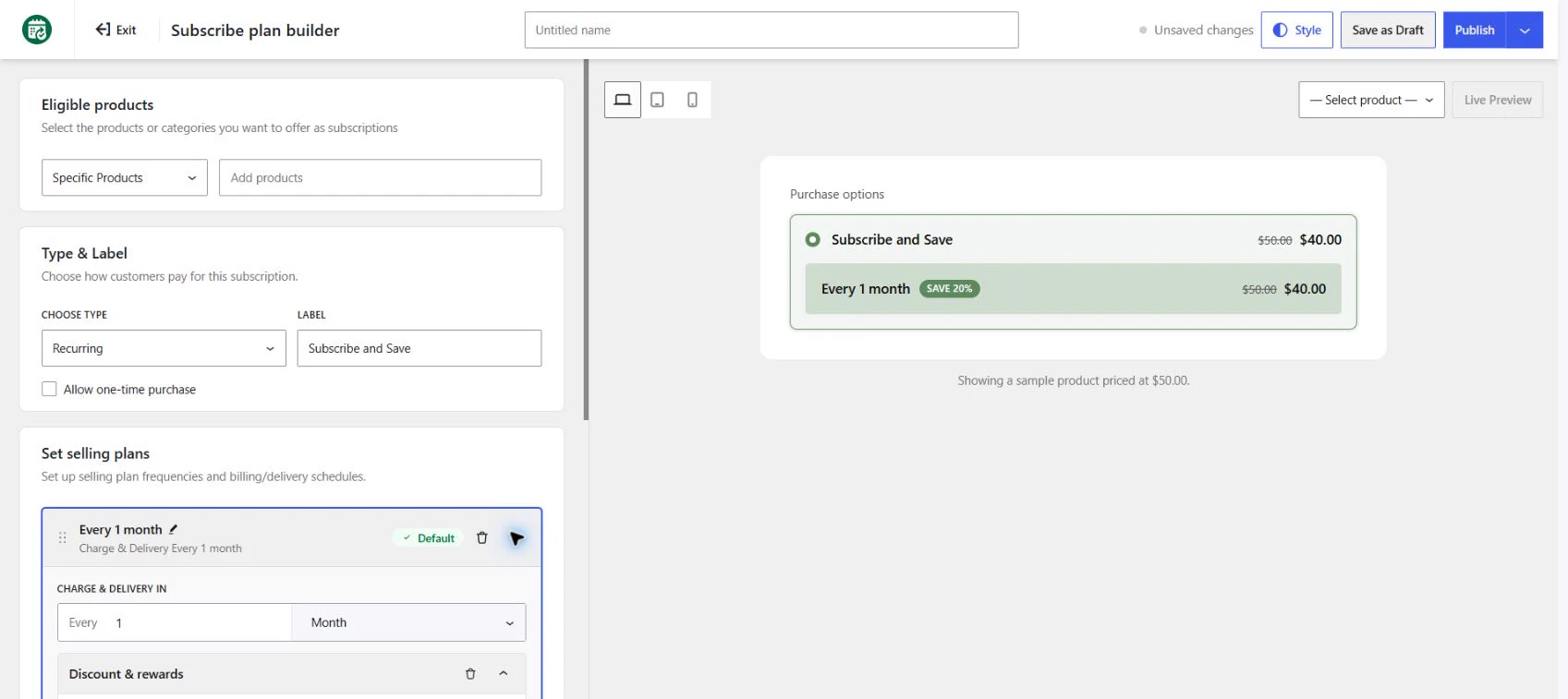
- Go to WowSubscription → Subscription Plans → Create Subscription Plan.
- Choose Recurring and select Start Setup.
- Enter a name for the plan.
- In Eligible products, choose Specific Products and select the products you want to include.
- Check the Type & Label settings. Enable Allow one-time purchase if customers should also be able to buy once.
- Expand the selling option under Set selling plans. Set Charge & Delivery in to Every 1 Month for a monthly option.
- Review the preview. Select an actual preview product when available so that you can distinguish its price from a sample-product illustration.
- Select Save as Draft to continue later, or Publish when the configuration is ready.
At least one eligible product or category is required by the observed publish validation. Correct validation messages before saving again. Publishing a plan configures an offer; it does not create a customer subscription or prove a renewal payment has succeeded.
For more options, see Recurring Subscription Plans.