


What if you could use AI’s help to create product recommendations rules that help recommend the right products in WooCommerce?
Yes, with an AI product recommendations plugin, you can achieve that goal. The tool can pull up relevant data such as product data, customer’s store activity and more – to recommend relevant products instead of showing the same suggestions to everyone.
So, a customer looking at a wireless keyboard might see a matching mouse, desk mat, or a better keyboard option without having to search for them.
For store owners, this can mean better product discovery, a smoother shopping experience, and more opportunities to increase average order value.
In this guide, you will learn the how you can use a product recommendation plugin with the power of AI – to set up recommendations efficiently.
Video Guide on Setting Up Recommendations Using AI
Why Should You Use AI for Product Recommendations?
AI can make the process of creating product recommendation rules much easier. Instead of manually configuring every condition, filter, and product relationship, you can describe what you want and let AI help build the rule.
Create Recommendation Rules with Simple Prompts
Instead of setting up a recommendation rule step by step, you can simply describe what you want.
For example, you may ask: “Recommend best-selling items from the hoodie category.”
AI can understand the request and turn it into a recommendation rule using the appropriate conditions, filters, and settings.
Set Up Recommendations Faster and More Accurately
Complex recommendation rules can involve multiple conditions, product filters, customer behavior, sorting options, and exclusions.
AI reduces the amount of manual configuration required and helps translate your intent into the right rule setup.
Build More Complex Rules Without the Complexity
You may want to recommend products based on several conditions at once, such as category, price range, stock status, popularity, or customer behavior.
Instead of configuring each condition manually, you can explain the recommendation you want in plain language and let AI help structure the rule.
Refine Rules Through Conversation
Your first rule does not have to be final.
You can continue refining it with instructions such as “exclude out-of-stock products” or “only recommend products above a 4-star rating.” This makes adjusting recommendation strategies faster and easier as your needs change.
What Kind of Recommendation Rules Can You Create with AI?
With a proper AI recommendation plugin, you can describe the recommendation you want in plain language and use AI to turn that instruction into a structured rule.
Here are some common recommendation rules you can create:
| Recommendation Type | Example Rule | Best For |
| Frequently Bought Together | Recommend socks and a sports bottle with running shoes | Cross-selling complementary products |
| You May Also Like | Recommend similar shirts based on category, attributes, or price | Helping shoppers discover alternatives |
| Best Sellers | Recommend the best-selling products from the current category | Promoting popular products |
| Upsell | Recommend higher-priced or higher-rated alternatives to the current product | Encouraging product upgrades |
| Cross-Sell | Recommend a mouse, stand, and keyboard with a laptop | Increasing order value with related products |
| Customer-Based | Recommend products based on a customer’s previous purchases or behavior | Creating more relevant recommendations |
You can also combine multiple conditions in one rule. For example:
“Recommend best-selling laptop accessories under $50, exclude out-of-stock products, and sort them by rating.”
AI helps build and refine the rule. If you use WowRecommend, it can handle the actual recommendation logic and when you Apply the rule, it displays the matching products in the locations you choose.
How to Use AI to Recommend Products in WooCommerce: Step-by-Step
You do not need to build an AI model or write recommendation algorithms yourself. With the right recommendation plugin, you can set up product recommendations with the headache. But first, you will need to meet a few prerequisites.
Prerequisites:
Before creating your first AI-powered rule, you need two things:
i. Get an AI API key:
You can use an API key from a supported AI provider. If you want to start without paid API usage, Gemini offers a free tier with a limit, while OpenRouter also provides access to free models with usage limits.
You can, of course, use APIs from providers such as OpenAI or Anthropic if you already have them configured.
ii. Connect the API to WordPress
Add your API credentials through the supported AI connector in WordPress. Once connected, the recommendation plugin can use the selected AI model to understand your instructions and help create recommendation rules.
For a more detailed guide on how to use the API using WordPress’ connector feature, read our documentation.
Step 1: Choose an AI Product Recommendation Plugin
WooCommerce includes basic upsell and cross-sell options, but creating more advanced recommendation strategies requires additional functionality – which can be provided by a recommendation plugin.
There are a handful of plugins that offer recommendations for WooCommerce.
We have built the WowRecommend plugin, that gives you an AI-powered rule builder along with advanced filters, smart sorting, and enhanced placement controls.
Its AI functionality makes creating the recommendation rules much easier because you can describe what you want instead of configuring everything manually.
Step 2: Tell AI What You Want to Recommend
After installing and activating WowRecommend, simply go to the Recommendation Builder.
Click on the AI Chat icon and start by describing your recommendation requirements in plain language.
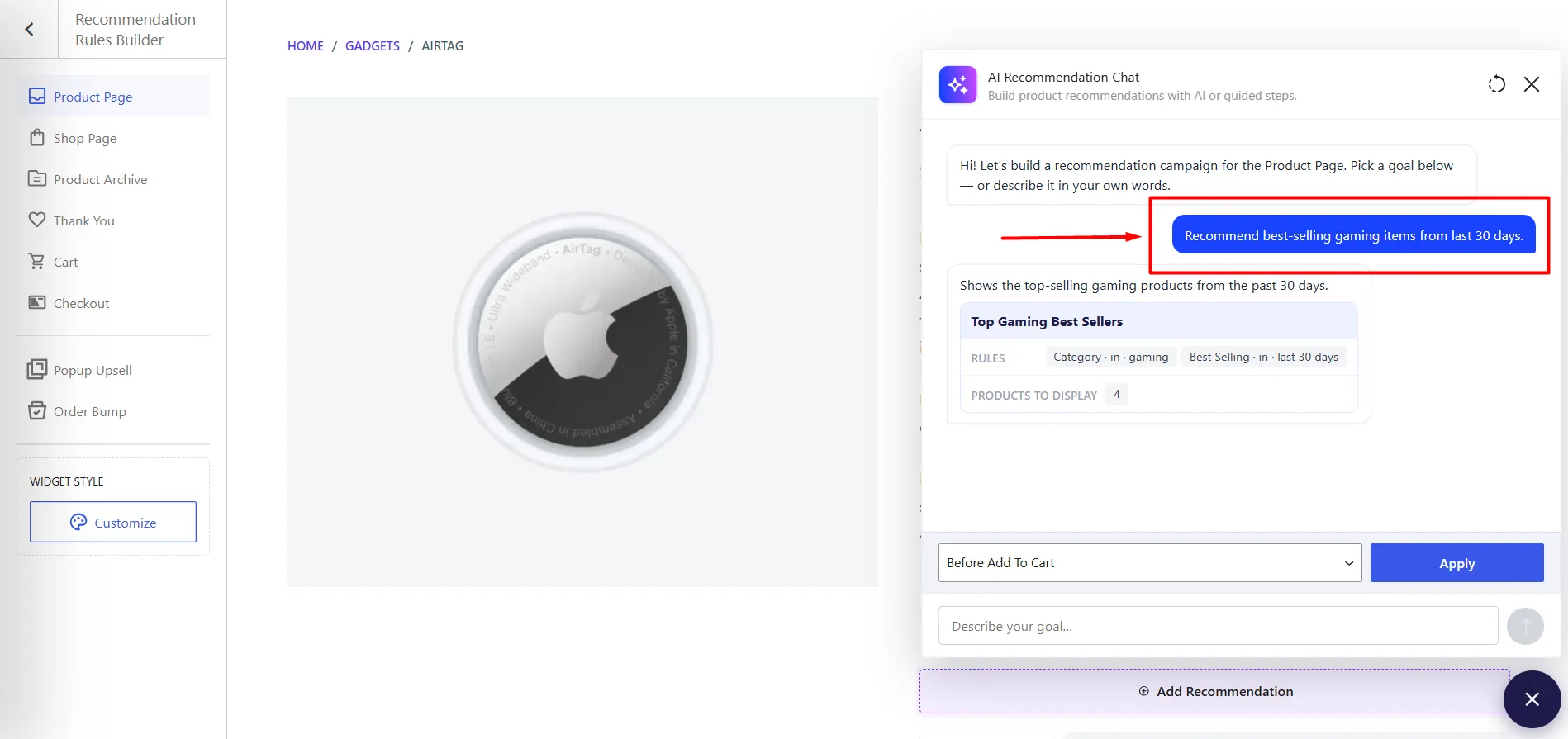
For example:
“Recommend best-selling gaming items from last 30 days.”
Or you can be more specific:
“Recommend products from the clothing category under $100, exclude out-of-stock items, and show the highest-rated products first.”
WowRecommend uses AI to interpret your instructions and build the appropriate recommendation rule.
Step 3: Review Filters, Sorting, and Placement
Once AI creates the rule, review the generated settings before publishing it.
You can adjust the filters to control which products qualify, use sorting to decide which matching products appear first, and choose the placement where the recommendations should be displayed.
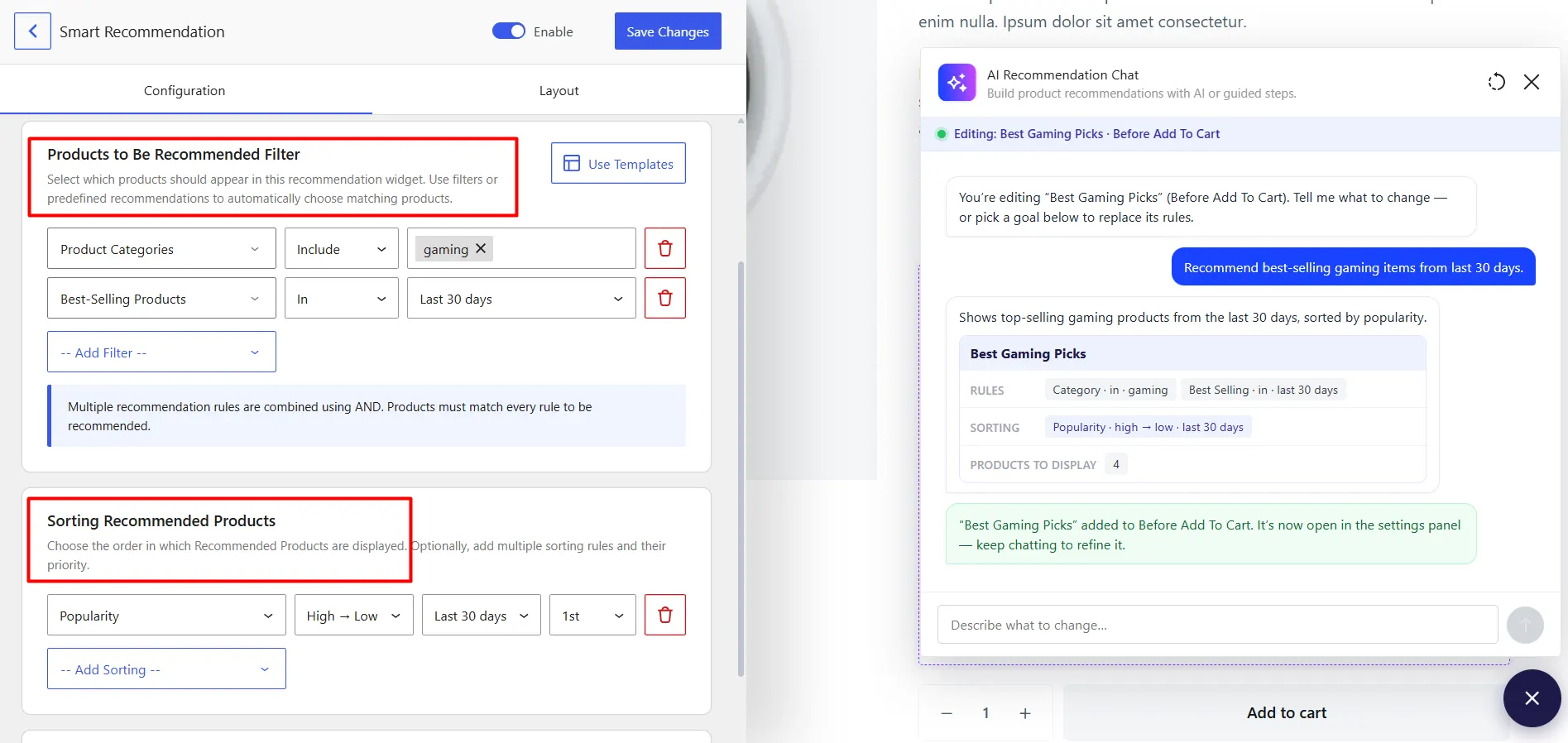
For example, you might show related products on the product page but use complementary products in the cart.
Step 4: Refine the Rule with AI
You do not have to rebuild the rule when you want to make a change. Simply tell AI what you want to modify.
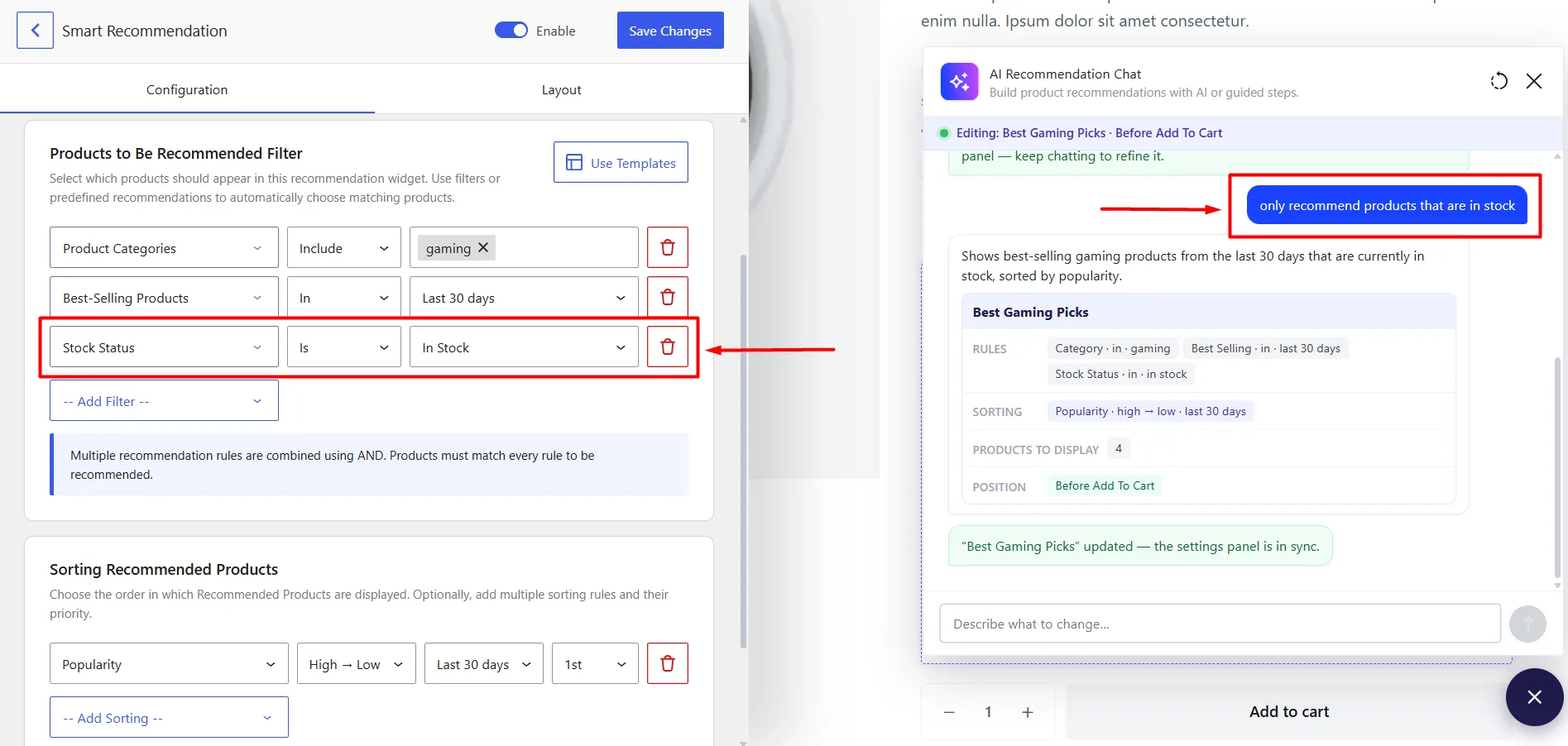
For example:
“Exclude products below a 4-star rating.”
“Only recommend products that are currently in stock.”
“Prioritize products priced between $30 and $80.”
AI updates the rule based on your new instructions. You can keep refining it until the recommendation logic matches exactly what you want.
Once the rule is ready, WowRecommend takes care of finding the matching products and displaying them in the selected locations across your WooCommerce store.
Best Practices for AI Product Recommendations
Simply adding AI recommendations to your store does not guarantee better results.
Keep these practices in mind.
Keep recommendations relevant
Relevance should always come first.
A popular product is not automatically a good recommendation.
If someone is buying a phone, recommending a phone case makes more sense than showing a random best seller.
Do not show too many products
More recommendations do not always mean more sales.
A small selection of relevant products is often easier to understand than a huge product grid.
Use different recommendations in different places
A product page and checkout page have different purposes.
Use recommendations that match the customer’s current stage in the buying journey.
Combine AI with business rules
AI can help automate decisions, but you still understand your products and customers better than anyone else.
Use rules to control important conditions.
For example, exclude:
- Out-of-stock products
- Discontinued products
- Products with very low margins
Recommend complementary products
Accessories and add-ons are often natural recommendations.
Think about what a customer needs after buying the main product.
Summing Up
AI product recommendations can turn a WooCommerce store from a simple product catalog into a more helpful shopping experience.
Instead of asking customers to search through hundreds of products, you can guide them toward products that are relevant to what they are viewing, buying, or adding to their cart.
You can use recommendations to promote complementary products, increase average order value, improve product discovery, and create a more personalized experience.
And you do not need to build the technology yourself.
A tool like WowRecommend can help you create AI-powered recommendations while still giving you control through filters, rules, sorting, and smart placements.
Add smarter product recommendations to your WooCommerce store today .
Try WowRecommend with an exclusive lifetime deal!


