
Visibility Settings let you control which users can see a specific shipping method on the cart and checkout pages. This provides flexibility in how shipping options are presented. For example, you can:
- Hide certain shipping methods from non-registered users
- Offer special rates to logged-in or returning customers
- Display standard shipping options for all users
Overall, it helps you tailor the shipping experience based on user type.
How to Control Shipping Method Visibility
Follow these simple steps to set visibility for a shipping rule:
- Go to the Additional Settings section
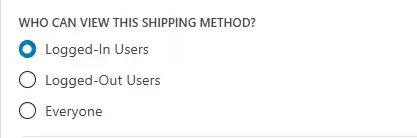
- Find the field labeled “Who can view this shipping method?”
- Select one of the following options:
- Logged-In Users – Visible only to customers who are signed in.
Suitable for member-only rates or loyalty-based offers. - Logged-Out Users – Visible only to visitors who are not logged in.
Useful for guest checkout offers or encouraging registration. - Everyone – Visible to all users, regardless of login status.
Best for standard shipping methods.
- Logged-In Users – Visible only to customers who are signed in.
Click Update to save. The shipping method will then be visible only to the selected user group.

