

PostX is the stronger choice for Gutenberg-first publishers who want post grids plus a broader blog-site building system. The Post Grid is the better fit if you want post grids inside Gutenberg, Elementor, or Divi with direct builder integrations and a lower regular one-site price.
Both plugins go beyond basic post grids. PostX includes dedicated Grid, List, Slider, and Post Module blocks, while The Post Grid includes grid, list, hover, slider, timeline, ticker, and other post-display options. The bigger difference is how far each plugin extends beyond post display. PostX goes further with Gutenberg blocks, starter sites, page templates, and site-wide publishing tools, while The Post Grid focuses more heavily on multi-builder compatibility and layout variations.
Quick Verdict: PostX vs The Post Grid (Who Wins and When)
Choose PostX when Gutenberg is your main editing environment and you want more than a single post-grid block. PostX includes 15 dedicated post-display blocks: 7 Post Grid blocks, 4 Post List blocks, 2 Post Slider blocks, and 2 Post Module blocks. It then extends those layouts with advanced queries, filtering, starter sites, page templates, archives, headers, footers, and other publishing features.
Choose The Post Grid when your priority is displaying posts across Gutenberg, Elementor, Divi, or shortcode-based layouts. It provides clearly defined grid, list, hover, and slider variations, plus archive and single-page tools, AI writing support, frontend post management, and broader native page-builder support.
Quick Comparison Table: PostX vs The Post Grid
This table compares the differences that matter most when choosing between PostX and The Post Grid.
| Criterion | PostX | The Post Grid |
|---|---|---|
| Primary editor focus | Gutenberg native; other builders via add-ons | Gutenberg, Elementor, and Divi native; shortcode support elsewhere |
| Post Display Options | 15 dedicated post-display blocks: 7 Grid, 4 List, 2 Slider, and 2 Post Module blocks | 9 grid variations, 7 list styles, 16 hover designs, 13 slider styles |
| Grid Options | 7 dedicated Post Grid blocks plus 50+ premade grid styles | 9 grid layout variations |
| Free version layouts | Basic grid, list, and slider blocks | 3 grid layouts, 3 list styles, 3 hover designs; no free slider |
| Template library (Pro) | 40+ Starter Sites, 366+ Page Templates, 250+ patterns product-wide | 70+ layouts, 19 pages, 88 sections |
| Query & Content Control | Query Builder, multiple post types, advanced filtering, taxonomy controls, sticky-post handling, and custom sorting | Query Builder with post-type selection, common filters, and advanced filtering in Pro |
| AJAX Filtering | 7+ filters, including custom taxonomy | Category and tag filters |
| AJAX Pagination | Load More, Numeric, Next/Previous | Default pagination free; Ajax Pagination, Ajax Load More, and Ajax Load on Scroll in Pro |
| AI Content Creation | ChatGPT integration in Pro | ChatGPT and Gemini integration in Pro |
| Frontend Post Submission | Included in Pro | Included in Pro, with login and registration forms |
| Full Blog Site Building | Includes starter sites and broader blog-building functionality | No comparable full blog-site building system |
| Site Builder | Posts, archives, taxonomies, authors, search, 404, home, headers, footers, mega menus | Single Post and Archive template building |
| Starter Sites & Templates | 40+ Starter Sites, 366+ Page Templates, and 250+ ready-made patterns | 70+ layouts, 19 premade pages, and 88 premade sections |
| Pricing, 1 site yearly | $39/year introductory, regular $49; renewal at full price | $31/year; renewal at $31 |
| Money-back guarantee | 14 days | 30 days |
| Additional Publishing Tools | Includes features such as Table of Contents, author-related blocks, reading progress, breadcrumbs, image/gallery blocks, video tools, accordion, tabs, dark mode, and mega menu functionality depending on plan | More focused on post-grid functionality, with features such as Table of Contents, news ticker, timeline, and other post-display tools in Pro |
| Best fit | Gutenberg-first blogs, magazines, and content-heavy sites that want post grids plus a broader site-building and publishing toolkit | Sites that mainly need post-grid functionality across Gutenberg, Elementor, Divi, or shortcode-based workflows |
Note: Features, pricing, plan limits, and availability can change over time. The information in this comparison was collected and verified from official product sources on September 29, 2026.
1. Which Plugin Offers More Post Display Layout Options?
👑 Verdict: PostX Wins for Overall Post Display Flexibility
PostX wins for overall post-display flexibility with 15 dedicated post-display blocks: 7 grids, 4 lists, 2 sliders, and 2 modules, plus premade styles and patterns for those blocks. The Post Grid offers more explicitly documented style variations within individual grid, list, hover, and slider categories.
Post Display Options Compared
PostX provides more dedicated post-display block types, while The Post Grid provides more explicitly counted style variations within its grid, list, hover, and slider layouts.
PostX includes 15 dedicated post-display blocks in Gutenberg: 7 Post Grid blocks, 4 Post List blocks, 2 Post Slider blocks, and 2 Post Module blocks. These give you different structural ways to display posts rather than limiting you to variations of a single grid block.

The 7 Post Grid blocks cover different grid structures, while the 4 Post List blocks provide dedicated list-based layouts. PostX also includes 2 Post Slider blocks for dynamic sliding post sections and 2 Post Module blocks for magazine-style post arrangements.
PostX adds premade designs on top of these blocks. Its Pro offering includes 50+ premade post-grid styles, while its wider pattern library provides ready-made designs for grids, lists, sliders, modules, and other blocks.
The Post Grid organizes its display options differently. Its free version includes 3 grid layouts, 3 list styles, and 3 hover designs, while sliders require Pro. In Pro, it provides 9 grid variations, 7 list styles, 16 hover designs, and 13 slider styles.
This distinction matters when comparing the raw numbers. PostX’s 7 grids, 4 lists, 2 sliders, and 2 modules are separate Gutenberg blocks, while The Post Grid’s published numbers primarily describe design variations within its layout types.
2. Which Plugin Works Across More Page Builders?
👑 Verdict: The Post Grid Wins for Page Builder Compatibility
The Post Grid wins page builder compatibility with native Gutenberg blocks, Elementor widgets, Divi modules, and shortcode output. PostX supports other builders through add-ons, but remains Gutenberg-first.
Page Builder Support Compared
PostX is Gutenberg-first and extends to several other builders through add-ons. The Post Grid goes further for native multi-builder use with Gutenberg blocks, Elementor widgets, Divi modules, and shortcode output.
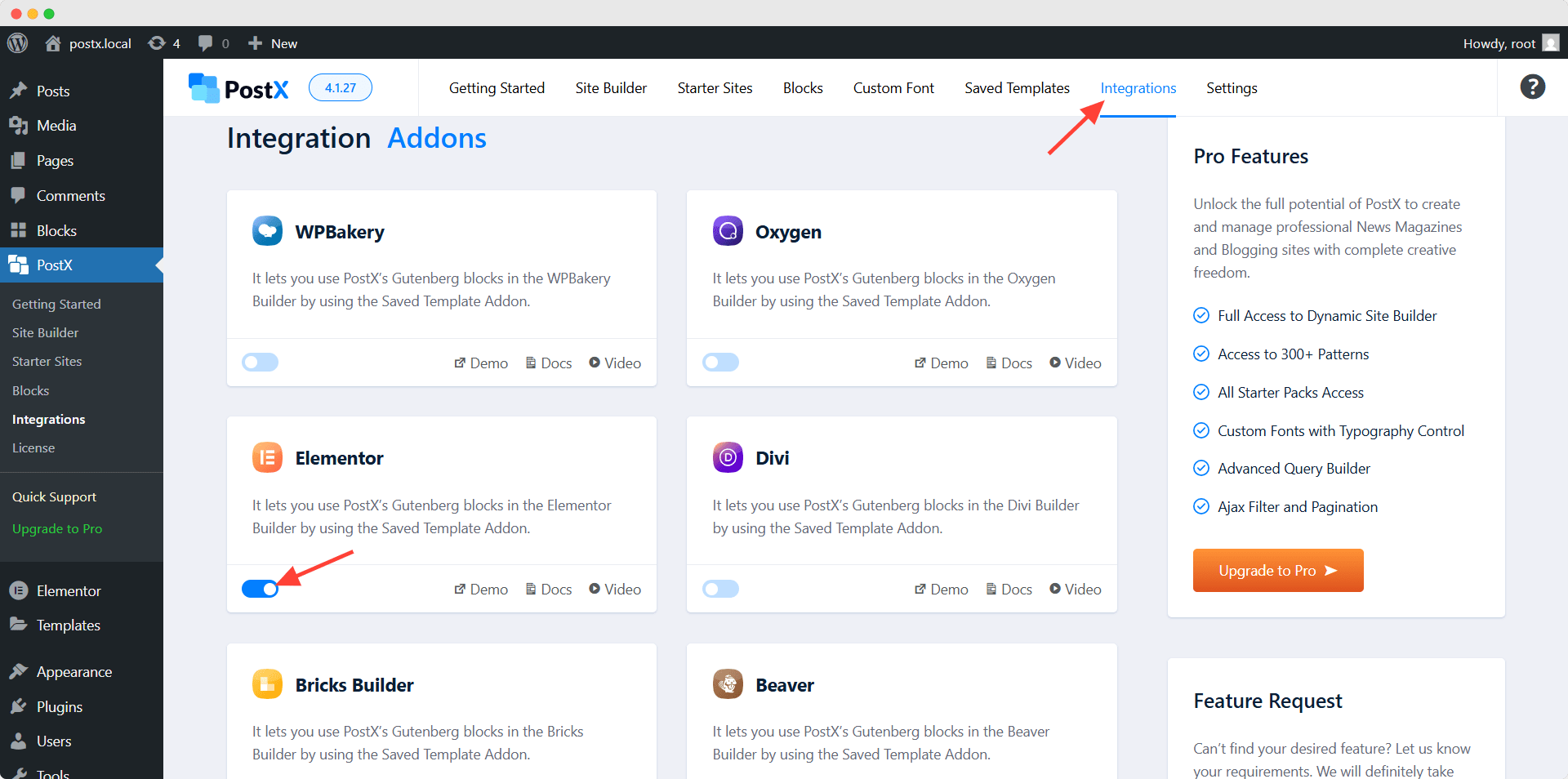
PostX works natively in Gutenberg. Its product materials also state compatibility with Elementor, Divi, Bricks, Beaver Builder, Oxygen, and WPBakery through add-ons or related integration workflows. Those integrations extend PostX beyond Gutenberg, but they are not native builder modules in every case.
The Post Grid includes Gutenberg blocks, 4 Elementor widgets, and 4 Divi modules in Pro. It also provides a shortcode generator, which lets you place a configured grid inside the Classic Editor, widgets, or other page builders that accept shortcodes.
3. Which Plugin Has the Larger Template Library?
👑 Verdict: PostX Wins for Template Library Depth
PostX wins template library depth with 40+ Starter Sites, 366+ Page Templates, and 250+ product-wide patterns. The Post Grid is more focused on individual layouts, pages, and sections.
Template Libraries Compared
PostX provides more material for building an entire content site, while The Post Grid concentrates more on individual layouts, pages, and sections. PostX Pro includes 40+ Starter Sites and 366+ Page Templates. Its WordPress.org listing also states that 250+ ready-made pattern designs are available product-wide, although the official listing does not clearly separate how many patterns belong to free and Pro plans.

The Post Grid Pro lists 70+ pre-made layouts, 19 pre-made pages, and 88 pre-made sections. That library is more focused on inserting prepared design pieces into an existing site.
4. Which Plugin Offers More Advanced Features?
👑 Verdict: PostX Wins for Publishing Feature Depth
PostX wins publishing feature depth with 7+ AJAX filters, advanced query controls, frontend submission, ChatGPT assistance, and more built-in blogging tools. The Post Grid has the advantage if dual AI providers or its specific AJAX pagination modes matter more.
Advanced Features Compared
PostX has the broader publishing-focused feature set, especially for filtering, query control, and blogging tools. The Post Grid matches many categories while adding three AJAX pagination methods and two AI providers.
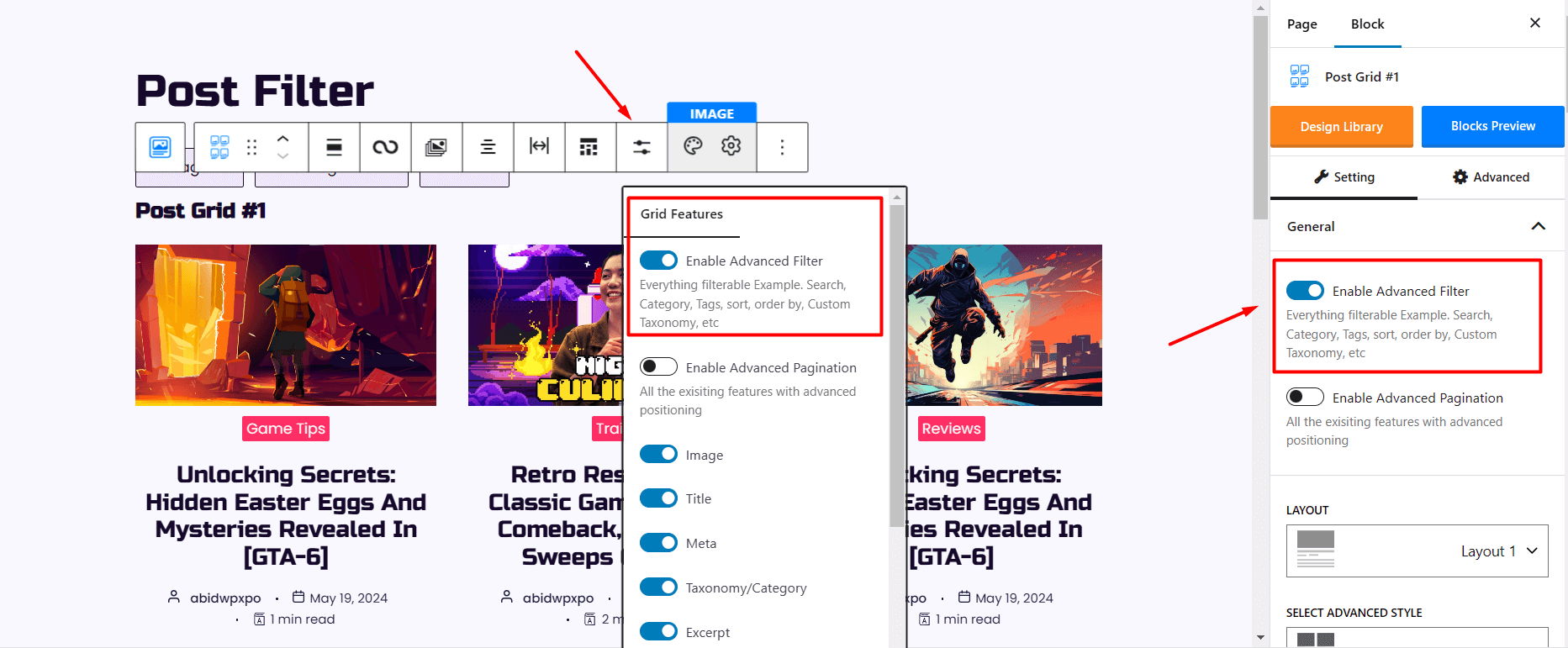
PostX Pro includes a query builder with category, tag, author, custom post type, custom logic, and multiple sorting choices. Its advanced filtering supports 7+ filter types, including category, tag, author, custom taxonomy, sorting, and search. It also includes AJAX pagination with Load More, Numeric, and Next/Previous options.
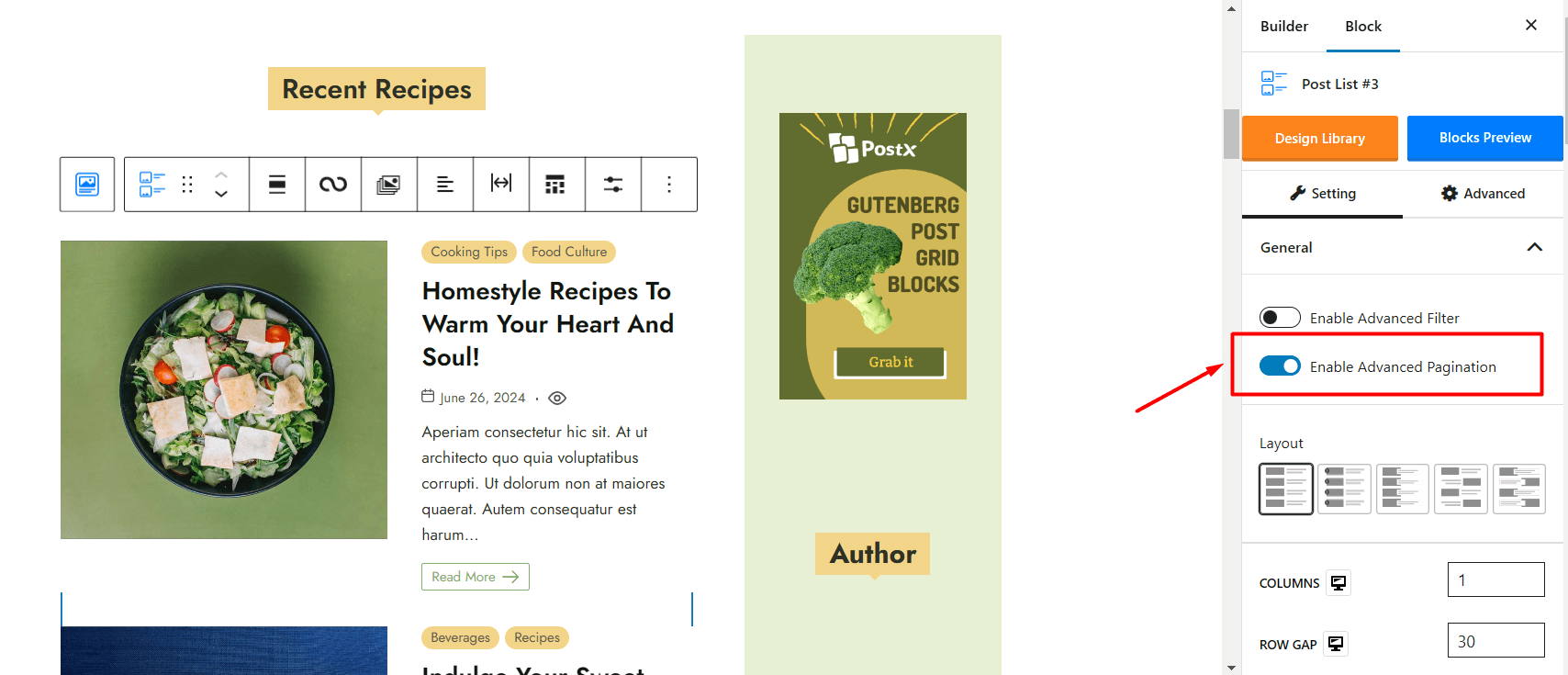
Beyond grids, PostX includes frontend post submission, ChatGPT-based content assistance, table of contents, breadcrumbs, a reading progress bar, author box features, and header, footer, and mega menu building.
The Post Grid Pro also includes an advanced query builder, AJAX filtering, frontend post submission, and a table of contents. Its pagination choices include Ajax Pagination, Ajax Load More, and Ajax Load on Scroll. Its AI tools support both ChatGPT and Gemini inside Gutenberg. Other display features include a news ticker, dynamic post slider, and post timeline.
5. Which Plugin Gives More Site-Building Control?
👑 Verdict: PostX Wins for Site-Building Control
PostX wins site-building control because its Pro builder covers far more dynamic page types plus headers, footers, and mega menus. The Post Grid concentrates on archive and single-post templates.
Site-Building Capabilities Compared
PostX gives you substantially broader site-building control. The Post Grid can build archive and single post templates, but PostX extends the same Gutenberg-based system across many more dynamic areas of a WordPress site.
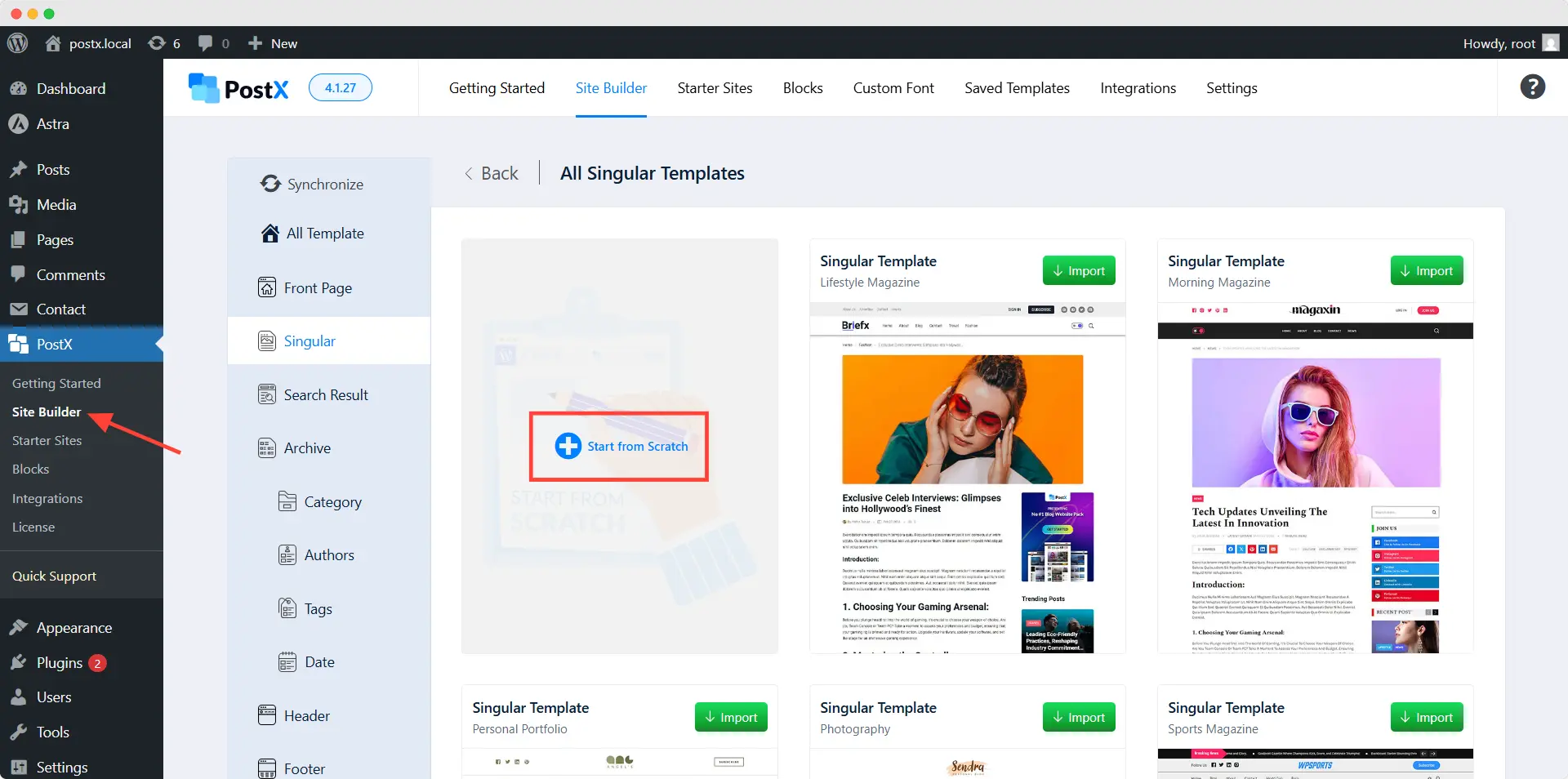
PostX Pro can create custom templates for single posts and pages, archives, categories, tags, authors, search results, 404 pages, and the home page. Its site-building tools also cover headers, footers, and mega menus. This lets a publisher use the same plugin for post displays and much of the site’s dynamic structure.
The Post Grid Pro provides an Archive and Single Page Builder through Gutenberg or Elementor. That gives you control over category-style archives and individual post templates without requiring PostX’s larger site-building layer.
6. Which Plugin Has the Easier Post Grid Workflow?
👑 Verdict: Both Offer an Easy Post Grid Workflow
PostX and The Post Grid are equally practical for creating post grids, but for different workflows. PostX offers a cleaner Gutenberg-first experience with integrated blocks, query controls, and premade designs, while The Post Grid makes grid placement easier across Gutenberg, Elementor, Divi, and shortcode-based sites.
Post Grid Workflow Compared
PostX and The Post Grid both make post grid creation straightforward, but they simplify different parts of the workflow. PostX keeps Gutenberg users inside one editing environment, while The Post Grid gives more flexibility when grids need to work across different builders.
With PostX, you add a post grid, list, slider, or related post block directly in Gutenberg, choose a layout or premade style, control which posts appear, customize the design, and publish. The block settings, query controls, layout options, and styling tools remain inside the Gutenberg editor, which keeps the workflow consistent for Gutenberg-based sites.

PostX also includes premade grid styles and patterns, so you can start from an existing design instead of building every layout manually. Its broader Starter Sites and site-building tools become useful later if you want to expand a grid into a complete blog, magazine, archive, or other publishing layout.
The Post Grid follows a similarly clear process: select the content, choose a layout, customize the design, and insert the grid. Its main usability advantage is placement flexibility. You can create and use grids through Gutenberg, Elementor, Divi, or the shortcode generator. A setup wizard added during its 2026 update cycle also helps new users configure the plugin.
7. Which Plugin Gives Better Value for the Price?
👑 Verdict: PostX Wins for Broader Long-Term Value
PostX costs more for a single yearly license, but it includes a broader publishing and site-building toolkit and offers lifetime licenses. The Post Grid costs less per year and provides a longer refund period, making it the stronger price-first option.
Pricing and Value Compared
PostX costs more yearly, but bundles a broader site-building system and offers lifetime licenses. The Post Grid has the lower one-site price and longer refund period, so value depends on whether you need grids alone or a wider publishing toolkit.
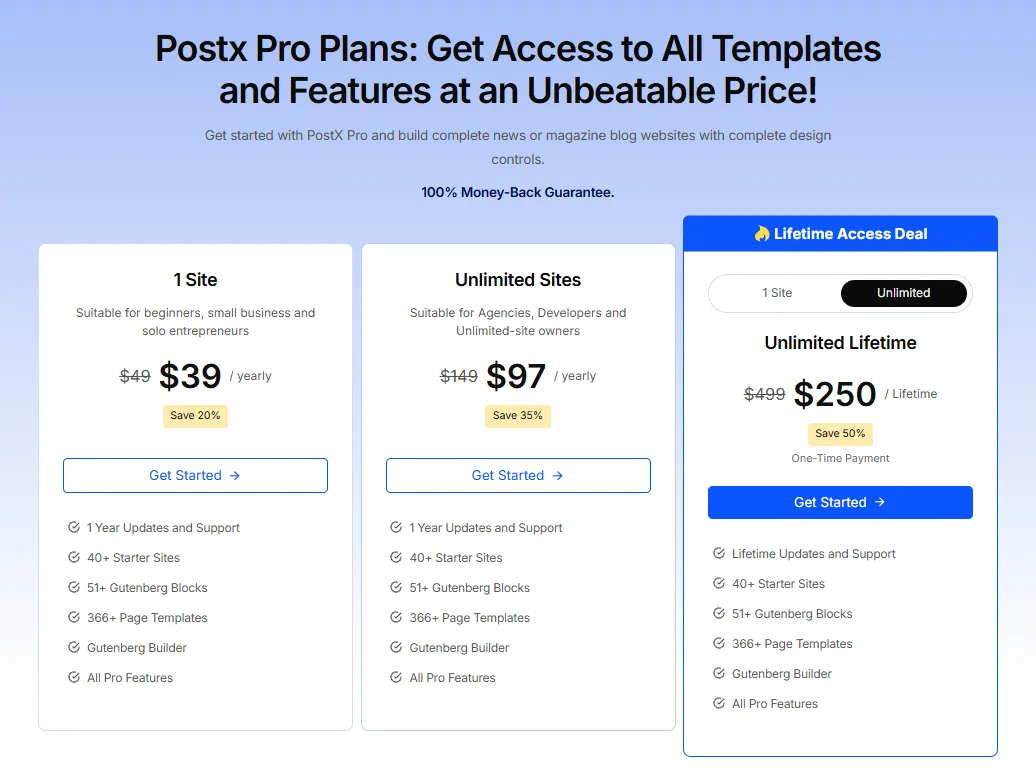
PostX charges $39 per year for one site at the introductory rate, then $49 at regular pricing. Unlimited Sites starts at $97, then $149. Lifetime options are $119 for one site and $250 for unlimited sites. The refund period is 14 days.
The Post Grid charges $31 per year for one site, $79 for 5 sites, and $159 for unlimited sites. The listed renewals remain the same. Its refund period is 30 days.
8. Which Plugin Has Better Support and Updates?
👑 Verdict: PostX Edges Ahead on Public Review Footprint
Both plugins show active development and have the same 4.8 out of 5 WordPress.org rating. PostX has the larger vendor-reported Trustpilot review base, while The Post Grid provides the longer refund period. Those figures support a difference in public review footprint, not a definitive claim that one support team is better.
Support and Update Records Compared
PostX shows active 2026 development, a 4.8 out of 5 WordPress.org rating, and a larger vendor-reported Trustpilot review base. The Post Grid has the same WordPress.org rating and a longer refund period.
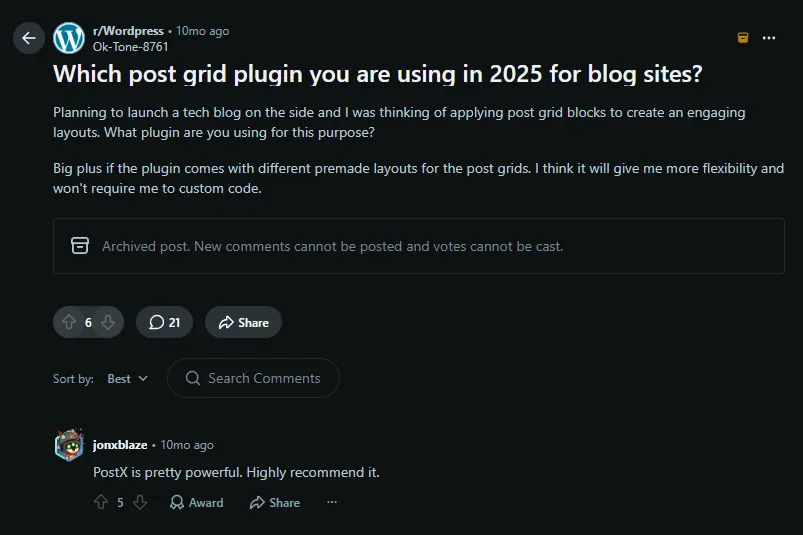
PostX has a 4.8 out of 5 WordPress.org rating from 265 reviews. Its product materials report 4.9 out of 5 on Trustpilot from 440+ reviews. WordPress.org shows releases through September 2026, including version 5.0.41 on September 16.
The Post Grid also has a 4.8 out of 5 WordPress.org rating from 265 reviews. Its product page reports 4.8 out of 5 on Trustpilot from 119+ reviews. WordPress.org lists version 7.9.6 with September 2026 releases.
How We Evaluated PostX and The Post Grid
We compared PostX and The Post Grid using the same criteria that matter when choosing a WordPress post display plugin. The comparison starts with their core job, creating and managing post layouts, then looks at how far each plugin extends beyond that.
First, we compared post display options and workflow. This includes grids, lists, sliders, modules, hover layouts, filtering, pagination, query controls, premade designs, and how easily each plugin lets you create and place those layouts.
Next, we looked at editor and page-builder compatibility. PostX is built primarily around Gutenberg, while The Post Grid provides native options for Gutenberg, Elementor, Divi, and shortcode-based placement. This matters because the easier plugin depends partly on where you already build your pages.
We also compared template depth and site-building scope. PostX extends into Starter Sites, page templates, dynamic templates, headers, footers, and other publishing tools. The Post Grid also goes beyond grids with archive and single-post building, but its broader focus remains post-display layouts across multiple builders.
Finally, we compared advanced features, pricing, support, and maintenance. This includes filtering, pagination, AI tools, frontend post submission, yearly and lifetime pricing where available, refund periods, public ratings, and recent update activity.
The goal is not to judge either plugin by feature count alone. Each section compares the same capability on both sides, then explains which plugin has the stronger fit for that specific use case.
FAQs About PostX vs The Post Grid
These questions cover practical differences that matter when you are choosing between the two plugins.
Q: Can I Use PostX or The Post Grid With Elementor?
Yes. The Post Grid provides dedicated Elementor widgets. PostX also works with Elementor, but its documented workflow uses PostX saved templates and an Elementor integration so you can place Gutenberg-built PostX layouts inside Elementor.
Q: Is the Free Version of Either Plugin Enough for a Basic Blog?
Yes. PostX Free includes dedicated Grid, List, Slider, and Post Module blocks, while The Post Grid Free includes grid, list, and hover layout options. Both are sufficient for basic post-display sections, but their layout systems are structured differently.
Q: Which Plugin Is Better for WooCommerce Product Grids?
The Post Grid has the clearer WooCommerce-specific option because Pro lists eight WooCommerce shortcode layouts. PostX can query WooCommerce products as a post type and filter them, but its post filter does not include price sorting.
Q: Do Both Plugins Support AJAX Filtering?
Yes, but the access level differs. PostX supports AJAX-based advanced filters for categories, tags, authors, and custom taxonomies. The Post Grid supports AJAX taxonomy filtering in Pro, without requiring a full page reload.
Q: Can I Switch from One Plugin to the Other Later?
Yes, but expect manual layout work. Each plugin uses its own blocks, widgets, templates, and settings. Your WordPress posts remain in the database, but grids, archive templates, and builder-specific sections usually need to be recreated.
Which Post Grid Plugin Should You Choose?
The choice comes down to how you want to build and reuse post layouts. PostX is the better fit when Gutenberg is your main environment and you want dedicated Grid, List, Slider, and Post Module blocks inside a broader publishing system. The Post Grid is the better fit when you want strong post-display layouts directly inside Gutenberg, Elementor, Divi, or shortcode-based workflows.
Choose PostX if you want 15 dedicated post-display blocks, 50+ premade grid styles, 366+ page templates, 250+ patterns, 40+ starter sites, advanced queries, and a Gutenberg-centered site builder for a content-heavy blog, news site, or magazine.
Choose The Post Grid if you prefer native Elementor widgets, native Divi modules, Gutenberg blocks, shortcodes, clearly defined grid/list/hover/slider variations, or a lower one-site yearly entry price.
The gap between the two is smaller than older comparisons suggest. The Post Grid now includes AI writing, archive and single-page building, frontend post tools, and advanced query features. PostX still offers the broader Gutenberg post-display and publishing ecosystem.


