

AI can help you run a WordPress site faster by handling first drafts, repetitive editing, image tasks, SEO fields, product copy, forms, translations, support questions, reporting, and routine admin work.
The best approach is not to let AI “run everything.” Use it to produce a useful first version, then keep a human responsible for facts, brand voice, permissions, and publishing.
In 2026, there are three main ways to use AI with WordPress:
- Built-in AI features, especially on WordPress.com.
- WordPress AI plugins that add tools to the editor or dashboard.
- External AI assistants and automation platforms connected through APIs, webhooks, or the Model Context Protocol, commonly called MCP.
Let’s explore the most practical ways to use AI in WordPress while keeping quality, accuracy, and human control intact.
Practical Ways to Use AI in WordPress at a Glance
Use this quick comparison to see where AI can save time and which WordPress plugins support each use case. Features, limits, and pricing may change, so check the latest plugin details before choosing a tool.
| Use case | How AI saves time | Recommended tools |
|---|---|---|
| Content & SEO | Drafts, rewrites, and optimizes content. | Rank Math SEO, Jetpack, GetGenie |
| Customer Support | Answers common questions automatically using your site content | Tidio, AI Engine |
| Image Creation | Generates, edits, and describes images. | AI Engine, AI Puffer |
| Product Copy | Creates descriptions, FAQs, and SEO text. | AI Product Tools, AI for WooCommerce |
| Analytics | Explains reports in plain language. | MonsterInsights |
| Forms | Builds dynamic forms from simple prompts. | WPForms, AI Engine, AI Puffer |
| Translation | Translates and localizes site content. | Weglot, GTranslate |
| Site Search | Understands meaning, not only keywords. | WPSOLR, AI Engine |
| Website Building | Generates pages, layouts, and starter copy. | Starter Templates, Spectra Blocks |
| Personalization | Recommends relevant products and content. | WPSOLR, AI for WooCommerce |
| AI Automation | Trigger workflows or perform approved site actions | Bit Integrations, Uncanny Automator, AI Engine |
What Is AI, and Why Does It Matter for Websites Today?
Artificial intelligence, or AI, refers to software that can perform tasks that normally require human judgment, such as understanding language, recognizing patterns, generating images, summarizing information, and making recommendations.
For website owners, this means AI can help turn a rough idea into a page outline, rewrite an unclear paragraph, generate product-description variations, summarize analytics, translate content, answer common customer questions, or move information between different tools.
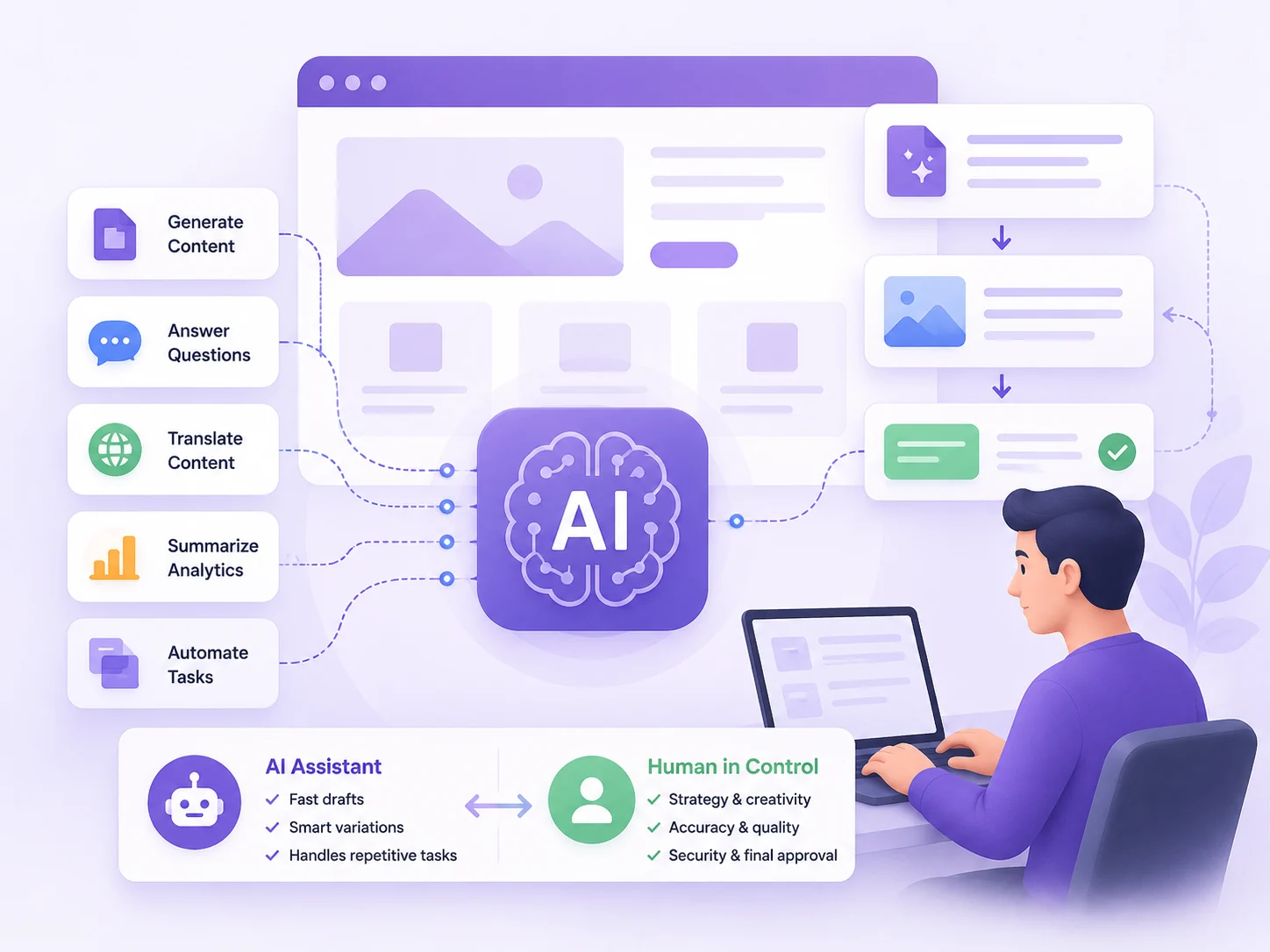
This matters because running a modern website involves much more than publishing a few pages. AI can reduce that workload by speeding up repetitive, structured tasks. That does not mean AI should replace writers, designers, developers, or website managers.
The most effective approach is to treat AI as a capable assistant rather than an unsupervised decision-maker. Let it handle first drafts, variations, summaries, and repetitive processes. Keep humans responsible for strategy, accuracy, creativity, security, and final approval.
11+ Practical Ways to Use AI in WordPress in 2026
Here are 11+ practical ways AI can save time, simplify WordPress tasks, and improve how you manage your WordPress website.
1. Create and Optimize Content for Better SEO
AI can assist with almost every stage of the WordPress content workflow, from turning an idea into an outline to rewriting paragraphs, generating titles, and drafting meta descriptions. It can also suggest related questions, keywords, internal links, and structural improvements.
This saves time because writers no longer have to begin every post with a blank page. You can provide your research, examples, and intended audience, then ask AI to organize the material into a first draft. It is also useful when updating old articles or creating several title and description variations.
Recommended tools: Rank Math SEO includes Content AI features for writing and optimization, while Jetpack adds an AI Assistant directly to the WordPress editor.
A Quick Workflow on Content Creation Using Jetpack
We used Jetpack directly inside the WordPress editor, which meant we did not have to move between separate writing and SEO tools.
We started by adding the AI Assistant block and giving it the topic, audience, tone, and key points. Jetpack then created an initial outline and draft. From there, we selected individual paragraphs to shorten, expand, or rewrite where needed.
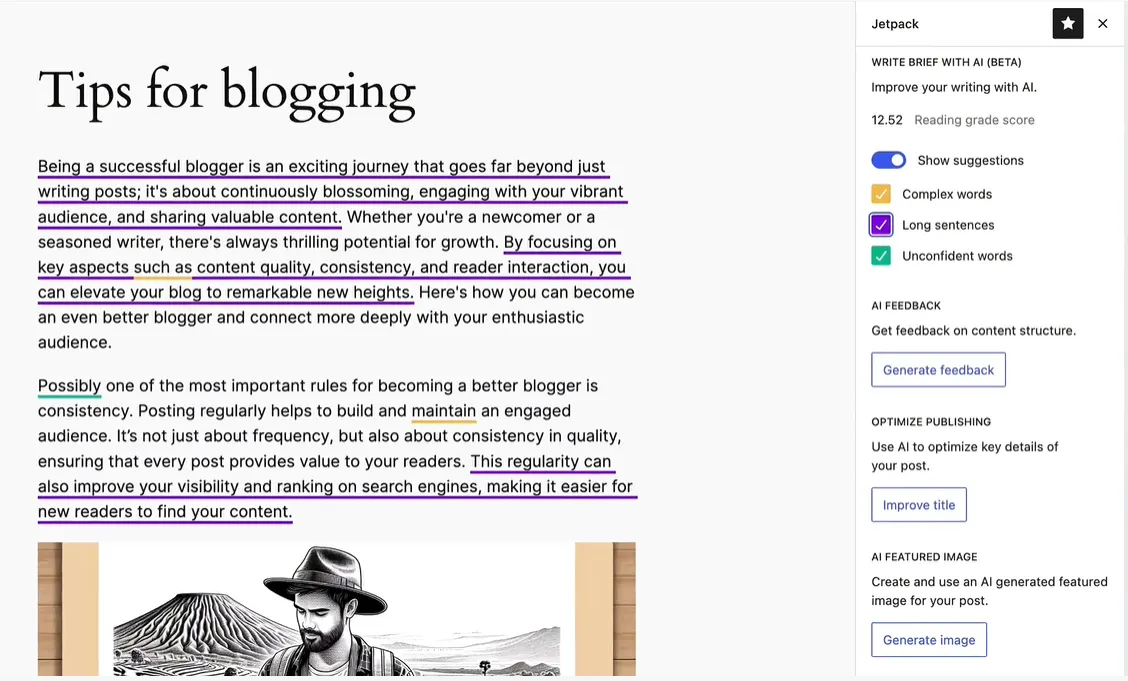
Once the article was in shape, we used Jetpack’s title and metadata tools to generate a few SEO title and description options. After reviewing the facts and adding our own examples, the post was ready for final editing.
This cut down the time spent building the first draft and preparing basic SEO fields.
Possible drawbacks and how to avoid them: AI content can sound generic, repeat existing information, or include inaccurate claims. Use it for outlines and first drafts, then verify the facts, add original examples, refine the tone, and review the content for search intent before publishing.
2. Add an AI Support Agent for 24/7 Customer Service
An AI support agent is a chatbot that answers visitor questions using your website content, product information, help articles, and predefined instructions. It can handle common questions about pricing, availability, shipping, refunds, account access, or services.

This can reduce the time spent answering the same questions repeatedly. The chatbot can respond outside business hours, collect contact details, recommend relevant pages, and pass more complicated conversations to a person.
Recommended tools: Tidio adds live chat, chatbots, and access to its Lyro AI support agent. AI Engine offers a more customizable chatbot framework that can use WordPress content, embeddings, and different AI providers.
A Quick Workflow on Customer Support Using Tidio
For customer support, we connected Tidio and trained Lyro using the information already available on the website.
The first step was adding the main support pages, FAQs, shipping details, and refund information to Lyro’s knowledge base. We then set a few instructions around tone and the types of questions it should answer.
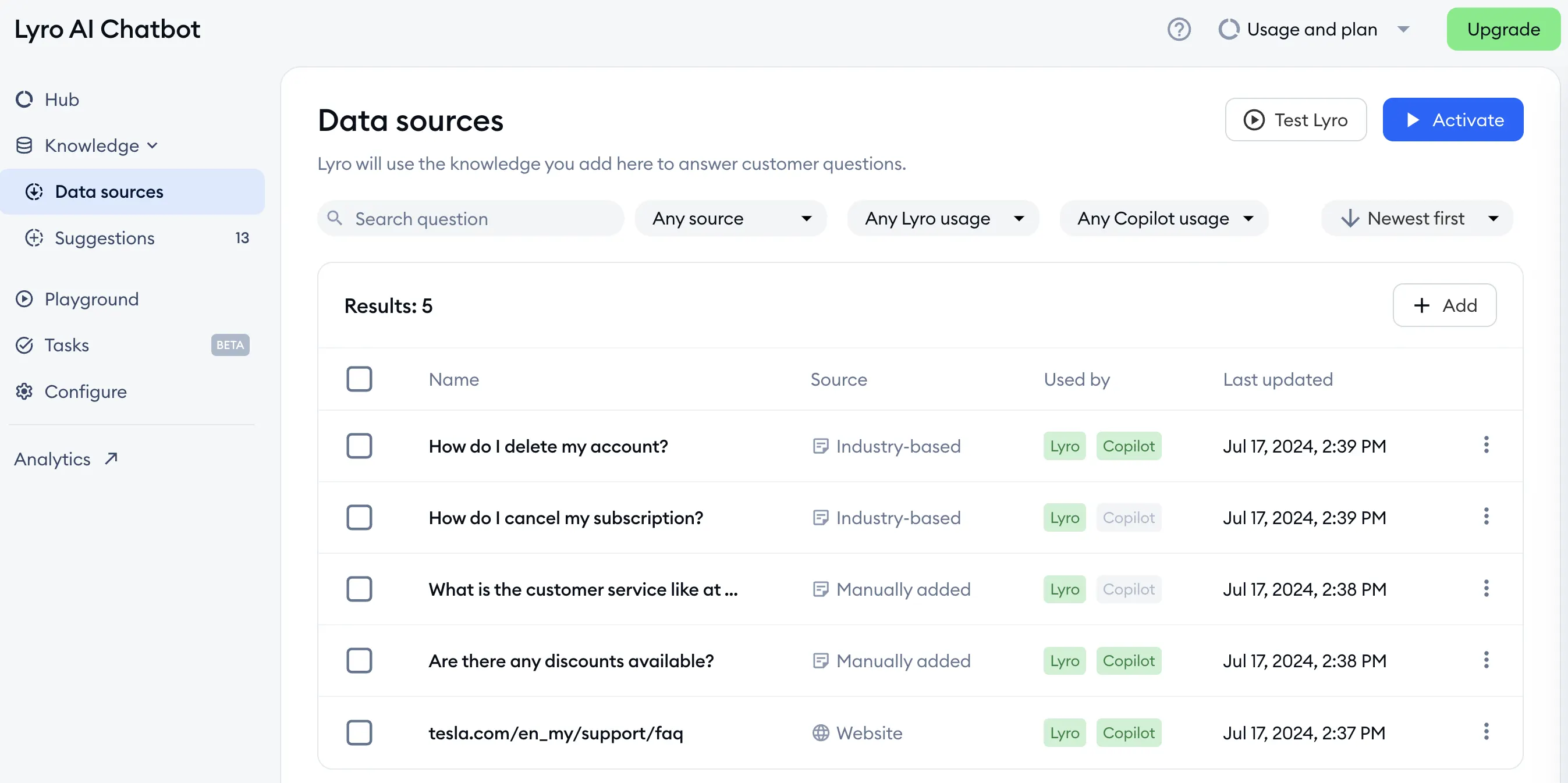
After testing common customer questions, we added a human handoff option for anything Lyro could not handle confidently.
With this setup, routine questions are answered automatically, while the support team only needs to step in for more complex cases.
Possible drawbacks and how to avoid them: An AI chatbot may provide incorrect answers when its knowledge source is incomplete or outdated. Keep its documentation updated, limit it to approved topics, review unanswered questions regularly, and always give visitors an easy way to reach a human agent.
3. Generate and Edit Website Images with AI
AI image tools create visuals from text prompts. Within WordPress, they can be used for featured images, blog illustrations, product concepts, backgrounds, and social media graphics. Some plugins also help write captions, file names, and alternative text.

The main time-saving benefit is removing the download-and-upload process. You can generate an image and place it in the WordPress Media Library without switching between several applications. This is useful for publishers that need simple supporting visuals regularly.
Recommended tools: Instant AI Image Generator connects WordPress to services such as OpenAI and Gemini, and imports generated images into the Media Library. AI Engine can also create images alongside its content and chatbot features.
A Quick Workflow on Image Creation Using AI Engine
We tested image generation with AI Engine so the entire process could stay inside WordPress.
After connecting an image provider, we opened a post and launched AI Copilot. We entered a prompt describing the subject, style, colors, composition, and intended use of the image.
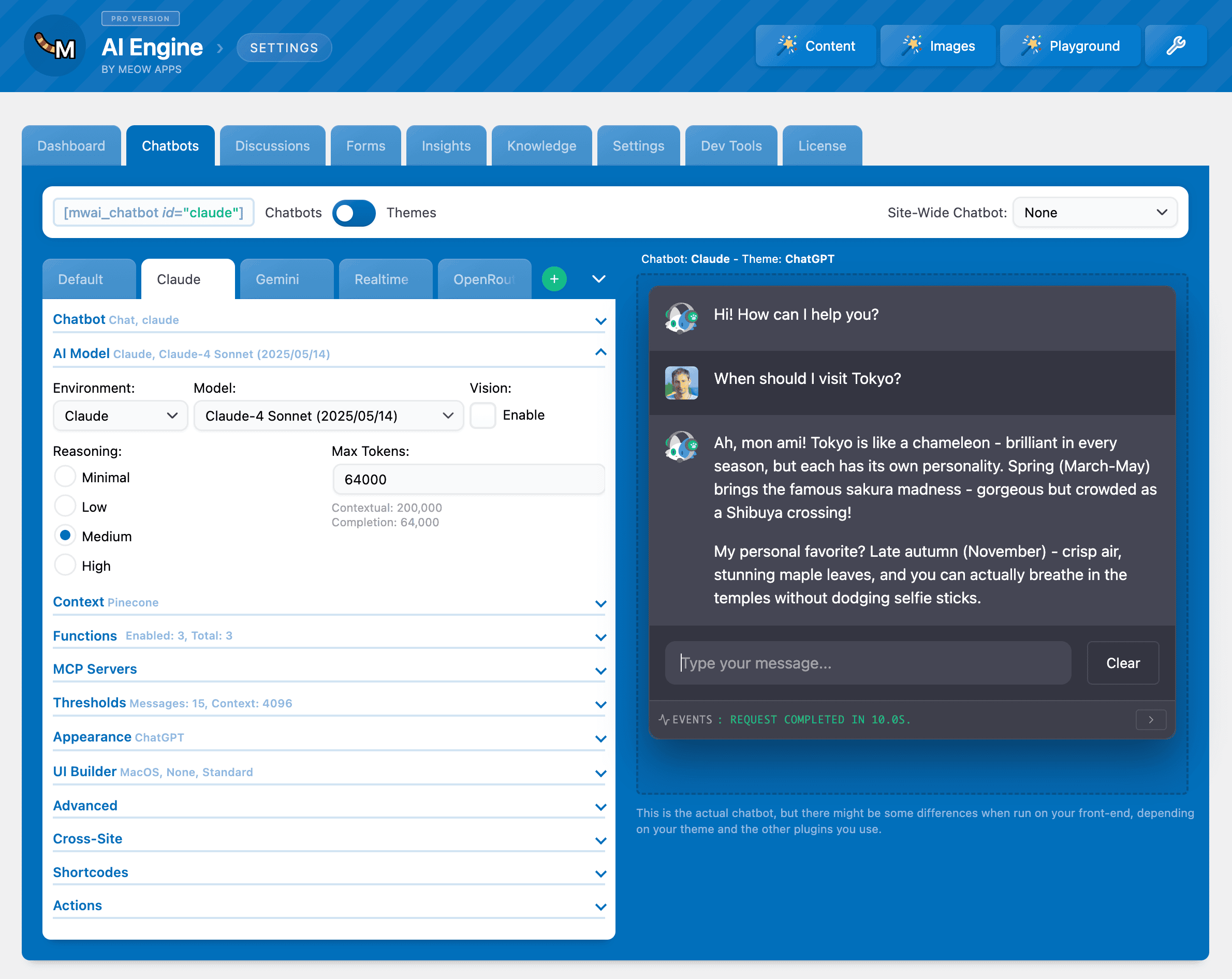
AI Engine generated the visual and added it to the Media Library, so there was no need to download it from another platform and upload it again.
We then checked the image for errors, added suitable alt text, and optimized the file before publishing. This made creating simple blog visuals much faster.
Possible drawbacks and how to avoid them: Generated images may contain distorted objects, unreadable text, inaccurate details, or inconsistent branding. Review every image carefully, avoid using AI for visuals that require factual accuracy, and edit the result before adding it to your website.
4. Write Better WooCommerce Product Descriptions
AI product-copy tools turn product details into titles, descriptions, benefit lists, FAQs, tags, and SEO metadata. They are particularly useful for stores with large catalogs where writing every description manually would take days or weeks.

Instead of starting each product page separately, store owners can create a reusable prompt and generate copy from verified attributes such as materials, dimensions, compatibility, and intended use. Some plugins also support bulk generation, which can speed up catalog creation and optimization.
Recommended tools: AI Product Tools supports bulk WooCommerce descriptions, titles, tags, FAQs, metadata, and alt text. AI Puffer also includes WooCommerce tools for generating product descriptions, titles, and SEO information.
A Quick Workflow on Product Description Creation Using AI Puffer
For product descriptions, we used AI Puffer with information already stored in WooCommerce.
We first selected a product and checked that its attributes, dimensions, materials, and other details were complete. Then, inside AI Puffer, we chose the fields we wanted to generate, including the title, short description, full description, tags, and SEO metadata.
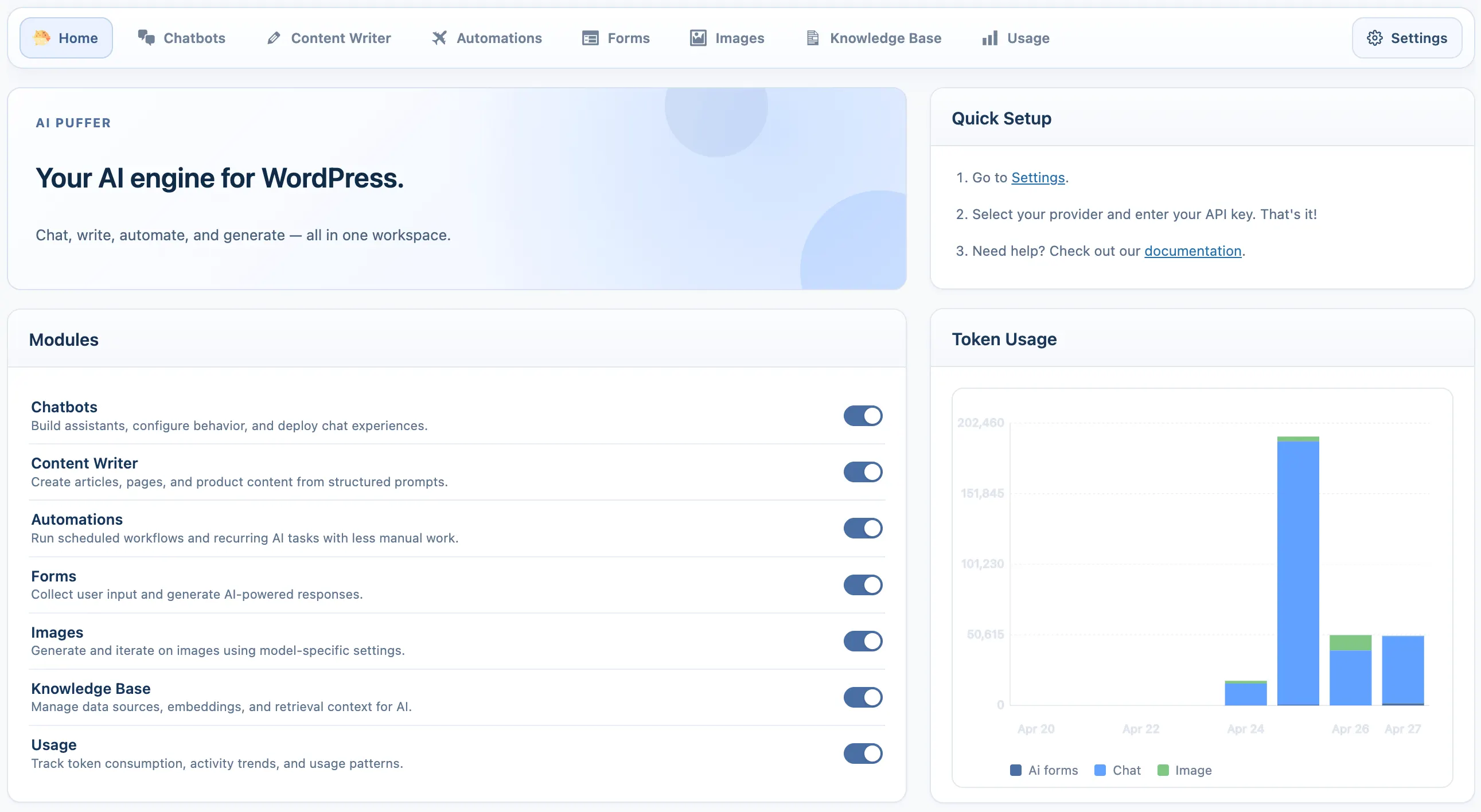
We adjusted the prompt to match the store’s tone and asked the AI to use only the supplied product information. After generating one description, we reviewed the accuracy and made a few edits before applying the same setup to more products.
This is especially helpful when several similar products need consistent copy.
Possible drawbacks and how to avoid them: AI may invent product specifications, exaggerate benefits, or create similar descriptions across multiple products. Provide verified product information, use clear prompt restrictions, and manually check dimensions, materials, compatibility, warranties, prices, and other important details.
5. Analyze Website Traffic and Performance with AI
AI analytics allows website owners to ask questions about their data in everyday language. Instead of searching through several reports, you might ask which pages lost traffic, which sources bring the most valuable visitors, or which products have high views but low sales.

This makes analytics more accessible to people who are unfamiliar with Google Analytics terminology. It can also speed up weekly reporting by summarizing changes, highlighting unusual patterns, and suggesting areas that deserve closer investigation.
Recommended tool: MonsterInsights connects WordPress with Google Analytics and provides reports inside the dashboard. Its WordPress.org changelog states that AI chat is available across its plans, allowing users to ask questions about their analytics.
A Quick Workflow on Website Analytics Using MonsterInsights
MonsterInsights made it easier to understand website data without going through several Google Analytics reports.
Once the site was connected to Google Analytics, we opened the reports inside WordPress and used Charlie Chat to ask direct questions about traffic and performance.
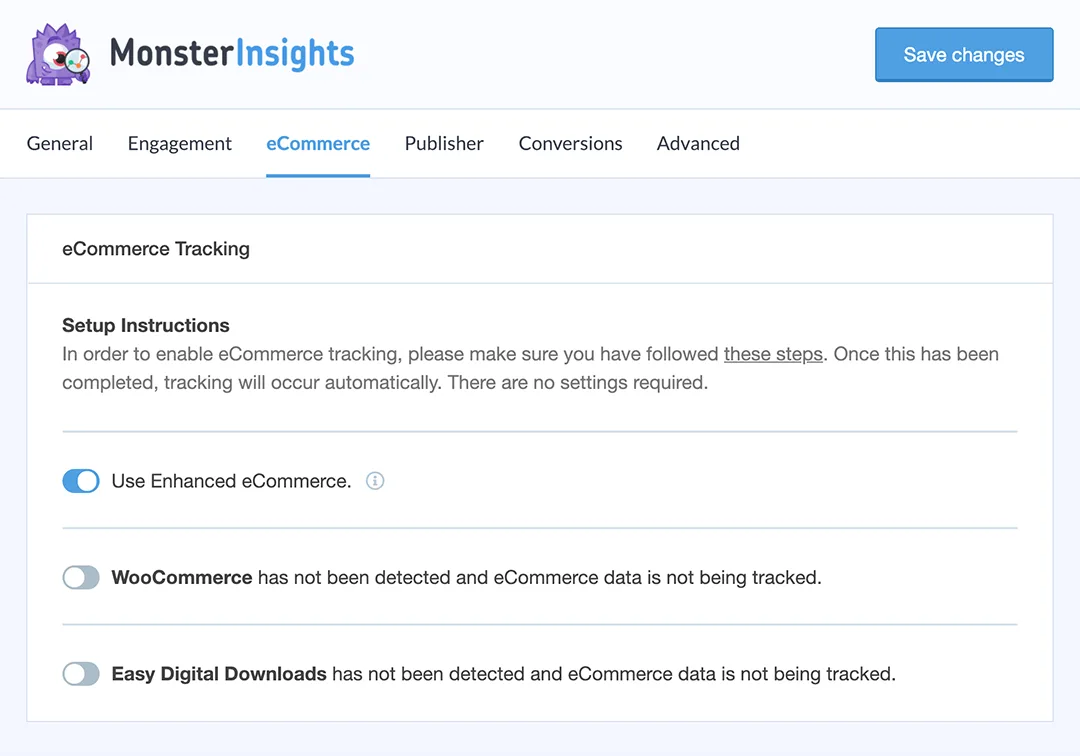
For example, we asked which pages received the most visits, where traffic had dropped, and which sources were bringing the most engaged users. We then opened the related reports to confirm the figures before making any decisions.
This saved time when preparing quick performance summaries and identifying pages that needed attention.
Possible drawbacks and how to avoid them: AI can misinterpret website performance when tracking, events, filters, or date ranges are incorrectly configured. Check your analytics setup first and verify important conclusions against the original reports before making business decisions.
6. Create Forms, Surveys, and Calculators with AI
AI form builders can turn a plain-language description into a ready-to-edit form. Instead of adding every field manually, you can ask for a contact form, event registration form, customer survey, project brief, quote request, or other form that fits your needs.
This saves time by generating the first structure, labels, choices, and field order. You can then refine the form with the normal drag-and-drop editor. AI is also useful for generating dropdown choices, translating labels, and editing existing forms through natural-language instructions.
Recommended tool: WPForms includes an AI form builder and smart form editing. Its repository listing also documents AI-generated choices and the ability to modify forms through a chat-style interface.
A Quick Workflow on Form Creation Using WPForms
We created a form with WPForms by describing what we needed instead of adding every field manually.
We asked the AI builder to create a website project brief with contact details, services, budget, launch date, and file upload. It produced the basic structure, and we then refined the fields using the drag-and-drop builder.
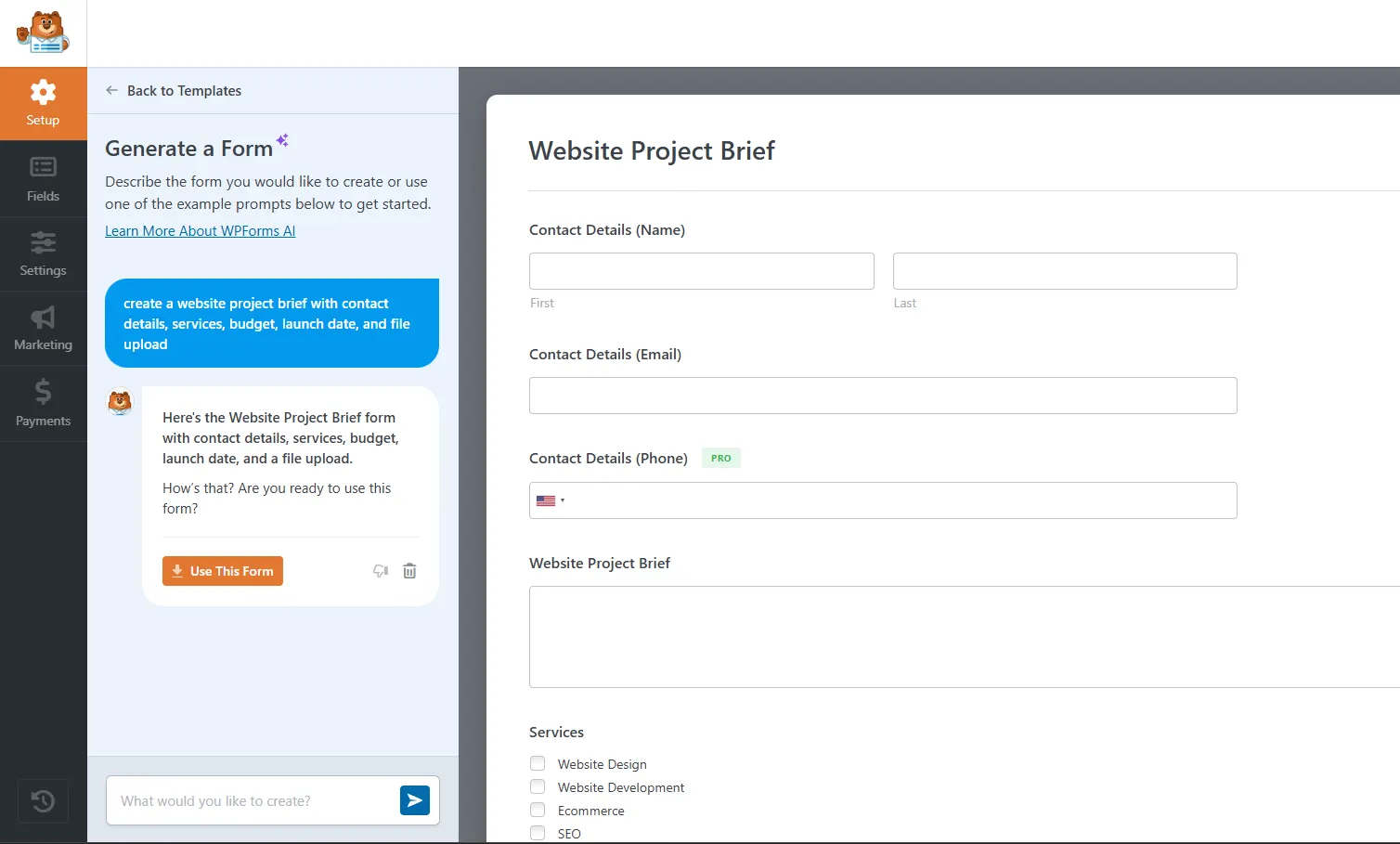
We also asked it to adjust labels and generate suitable choices for dropdown fields. Before publishing, we configured notifications, confirmations, spam protection, and validation.
The AI handled the first setup, while we focused on making sure the form worked properly for real users.
Possible drawbacks and how to avoid them: An AI-generated form may be missing validation, conditional logic, consent fields, notifications, or spam protection. Review every field, test the complete submission process on different devices, confirm email delivery, and check how submitted data is stored.
7. Translate and Localize Website Content
AI translation tools can translate posts, pages, product descriptions, menus, checkout content, and metadata into multiple languages. Unlike manual translation, they can process large amounts of content quickly and update translations as the original site changes.
This can save significant time for international blogs, service businesses, and WooCommerce stores. Instead of translating each page from scratch, a human reviewer can focus on correcting terminology, tone, and culturally sensitive wording.
Recommended tools: Weglot combines automatic translation from services such as DeepL, Google, and Microsoft with editing controls and AI models for brand voice. GTranslate uses Google’s translation service to make WordPress content available in many languages.
A Quick Workflow on Website Translation Using Weglot
With Weglot, the process started by selecting the site’s original language and the languages we wanted to add.
Once the plugin was connected, Weglot automatically detected and translated the website content. Instead of translating every page manually, we reviewed the results through its dashboard and visual editor.
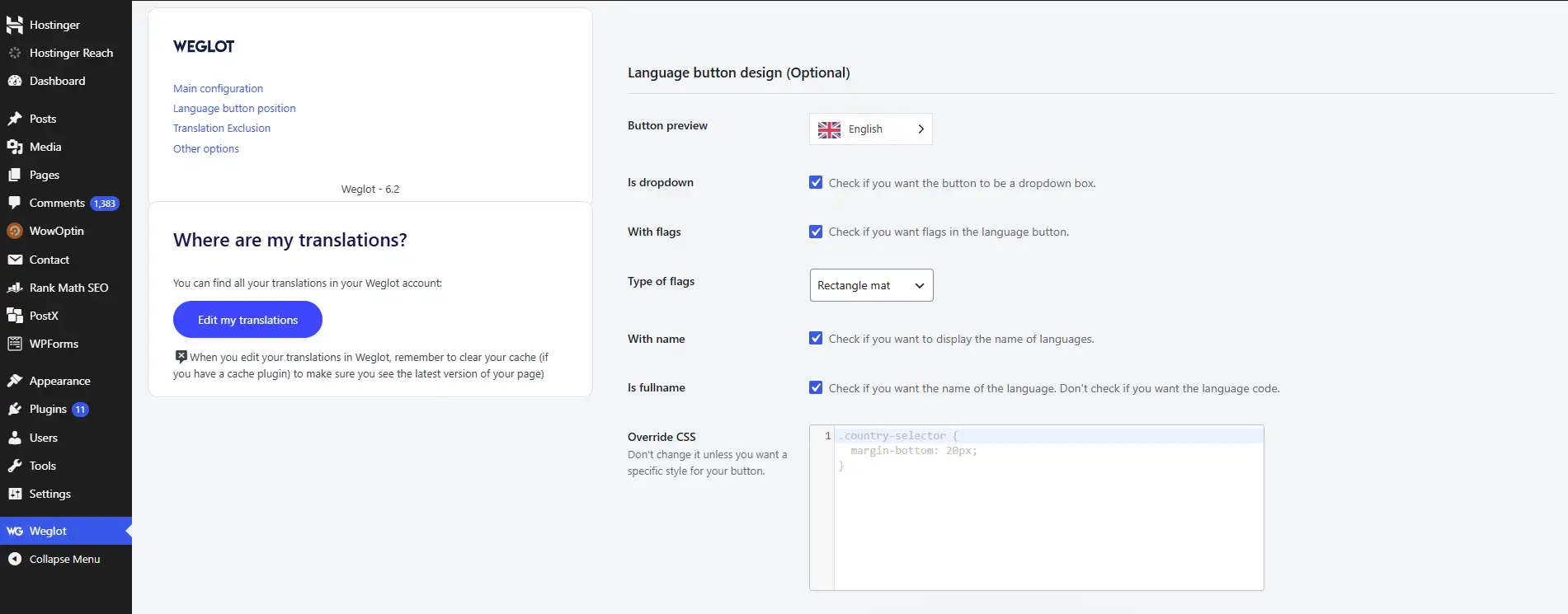
We paid extra attention to product names, calls to action, checkout text, and important service pages. We also adjusted the language switcher and tested the main user journeys in each language.
This reduced the initial translation workload while still leaving room for human review where wording mattered most.
Possible drawbacks and how to avoid them: Automated translations may be technically correct but still sound unnatural or use inappropriate regional terms. Have a fluent speaker review important pages, especially product information, calls to action, checkout content, legal text, and customer policies.
8. Improve WordPress Search with AI
Traditional WordPress search relies heavily on exact keyword matches. AI-powered search can understand meaning, synonyms, misspellings, and natural-language questions. A visitor searching for “comfortable shoes for standing all day,” for example, could find relevant products even when that exact phrase does not appear in the title.
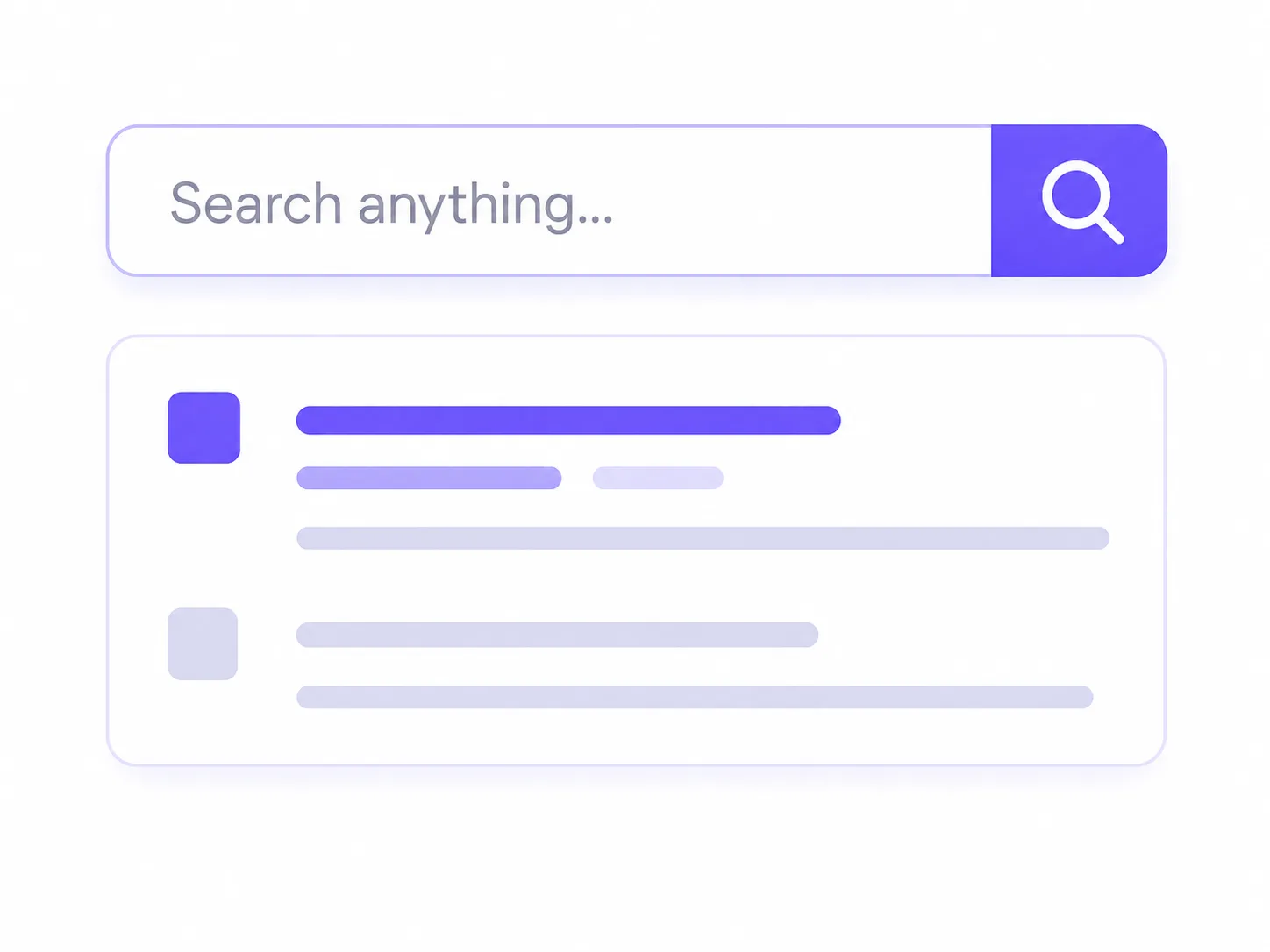
Better search reduces the time visitors spend browsing categories or trying different keywords. It is particularly valuable for large stores, documentation sites, directories, and publishers with extensive archives.
Recommended tools: WPSOLR supports AI, vector, hybrid, and traditional keyword search through external search engines. AI Search for WooCommerce uses semantic search to match queries with product meaning rather than exact wording.
A Quick Workflow on Product Search Using AI Search for WooCommerce
We used AI Search for WooCommerce to improve how visitors find products when they do not know the exact product name.
After installing the plugin, we selected the product fields that should be included in search, such as titles, descriptions, categories, tags, SKUs, and attributes. The plugin then generated embeddings and indexed the catalog.
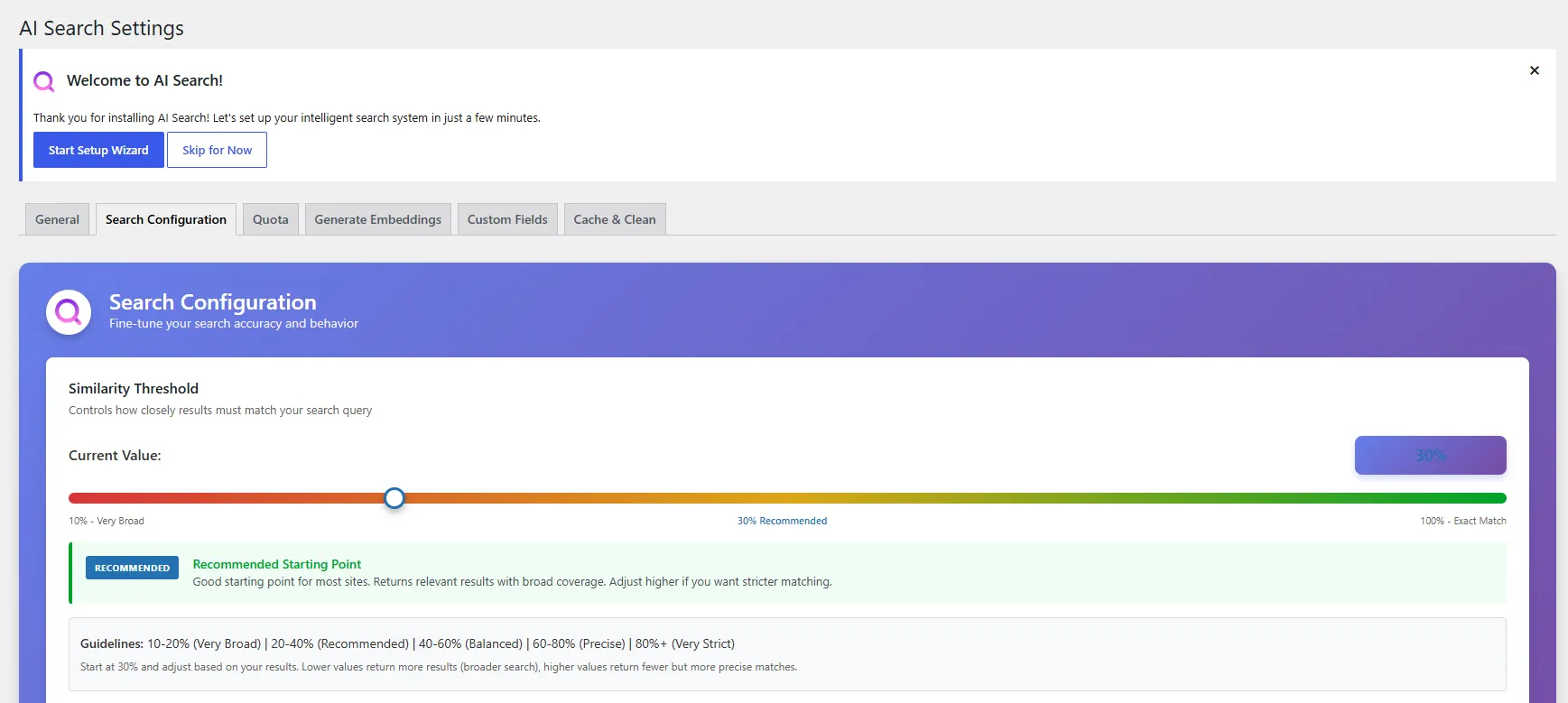
We tested it with natural phrases, misspellings, and broader search queries. When the results were too general, we adjusted the similarity settings and kept keyword fallback enabled.
This helped shoppers reach relevant products with fewer searches and less category browsing.
Possible drawbacks and how to avoid them: Semantic search may require external indexing, AI APIs, or additional configuration, and its results may sometimes feel unpredictable. Test it with real visitor queries, monitor unsuccessful searches, and keep keyword-based search available until the AI results are consistently relevant.
9. Build Website Pages and Layouts with AI
AI website builders create an initial website or page from a short description of the business. They can generate layouts, headings, copy, images, color suggestions, and common pages such as Home, About, Services, and Contact.

This is useful when the blank canvas slows down a project. Agencies can produce a first concept more quickly, while small-business owners can create a workable starting point without designing every section manually.
Recommended tools: Starter Templates connects with ZipWP to generate and import complete WordPress websites, pages, content, and designs. Spectra Blocks works with the native block editor and uses its companion AI tool to generate page drafts from prompts.
A Quick Workflow on Website Building Using Starter Templates
For the website-building test, we started with a short description of the business rather than a blank WordPress page.
Starter Templates asked for the business type, services, audience, and preferred design direction. From that information, it suggested a complete website structure, along with page layouts, images, colors, and starter copy.
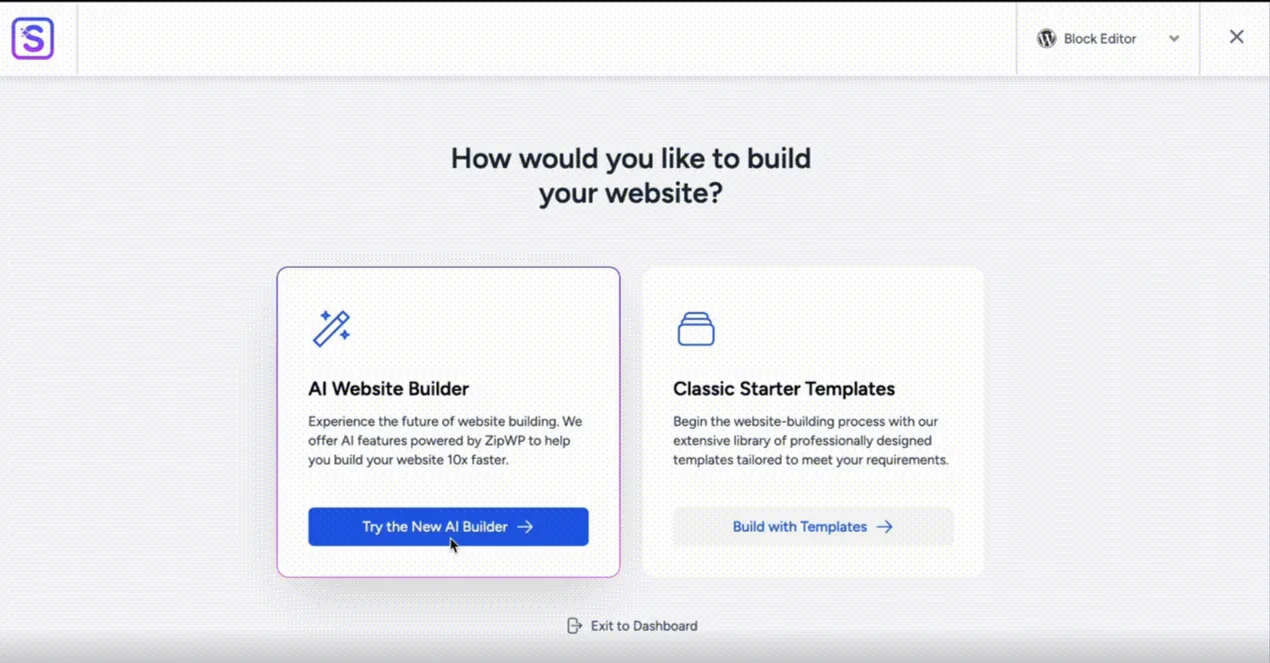
We imported the design, then replaced the generic text and visuals with real business information. The final stage was checking the site on mobile, testing forms, and reviewing navigation and calls to action.
The AI provided a workable first version, which reduced the amount of time spent planning the initial layout.
Possible drawbacks and how to avoid them: AI-generated websites can contain generic copy, repetitive layouts, weak branding, or accessibility and mobile-design issues. Treat the result as a starting point, then customize the content, test different screen sizes, check performance, and review every conversion path before launch.
10. Build WordPress Websites with AI and Full Frontend Control
AI website builders are useful for generating a starting point, but some projects need more control over the frontend structure, reusable components, styles, and dynamic content. This is where CrocoBuilder takes a different approach.
CrocoBuilder is an AI-native WordPress frontend builder that combines AI-assisted website creation with direct control over HTML, CSS, and JavaScript. Instead of treating the AI-generated result as a finished template, you can use AI to create pages and components while keeping the underlying frontend structure editable.

TWe started by describing the type of website and the page structure we wanted to create. CrocoBuilder’s AI assistant generated the initial layout, after which we refined the sections, styles, and reusable components through the visual builder.
The workflow can also include custom components generated from AI prompts. Because these components use standard HTML, CSS, and JavaScript, we could inspect and modify the generated code instead of relying on a closed visual abstraction.
Another useful part of the workflow is the unified design system. We could define reusable CSS classes, variables, typography, colors, spacing, and responsive breakpoints once and reuse them across the project. This makes AI-generated pages easier to keep consistent as the site grows.
CrocoBuilder also supports dynamic WordPress interfaces through features such as Loop Builder, Query Builder, conditional visibility, and reusable components. This makes it more suitable for projects where AI needs to help with more than a static landing page.
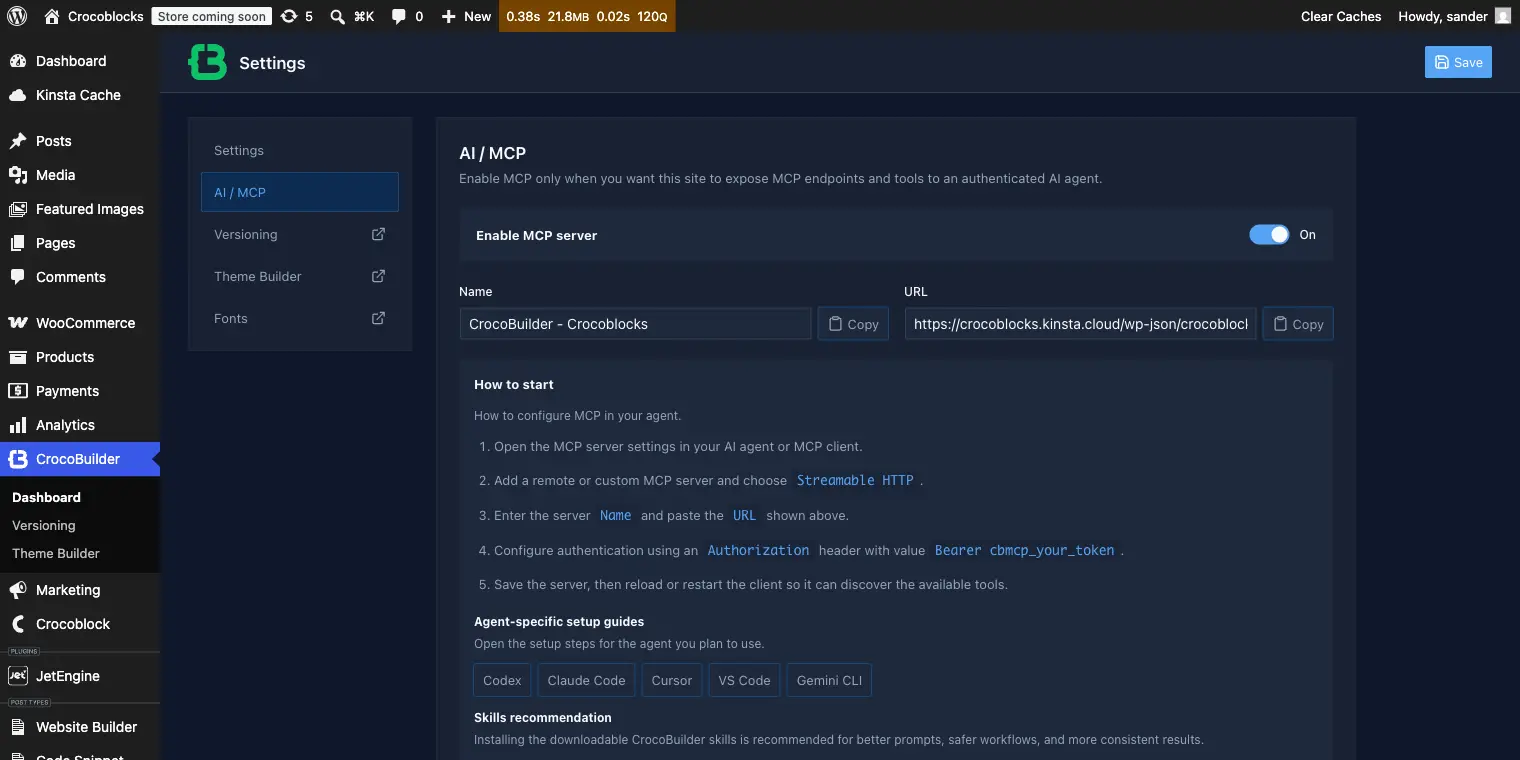
For developers who already use AI coding tools, CrocoBuilder can extend the workflow through MCP connections. This allows compatible AI agents to work with selected site structures, components, styles, queries, and pages while keeping changes subject to review.
The main benefit is that AI handles more of the initial implementation while the developer retains control over the resulting frontend architecture.
Possible drawbacks and how to avoid them: AI-generated layouts and components still require human review. Check the generated code, responsive behavior, accessibility, performance, and dynamic logic before publishing. For larger projects, establish reusable classes, variables, and components early so AI-generated work remains consistent with the site’s design system.
11. Personalize Content and Product Recommendations
AI personalization changes what visitors see based on their behavior, interests, searches, previous purchases, or current session. It can recommend products, related articles, upsells, offers, or category results that are more relevant to each visitor.

This saves time because store owners do not have to create every recommendation rule manually. On larger sites, AI can continuously adjust suggestions as products, content, and visitor behavior change.
Recommended tools: Fast Simon’s Search, Filters & Merchandising plugin provides AI-powered search, merchandising, product recommendations, and personalization for WooCommerce. WPSOLR also supports recommendation features alongside its search tools.
A Quick Workflow on Product Personalization Using Fast Simon
We used WPSOLR to connect WooCommerce with a recommendation engine for related products, upsells, cross-sells, and personalized suggestions.
After indexing the catalog, we connected a service such as Recombee, selected the product and visitor data it could use, and chose where recommendations should appear. We then tested the results to remove irrelevant or repetitive suggestions.
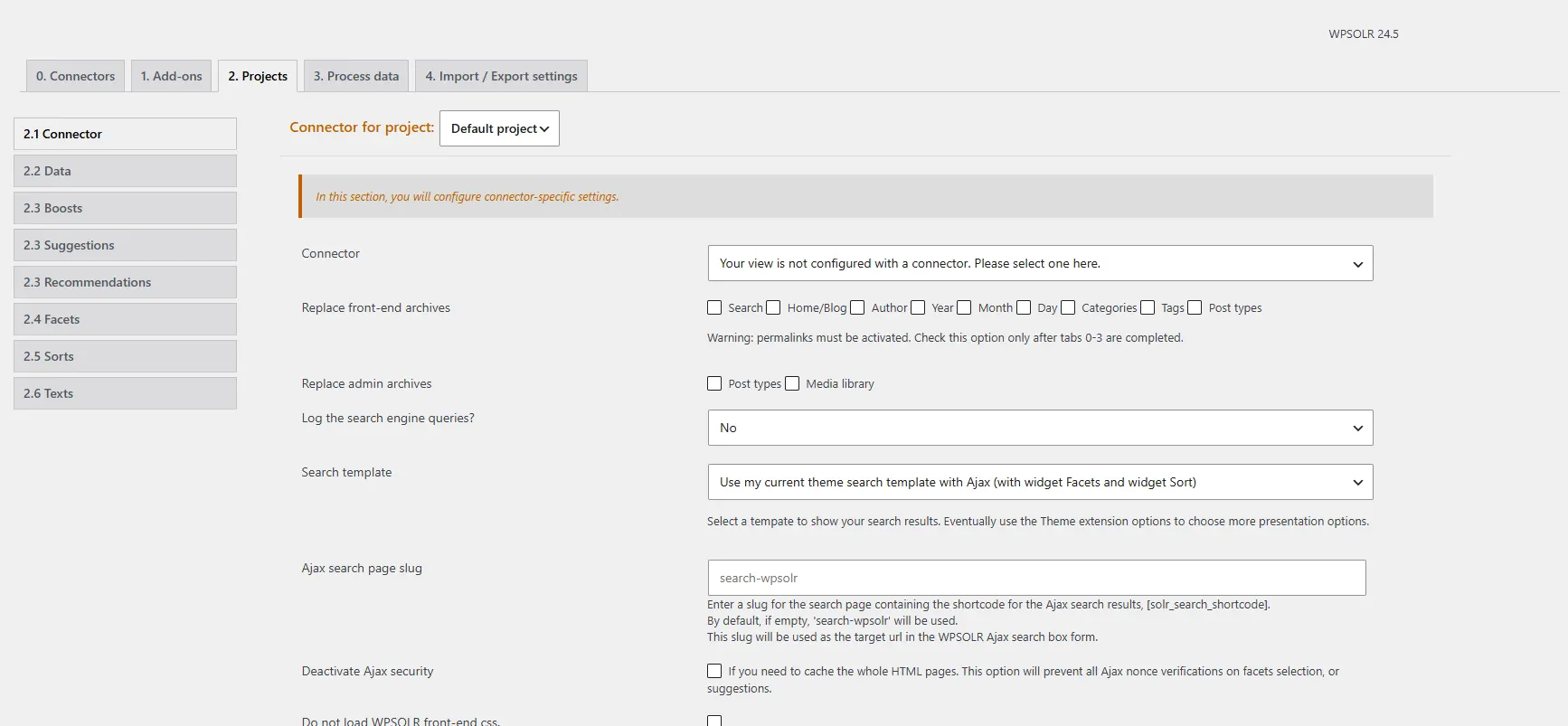
Once configured, WPSOLR updates recommendations as products and customer behavior change, reducing manual work.
Possible drawbacks and how to avoid them: Personalization requires enough visitor and product data to produce useful recommendations, and it may involve sending behavioral data to an external service. Review the provider’s privacy policy, collect appropriate consent, limit the data being shared, and compare personalized recommendations against manually selected options.
12. Automate WordPress Workflows with AI Agents
AI automation combines a trigger, an AI step, and an action. For example, a form submission could be summarized and sent to the correct team, or a newly published post could trigger AI-generated social copy and an email draft.
These workflows save time by removing repeated copying, pasting, formatting, and routing between WordPress and other platforms. More advanced agents can also interact with posts, media, users, comments, or WooCommerce data when given the necessary permissions.
Recommended tools: Uncanny Automator connects WordPress events with providers such as OpenAI, Anthropic, Gemini, and other applications. Bit Flows provides visual workflows with AI-agent steps and external integrations. AI Engine adds automation, function calling, and MCP access for exposing selected WordPress actions to compatible agents.
A Quick Workflow on AI Automation Using Bit Integrations
We tried this using Bit Integrations, and it saves time by moving data as soon as an event happens, so you do not have to copy form entries, customer details, or order information between tools manually.
First, we created a new integration and selected the contact form submission as the trigger. Then, we chose an outgoing webhook or custom API as the action and connected it to the AI service.
Next, we mapped the customer’s name, email, subject, and message. We also added a simple instruction asking the AI to summarize the enquiry, identify its category, and set an urgency level.
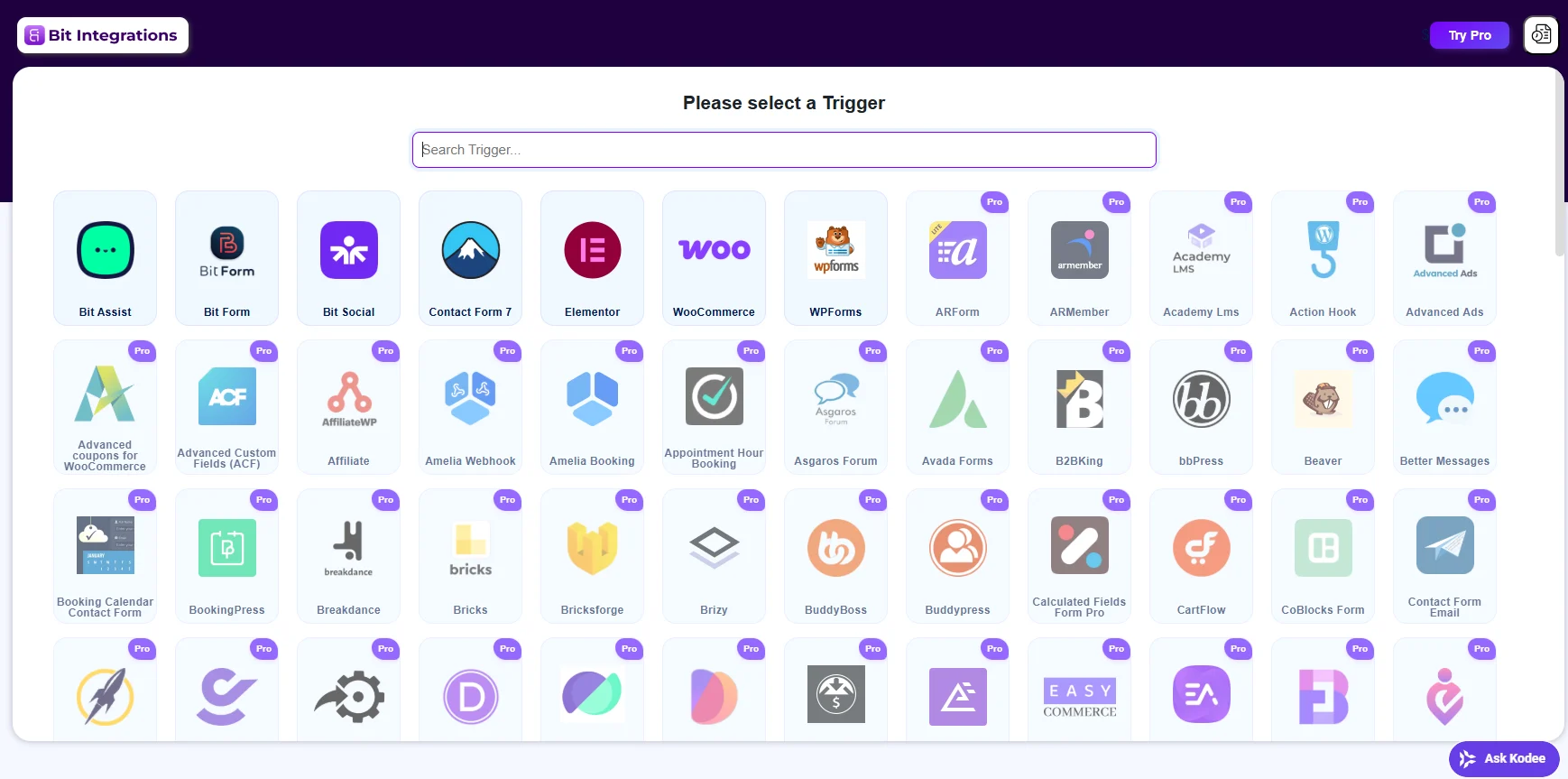
After that, we submitted a test entry and checked whether the data and AI response were processed correctly. Once everything worked as expected, we activated the integration.
Now, every new enquiry can be summarized and organized automatically before it reaches the support team, saving them from reviewing and sorting each message manually.
Possible drawbacks and how to avoid them: A poorly configured automation can repeat mistakes, send incorrect messages, overwrite content, expose private information, or increase API costs. Begin with low-risk tasks, restrict permissions, keep activity logs, set usage limits, and require human approval for publishing or other high-impact actions.
A Practical Rule for Using AI in WordPress
Use AI to speed up the work, not to make the final decision.
- Let it handle the repetitive parts—outlines, formatting, variations, summaries, first drafts, and routine content updates.
- Then use human judgment to verify facts, shape the strategy, add original insight, protect the brand voice, and approve anything that affects customers or gets published.
A useful guideline is to let AI complete the first 70% and reserve the final 30% for human review. This saves time without filling your website with generic content or unreliable automation.
Common Questions About Using AI in WordPress
Here are clear answers to the most common questions about AI tools, plugins, SEO, automation, and content creation in WordPress.
Does WordPress have built-in AI?
WordPress.com has built-in AI features for website creation, content assistance, images, and agent connections.
Self-hosted WordPress sites usually add AI through plugins, APIs, or automation services. The open-source WordPress project is also developing AI-related infrastructure and experimental features, but availability depends on the site and setup.
Can I connect ChatGPT to WordPress?
Yes. You can use a WordPress plugin that connects to an AI API, an automation platform, or an MCP-compatible connection where supported.
The exact setup depends on whether you use WordPress.com or self-hosted WordPress and what actions you want the assistant to perform.
Is AI-generated content bad for WordPress SEO?
Not automatically. Google says appropriate use of AI is not against its guidelines. The risk comes from publishing unoriginal, inaccurate, or scaled content created mainly to manipulate rankings. AI-assisted content should add original value and receive editorial review.
What is the best AI plugin for WordPress?
There is no single best option for every site.
Jetpack AI fits editor-based writing workflows. Yoast and Rank Math focus more heavily on SEO. WPForms AI handles forms. WPML handles translation. Tidio focuses on customer support, while Uncanny Automator connects AI to broader workflows.
Choose according to your use case, data policy, WordPress setup, compatibility requirements, and budget.
Should AI be allowed to publish automatically?
For most content and business workflows, draft-first is safer.
Automatic publishing may be reasonable for tightly controlled, low-risk updates. However, factual content, customer-facing messages, code, product information, prices, and policy changes should normally require human approval.
Can AI completely manage a WordPress website?
AI can manage selected tasks, but giving it unrestricted control is risky.
A better approach is to define the actions it can perform, restrict permissions, require approval for high-impact changes, maintain backups, and keep an activity log. AI should operate within a controlled workflow rather than acting as an unsupervised administrator.
Start Using AI Where It Saves the Most Time
AI can make WordPress work faster, but it is most effective when applied to a clear, repetitive task. Start with one bottleneck, choose a tool that fits your existing workflow, and keep human review in place for accuracy, security, and final decisions.
Used carefully, AI can reduce routine work without sacrificing the quality or reliability of your website.


