


A WordPress website operator from previous years needed to handle multiple time-consuming duties, which included creating metadata for numerous posts and tracking customer requests through multiple browser windows, reducing large hero image files individually, and adjusting Gutenberg layouts until dawn.
The current situation presents a complete transformation from what existed before. Artificial intelligence serves as the fundamental structure that supports modern web management systems since 2026, although the term remains popular among enterprise software providers.
The correct combination of AI tools for WordPress, which includes smart editorial assistants and automated customer service agents, will help you save more than twenty hours each week while delivering enhanced user experience quality.
The WordPress plugin directory shows an overwhelming number of new plugins that display “AI” on their introductory pages.
The software programs that you install on your database system will increase its size while producing content that damages your website’s search engine optimization performance.
We conducted testing on various tools to create this list, which contains proven tools that work effectively in real-world situations.
The following AI tools for WordPress have become essential for running WooCommerce stores with high traffic, managing client portals through agencies, and operating editorial news blogs during this year.
What Makes an AI Tool for WordPress Useful?
Before you add five new plugins, you need to determine the specific problems that AI tools for WordPress should address on your website.
The goal isn’t to hand over the keys to your website and walk away. The best tools function as efficient co-pilots that perform automated tasks to enable users to concentrate on their strategic work and creative activities.
When evaluating any plugin or SaaS integration, look for three main traits:
- Native Gutenberg & Core Compatibility: The tool should work inside your existing workflow—whether that’s the Block Editor, WooCommerce backend, or your external support dashboard—without requiring you to switch between ten different browser tabs.
- Lightweight Architecture: Heavy scripts running on your front-end will kill your Core Web Vitals. The best tools process heavy computations via off-site APIs rather than burdening your WordPress server.
- True Practical Value: Does it solve a real problem (like speeding up support resolution times or optimizing images automatically), or is it just generating robotic paragraphs that need 20 minutes of editing?
With those standards in mind, let’s dive into our top picks for 2026.
Top Picks AI Tools for WordPress in 2026
1. WowRecommend (by WPXPO) — Best for eCommerce Personalization

Static “Related Products” sections that appear on eCommerce stores tend to achieve poor conversion results for their owners.
Showing a generic list of random items at the bottom of a checkout or product page leaves money on the table.
WowRecommend functions as a top AI tool for WordPress because it integrates advanced machine learning technology into WooCommerce platforms through its WooCommerce integration.
The plugin uses live customer behavior data, previous purchases, and current shopping basket items and product groupings to generate suitable recommendations without requiring store managers to build cross-sell rules for each product individually.
| Feature | Capability |
|---|---|
| Recommendation Engine | Uses 32+ filters across product, sales, behavior, and relationship groups. |
| Personalization | Tracks browsing history, cart activity, and previous purchases. |
| Conversion Tools | Includes dedicated Popup Upsells and Checkout Order Bumps. |
| Smart Sorting | Prioritizes products by popularity, conversion, or rating. |
- Best for: WooCommerce store owners looking to increase Average Order Value (AOV).
- Keep in mind: You can use AI Chat to build rules or manually customize every filter for total control.
2. ThriveDesk — Best for AI-Powered Customer Support

Customer support can make or break an online business. Yet, managing live chat, email inquiries, and WooCommerce refund requests inside the standard WordPress admin panel is a recipe for missed messages and slow response times. That’s where modern AI customer service solutions like ThriveDesk come in.
ThriveDesk provides a simple customer service solution that works as a single platform for WordPress and WooCommerce businesses. ThriveDesk delivers fast performance through its simple interface, which integrates directly with your existing systems without causing browser slowdowns or requiring expensive enterprise software licenses.
ThriveDesk stands out as the best WordPress AI tool for 2026 because it provides smart assistant functions that operate within your common messaging system and real-time chat interface.
| Feature | Capability |
|---|---|
| AI Assist | Summarizes long email threads and suggests professional, documentation-based replies. |
| WooCommerce Intel | View order history, shipping details, and issue refunds within the conversation sidebar. |
| Automation | Handles automated subscription cancellation alerts and proactive customer notifications. |
| Performance | Engineered for zero impact on front-end speed and Core Web Vitals optimization. |
- Best for: Store owners needing efficient, integrated ticketing without bloated CRM systems.
- Why it matters: Cuts resolution time through deep WP/Woo context directly in the inbox.
3. NiroHelp – AI-Native WordPress Helpdesk
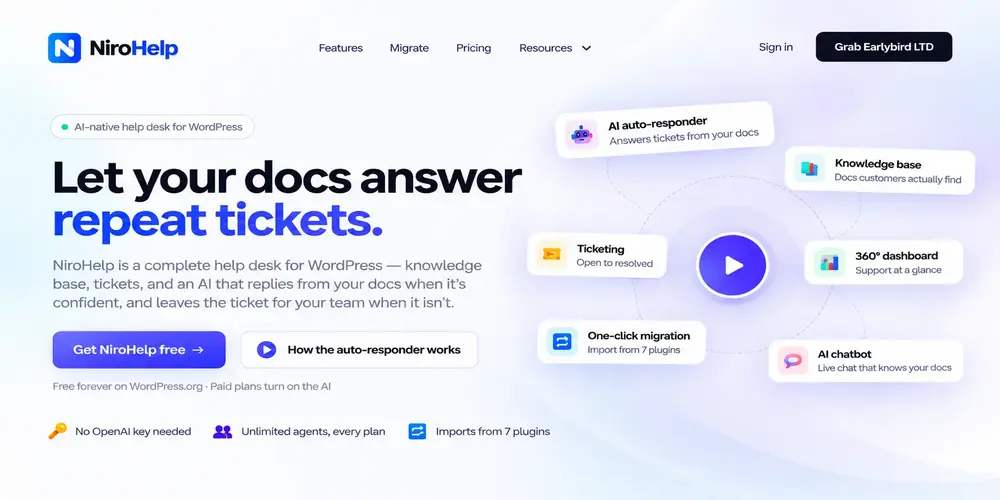
Customer support can become time-consuming when WordPress businesses receive the same questions about product setup, licensing, troubleshooting, and common issues. Answering every ticket manually leaves less time for complex customer problems.
NiroHelp is an AI-native WordPress help desk that brings ticket management, a knowledge base, and AI-powered support together in one place. It helps support teams manage customer requests and automatically answer suitable tickets using their published documentation.
Unlike a general-purpose AI chatbot, NiroHelp can check whether its documentation contains a relevant answer before replying. If the available information does not meet the configured confidence threshold, the ticket stays with the human support team.
| Feature | Capability |
| Knowledge Base | Creates searchable help articles that customers and AI can use to find answers. |
| AI Auto-Responder | Automatically replies to suitable support tickets using published documentation. |
| Ticket Management | Organizes customer requests with assignment, statuses, and custom fields. |
| AI Chatbot | Answers visitors’ questions using the website’s knowledge base. |
| Email Piping | Converts incoming support emails into trackable tickets within the helpdesk. |
| Multiple Site Support | Manages customer support for multiple websites from one helpdesk. |
| Support Dashboard | Tracks ticket activity, overdue requests, customer sentiment, and support performance. |
Best for: WordPress product businesses, WooCommerce stores, and agencies that want to streamline customer support.
Why it matters: Reduces repetitive support work. Saves you cost and time while keeping human agents in control of questions that need further investigation.
4. Rank Math AIR — Best for Search Engine Optimization

Search engines in 2026 give more importance to topical authority, search intent, and entity relationships than they do to basic keyword stuffing.
Rank Math Content AI functions as an interactive search strategist inside the Gutenberg editor, which makes it a top AI tool for WordPress according to its unique feature that goes beyond standard SEO plugins, which only count phrase occurrences on pages.
| Feature | Capability |
|---|---|
| SERP Intelligence | Uses live data to suggest keyword counts and structural headings based on ranking sites. |
| AI Metadata | Generates schema-compliant titles and descriptions with a brand-consistent natural tone. |
| Topical Authority | Identifies content gaps and related semantic topics to build comprehensive site relevance. |
| Optimization Hub | Real-time scoring within Gutenberg for text, media, and link density benchmarks. |
- Best for: SEO-focused publishers and eCommerce stores targeting long-tail organic search.
- Why it matters: Ensures content is data-backed and competitive without requiring external audit tools.
5. 10Web AI WordPress Assistant — Best for Site Building

The creation of a new website demands multiple days to complete the wireframing process and placeholder content development, and responsive design verification.
The 10Web AI Assistant speeds up the prototyping process by providing rapid prototyping capabilities during the prototyping stage.
10Web enables you to begin by sharing your business details, audience information, and design preferences instead of working on an empty workspace.
The tool produces an operational WordPress layout that includes sample images and block structures and mobile-friendly design elements.
| Feature | Capability |
|---|---|
| AI Re-creation | Clones existing URLs into editable Gutenberg or Elementor templates instantly. |
| Content Gen | Fills layouts with industry-relevant copy to replace generic placeholder text. |
| Design Systems | Generates cohesive brand colors and typography across the entire site structure. |
| Mobile Optimization | Ensures generated blocks are natively responsive and speed-optimized for 2026 standards. |
- Best for: Freelancers and agencies building client mockups or migrating sites at scale.
- Why it matters: Automates layout prototyping, saving days of manual design work.
6. ShortPixel with AI Optimization — Best for Performance

High-resolution visuals make websites engaging, but unoptimized media remains the single biggest culprit behind slow page loads and poor Core Web Vitals scores.
ShortPixel operates differently from traditional image compression plugins because it uses machine-learning technology to analyze each image element instead of applying standard compression algorithms to all images.
The system achieves an exact balance between visual clarity and byte reduction through its advanced precision methods.
| Feature | Capability |
|---|---|
| Adaptive Resizing | Intelligently crops thumbnails by detecting primary focal points in the frame. |
| Next-Gen Formats | Dynamic delivery of WebP and AVIF formats via a global content delivery network. |
| Smart Compression | Strips excessive file weight without compromising color accuracy on high-density screens. |
| Bulk Optimization | Processes the entire Media Library in the background without impacting server load. |
- Best for: Performance-critical sites and photography portfolios needing rapid load times.
- Why it matters: Speeds up page loads and improves SEO rankings via intelligent asset compression.
7. CodeWP — Best for Custom Snippet Generation

Website owners who use WordPress eventually reach a point when standard plugin options fail to meet their specific requirements.
You need to hide particular shipping options from users who belong to specific user groups, you want to change the text on your checkout button, and you want to create a webhook which connects with your external CRM system.
Developers need to be hired for this task because it involves using untested forum code which could break the website.
CodeWP solves this problem through its AI code generator, which receives training from the WordPress core codebase and WooCommerce functions and major plugin APIs including ACF and Gravity Forms, and the REST API.
| Feature | Capability |
|---|---|
| Verified Hooks | Generates code following the latest WordPress security standards and filters. |
| WooCommerce Intel | Builds custom checkout fields, badge logic, and cart rules automatically. |
| Code Translation | Explains generated PHP, JS, or CSS line-by-line for educational value. |
| Plugin Awareness | Includes specific training for major plugins like ACF, Rank Math, and Elementor. |
- Best for: Power users and developers who need safe, custom snippets fast.
- Why it matters: Eliminates manual coding overhead while maintaining site security and compatibility.
Summary Comparison of Top AI Tools for WordPress
| Tool | Primary Purpose | Key Benefit |
|---|---|---|
| WowRecommend | Product Recommendation | Increases AOV through behavior-based upselling. |
| ThriveDesk | Customer Support | Cuts resolution time with deep WP/Woo integration. |
| NiroHelp | AI-Native WordPress Helpdesk | Automates support replies, manages tickets and emails, supports multiple websites, tracks customer sentiment, and helps resolve complex issues through human agents. |
| Rank Math AI | SEO Optimization | Optimizes content based on live SERP data. |
| 10Web AI | Site Building | Automates layout prototyping and content migration. |
| ShortPixel AI | Image Optimization | Speeds up site load times via intelligent compression. |
| CodeWP | Snippet Generation | Generates safe, verified PHP/JS hooks without manual coding. |
Best Practices for Implementation
- Audit Current Workflows: Create a process map of your current operations before tool implementation to discover AI application areas which will reduce operational obstacles. The implementation of tools should focus on resolving current operational blockages instead of adding items for their appearance value.
- Staging and Speed Testing: Always deploy new AI integrations in a staging environment first. Use tools like PageSpeed Insights to measure any impact on Core Web Vitals before moving to production.
- Regular Maintenance Review: AI configurations are not static. You should schedule quarterly evaluations to check prompt logic and data sources and tool effectiveness because these reviews will help you adjust your digital plan to meet changing brand targets.
- Human Oversight: Maintain a “Human in the Loop” policy. You need to check all AI-generated content for brand consistency and security threats before you make it available to the public.
Final Thoughts: The Journey to Sustainable Site Growth
WordPress AI automation will take center stage in 2026 to drive the development of upcoming digital trends.
Websites that perform best understand that AI-powered web management requires ongoing optimization instead of being a one-time setup process.
The deployment of intelligent WordPress helpdesk plugin systems helps organizations handle customer inquiries, while automated design assistants help users develop adaptable website designs.
The selection of tools that focus on user experience and performance will help organizations build sustainable website development systems. The selection of tools that focus on user experience and performance will help organizations build sustainable website development systems.
Your digital strategy will reach its highest potential when human creativity combines with AI operational power to produce its strongest results.
Begin with small projects while you perform thorough testing because these intelligent systems will manage operational tasks, which enables you to concentrate on your strategic objectives.


