

Subscriptions allow you to sell products or services on a recurring basis instead of relying on customers to place a new order every time they need something.
You can set a billing schedule, collect recurring payments, process renewal orders and manage ongoing customer subscriptions. However, subscription functionality is not built into WooCommerce. You need a subscription plugin to enable it.
Whether you want to sell monthly subscription boxes, digital products or ongoing services, understanding how the subscription lifecycle works will help you set up the right system for your store.
What Does a Subscription Mean?
A subscription is a selling model in which a business provides products, services or access to resources on a recurring basis under predefined billing terms.
Unlike a one-time purchase, a subscription establishes an ongoing commercial relationship between your store and its customers, creating opportunities to generate recurring revenue.
For example, if you run an online coffee store, instead of relying on customers to return whenever they run out of coffee, you can offer a $25 monthly subscription and deliver a bag of coffee every month.
WooCommerce offers an extension to enable subscription selling. Third-party subscription plugins are also available, including free, freemium and premium solutions.
While their features and technical implementations differ, the fundamental subscription lifecycle is similar.
What Types of Businesses Are Suitable for a Subscription Model?
A subscription model works particularly well for businesses that sell products customers need regularly or provide services that deliver ongoing value.
Here are some common business types and their potential target customers:
| Business type | Subscription examples | Target customers |
|---|---|---|
| Consumable products | Coffee, pet food, skincare, supplements | Customers who regularly replenish products |
| Subscription boxes | Beauty products, snacks, books | Customers who enjoy discovering new products |
| Digital products | Premium content, newsletters, learning materials | Professionals, students and enthusiasts |
| Services | Website maintenance, coaching, cleaning | Individuals and businesses requiring ongoing support |
| Software | Software licenses, online applications | Businesses and individuals requiring continuous software access |
| Memberships | Online communities, exclusive content | Customers seeking ongoing access or exclusive benefits |
If you already run a WooCommerce store, look at your repeat purchase patterns. Products that customers frequently reorder are good candidates for a subscription offering.
Pros and Cons of the Subscription Business Model
While subscriptions can make your revenue more predictable, they also introduce additional operational responsibilities.
| Pros | Cons |
|---|---|
| More predictable recurring revenue | Revenue loss when subscribers cancel |
| Greater potential customer lifetime value | Continuous effort to retain subscribers |
| Less dependence on acquiring new customers for every sale | Failed payments and billing complications |
| Better inventory and demand forecasting | Ongoing fulfillment responsibilities |
| Opportunities to build long-term customer relationships | Discounts and delivery costs can reduce profit margins |
A subscription model may not be suitable for products customers rarely replace or services that solve a one-time problem.
Before introducing subscriptions, consider whether your customers have a recurring need, whether you can consistently deliver value and whether the recurring price can sustain your profit margins.
How Subscriptions Work in WooCommerce?
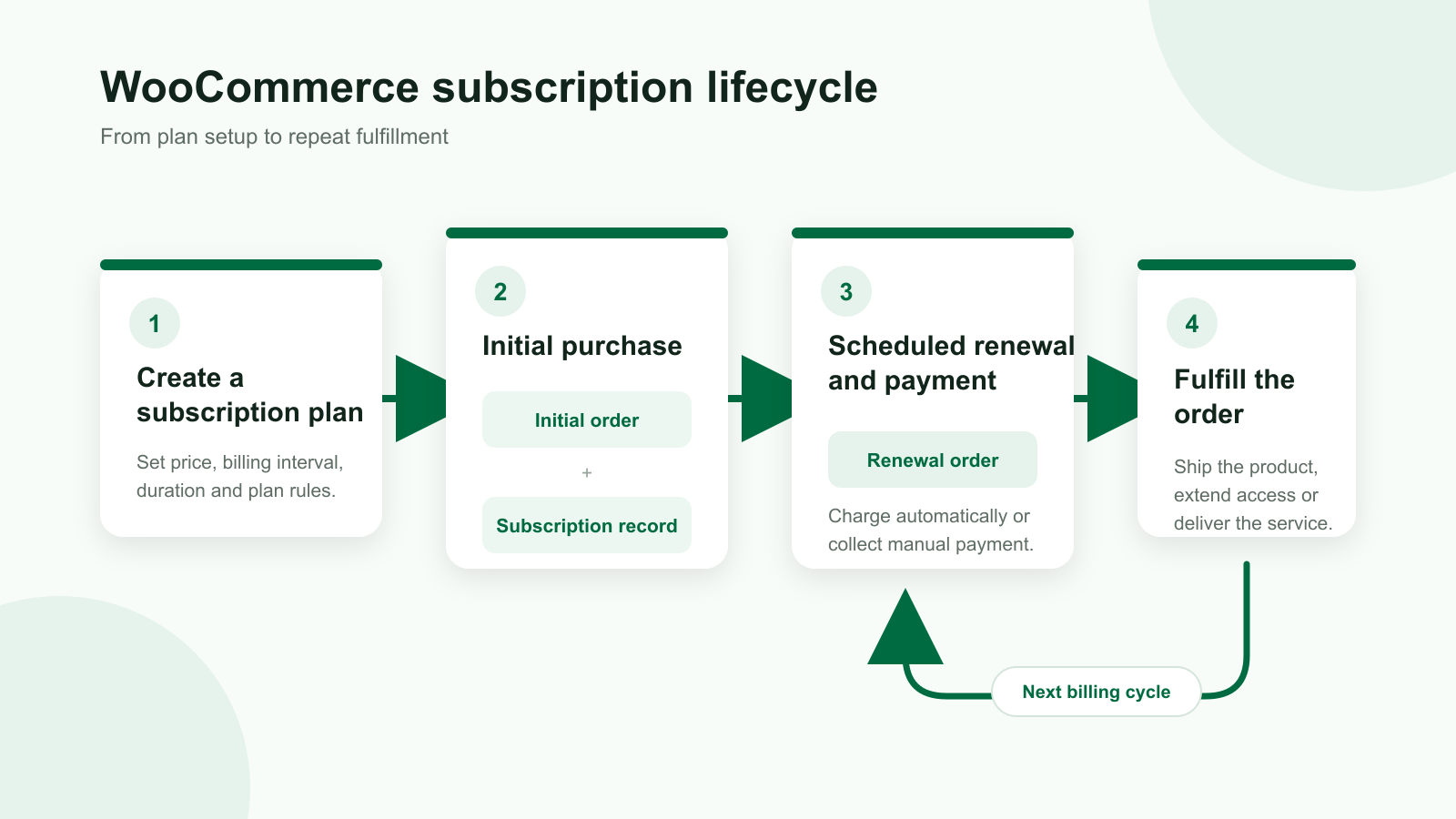
Subscriptions work in WooCommerce by allowing you to create subscription plans, accept initial subscription orders, collect recurring payments and process renewal orders according to a predefined billing schedule.
Let’s use a monthly coffee subscription to understand how each stage works from a store owner’s perspective.
1. The Store Creates a Subscription Plan
A subscription plan defines what you will sell, how much you will charge and how frequently you will collect payments.
Depending on your subscription plugin, you can configure terms such as:
- Subscription price
- Billing frequency (daily, weekly, monthly or yearly)
- Subscription duration or maximum billing cycles
- Free trials and sign-up fees
- Subscription and renewal discounts
For our coffee store, we create a subscription plan that charges $25 per month and continues until the subscription is canceled.
We can also offer a regular one-time purchase alongside the subscription if the plugin supports both purchase options.
2. The Customer Purchases a Subscription
When a customer purchases a subscription from your WooCommerce store, your subscription system typically creates two related records:
- Initial order: Records the first purchase, including its payment and fulfillment information.
- Subscription record: Stores the ongoing agreement, including billing terms, subscription status and future renewal dates.
If you offer automatic recurring payments, payment authorization is also established through a supported payment method during signup.
For our coffee store, a new subscriber on January 10 generates an initial order worth $25. The subscription system records February 10 as the next scheduled billing date.
You can then fulfill the initial order and manage future renewals through the subscription system.
3. The Subscription Renews on Schedule
When the next billing date arrives, your subscription system initiates the renewal process.
For automatic renewals, the payment system attempts to collect the recurring amount using the customer’s authorized payment method. For manual renewals, the merchant relies on the customer completing the outstanding payment.
The subscription plugin also manages the associated renewal order and updates the subscription according to the payment outcome.
In our coffee store, the next $25 payment becomes due on February 10. Once the payment succeeds, we have another paid order to fulfill without requiring the customer to place a new order manually.
4. The Store Fulfills the Renewal Order
Once the renewal payment is received, you can process and fulfill the corresponding order.
For our coffee store, this means preparing and shipping another bag of coffee. For a digital product or ongoing service, fulfillment might involve extending access or delivering the next scheduled service.
You can manage these recurring orders alongside your regular WooCommerce orders.
This cycle continues until the subscription expires, is canceled or is otherwise interrupted.
How Do Recurring Payments Work in WooCommerce?
Recurring payments in WooCommerce allow you to collect payments from subscribers at predefined intervals without requiring them to place a new order for every billing cycle.
Two components work together to make this possible:
- Subscription plugin: Manages subscription pricing, billing schedules, renewal orders and subscription records.
- Payment gateway: Processes the actual financial transactions and communicates payment outcomes to your store.
For example, if you offer a $25 monthly coffee subscription, the subscription system determines when the payment is due, while a compatible payment gateway such as Stripe or PayPal processes the authorized charge.
Automatic vs. Manual Recurring Payments
Depending on your subscription plugin and payment configuration, you can collect recurring payments through automatic or manual renewals.
| Automatic Renewals | Manual Renewals |
|---|---|
| Collect payments automatically according to the billing schedule. | Collect payments when subscribers manually pay their renewal orders. |
| Requires a compatible recurring payment gateway and supported payment method. | Requires a subscription plugin that supports manual renewals. |
| Reduces manual billing and payment collection work. | May require additional payment reminders and follow-ups. |
| Offers greater potential for uninterrupted recurring revenue. | Revenue collection depends on subscribers taking action. |
| Suitable for businesses prioritizing automated subscription operations. | Suitable for businesses that require payment approval or greater billing flexibility. |
Automatic renewals are generally more practical for businesses selling frequently replenished products, digital subscriptions and ongoing services.
Manual renewals may be more appropriate for businesses that require customers to approve each payment, such as certain B2B or service-based businesses.
How Are Automatic Payments Authorized?
When you accept a subscription through a compatible payment gateway, the customer authorizes future recurring charges as part of the subscription signup process.
The gateway typically uses a secure payment token or billing agreement that allows future transactions to be processed without requiring the customer to re-enter their payment details.
When a renewal becomes due, the subscription system and payment gateway coordinate to process the authorized payment. Depending on the payment outcome, the renewal order is marked as paid, pending or failed.
The first payment can also differ from subsequent payments if the subscription includes a free trial, signup fee or introductory discount.
In some cases, additional customer authentication may still be required.
Which Payment Methods Support Recurring Payments in WooCommerce?
Not every payment method that works for a regular WooCommerce purchase supports automatic recurring payments.
Common payment options include:
| Payment option | Application in subscription billing |
|---|---|
| Credit and debit cards | Automatic recurring charges through compatible gateways |
| PayPal | Recurring payments through supported PayPal billing arrangements |
| Direct debit | Recurring bank account payments where supported |
| Bank transfers | Typically used for manually paid renewals |
| Digital wallets | Automatic renewals where the gateway and wallet support them |
Popular payment solutions such as Stripe, PayPal, WooPayments, etc offer recurring payment capabilities through supported integrations.
However, gateway compatibility varies between subscription plugins. Even when a gateway supports subscriptions, not every payment method offered by that gateway necessarily supports automatic renewals.
Before choosing a payment gateway, verify:
- Compatibility with your subscription plugin
- Supported recurring payment methods
- Availability in your business’s target countries
- Transaction fees
- Payment retry and recovery capabilities
- Support for updating subscription payment details
Choosing the right payment gateway is important because payment reliability directly affects your ability to collect recurring revenue.
What Is a Subscription Renewal Order in WooCommerce?
A subscription renewal order is an individual WooCommerce order associated with a subsequent billing cycle of an existing subscription. It records the items, amount due, payment status and relevant fulfillment information for that cycle.
The subscription itself represents the ongoing purchase agreement, while each renewal order represents an individual transaction within that agreement.
Here is how our $25 monthly coffee subscription might appear in the store’s records:
| Date | Order type | Amount | Payment status |
|---|---|---|---|
| January 10 | Initial order | $25 | Paid |
| February 10 | Renewal order | $25 | Paid |
| March 10 | Renewal order | $25 | Paid |
| April 10 | Next scheduled renewal | $25 | Not yet due |
This example assumes successful payments for the first three months, with shipping and taxes excluded.
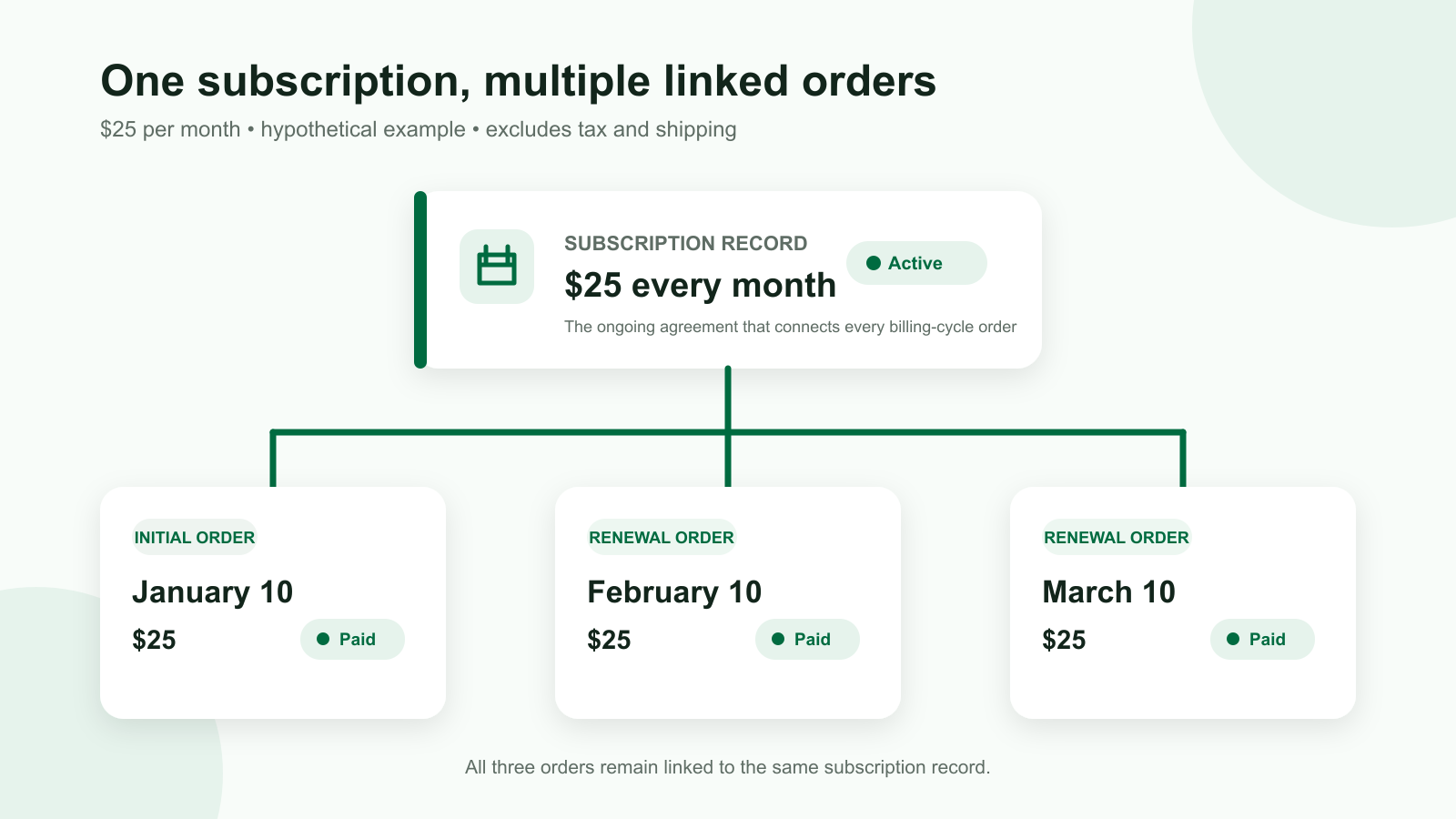
As the store owner, you have generated $75 in sales from one subscription across three completed transactions, without requiring three separate subscription signups.
This distinction helps you manage individual payment order histories, inventory, revenue and fulfillment while maintaining a record of each customer’s ongoing subscription.
What Happens When a Subscription Changes or a Payment Fails?
Not every subscription follows an uninterrupted billing cycle. Customers may change their subscription preferences, payments may fail or a subscription may reach its scheduled end.
Here are some common situations that you may encounter when managing subscriptions:
| Situation | What happens |
|---|---|
| Failed payment | The renewal remains unpaid and the subscription may be placed on hold. |
| Payment recovery | The system may retry the charge or request updated payment information. |
| Paused subscription | Future renewals are temporarily suspended. |
| Skipped renewal | A scheduled billing or delivery cycle is skipped, where supported. |
| Cancellation | Future renewals stop, although existing prepaid benefits may continue until the paid period ends. |
| Expiration | A subscription reaches its predefined end date or billing limit. |
The exact behavior depends on your subscription plugin, payment gateway and store settings.
Some plugins also provide a customer self-service portal within WooCommerce My Account. This allows subscribers to perform supported actions, such as updating payment information, pausing, resuming or canceling their subscriptions, without contacting you directly.
How Can You Recover Failed Subscription Payments?
Failed subscription payments can occur due to insufficient funds, expired cards, bank declines or payment processing issues.
A failed payment does not necessarily mean the customer wants to stop subscribing. Losing a subscriber because of an unsuccessful payment is known as involuntary churn.
You can reduce potential revenue loss through payment recovery strategies such as:
- Automatically retrying eligible failed payments.
- Sending failed payment notification emails with payment instructions.
- Reminding subscribers to update expiring payment methods.
- Allowing subscribers to manually pay failed renewal orders.
- Offering a reasonable grace period before ending subscription benefits, where appropriate.
This process is commonly known as dunning management, which helps businesses recover outstanding subscription payments before losing subscribers.
How Can You Retain and Win Back Subscribers?
While payment recovery addresses involuntary churn, you also need strategies to retain customers who intentionally want to cancel their subscriptions.
Depending on why customers are leaving, you can:
- Offer a temporary subscription pause instead of cancellation.
- Allow customers to skip a renewal if they have enough products.
- Offer more flexible subscription frequencies.
- Provide targeted discounts to customers considering cancellation.
- Send win-back offers to former subscribers.
You can also reward existing subscribers with discounts on selected renewal orders.
For example, our coffee store could offer a 10% discount on every subscription order or a special discount on every third renewal to reward long-term subscribers.
These renewal discounts can encourage continued subscriptions while giving customers an additional reason to purchase through a subscription rather than placing individual orders.
However, make sure your retention offers are financially sustainable. Discounts should help retain profitable subscriptions rather than reduce revenue without improving retention.
What Do You Need to Sell Subscriptions in WooCommerce?
You need three main components to sell and manage subscriptions in WooCommerce:
| Component | What it does |
|---|---|
| WooCommerce | Handles products, checkout orders and store operations. |
| Subscription plugin | Adds subscription plans, billing schedules, renewal processes and subscription management. |
| Payment gateway | Processes initial and recurring payments according to supported payment methods. |
Since WooCommerce does not offer subscription management natively, choosing a suitable subscription plugin is an important part of your setup. For a broader comparison, see the GetWholesaleX guide to the best WooCommerce subscription plugins.
You can use the official premium WooCommerce Subscriptions extension or a third-party alternative like WowSubscription, an all-in-one subscription plugin for WooCommerce.
WowSubscription allows you to create recurring subscription plans, configure flexible billing intervals, offer subscription and renewal discounts, manage renewal orders and provide customers with subscription self-service options.
WowSubscription provides payment integrations for Stripe and PayPal Payments; Pro also supports WooPayments and Square. Each requires a compatible, configured gateway setup. See the Free and Pro feature comparison for details.
When choosing a subscription plugin for your store, consider its supported payment gateways, billing flexibility, renewal management, payment recovery, retention features and customer controls. These capabilities determine how much of your subscription operation you can manage or automate.
Getting Started with Subscriptions in WooCommerce
Before setting up subscriptions, decide which products you want to sell on a recurring basis, how frequently you should collect payments and how you will fulfill recurring orders.
Start with products that have demonstrated repeat purchase demand, choose sustainable subscription pricing and establish a system to manage renewals and retain subscribers.
Once you have defined your subscription model, choose a plugin and payment gateway that support those requirements.
If you want to explore subscription selling in your existing WooCommerce store, you can start with WowSubscription and create subscription plans around your products and business needs.
