

Quick Answer: Which Plugin Is Better?
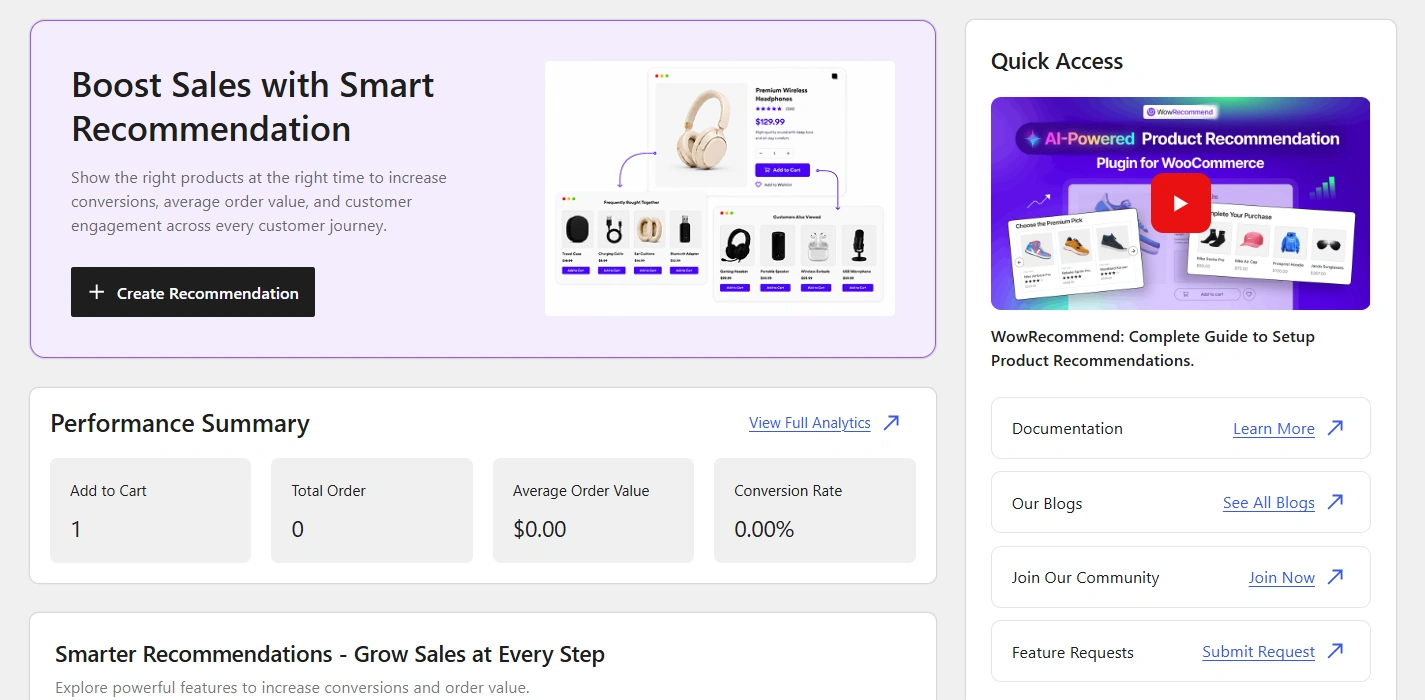
WowRecommend is my pick if you want an all-in-one product recommendation plugin with AI-assisted setup. It offers a live-preview builder, customer behavior filters, popup upsells, and checkout order bumps. You can also start with its free version.
WooCommerce Product Recommendations is a good fit if you prefer an official WooCommerce extension. It supports detailed product filters, multiple weighted ranking signals, automated Frequently Bought Together suggestions, and enhanced display locations.
WowRecommend is more budget-friendly, with lower annual pricing and lifetime purchase options. WooCommerce Product Recommendations offers a popular recommendation engine with annual subscription pricing.
WowRecommend vs. WooCommerce Product Recommendations at a Glance
Here’s a quick comparison before we get into the details.
| Factor | WowRecommend | WooCommerce Product Recommendations |
|---|---|---|
| Rule Builder | Live preview, templates, Guided Steps, AI setup | Engines with filters, amplifiers, and visibility conditions |
| Filters | 32+ across four groups | 10 shared filters plus engine-specific filters |
| Sorting | Seven priority-based methods | Seven weighted amplifiers |
| Behavior Targeting | Nine filters, including five Pro options | Browsing signals, cart, order, date, and location conditions |
| Frequently Bought Together | Bought Together filter and sorting in Pro | Automated order-data engine and purchase-related amplifiers |
| Placements | 16 | 20 |
| Popup Upsells | Available in Pro | No dedicated popup upsell feature listed |
| Checkout Order Bumps | Available in Pro | No dedicated order bump feature listed |
| Analytics | Orders, revenue, conversion rate, AOV | Gross/net revenue and conversions |
| AI Rule Creation | Available | Not listed |
| Free Version | Yes | No |
| Starting Annual Price | $41 for one site; $75 for unlimited sites | $99 per year |
| Lifetime Pricing | Offers starting at $150 | Not available |
What to Look for in a Product Recommendation Plugin
Before comparing individual features, think about what you want recommendations to do.
Showing similar products on a product page is different from offering a small add-on at checkout.
For example, a clothing store may want to show similar jackets on product pages and matching scarves in the cart. An electronics store may use purchase history to recommend chargers or other accessories.
Here are the things I would prioritize:
- Easy rule creation: You should be able to build recommendation rules without manually connecting every product.
- Relevant product filters: Categories, attributes, purchase history, and customer activity help you show useful suggestions.
- Flexible placements: Recommendations should appear where customers are most likely to find them helpful.
- Different offer formats: Popup upsells and checkout order bumps can provide additional selling opportunities.
- Analytics: You should know which recommendations generate orders and revenue.
- Pricing and compatibility: Consider renewal costs, theme support, and available features before purchasing.
Now, let us see how both plugins compare.
WowRecommend vs. WooCommerce Product Recommendations: Detailed Comparison
1. Rule Creation and Setup
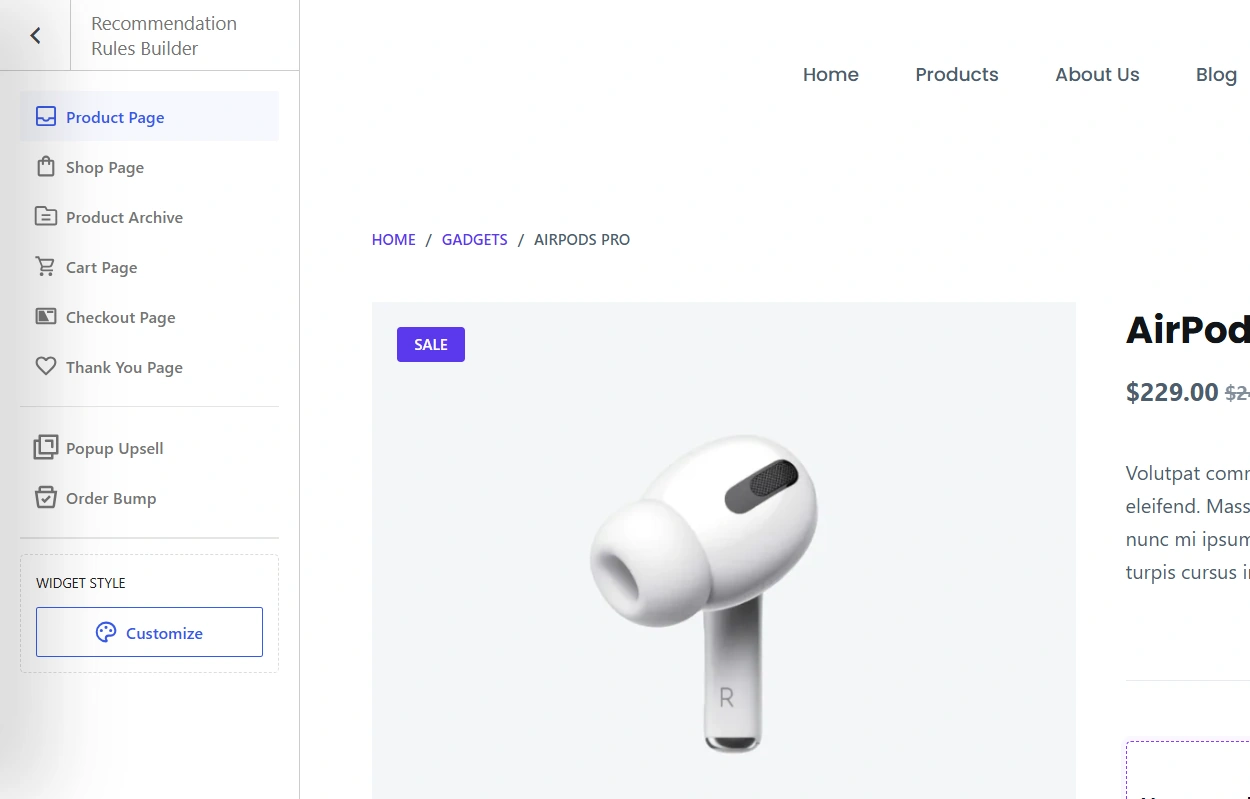
WowRecommend lets you create product recommendations while previewing how they will appear on your storefront.
You can select the target page, choose a placement, configure product filters, and adjust sorting options. The live preview helps you see which products qualify for your recommendation rules.
There are four ways to get started:
- Templates: Use ready-made setups for upsells, cross-sells, best sellers, new arrivals, and other common goals.
- Guided Steps: Follow a structured setup process to build recommendations.
- AI Chat: Describe the recommendation you want in plain English.
- Manual Setup: Create recommendation rules and configure everything yourself.
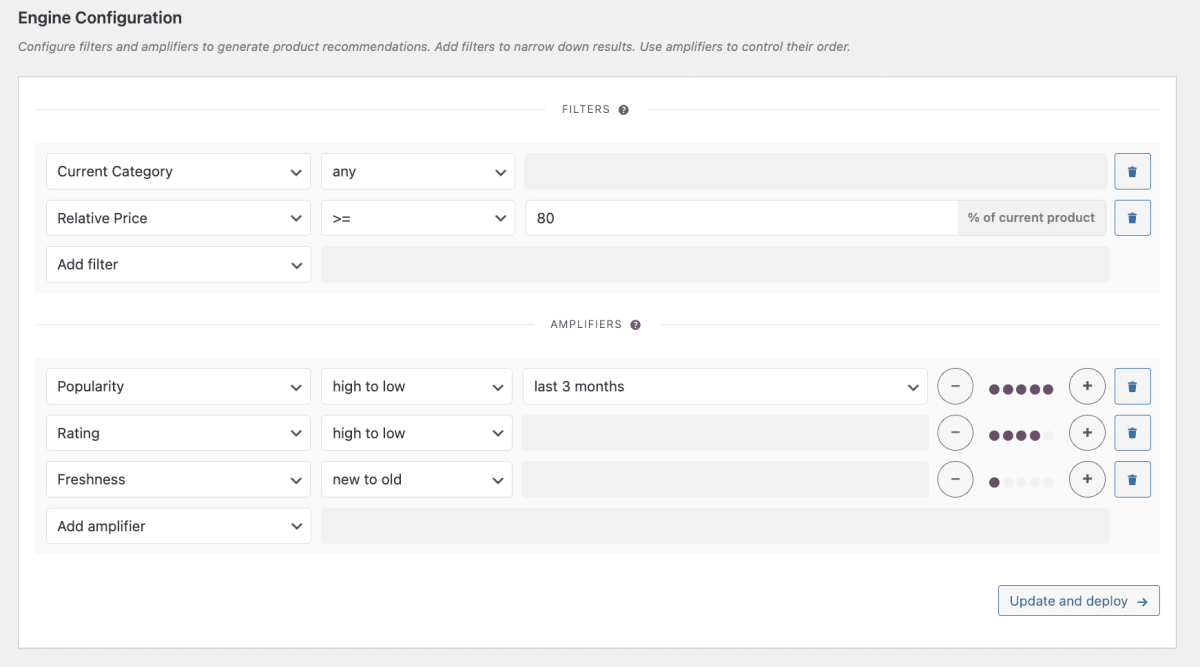
WooCommerce Product Recommendations, on the other hand, uses recommendation engines built around three elements:
- Filters: Select which products are eligible for recommendations.
- Amplifiers: Prioritize products based on different ranking signals.
- Visibility Conditions: Control when and where recommendations appear.
For example, you can create a recommendation engine that displays popular products from the same category while excluding specific products.
My pick: WowRecommend for its visual setup process. Its live preview and different setup options make recommendation creation more approachable. Woo’s engine builder is also useful if you prefer configuring recommendation logic directly.
2. Filters and Sorting Options
A good recommendation plugin should give you control over what customers see.
After all, showing technically related products is not enough. You want recommendations that make sense for the customer.
WowRecommend provides 32+ filters across four groups:
- Product
- Sales & Performance
- Customer Behavior
- Product Relationships
Product filters cover categories, tags, attributes, brands, price, stock status, and specific products.
Pro adds advanced options such as Relative Price, Newest Products, best sellers, high-revenue products, and high-conversion products.
For sorting, WowRecommend offers seven methods:
Popularity, Conversion, Freshness, Price, Rating, Random, and Bought Together.
You can combine multiple sorting methods and arrange them by priority. For example, popularity can be the primary sorting factor, while rating helps determine the order when products have equal popularity.
WooCommerce Product Recommendations also offers extensive filtering options.
Its ten shared filters include Attribute, Category, Created, Featured, On Sale, Price, Product, Recently Viewed, Stock Status, and Tag.
Depending on the recommendation engine, you also get filters such as Current Category, Current Tag, Relative Price, and Product Bundle.
Woo provides seven amplifiers:
- Freshness
- Price
- Rating
- Popularity
- Conversion Rate
- Bought Together
- Others Also Bought
These amplifiers support weighted ranking.
For example, you can give product ratings more importance than popularity, allowing both signals to influence which products appear first.
My take: Both plugins provide useful filtering and sorting controls. WowRecommend offers a wider variety of customer behavior and performance-based filters, while Woo provides flexible weighted ranking.
The choice depends on whether you prefer priority-based sorting or combining several ranking signals with different weights.
3. Personalization With Customer Behavior
Picture a customer browsing several candles, viewing one particular candle repeatedly, and then removing it from their cart.
That activity tells you something about their interests.
WowRecommend includes nine customer behavior filters.
Four are available in the free version:
- Products Viewed: Recommend products based on browsing activity.
- Recently Viewed: Show products customers looked at recently.
- Frequently Viewed: Target products viewed repeatedly.
- Previously Purchased: Use customers’ purchase history.
Pro adds Added to Cart, Removed from Cart, and Customer Interest filters for categories, tags, and attributes.
You can also combine these signals with regular product filters to make recommendations more relevant.
WooCommerce Product Recommendations supports recently viewed products and categories. It also provides visibility conditions based on shopping cart contents, previous orders, browsing activity, dates, and location.
For example, you can configure recommendations that appear only when certain products are in the cart.
My pick: WowRecommend for its dedicated customer behavior filters. However, Woo’s date and location-based visibility conditions can be particularly useful for targeted promotions.
4. Frequently Bought Together Recommendations
Frequently Bought Together recommendations help customers discover products that are commonly purchased together.
For example, someone buying a camera may also need a memory card or camera bag.
WooCommerce Product Recommendations uses order data to identify purchasing relationships.
Its Bought Together amplifier prioritizes products purchased in the same order. The Others Also Bought amplifier considers products purchased by the same customer across different orders.
This gives you two ways to identify related purchasing patterns.
WowRecommend Pro provides a Bought Together filter and a Bought Together sorting method.
These help identify and rank products based on purchasing relationships. It also includes upsell and cross-sell relationship filters.
My advice: Compare the recommendations using your own product catalog. Both plugins provide purchasing-data-based recommendations, but the results can depend on your store’s order history and product relationships.
5. Placements, Popup Upsells, and Order Bumps
Where you display recommendations matters just as much as which products you recommend.
A related product on a product page can help customers compare options. Meanwhile, a complementary item at checkout might encourage them to complete a larger purchase.
WooCommerce Product Recommendations supports more than 20 display locations.
These include shop pages, product pages, category and tag archives, cart pages, checkout, thank-you pages, and order-pay pages.
That gives you plenty of options for displaying recommendation sections throughout the buying journey.
WowRecommend offers 16 placements across product, shop, archive, cart, checkout, and thank-you pages.
It also includes two additional offer formats in Pro:
- Popup Upsells: Display targeted product offers after customer actions or a specified delay.
- Checkout Order Bumps: Recommend complementary products directly during checkout.
For example, you can display a matching accessory when someone adds a product to their cart. Or you can offer a related item before they complete checkout.
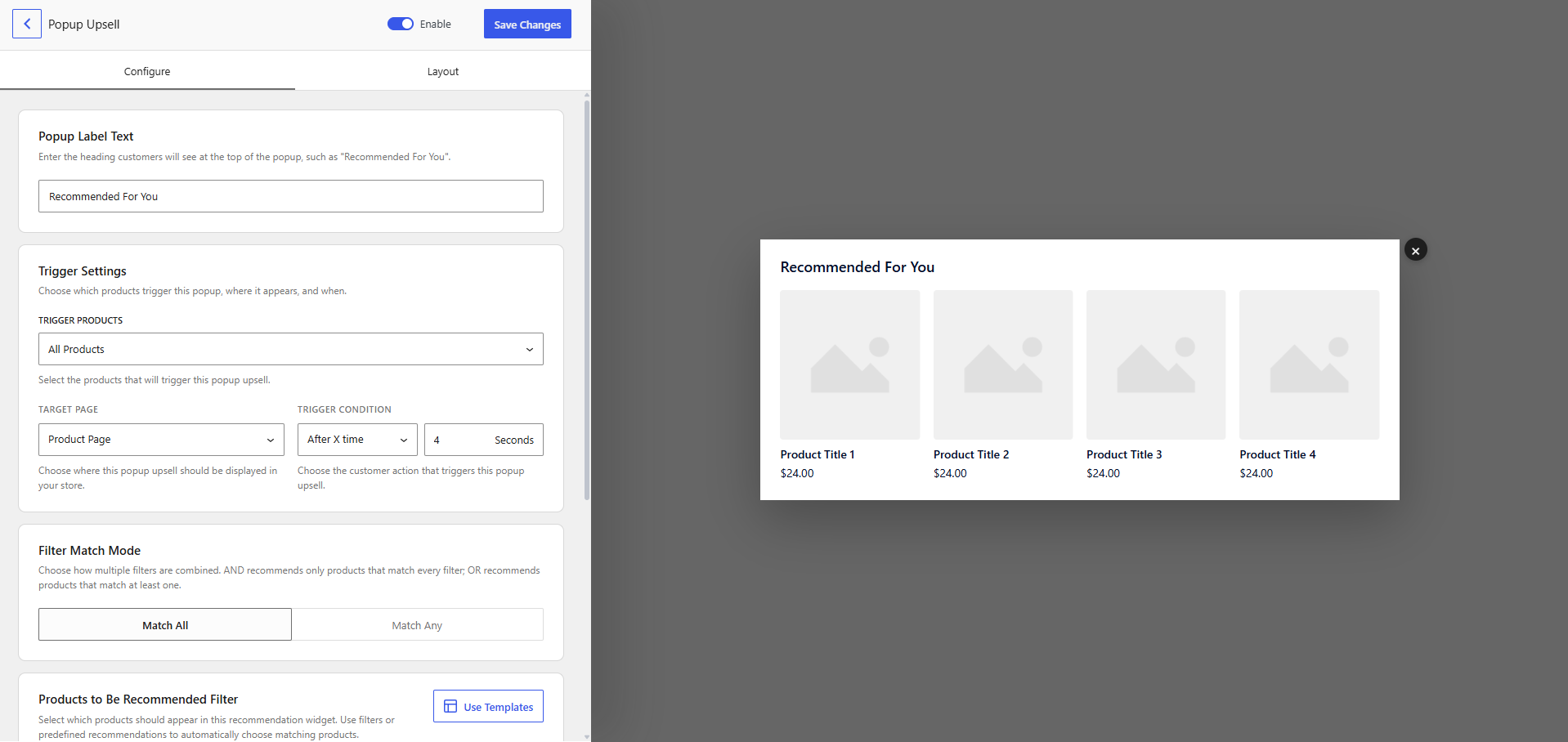
Woo supports recommendation sections at checkout, but it does not list dedicated popup upsell or order bump formats.
My pick: WowRecommend if you want more upsell solutions in one plugin. Woo is a good alternative if you mainly need regular recommendation sections across more storefront locations.
6. Analytics and Reporting
Once your recommendations are live, you need to know whether customers are actually purchasing the suggested products.
WooCommerce Product Recommendations provides reporting for gross revenue, net revenue, and conversions.
You can filter reports by date, converted product, and recommendation location.
WowRecommend tracks orders and completed-order revenue attributed to recommendation rules and placements.
Its analytics also include conversion rate and average order value (AOV), with reporting for popup upsells and checkout order bumps.
For example, you can review whether a checkout offer is contributing to larger orders or whether a product-page recommendation is generating purchases.
My take: Both plugins cover the essential reporting needs. WowRecommend is useful when tracking different types of upsell offers, while Woo provides gross and net revenue reporting.
7. AI Rule Creation
Sometimes, you know exactly what products you want to recommend but do not want to configure every condition manually.
This is where WowRecommend’s AI-assisted rule creation can help.
WowRecommend includes an AI chat builder where you can describe your recommendation in plain English.
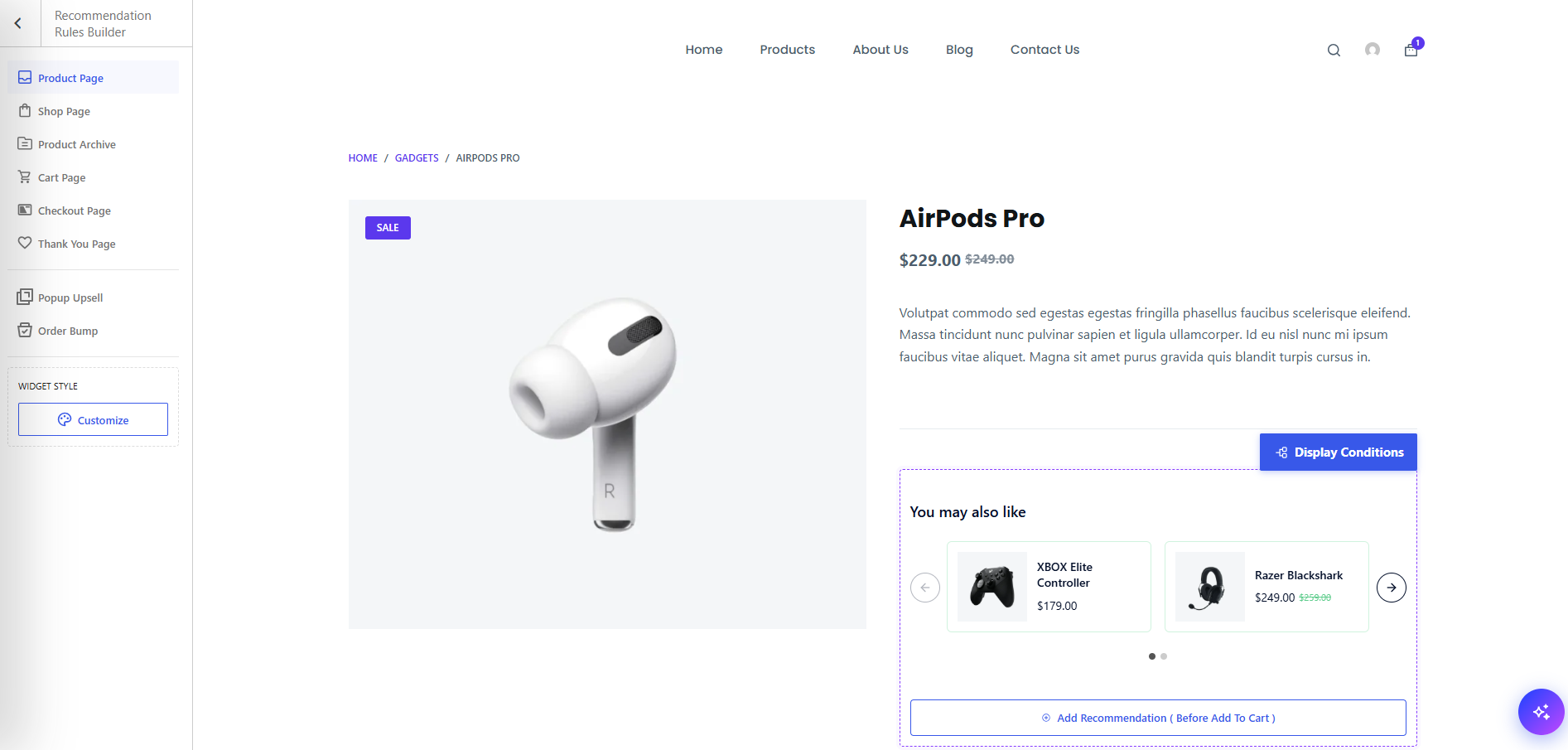
For example:
“Recommend best-selling products on the product page and exclude out-of-stock items.”
The AI can help create the corresponding recommendation rule, which you can refine afterward.
This feature uses the WordPress 7.0+ AI client and requires a connected AI provider.
The configured provider receives your prompt and relevant setup context, which may include rule settings and product taxonomy information. AI helps create the recommendation rules.
You can also skip AI entirely and use templates, Guided Steps, or manual setup. That works perfectly to create optimized recommendations.
WooCommerce Product Recommendations does not offer an equivalent AI chat builder. Its recommendation engines are configured through the regular engine editor.
My pick: WowRecommend if you want AI-assisted recommendation creation. It is particularly useful for turning a recommendation idea into a configured rule without going through every setting yourself.
8. Pricing and Long-Term Cost
Pricing is another important factor, especially if you plan to use the plugin across multiple WooCommerce stores.
WowRecommend has a free version and offers both yearly and lifetime Pro plans.
At the time of writing, the official WowRecommend pricing page lists the following offers:
| WowRecommend Plan | Offer Price | Regular Price |
|---|---|---|
| One Site – Yearly | $41 for the first year | $69/year |
| Unlimited Sites – Yearly | $75 for the first year | $149/year |
| Lifetime Offer | $150 one-time | $299 |
| Higher-Tier Lifetime Offer | $180 one-time | $599 |
Annual subscriptions renew at the regular price. WowRecommend also provides a 14-day money-back guarantee.
WooCommerce Product Recommendations costs $99 for one year or $158.40 for two years.
Its subscription includes updates and support, along with a 30-day money-back guarantee. There is no free version.
Here’s how the one-site annual subscription costs compare over time.
| Years of Use | WowRecommend | WooCommerce Product Recommendations |
|---|---|---|
| 1 Year | $41 | $99 |
| 3 Years | $179 | $297 |
| 5 Years | $317 | $495 |
The comparison uses WowRecommend’s $41 introductory price and $69 annual renewals, against Woo’s $99 annual subscription. Taxes, future pricing changes, and alternative billing plans are not included.
For a single store, WowRecommend offers a lower initial investment and lower annual costs under these pricing assumptions.
Its lifetime plans also give store owners another payment option beyond recurring subscriptions.
My pick: WowRecommend for pricing flexibility and long-term affordability. It is particularly attractive if you want to start with a free version or prefer a one-time purchase.
Which Product Recommendation Plugin Should You Choose?
Both plugins can automate product recommendations, but they suit slightly different requirements.
Here’s how I would decide.
Choose WowRecommend If You Want More Recommendation Capabilities
I would recommend looking at WowRecommend first if you want:
- A live-preview recommendation builder with templates and Guided Steps.
- AI-assisted recommendation rule creation.
- Customer behavior filters based on browsing, purchases, and cart activity.
- Popup upsells and checkout order bumps.
- A free version to explore before upgrading.
- Affordable yearly plans and lifetime purchase options.
For example, a growing clothing store can recommend matching accessories on product pages, show complementary products in the cart, and introduce additional offers at checkout.
You can manage these recommendation formats from one plugin instead of relying on separate tools for each type of offer.
Choose WooCommerce Product Recommendations If You Need an Official Woo Tool
WooCommerce Product Recommendations is a good choice if you want:
- An official WooCommerce marketplace extension.
- An established product recommendation engine.
- Detailed product filters and weighted amplifiers.
- Automated Bought Together and Others Also Bought recommendations.
- Date and location-based visibility conditions.
It is particularly useful for stores that want recommendation sections across different pages and prefer fine-tuning product rankings through weighted signals.
One thing to consider is theme compatibility. Woo states that its recommendation engines are not optimized for block themes and may not work as expected with them.
So, check compatibility with your store’s theme before making the final decision.
Frequently Asked Questions
Is WowRecommend a Good Alternative to WooCommerce Product Recommendations?
Yes. WowRecommend offers automated product recommendations, customer behavior filters, a live-preview builder, AI-assisted setup, popup upsells, and checkout order bumps.
It also has a free version, making it easier to explore its features before purchasing Pro.
Do I Need AI to Use WowRecommend?
No. AI is completely optional. You can create recommendations using templates, Guided Steps, or manual setup without connecting an AI provider.
What Is Included in WowRecommend Free?
WowRecommend Free includes basic product and relationship filters, four customer behavior filters, and placements across product, shop, and archive pages.
Pro adds advanced sales and performance filters, additional customer behavior filters, cart and checkout-related placements, popup upsells, and order bumps.
Can WooCommerce Product Recommendations Show Popup Upsells or Order Bumps?
WooCommerce Product Recommendations supports recommendation sections on cart and checkout pages.
However, it does not list dedicated popup upsells or checkout order bumps as separate offer formats.
Which Product Recommendation Plugin Is Cheaper?
WowRecommend has the lower starting annual price at $41 for one site, compared with WooCommerce Product Recommendations at $99 per year.
WowRecommend also offers lifetime plans, while Woo provides annual and two-year subscription options.
Summing Up
Both WowRecommend and WooCommerce Product Recommendations can help you automate product suggestions and reduce the work of manually assigning upsells and cross-sells.
WowRecommend is my recommendation if you want flexible rule creation, AI-assisted setup, personalized suggestions, and different upsell formats in one plugin.
WooCommerce Product Recommendations is worth considering if you prefer an established official extension with detailed engine filters, weighted ranking, and more fixed display locations.
