

Want a bestsellers section on your category pages, a recently viewed section on the cart page, and complementary products on every product page? Setting up each one by hand gets old fast. A recommendation plugin lets you set the rules once and apply them across your whole store.
Two plugins do this well: WowRecommend by WPXPO and WooCommerce Product Recommendations by WebToffee. Both are rule-based, both come with ready-made recommendation types, and both let you build custom rules. Where they differ is in how you build those rules, which extra formats they support, and how they are priced.
I went through both plugins using their feature sets, pricing pages, and reviews. So, let’s give you all the details!
Quick Answer
Choose WowRecommend if you want one plugin for recommendations, upsells, and checkout offers. It has a live builder, AI-powered rules, popup upsells, and checkout order bumps. It also has a free version and a lifetime price.
Choose WebToffee if you want a form-based plugin with a broad set of display rules, such as user role, cart total, and day of the week. It also comes with pre-configured recommendation tiles, and it suits you if you are happy with yearly billing.
WowRecommend vs WebToffee at a Glance
| Factor | WowRecommend | WebToffee |
|---|---|---|
| Rule setup | AI chat, Guided Steps, live builder, templates | Form-based setup with 13 pre-configured recommendation tiles and a custom option |
| Filters | 32+ filters organized in four groups | Category, attribute, tag, price, rating, on sale, featured, relative price, recently viewed, cart-based, and more |
| Display conditions | Scheduling by date, plus display settings for several widgets in one spot | User role, cart total, category, product, average item price, stock status, price, viewing day, and viewing date |
| Sorting | 7 methods, stackable by priority | Popularity, rating, price, latest, and random |
| Frequently bought together | Bought Together filter and sorting | Pre-built template with adjustable threshold values |
| Popup upsells and order bumps | Yes | No |
| Analytics | Order attribution, revenue, conversion rate, and AOV | No |
| AI support | Yes | No |
| Free version | Yes, with the core builder | A separate free plugin for related products only |
| Price | $99 lifetime (1 site), $199 lifetime (unlimited sites) | $89 per year for one site |
Before you compare features, check these six points:
What to Check Before You Choose
- Setup effort: Ready-made recommendation types save time. A custom rule builder gives you room to grow.
- Targeting: Filters decide which products qualify. Display conditions decide when and for whom a section appears.
- Personalization: Browsing, cart, and purchase history make recommendations relevant to each visitor.
- Formats: Suggestions on common pages are a good start. Popups and checkout order bumps give you more options.
- Reporting: You need to see which recommendations bring in orders and revenue.
- Cost: Compare yearly pricing with one-time pricing over several years.
Detailed Comparison Between WowRecommend and WooCommerce Product Recommendation
Rule Creation and Setup
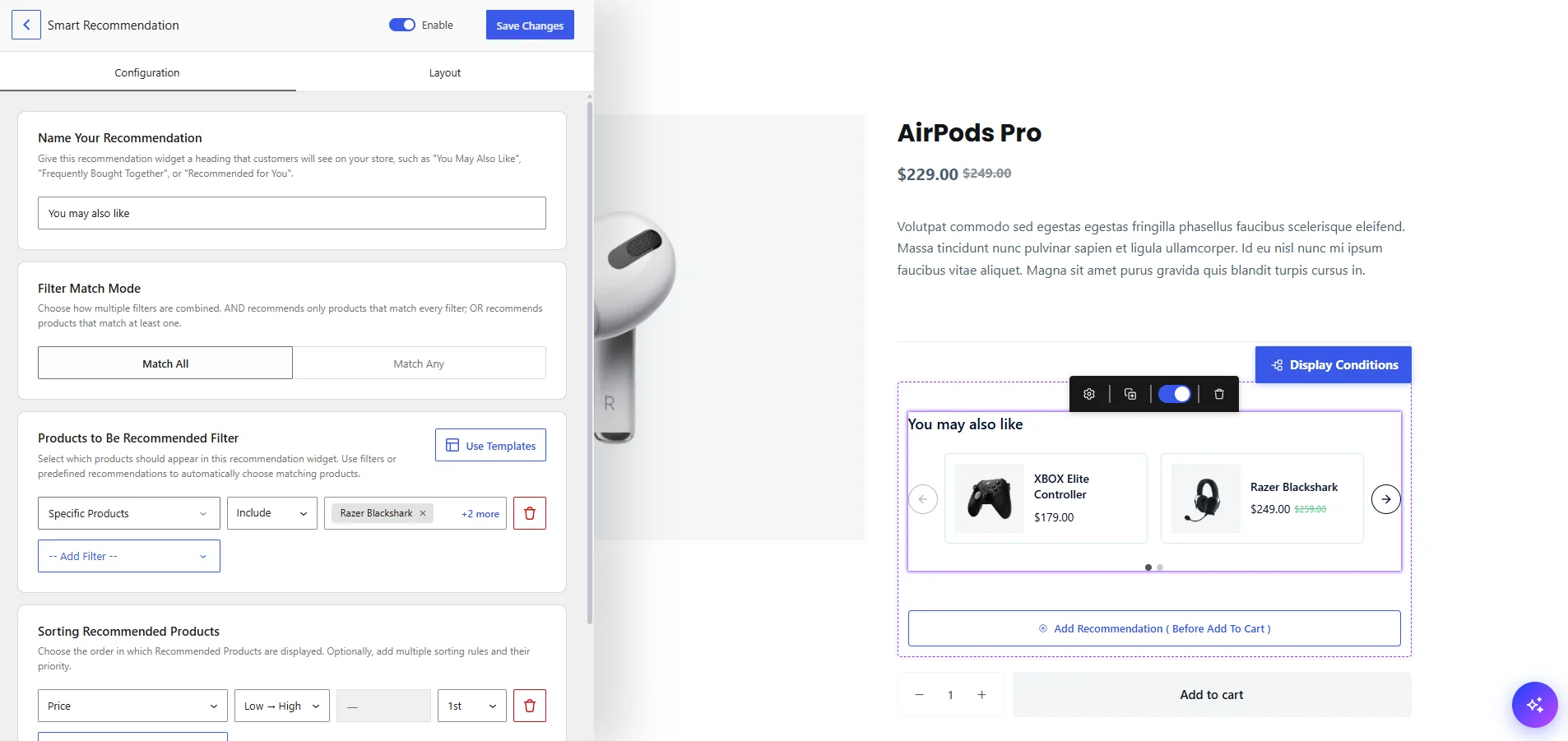
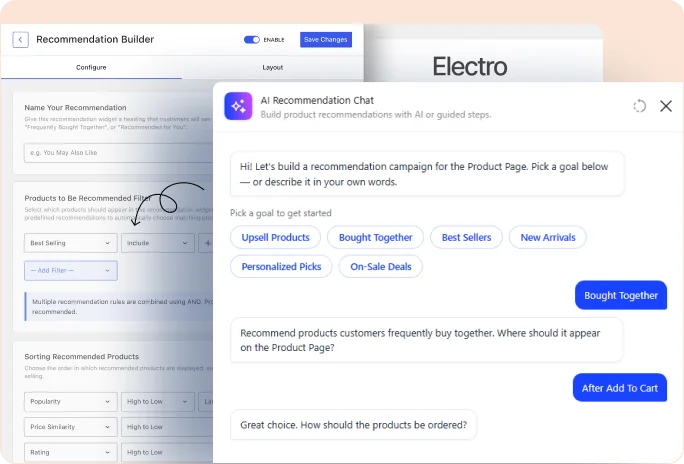
WowRecommend uses a live builder. You pick the page and placement, add filters, set the sorting, and watch a storefront preview update as you edit.
You can start from a template (Upsell, Cross-Sell, Best Sellers, New Arrivals, On Sale, Increase AOV, or Clear Inventory), follow Guided Steps, describe the rules to an AI chat in plain English, or build everything by hand. Templates and Guided Steps do not need an AI provider.
WebToffee starts in WooCommerce under Product Recommendations, where you pick a page type. The plugin then lists the pre-configured recommendations for that page, such as Related Products, Bestsellers, New Arrivals, Recently Viewed, Hot Sellers, Trending Now, and Similar Products.
You can create one with a click, edit it, or choose the Create Your Own tile for a custom rule. Each recommendation also gets a shortcode you can paste into any page or post.
WebToffee’s tile-based start is quick for standard strategies. WowRecommend adds a live preview and more ways to get started.
Winner: WowRecommend, for the live preview and the AI option.
Filters and Sorting
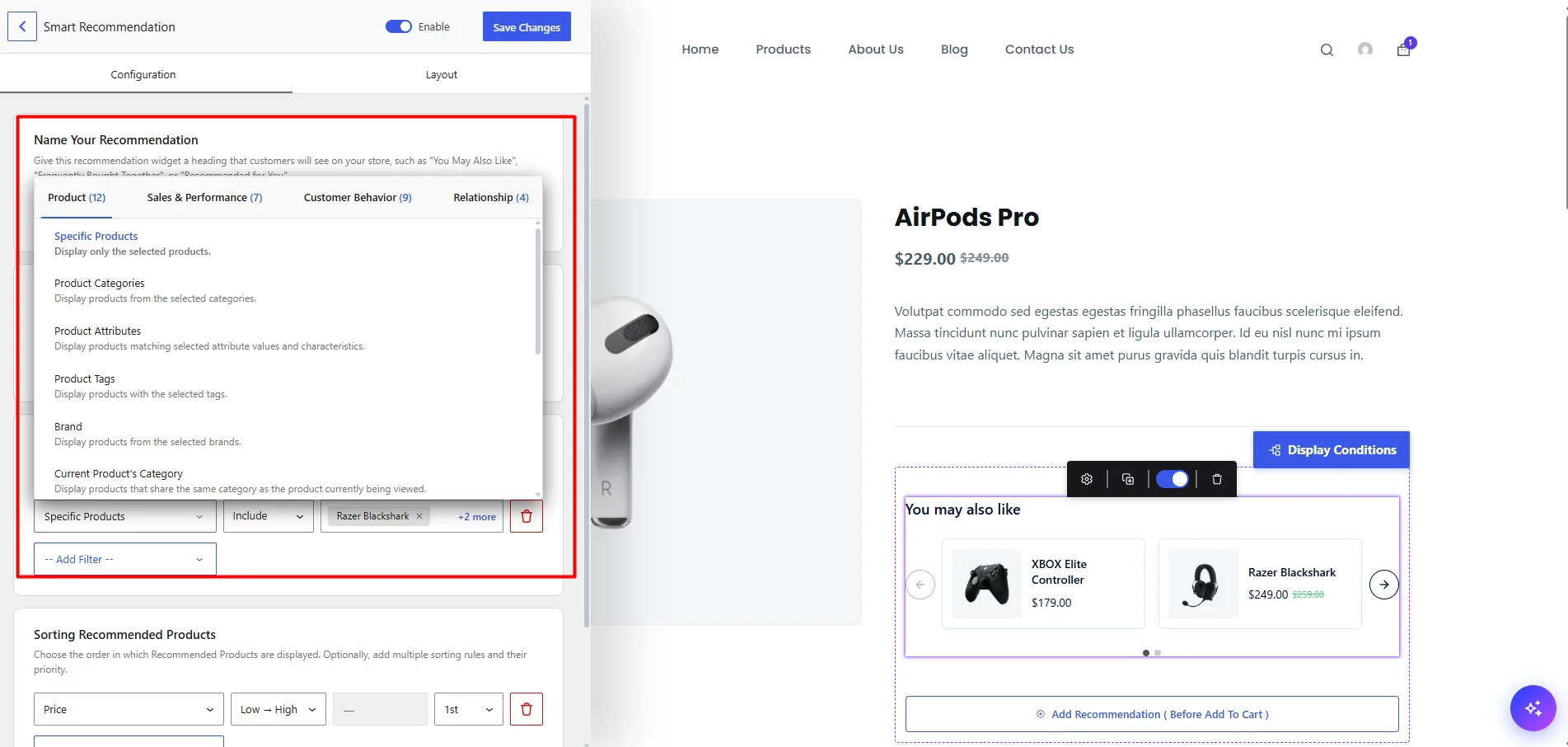
WowRecommend has 32+ filters in four groups: product data, sales and performance, customer behavior, and product relationships. The sales and performance group includes best sellers, high-revenue, low-selling, high-conversion, on-sale, featured, and high click-through products.
Seven sorting methods can be stacked by priority, so a second method breaks any ties left by the first. Relative price and the sales and performance filters are Pro features.
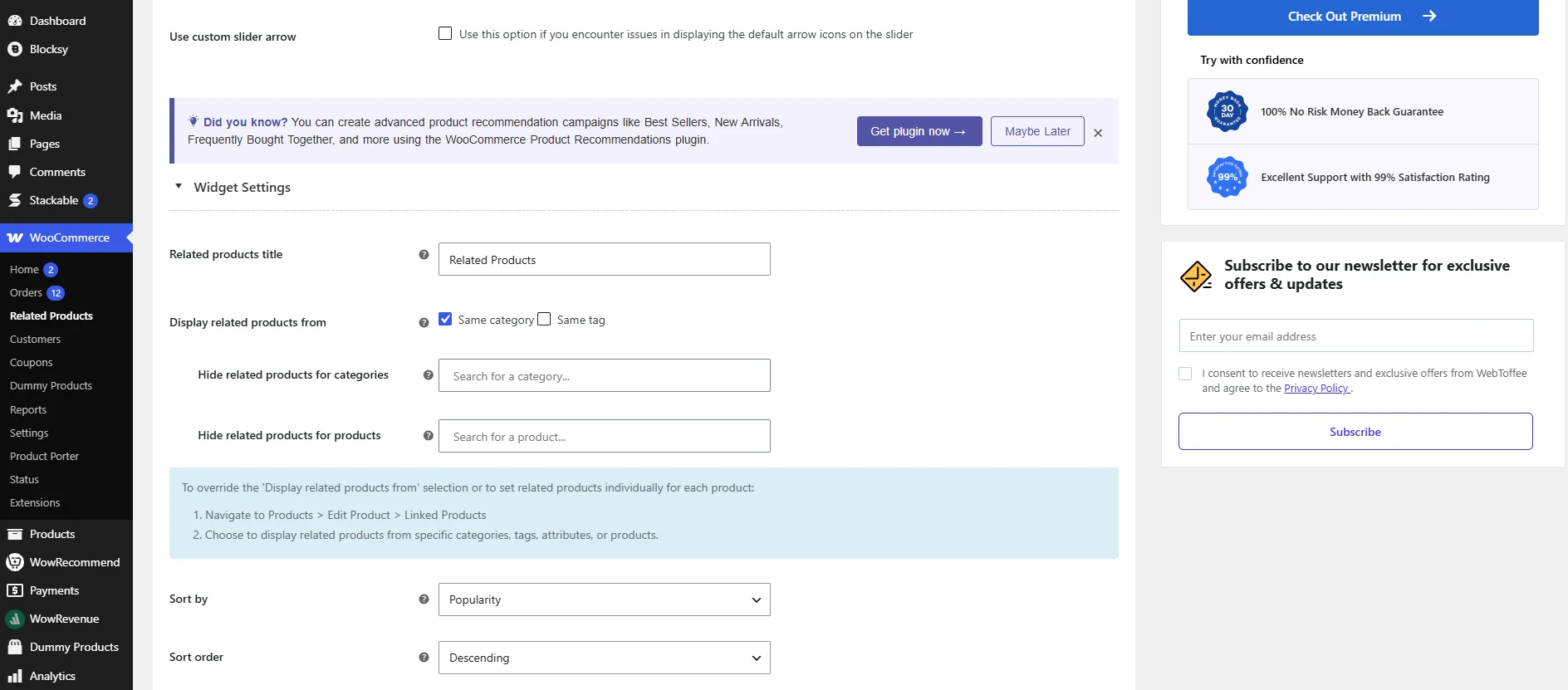
WebToffee filters custom recommendations by category, attribute, tag, created-in period, featured, on sale, relative price, rating, recently viewed products and categories, the current product’s category, tag, or attribute, and product price.
On the cart, checkout, and order confirmation pages, it can also filter by the cart products’ categories, attributes, and tags. Sorting covers popularity, rating, price, latest, and random, with high-to-low or low-to-high order where it applies.
Winner: WowRecommend, for the wider filter set.
Display Conditions and Scheduling
WebToffee is stronger here. Its display criteria decide when a section appears, and they include category, product, user role, cart total, average item price, stock status, product price, viewing day of the week, and viewing date range. For example, you can show a recommendation only to logged-in customers with a cart above a set value, or only on weekends.
WowRecommend lets you schedule a recommendation with a start and end date. When several recommendations share one placement, display settings let you show them instantly, rotate them on a timer, or rotate them after a set number of page reloads. Popup upsells and order bumps have their own trigger and cart conditions.
Winner: WebToffee, for the broader display criteria.
Personalization With Customer Behavior
WowRecommend has nine behavior filters. The free version includes Products Viewed, Recently Viewed, Frequently Viewed, and Previously Purchased. Pro adds Added to Cart, Removed from Cart, and Customer Interest filters, which are based on categories, tags, and attributes. You can combine these with other filters, such as recently viewed products that are in stock.
WebToffee personalizes with recently viewed products, recently viewed categories, and cart-based filters. Pre-built tiles such as Our Picks for You, Did You Forget These, and Recently Viewed use this data.
Winner: WowRecommend, for the number of behavior signals.
Frequently Bought Together
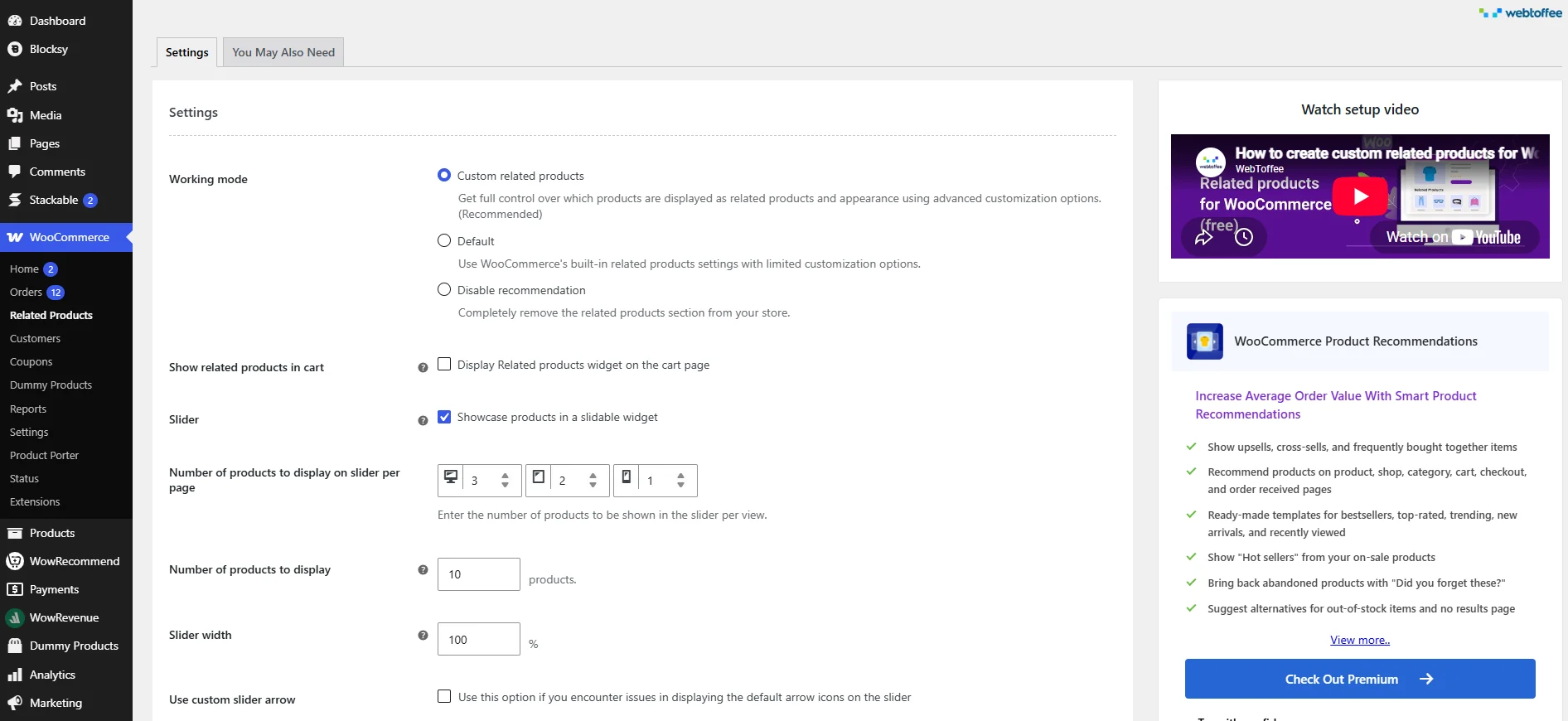
Both plugins offer Frequently Bought Together recommendations. WebToffee gives you a pre-built template and documentation on how its algorithm works and how to adjust the threshold values.
WowRecommend uses a Bought Together filter built on real order relationships, plus a Bought Together sorting method.
WebToffee also sells a separate Frequently Bought Together plugin with bundle layouts and discounts, at $59 per year.
Winner: Tie.
Placements and Upsell Formats
WebToffee places recommendations on the single product, category, shop, cart, checkout, order confirmation, and no-search-results pages. For each page you pick a position, such as below the add to cart button, above the cart table, or below the order details. Sections display as a grid or a slider.
WowRecommend offers 16 locations across product, shop, archive, cart, checkout, and thank-you pages. Like WebToffee, you can also decide exactly where the recommendation appears, such as after adding to cart, below product tabs and so on.
It also includes popup upsells, which can open after a customer action or a time delay, and one-click checkout order bumps.
Winner: WowRecommend, for popup upsells and order bumps.
Analytics and Reporting
WowRecommend tracks analytics for the orders and completed-order revenue that’s been driven from recommendations. It also tracks conversion rate and average order value.
WebToffee’s documentation and product listings do not mention recommendation analytics, so you would need your own tools to measure results.
Winner: WowRecommend.
AI Features
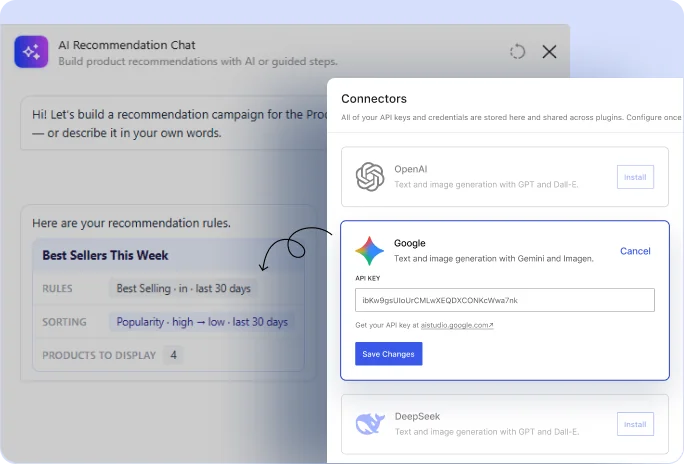
WowRecommend includes an AI rule builder. It uses the built-in AI client in WordPress 7.0 and later. You connect an AI provider under Settings, then Connectors, describe a rule in plain English, and refine it by chat. The AI builds the rule for you. The plugin works without AI, so you can skip the feature if you would rather not use it. WebToffee does not list an AI feature.
Winner: WowRecommend.
Free Version
WowRecommend’s free version includes the live builder, templates, the AI rule builder, product filters (categories, tags, attributes, brands, price, and stock status), four behavior filters, related-product and cross-sell relationships, sorting, styling, and placements on product, shop, and archive pages.
WebToffee’s free option is a separate plugin called Related Products for WooCommerce. The advanced recommendation types, filters, and display criteria belong to the premium plugin.
Winner: WowRecommend, because its free version includes more recommendation filters and the AI feature.
Pricing and Long-Term Cost
WowRecommend has a free version. At the time of writing, Pro is sold as a lifetime license: $99 for one site (regular price $299) and $199 for unlimited sites (regular price $599). Both include lifetime updates, support, and a 14-day money-back guarantee. WPXPO presents this as a limited-time offer, so check the current price before you buy.
WebToffee starts at $89 per year for one site. Its listings show a range of $89 to $199 per year across license tiers, with a 30-day money-back guarantee.
| Years of use | WowRecommend (1 site, lifetime) | WebToffee (1 site, yearly) |
|---|---|---|
| 1 year | $99 | $89 |
| 3 years | $99 | $267 |
| 5 years | $99 | $445 |
These figures assume you renew WebToffee at the listed yearly price. WebToffee costs $10 less in year one. After that, the lifetime license costs less.
Winner: WowRecommend, for long-term cost while the lifetime offer lasts.
Which Should You Choose?
Both plugins can automate recommendations across your catalog. The better fit depends on how much control you want and how many upsell formats you need.
Choose WowRecommend if you:
- want an all-in-one recommendation solution
- want a live builder, Guided Steps, or an AI chat when building rules
- need behavior filters such as cart activity and customer interests
- want popup upsells, checkout order bumps, and recommendation analytics in one plugin
- prefer a one-time price, or want to start with a free version that includes the core builder
Choose WebToffee if you:
- need display criteria such as user role, cart total, viewing day, or date range
- want a shortcode for every recommendation so you can place it on any page
- are comfortable with annual billing
For most growing stores that want one plugin for rules, personalization, and upsell formats, WowRecommend offers more features at a lower long-term cost.
WebToffee is a sensible choice if you need its display criteria and prefer a straightforward, form-based setup.
FAQs About WowRecommend and WebToffee Product Recommendations
Is WowRecommend a good alternative to WebToffee Product Recommendations?
Yes, if you want more filters, behavior signals, upsell formats, and AI features in one plugin. WebToffee has broader display criteria, such as user role, cart total, and viewing day, which WowRecommend does not list for page sections.
Does WebToffee have a free version?
WebToffee has a free plugin called Related Products for WooCommerce. It handles custom related products only. The advanced recommendation types, filters, and display criteria are in the premium plugin.
Do I need AI to use WowRecommend?
No. AI is optional. You can build rules manually, start from templates, or follow Guided Steps. The AI chat needs WordPress 7.0 or later and an AI provider connected under Settings, then Connectors, with a free or paid API key.
Which plugin is better for Frequently Bought Together recommendations?
Both offer them. WebToffee has a pre-built template and adjustable threshold values, and it also sells a separate Frequently Bought Together plugin. WowRecommend uses a Bought Together filter and sorting method based on real order data, available in Pro.
Can I use both plugins on the same store?
Technically yes. But two recommendation plugins can show overlapping sections on the same page and add extra load. It is usually better to choose one and test it on a staging site first.
Summing Up
Both plugins can do the job. Pick the one that matches how you like to work: a live builder, AI, and popup upsells with a lifetime price, or a form-based setup with deep display rules and yearly billing. Test your pick on a staging site before it goes live.


