

Black Friday brings more customers to your WooCommerce store, but higher traffic does not automatically mean you are getting the most value from every order.
A customer might arrive for a discounted laptop and leave with only the laptop. But if you show a relevant mouse, laptop sleeve, or upgraded model at the right moment, that same customer may be willing to spend more.
That is where product recommendations become useful.
The scale of the opportunity is significant. Adobe reported that U.S. shoppers spent $11.8 billion online on Black Friday 2025, up 9.1% year over year. Across the full 2025 holiday season, the share of units sold from the most expensive product tier increased by 20% compared with the rest of the year.
So shoppers are not always looking for the cheapest possible item during Black Friday. A strong deal can also make them comfortable buying better products or adding more to the order.
In this guide, we will look at 14 practical Black Friday product recommendation ideas you can use to increase average order value without simply adding more discounts everywhere.
Quick Look at Essential Recommendation Ideas During this Black Friday
To showcase these recommendations effectively we suggest a product recommendation plugin like WowRecommend – which is an all-in-one recommendation solution for WooCommerce stores, boasting 32+ advanced filters, smart sorting, AI-powered rule building and live preview option.
| Black Friday Idea | Recommendation Logic | Example |
| Frequently Bought Together | Frequently bought together relationship | Camera + battery + memory card |
| Related Products | Current product category or tag | Running shoes + similar running shoes |
| Complementary Accessories | Product, category, or relationship filters | Laptop + mouse + sleeve |
| Premium Upsell | Upsell product relationship | 128GB phone → 256GB model |
| Previously Purchased Products | Previous purchase behavior | Previously purchased cleanser + same cleanser again |
| Black Friday Best Sellers | Sales performance + popularity sorting | Top-selling Black Friday products |
| Same Category Products | Current Product’s Category filter | Coffee machine + other coffee machines |
| Matching Attributes | Current Product’s Attribute filter | Leather bag + leather accessories |
| Same Brand Products | Brand filter | Samsung phone + Samsung accessories |
Why Product Recommendations Matter During Black Friday
During Black Friday, shoppers usually have strong buying intent. They are actively comparing products, checking discounts, and looking for the best value they can get from their budget.
Product recommendations help you use that intent more effectively.
Instead of showing random items and hoping shoppers click, you can guide them toward products that make sense based on what they are already viewing or buying.
This can help your store:
- Increase average order value: Recommend complementary products, upgrades, or add-ons that increase the total order amount.
- Improve product discovery: Help customers find useful items that they may not have noticed while browsing.
- Create natural upsell opportunities: Show better or higher-value alternatives while customers are already comparing products.
- Generate more cross-sells: Recommend products that make the original purchase more useful.
- Make large catalogs easier to explore: Use categories, attributes, brands, behavior, and other signals to narrow down relevant products.
- Get more value from existing traffic: You already paid or worked to bring the shopper to your store. Recommendations can help generate more revenue from that visit.
There is also growing evidence that shoppers are comfortable receiving this type of guidance. During Cyber Week 2025, Salesforce reported that AI and agents influenced 20% of global purchases through experiences that included personalized product recommendations and conversational customer service.
The important part is relevance.
A random product carousel titled “You May Also Like” may not contribute much. A carefully selected recommendation such as “Complete Your Camera Setup” with a memory card, tripod, and spare battery is much more useful.
The product you recommend, where you show it, and when the customer sees it all matter.
Best Black Friday Product Recommendation Ideas to Increase AOV
You do not need one recommendation strategy for your entire store.
Different products and stages of the buying journey create different opportunities. Here are 14 strategies you can test during your Black Friday campaign.
Idea 1: Recommend Frequently Bought Together Products
Frequently bought together recommendations show products that naturally make sense when purchased with the item a customer is currently viewing.
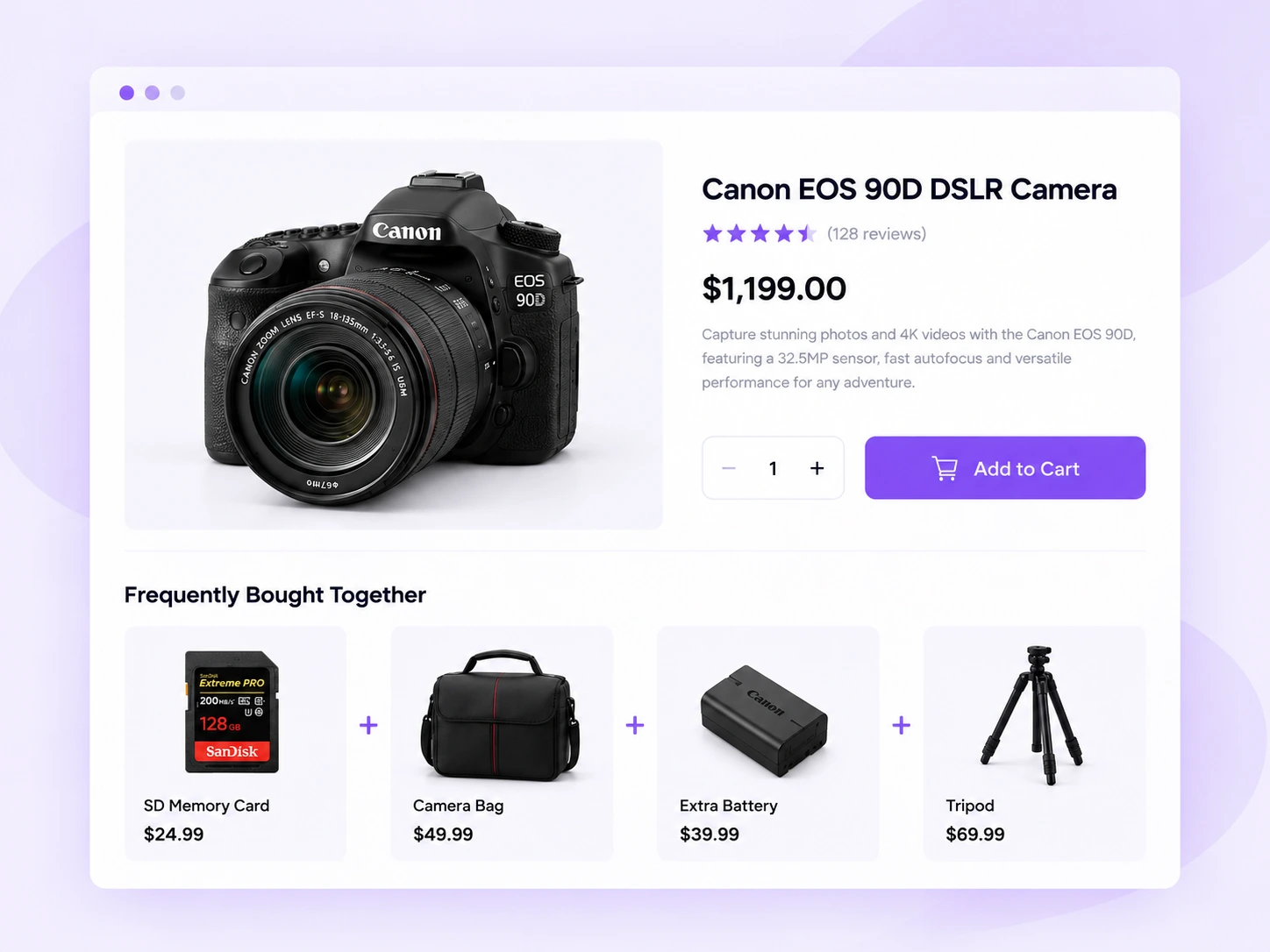
Imagine someone finds your Black Friday deal on a DSLR camera. Instead of only showing the camera, you can recommend a memory card, camera bag, spare battery, and tripod.
The shopper was not necessarily searching for those accessories. But once they see them beside the camera, the complete purchase starts to make sense.
This strategy works especially well for electronics, beauty products, fashion, home appliances, tools, pet supplies, fitness products, and hobby stores.
The product page is usually a strong place for frequently bought together recommendations because customers are still deciding what they need. You can also bring the same logic into the cart.
Idea 2: Show Related Products From the Same Category
Sometimes the customer has found the right type of product but not necessarily the right product.
That is where related recommendations can help.
Suppose someone is viewing a pair of running shoes. You can show other running shoes with different colors, features, price points, or customer ratings.
This gives shoppers alternatives without forcing them to return to your main category page and start their search again.
You can display these recommendations underneath the main product information with headings such as:
- You May Also Like
- Similar Black Friday Deals
- More From This Collection
- Other Options You Might Like
Idea 3: Recommend Complementary Accessories
Accessories are one of the simplest ways to increase AOV because they usually cost considerably less than the main product.
If a shopper is prepared to spend $500 on a product, adding a useful $20 or $30 accessory may feel like a much smaller decision.
For example:
| Main Product | Recommended Accessories |
| Smartphone | Case, charger, screen protector |
| Laptop | Mouse, sleeve, USB hub |
| Camera | Memory card, tripod, battery |
| Coffee machine | Filters, coffee beans, cleaner |
| Gaming console | Controller, headset, charging dock |
The key is compatibility.
A recommendation is only useful if the accessory works with the product the customer is buying. Showing an incompatible charger or case can quickly damage trust.
Electronics stores are an obvious fit, but this strategy also works for fashion accessories, sporting goods, automotive products, musical instruments, tools, beauty devices, and kitchen equipment.
Idea 4: Upsell to a Higher-Value Product
Not every recommendation needs to add another item to the cart.
Sometimes the better opportunity is to help the customer choose a more valuable version of the product they are already considering.
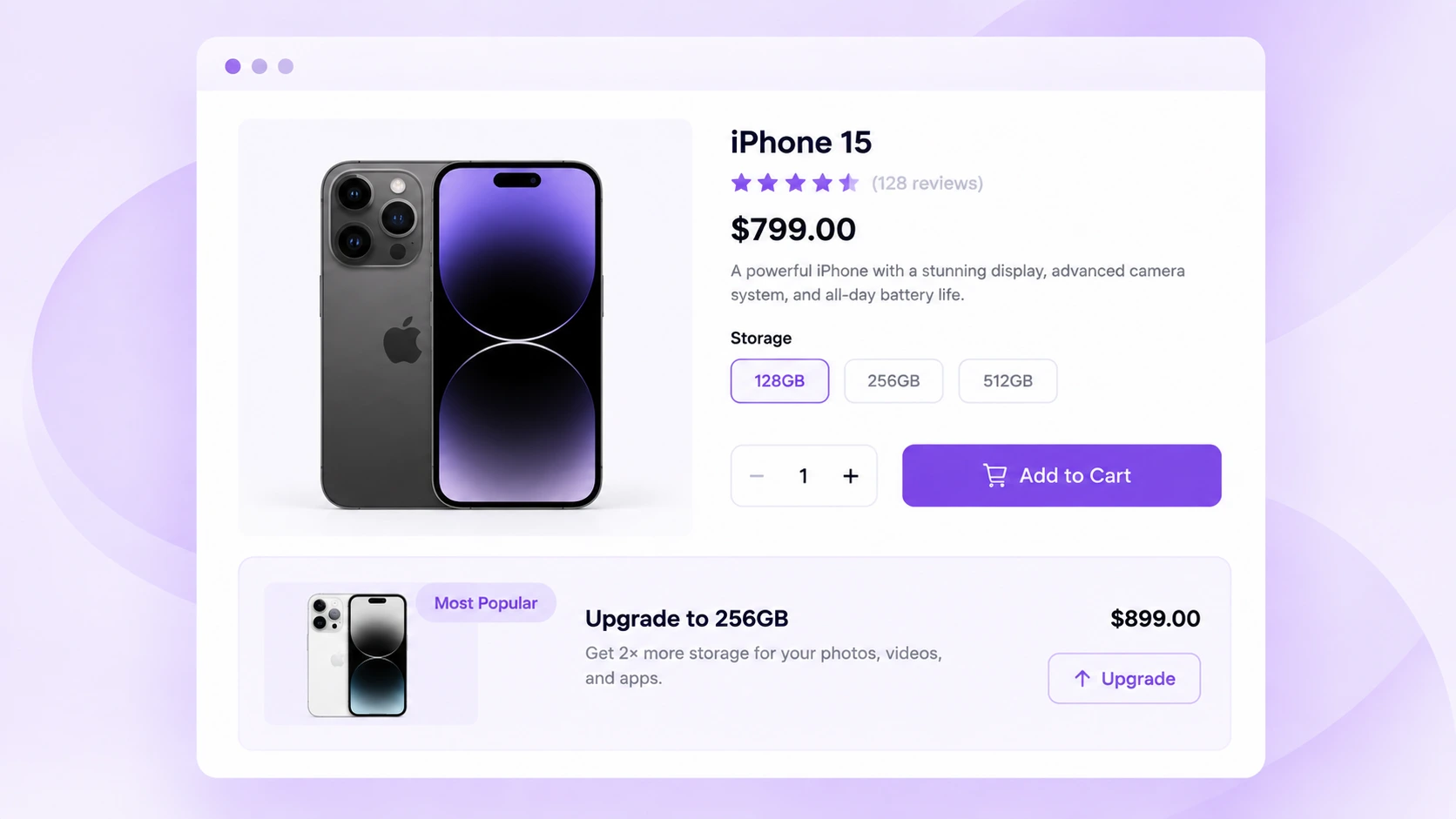
Suppose a customer is looking at a discounted 128GB smartphone. You can recommend the 256GB version and explain the added storage they get for the additional cost.
The same idea works with:
- Basic vs. premium appliances
- Standard vs. professional tools
- Entry-level vs. advanced cameras
- Smaller vs. larger storage capacity
- Basic vs. premium skincare sets
- Standard vs. higher-spec computers
Black Friday can be a particularly good time for this strategy.
Adobe found that during the 2025 U.S. holiday season, strong discounts encouraged shoppers to trade up. The share of units sold from the most expensive product tier was 20% higher than during the rest of the year.
That does not mean you should always push the most expensive product. The upgrade still needs to provide a clear benefit.
Idea 5: Recommend Products Customers Previously Purchased
Some products are not one-time purchases. Customers need to restock them regularly, which makes previous purchase history useful for repeat-product recommendations.
For example:
Previously purchased: Facial cleanser
Recommend: Buy the same cleanser again
Or:
Previously purchased: Coffee beans
Recommend: Restock the same coffee beans
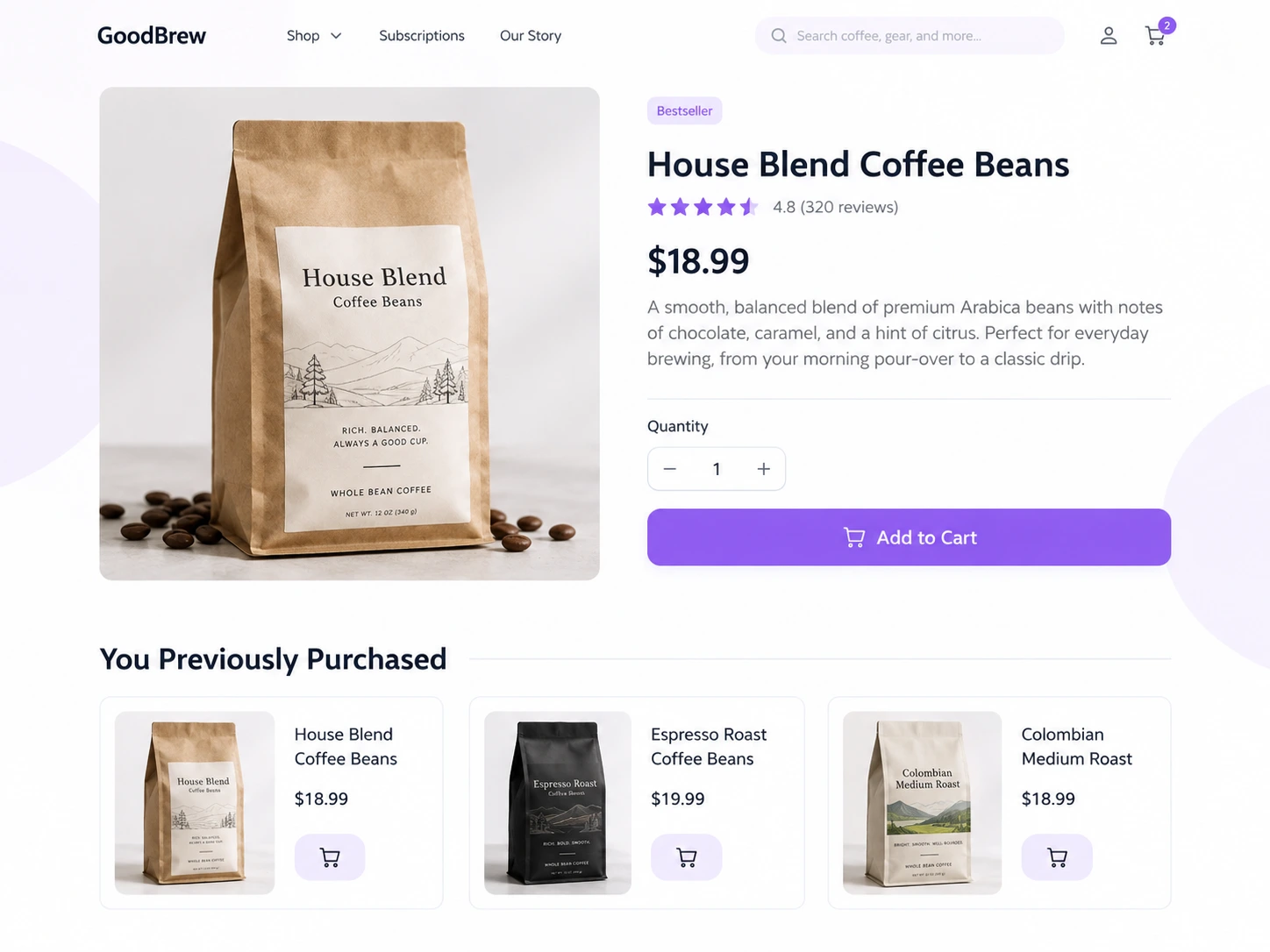
You can use this strategy for products such as groceries, skincare, supplements, pet food, cleaning supplies, coffee, personal care items, and other regularly consumed products.
During Black Friday, this can work especially well because returning customers may already be planning to stock up. Showing products they have purchased before can make it easier for them to reorder while the item is discounted.
Idea 6: Recommend Black Friday Best Sellers
When shoppers see dozens of discounted products, deciding what to buy can become difficult.
Best-seller recommendations reduce that decision fatigue by showing products other customers already buy frequently.
A simple section such as Black Friday Best Sellers can work across your shop page, category pages, product pages, or other high-traffic sections.
You might show:
- Best-selling electronics
- Best-selling skincare
- Most popular gifts
- Top-selling shoes
- Customer-favorite home products
This works especially well if your store already has enough sales data to identify meaningful best sellers.
You can also make the recommendation more specific. Instead of showing store-wide best sellers everywhere, show the best sellers from the category the shopper is currently browsing.
Idea 7: Recommend Trending Products
Best sellers and trending products are not always the same thing.
A best seller may have performed strongly over several months. A trending product may have suddenly become popular over the last few days.
During Black Friday, buying behavior can change quickly. A particular gift, gadget, jacket, toy, or beauty product may start getting significantly more attention as your campaign progresses.
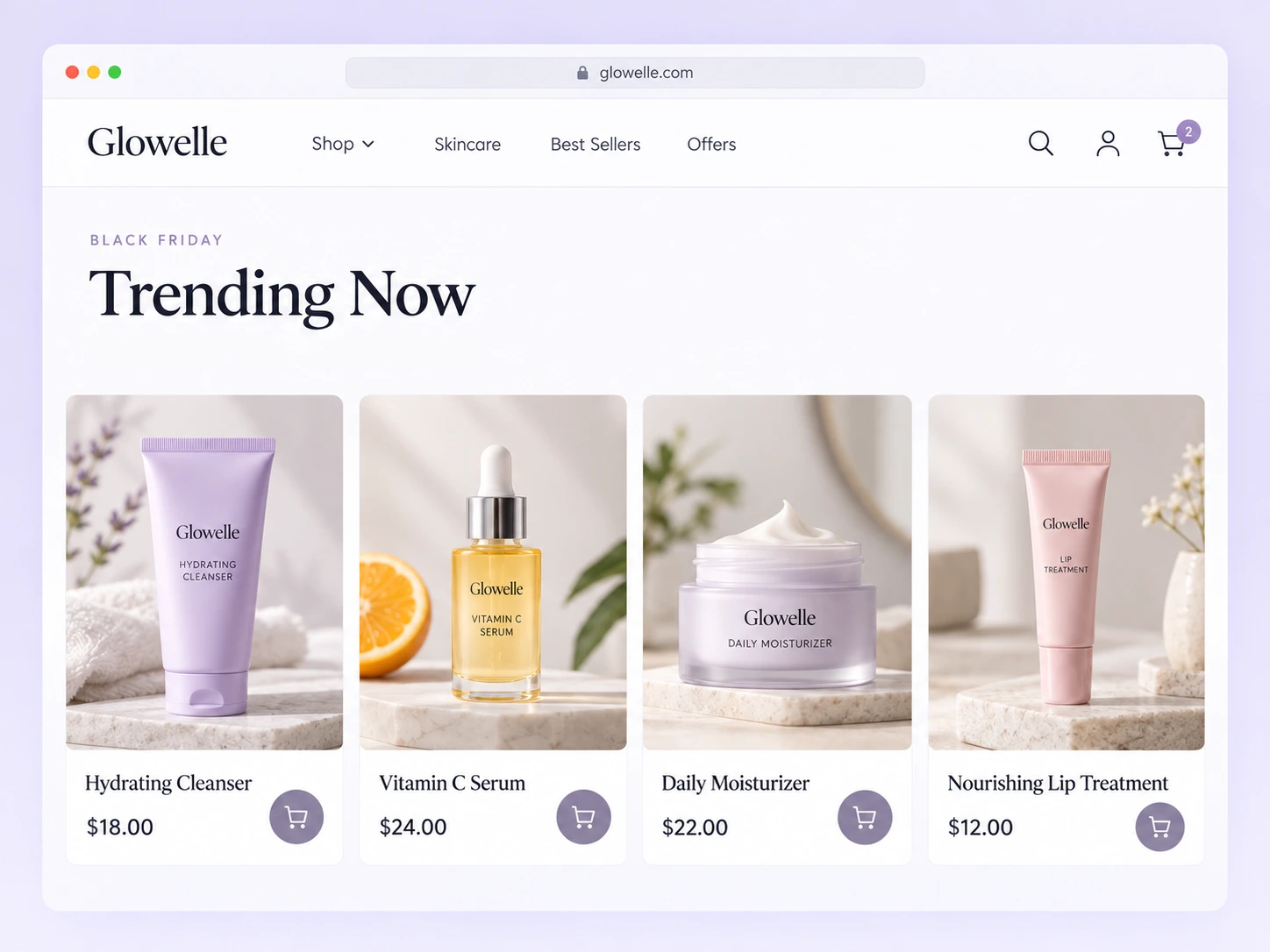
Showing these products as Trending Now, Popular This Black Friday, or Shoppers Are Loving These can help customers discover what is currently attracting attention.
This approach works well for:
- Fashion
- Electronics
- Toys
- Beauty
- Gifts
- Home decor
- Seasonal products
Just make sure your definition of “trending” is based on meaningful data such as recent sales, views, or conversions.
Do not label a product as trending simply because you want to sell more of it.
Idea 8: Recommend Products Based on the Current Category
For larger WooCommerce stores, manually choosing related products one by one quickly becomes difficult.
Category-based recommendations give you a more scalable approach.
Suppose a customer opens a product from your “Men’s Watches” category. Your recommendation system can automatically find other eligible products from that same category.
If they move to “Running Shoes,” the recommendations change automatically.
That makes the recommendation context-aware without requiring you to create a separate campaign for every product.
Idea 9: Recommend Products With Matching Attributes
Categories tell you what type of product something is. Attributes can tell you much more about the product itself.
That makes attribute-based recommendations useful when shoppers care about details such as:
- Color
- Material
- Size
- Style
- Storage
- Compatibility
- Capacity
- Pattern
Imagine a customer is viewing a black leather handbag.
Instead of simply recommending other bags, you can recommend products that share the black or leather attributes. This might include a matching wallet, belt, card holder, or another bag.
This gives you much more control over the logic behind the recommendation.
Fashion, furniture, electronics, jewelry, home decor, sports, and automotive stores can benefit significantly from this approach.
Idea 10: Recommend Products From the Same Brand
Brand loyalty can make recommendations easier.
If a shopper is already viewing a particular brand, there is a reasonable chance they may be interested in other products from the same company.
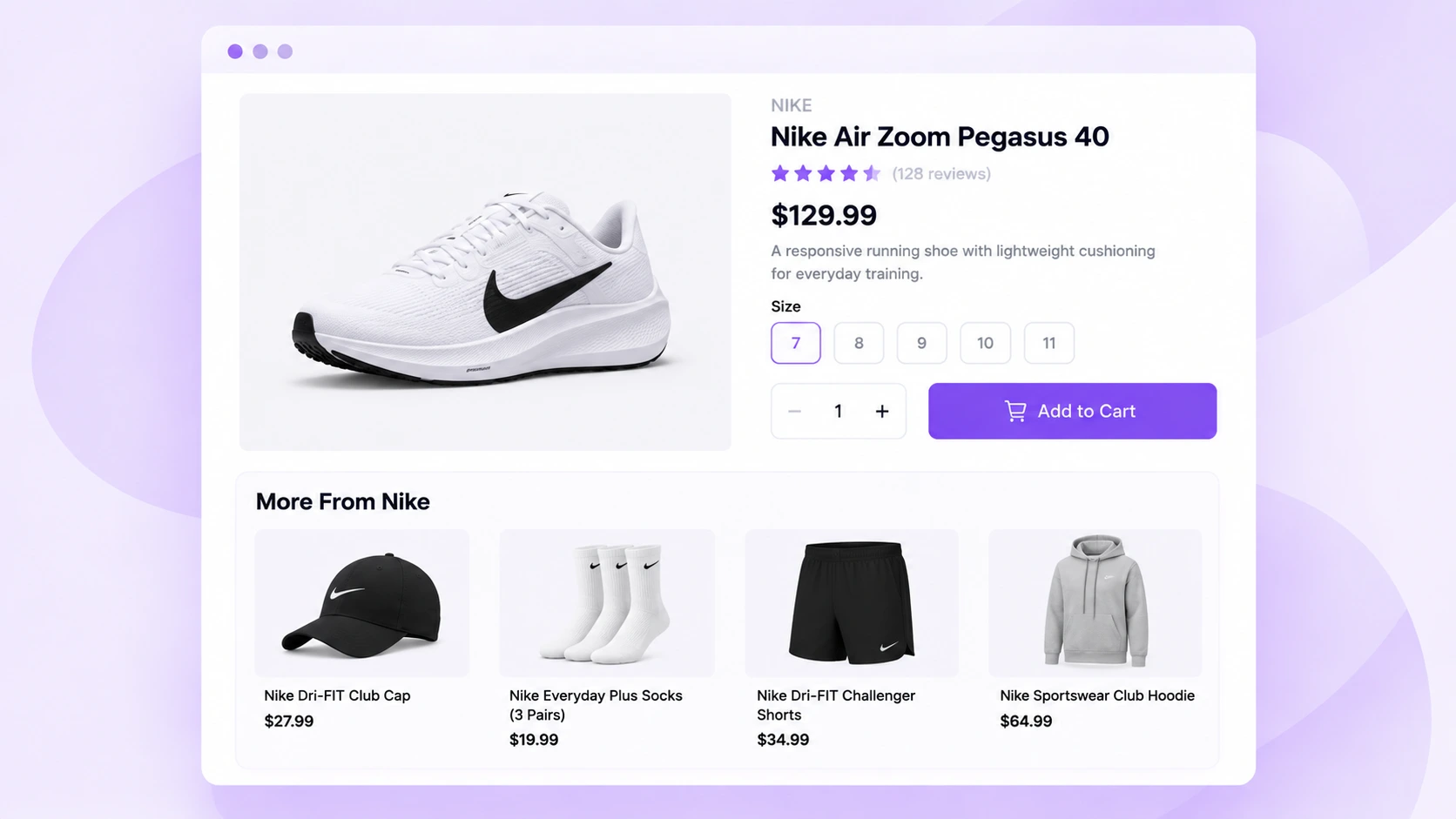
For example:
Viewing: Nike running shoes
Recommend: Nike socks, shorts, jackets, or other footwear
Or:
Viewing: Samsung smartphone
Recommend: Samsung earbuds, smartwatch, tablet, or charger
This strategy works well for multi-brand stores where customers regularly shop based on manufacturer or label.
During Black Friday, you can make the section more campaign-specific with headings such as:
- More Black Friday Deals From This Brand
- Shop More From [Brand]
- More Deals You May Like
Idea 11: Recommend New Arrivals Alongside Black Friday Deals
Black Friday is a useful opportunity to give new products visibility.
Your highest-traffic shopping period brings many people into the store who may not have seen your latest products yet.
For example, someone browsing discounted winter jackets can see a small New Arrivals recommendation showing your latest scarves, gloves, or accessories.
The new product does not necessarily need the biggest discount in your store. It simply needs to be relevant enough to deserve the shopper’s attention.
You can also combine freshness with category or brand filters to stop unrelated new products from appearing.
Idea 12: Cross-Sell Products on the Cart Page
By the time a shopper reaches the cart, they have already made an important decision.
They have chosen something they are interested in buying.
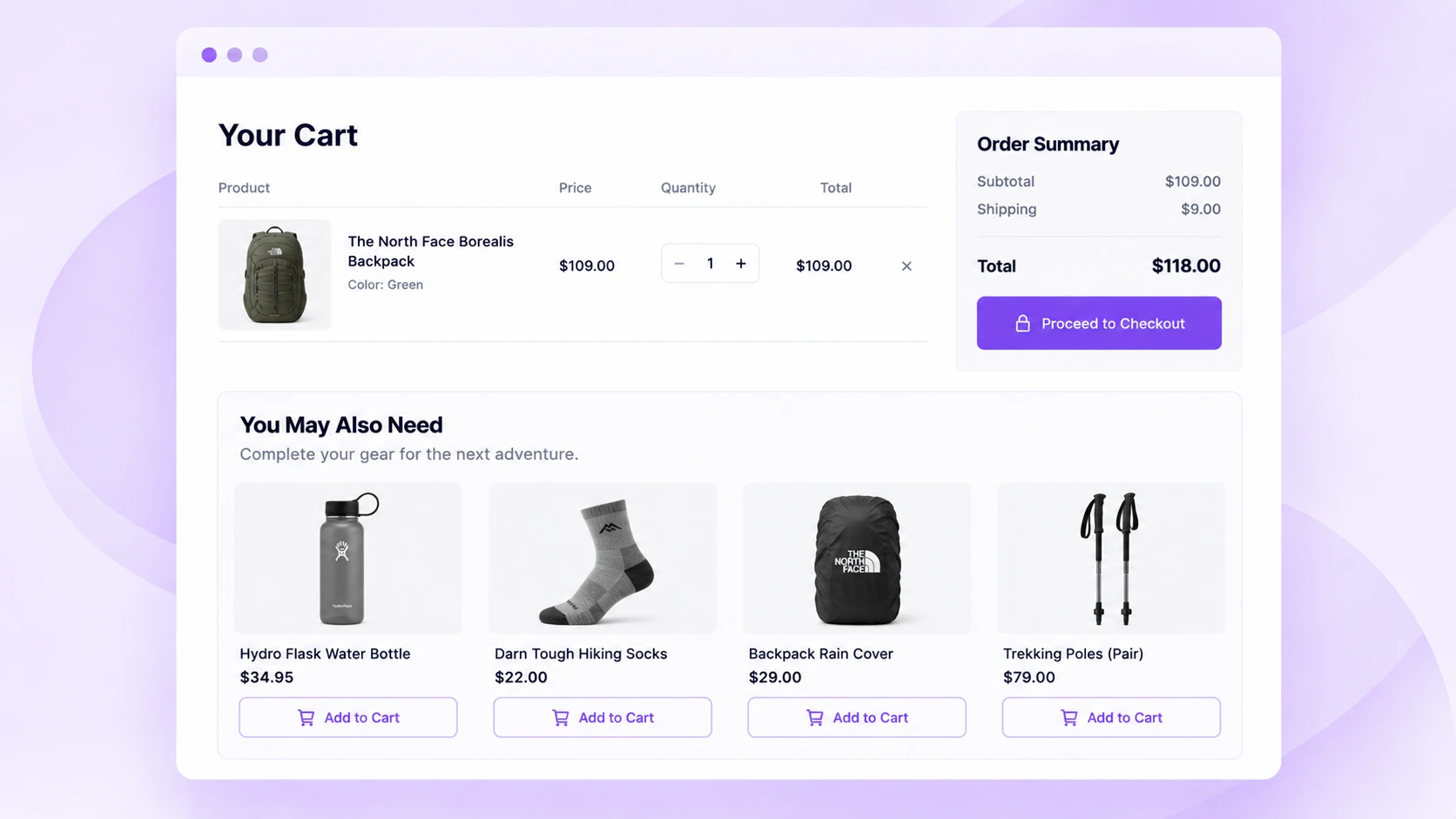
This makes the cart a strong place for focused cross-sells.
Suppose a customer has added a coffee machine to their cart. You can recommend filters, coffee beans, or reusable cups.
Or if they added hiking boots, you might suggest hiking socks or waterproofing spray.
WooCommerce itself supports manually assigned cross-sells and displays them in relation to items in the customer’s cart.
The main rule here is simple: keep your cart recommendations relevant.
A shopper who is nearly ready to check out does not need another full product catalog. Two or three useful additions can be more effective than ten unrelated suggestions.
Idea 13: Add a Checkout Order Bump
Checkout is even closer to the purchase.
At this stage, you generally want a recommendation that is easy to understand and does not require much extra thinking.
That is where an order bump can work well.
An order bump is a small additional offer shown during checkout. The shopper can add it to the existing order with minimal friction.
Examples include:
- Gift wrapping
- Extra batteries
- Screen protector
- Small accessory
- Replacement filter
- Travel-size product
- Extended accessory pack
- Low-cost complementary item
Imagine someone is buying a $120 perfume set.
A $6 gift bag or $10 travel atomizer may be a reasonable checkout offer. Showing them another $150 perfume set probably creates too much distraction.
The closer the customer gets to payment, the simpler the recommendation should usually become.
Idea 14: Recommend Products Based on What Is Already in the Cart
Basic cart cross-selling often relies on products you manually associate beforehand.
A more dynamic approach is to use the actual products, categories, or customer activity in the cart as recommendation context.
Instead of recommending random beauty products, you might show a moisturizer or sunscreen that completes the routine.
This works because the recommendation is based on what the shopper has already told you through their cart.
It can be particularly useful for beauty routines, outfits, electronics setups, cooking ingredients, fitness equipment, pet products, office supplies, and hobby products.
How to Create Product Recommendations in WooCommerce
The right setup depends on how advanced you want your recommendations to be.
For a simple WooCommerce store, you can start with native features. WooCommerce lets you manually assign upsells and cross-sells to products. Upsells are generally shown on product pages, while cross-sells are associated with products in the cart.
WooCommerce can also generate related product collections based on shared product categories and tags.
A basic Black Friday setup can look like this:
- Identify your main Black Friday products.
- Decide which products make good upsells or complementary purchases.
- Add relevant upsells and cross-sells.
- Check how those recommendations appear on your storefront.
- Keep your Black Friday recommendations focused on products that are actually useful together.
- Monitor orders and see which combinations customers respond to.
This works when you have a manageable number of products and fairly simple recommendation needs.
The challenge appears when you want your recommendations to change dynamically. In that regard, creating the right recommendation logic is crucial.
For example, you may want to show products from the current category, stay within a certain relative price range, use customer behavior, prioritize best sellers, recommend products from the same brand, or create different recommendations on the product, cart, checkout, and thank-you pages.
That is where a dedicated recommendation plugin becomes more useful.
How Do You Set Up Advanced Product Recommendations?
A WooCommerce product recommendation plugin gives you more control over which products are recommended and under what conditions.
Instead of manually connecting every product to another product, you can create rules.
For example:
If a customer is viewing a product from the “Running Shoes” category, recommend other on-sale running products priced slightly higher than the current product.
Or:
If someone is viewing a Samsung phone, recommend products from Samsung that match selected accessory categories.
This makes recommendation management much easier as your catalog grows.
Depending on the plugin, you may be able to create recommendations using:
- Product categories
- Tags
- Attributes
- Brands
- Product price
- Relative price
- Sales performance
- Recently viewed products
- Purchase history
- Customer interests
- Upsell and cross-sell relationships
- Frequently purchased combinations
You can then decide where those recommendations appear.
Create Black Friday Product Recommendations With WowRecommend
WowRecommend is an AI-Powered Product Recommendation Plugin for WooCommerce. It’s best for stores needing an all-in-one recommendation system with advanced filters, AI-assisted guided setup, popup upsell, and order bump in one plugin.
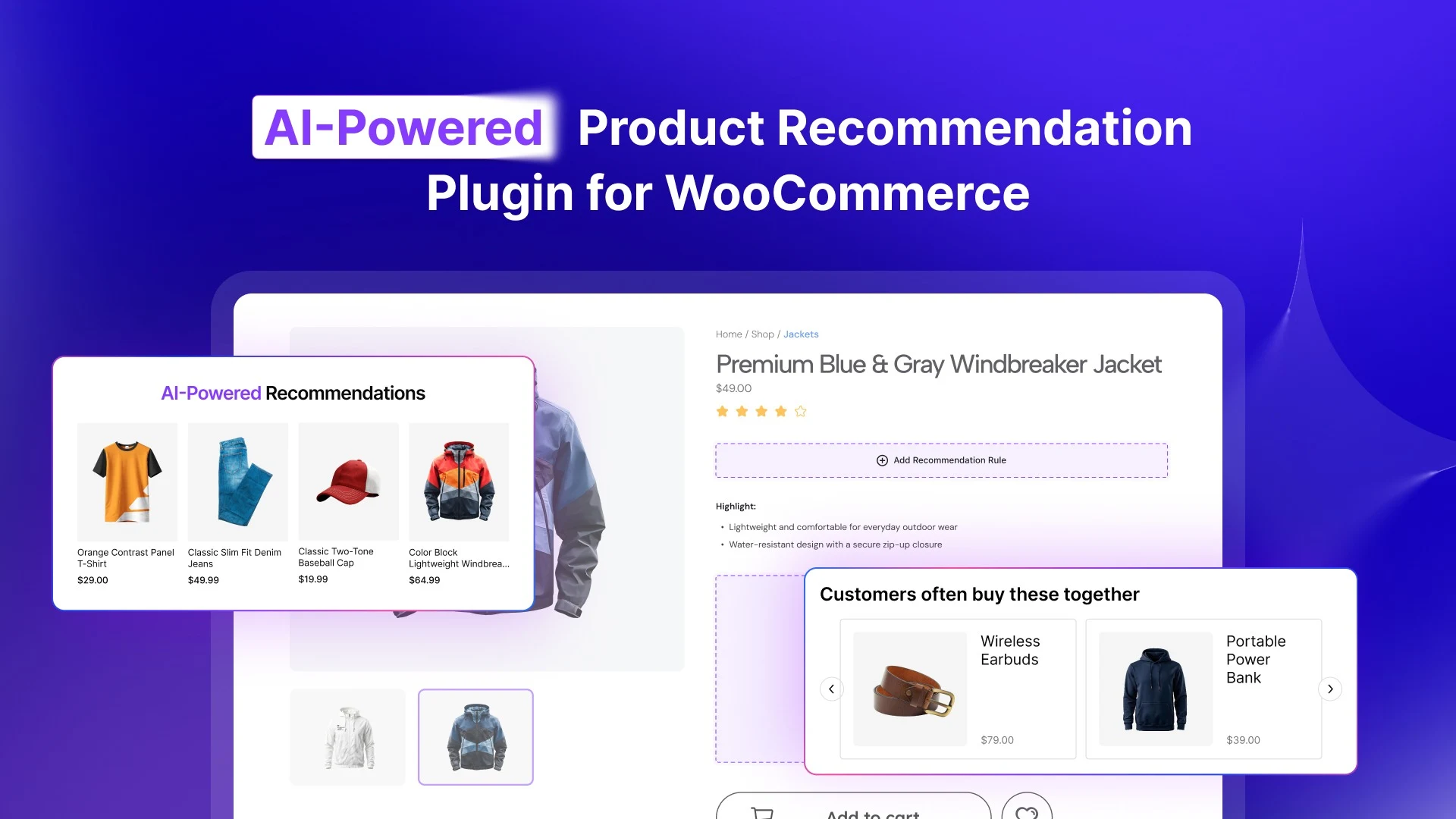
It currently includes 32+ recommendation filters covering product data, sales performance, customer behavior, pricing, and product relationships. It also supports smart sorting, premade templates, popup upsells, checkout order bumps, and recommendation analytics.
For example, you can use product filters to recommend based on categories, attributes, tags, brands, price, relative price, stock status, or information from the product currently being viewed.
Behavior filters can use signals such as products viewed, recently viewed products, frequently viewed products, cart activity, previous purchases, and customer interests.
WowRecommend also lets you place recommendation campaigns on the Product Page, Shop Page, Product Archive, Cart, Checkout, and Thank You page.
If you do not want to build every campaign from scratch, premade templates are available for common goals such as Upsell Products, Cross-Sell Products, Best Sellers, New Arrivals, On Sale Products, Increase AOV, and Clear Inventory.
The basic workflow is straightforward:
- Choose the page where you want the recommendation.
- Select the placement.
- Choose a template or start from scratch.
- Add filters to control which products can appear.
- Set sorting rules.
- Customize the layout.
- Add optional display conditions or scheduling.
- Preview and publish the recommendation.
Where Should You Show Product Recommendations During Black Friday?
Choosing the products is only half of the strategy.
You also need to decide where the recommendation should appear.
A recommendation that works perfectly on a product page may feel distracting at checkout.
i. Product Page Recommendations:
Product pages give you the most flexibility.
The shopper is still evaluating the product, so you can show:
- Similar products
- Premium alternatives
- Frequently bought together products
- Accessories
- Same-brand products
- Matching attribute recommendations
- Best sellers
- New arrivals
Try not to mix too many strategies in the same area.
One clear Frequently Bought Together section and one Similar Products section may be enough.
ii. Shop and Category Page Recommendations:
These pages are useful for discovery-focused recommendations.
You can highlight:
- Best sellers
- Trending products
- New arrivals
- Products currently on sale
- Category-specific recommendations
These recommendations help shoppers who have not yet decided exactly what they want.
For Black Friday, this can be particularly useful when you have a large sale catalog and want to guide shoppers toward products with strong demand.
Cart Page Recommendations:
The cart should focus on products that improve or complement what the customer is already buying.
Think accessories, refills, add-ons, matching products, or small complementary purchases.
Someone with a laptop in their cart does not need recommendations for another laptop unless there is a very clear upgrade opportunity.
They are more likely to benefit from a mouse, sleeve, stand, or hub.
Checkout Recommendations:
At checkout, reduce complexity.
A simple order bump is usually more appropriate than a large recommendation grid.
The product should ideally:
- Be inexpensive relative to the existing order
- Clearly complement the purchase
- Require little additional research
- Be easy to add with one action
If your checkout recommendation creates another major purchasing decision, it can become a distraction instead of an AOV opportunity.
Thank You Page Recommendations:
The order may already be complete, but the relationship with the customer is not.
You can use the thank-you page to introduce products they may want next, particularly for repeat-purchase categories.
This placement is less about increasing the order that just finished and more about encouraging the next purchase.
A Few Tips Before Launching Your Black Friday Recommendations
More recommendations do not automatically create better results.
You still need to be selective.
Keep recommendations relevant. A recommendation should have an obvious connection to what the customer is viewing, buying, or interested in.
Do not overwhelm the customer. Showing five recommendation sections on the same product page can create unnecessary noise.
Use clear headings. “Complete Your Setup” tells the customer more than a generic “Recommended Products.”
Think about price gaps. A $15 add-on beside a $500 product feels different from another $500 purchase.
Prioritize mobile. Adobe reported that 56.4% of U.S. online holiday spending in 2025 happened on smartphones. Your recommendation sections need to remain easy to browse and add from smaller screens.
Track what actually sells. Recommendation impressions and clicks can be useful, but completed orders and recommendation-generated revenue tell you much more about business impact.
WowRecommend’s analytics, for example, tracks metrics including recommendation-generated orders, AOV, conversion rate, add-to-cart activity, and revenue performance.
Grab the Special Black Friday Deal for a Product Recommendation Plugin
If you are preparing your WooCommerce store for Black Friday, this can also be a good time to add a more advanced recommendation system.
Keep an eye on WPXPO’s Black Friday offers for plugins such as WowRecommend.
With WowRecommend, you can create product recommendations using catalog data, sales performance, customer behavior, pricing, product relationships, and other conditions.
You can then place those recommendations across important WooCommerce pages, add popup upsells or checkout order bumps, and track how those campaigns contribute to sales.
The goal is not to put more products in front of every customer.
It is to recognize the buying opportunity that already exists and show the shopper something useful at the right moment.


