


PostX and Smart Post are Gutenberg-first WordPress plugins for building post grids and other content layouts. PostX goes deeper into reusable publishing layouts, templates, dynamic content, and site-wide building, while Smart Post covers more distinct post-display formats such as carousels, thumbnail sliders, and timelines. PostX is the stronger fit when post grids are part of a broader publishing workflow, while Smart Post suits users who prioritize display-format variety.
Quick Verdict: PostX vs Smart Post
The choice mainly depends on whether you need deeper publishing tools or a wider range of post-display formats.
| Best For | Why | |
|---|---|---|
| PostX | Gutenberg publishers building blogs, magazines, or news sites | Deeper Grid, List, Slider, and Module system, 366+ Page Templates, 40+ Starter Sites, dynamic content, advanced filtering, and broader site-building controls |
| Smart Post | Gutenberg users who want more post-display formats | Grids, lists, carousels, sliders, thumbnail sliders, timelines, and a news ticker across 60+ Gutenberg blocks |
Quick Comparison Table: PostX vs Smart Post
PostX focuses more on publishing depth and site-wide control, while Smart Post offers more distinct post-display formats. The table summarizes the main differences between their current capabilities.
| Criterion | PostX | Smart Post |
|---|---|---|
| Primary editor focus | Gutenberg native; reusable layouts supported in Elementor, Divi, Bricks, Beaver Builder, Oxygen, and WPBakery | Gutenberg native; Saved Templates supported in Elementor, Divi, Bricks, Beaver Builder, Oxygen, and WPBakery |
| Post Display Options | 15 dedicated blocks: 7 Grid, 4 List, 2 Slider, and 2 Post Module blocks | 19 dedicated formats/blocks (4 Pro-only): 6 Grid, 3 List, 2 Carousel, 2 Slider, 2 Thumbnail Slider, 3 Timeline, and 1 News Ticker |
| Overall Gutenberg Blocks | 51+ Gutenberg blocks | 60+ blocks |
| Grid Options | 7 dedicated Post Grid blocks plus 50+ premade grid styles | 6 dedicated Post Grid blocks; Post Grid 01 has 9 layouts and 8 orientations |
| Templates & Patterns | 40+ Starter Sites, 366+ Page Templates, 250+ patterns | 250+ Ready Patterns and a Smart Design Library; no published starter-site or page-template library |
| Query & Content Control | Posts, pages, CPTs, taxonomies, authors, exclusions, related posts, Quick Query, Unique Content Group | Posts, pages, CPTs, taxonomies, authors, dates, keywords, custom fields, exclusions, and multiple ordering controls |
| Frontend Filtering | 7+ AJAX filters including category, tag, author, custom taxonomy, sorting, and search | AJAX filtering by taxonomy, author, sorting, keyword search, and related query controls |
| AJAX Pagination | Load More, Numeric, Next/Previous | Load More, Infinite Scroll, Navigation, Numeric |
| Site Builder | Home, single, archive, category, tag, author, search, date, 404, header, footer, and mega menu | Archive and Single Page Builders, 22 Website Builder blocks (docs navigation), with header/footer and mega-menu builders still listed as upcoming |
| Global Design Controls | Global styles, custom fonts, reusable templates, responsive block controls | Global colors, typography, shadows, responsive controls, Saved Templates, and custom CSS |
| 1-Site Yearly Pricing | $39, discounted from a listed $49 | $39/year |
| 1-Site Lifetime Pricing | $119, discounted from a listed $149 | $139, discounted from a listed $278 |
| Money-Back Guarantee | 14 days | 14 days |
| Best Fit | Gutenberg publishers wanting post layouts inside a broader publishing and site-building system | Gutenberg users wanting more post-display formats and layout variation |
Note: Features, pricing, plan limits, and availability can change over time. The information in this comparison was collected and verified from official product pages, documentation, and WordPress.org on September 29, 2026. Features still explicitly marked as Upcoming were not counted.
1. Which Plugin Gives You More Layout Flexibility?
👑 Verdict: PostX Wins for Layout Depth and Reuse
PostX wins for layout depth and reuse with 7 Post Grid blocks, 4 Post List blocks, 2 Post Slider blocks, 2 Post Module blocks, 50+ premade grid styles, and 366+ page templates, while Smart Post offers more distinct post-display formats.
Post Display Options Compared
PostX includes 7 Post Grid blocks, 4 Post List blocks, 2 Post Slider blocks, and 2 Post Module blocks. Its core formats carry real design depth: the product page lists 7 grid types and 50+ premade grid styles, so the variety sits inside the blocks rather than requiring a new block for every design.

The 2 Post Module blocks are the difference that matters most. They are composite, magazine-style layouts that assemble a front page in a single block. Smart Post has no equivalent, so a magazine layout there means combining a carousel, a grid, and a timeline as separate blocks and matching them by hand.

Smart Post includes 6 Post Grid blocks, 3 Post List blocks, 2 Post Carousel blocks, 2 Post Slider blocks, 2 Post Thumbnail Slider blocks, 3 Post Timeline blocks, and a News Ticker. Individual blocks hold real variation, since Post Grid 01 has 9 layouts and 8 content orientations, and Post Carousel 02 has 16 carousel styles and 4 layouts.
Reuse is where the gap widens. PostX ships 366+ page templates against Smart Post’s 250+ Ready Patterns, so a PostX layout arrives as a finished page rather than a section you assemble. PostX’s global styles and custom fonts also apply across grid, list, module, and slider blocks, which keeps a multi-section site visually consistent. Smart Post’s carousel and timeline blocks manage their own styling.
PostX goes deeper in its core Grid, List, and Module families and reuses finished layouts more easily. Smart Post offers more distinct formats, and the right choice depends on whether you need breadth of format or depth and reuse inside the formats you already use.
2. Which Plugin Works Across More Page Builders?
👑 Verdict: Tie for Page Builder Compatibility
PostX and Smart Post tie for page-builder compatibility because both support Gutenberg and extend saved layouts to Elementor, Divi, Bricks, Beaver Builder, Oxygen, and WPBakery.
Page Builder Support Compared
PostX works natively inside Gutenberg. Its Saved Templates and integration system supports Elementor, Divi, Bricks, Beaver Builder, Oxygen, and WPBakery, allowing Gutenberg-built layouts to be reused through builder integrations or shortcodes.
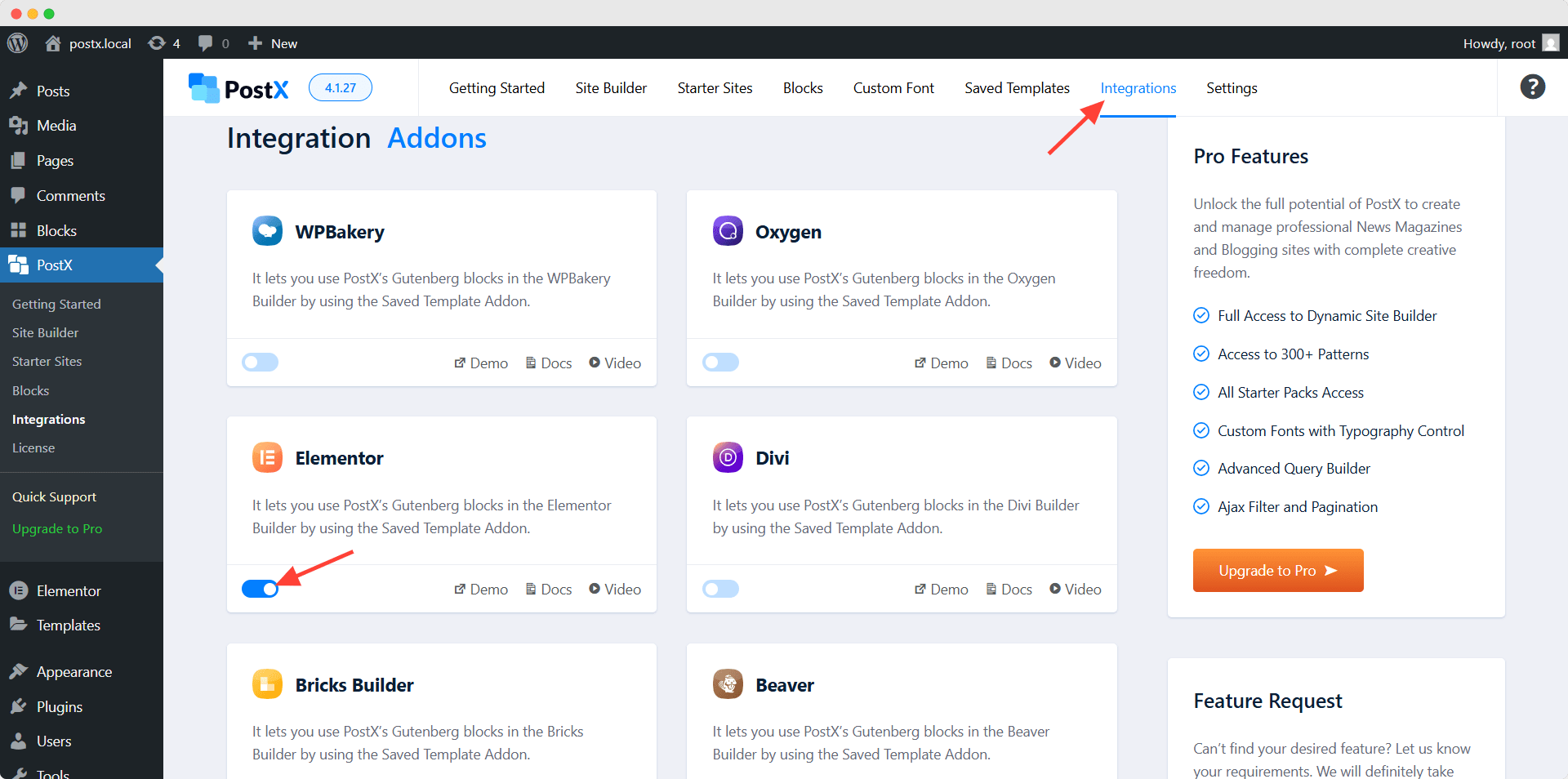
Smart Post follows a similar model. Its Gutenberg rebuild added Saved Template integrations for Elementor, Divi, WPBakery, Oxygen, Beaver Builder, and Bricks.
Neither plugin should be treated as Elementor-first or Divi-first. Gutenberg remains the primary editing environment, while Saved Templates extend layouts into other builders. Builder coverage is the one category where neither plugin leads, and that parity does not offset PostX’s advantage elsewhere.
3. Which Plugin Has the Larger Template Library?
👑 Verdict: PostX Wins for Template Library Depth
PostX wins for template library depth with 40+ Starter Sites, 366+ Page Templates, and 250+ patterns, while Smart Post offers 250+ Ready Patterns and a Smart Design Library but does not publish a comparable starter-site or page-template library.
Template Libraries Compared
PostX lists 40+ Starter Sites, 366+ Page Templates, and 250+ patterns. These resources operate at different levels of site creation, from individual Gutenberg sections to complete website structures for blogs, magazines, news sites, and other publishing niches.
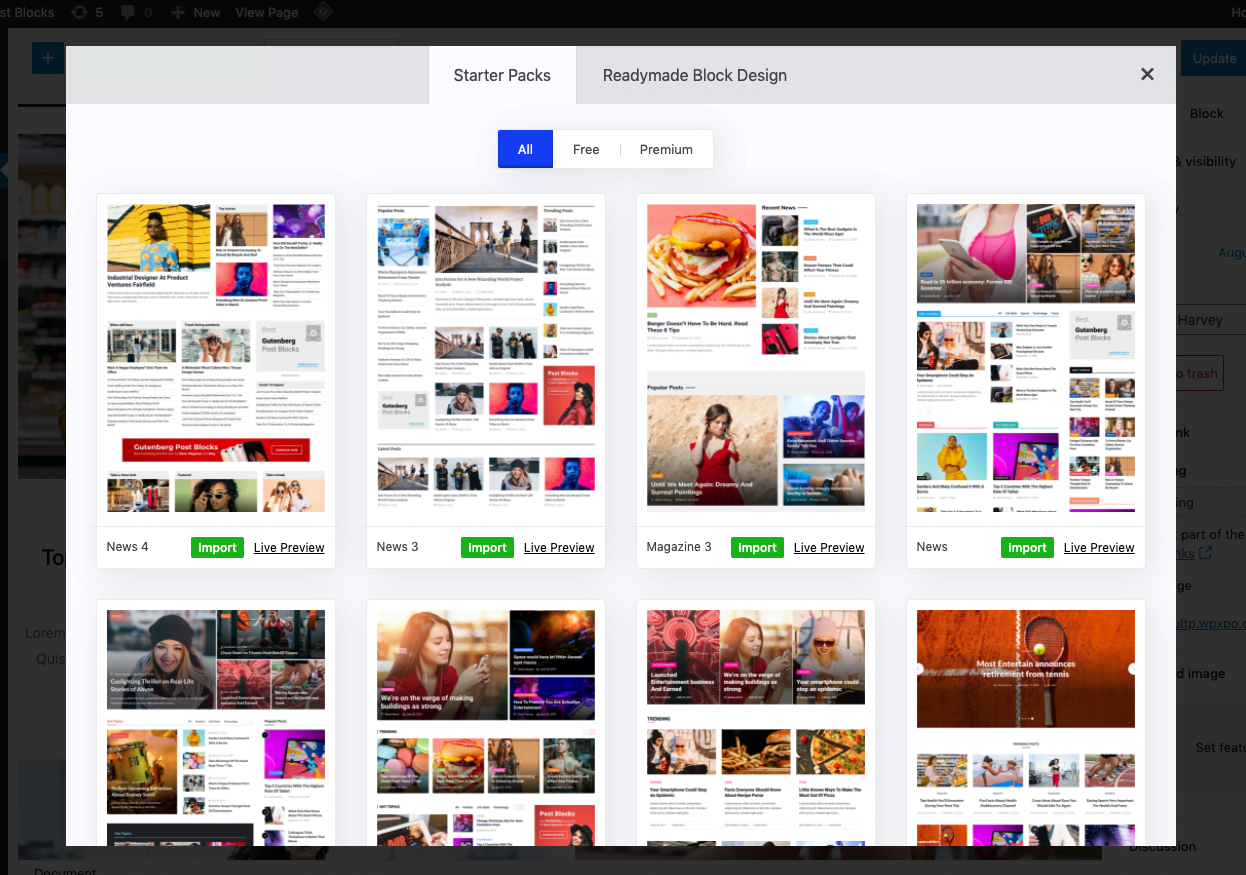
Patterns handle individual sections, page templates provide prepared pages, and Starter Sites give users a much larger site structure to begin with.
Smart Post promotes 250+ Ready Patterns and a Smart Design Library that imports prepared designs into Gutenberg. It does not publish a starter-site or page-template library on its own site.
PostX has the deeper library at the page and full-site level, with 366+ Page Templates and 40+ Starter Sites sitting above its pattern collection.
4. Which Plugin Offers More Advanced Features?
👑 Verdict: PostX Wins for Publishing Feature Depth
PostX wins for publishing feature depth with Dynamic Content, Front End Post Submission, 7+ AJAX filters, advanced querying, ChatGPT integration, taxonomy tools, and broader site-building controls, while Smart Post covers many core querying, filtering, styling, and post-metadata features.
Advanced Features Compared
PostX includes an Advanced Query Builder that supports posts, pages, custom post types, taxonomies, selected authors, specific posts, exclusions, related-post logic, multiple ordering options, Quick Query, and Unique Content Groups for reducing duplicate content across blocks.
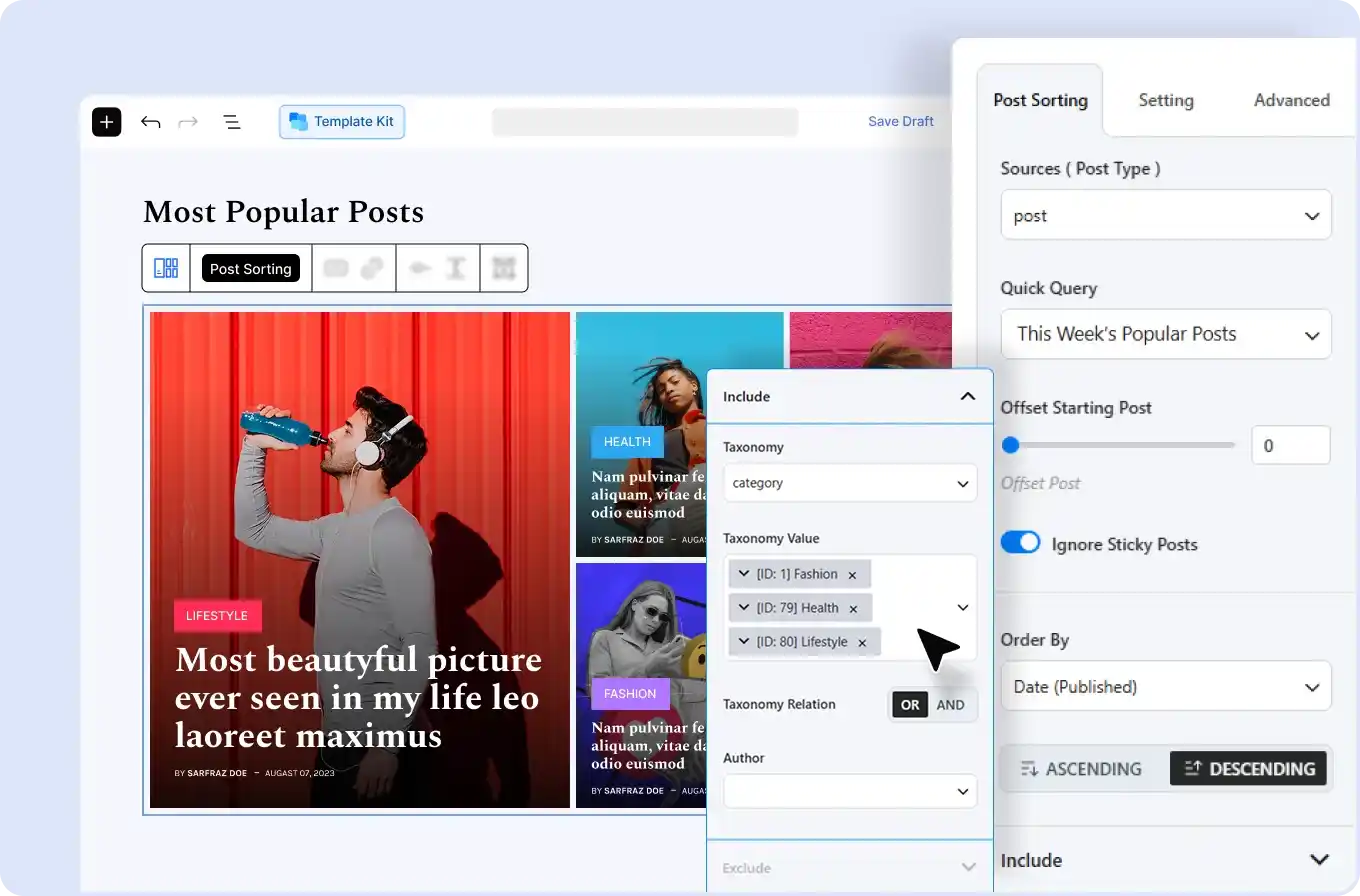
Its wider publishing toolkit includes 7+ AJAX filters, Dynamic Content, Front End Post Submission, ChatGPT integration, Progress Bar, Table of Contents, custom fonts, Taxonomy Image & Color, Saved Templates, advanced search, and AJAX pagination.
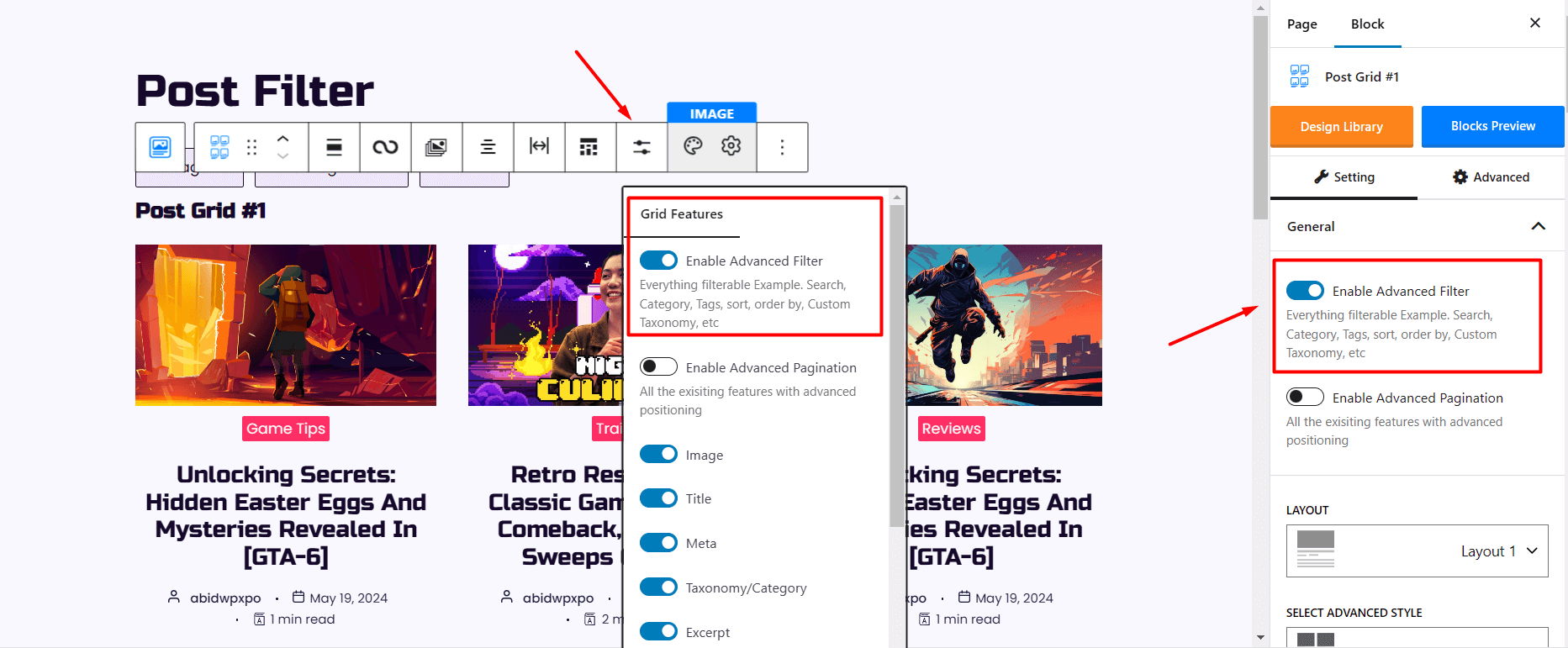
Smart Post’s post blocks can query posts, pages, and custom post types, filter by taxonomies, authors, keywords, custom fields, and other conditions, and combine those controls with live frontend filtering and pagination.
Its feature set includes Global Style Settings, Table of Contents, Smart Search, post badges, featured video, image galleries, view and like counters, reading-time blocks, Saved Templates, and custom CSS.
Smart Post documents integrations with Mailchimp, DeepSeek, and OpenWeather. Its ChatGPT and Google Maps features are still listed as upcoming and are not counted as active capabilities here.
Smart Post now covers most of the same general post-display and content-control ground. PostX keeps an advantage through Dynamic Content and Front End Post Submission alongside its query, filtering, and site-building tools.
5. Which Plugin Gives More Site-Building Control?
👑 Verdict: PostX Wins for Broader Dynamic Site Control
PostX wins for dynamic site control because its live builder covers home, single, archive, taxonomy, author, search, date, and 404 templates plus headers, footers, and mega menus, while Smart Post’s header, footer, and mega-menu builders remain unreleased.
Site-Building Capabilities Compared
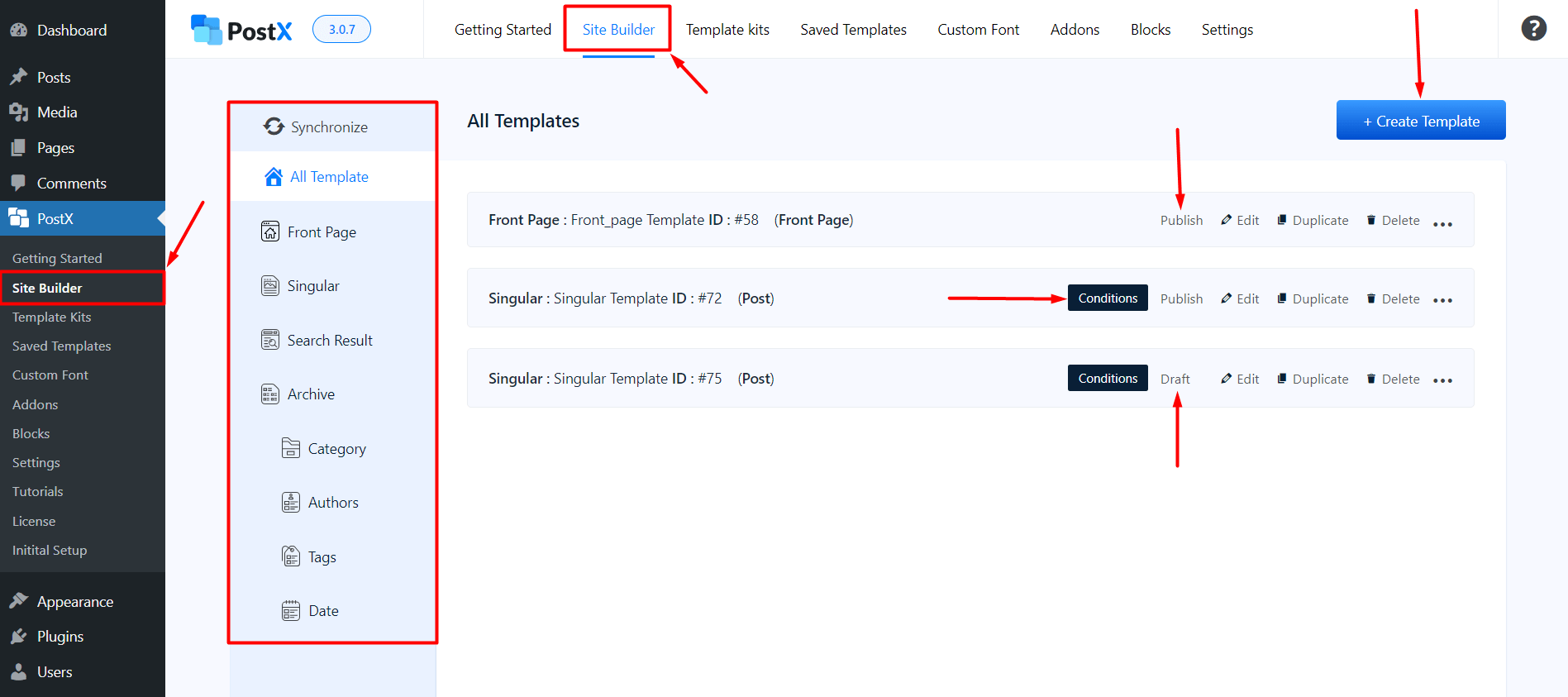
PostX’s Dynamic Site Builder supports templates for the homepage, single posts, single pages, archives, categories, tags, authors, search results, date archives, headers, footers, and 404 pages. Mega-menu functionality is also live.
This lets a publisher move from building individual post sections to controlling much of the site’s dynamic WordPress structure with the same plugin.
Smart Post has live Archive and Single Page Builders. Its documentation navigation lists 22 Website Builder blocks, while its WordPress.org listing counts 19+ Archive Builder blocks.
Smart Post’s Archive and Single Page Builders are live, and they work. Its header and footer builder, mega menu builder, starter sites, and a broader visual website builder are still listed as upcoming by the vendor on WordPress.org as of September 29, 2026. Smart Post’s site-building scope is real but narrower than PostX’s.
PostX’s advantage is larger than the earlier comparison implied. Its header, footer, and mega-menu builders are already live, while Smart Post still lists those capabilities as unreleased.
6. Which Plugin Has the Easier Post Grid Workflow?
👑 Verdict: Both Offer an Easy Gutenberg Post Grid Workflow
PostX and Smart Post tie for post-grid workflow because both let users build grids directly in Gutenberg with query controls, premade designs, filtering, pagination, and visual customization without requiring a separate page builder.
Post Grid Workflow Compared
With PostX, you add one of its Post Grid blocks in Gutenberg, select content through the Query Builder, choose or customize a layout, configure filtering and pagination where needed, and publish. Premade styles and patterns reduce the need to design every section manually.

The same workflow carries into Post Lists, Sliders, Modules, Saved Templates, and dynamic site templates.
Smart Post uses a similar block-editor process. You add a grid, select the layout, configure the Advanced Query Builder, adjust content orientation, enable frontend filters or pagination, and customize the design from the block settings. Post Grid 01, for example, puts nine layouts and eight orientations inside one block.
The Smart Design Library and Saved Templates give users prepared starting points as well.
For the core task of building a post grid, the workflows are comparable. PostX connects that process more directly to its wider publishing system, while Smart Post exposes more layout formats.
7. Which Plugin Gives Better Value for the Price?
👑 Verdict: PostX Wins for Broader Long-Term Value
PostX wins for broader long-term value because both plugins cost $39 yearly for one site, while PostX has the lower lifetime price at $119 versus $139 and includes 40+ Starter Sites, 366+ Page Templates, and wider publishing-site controls.
Pricing and Value Compared
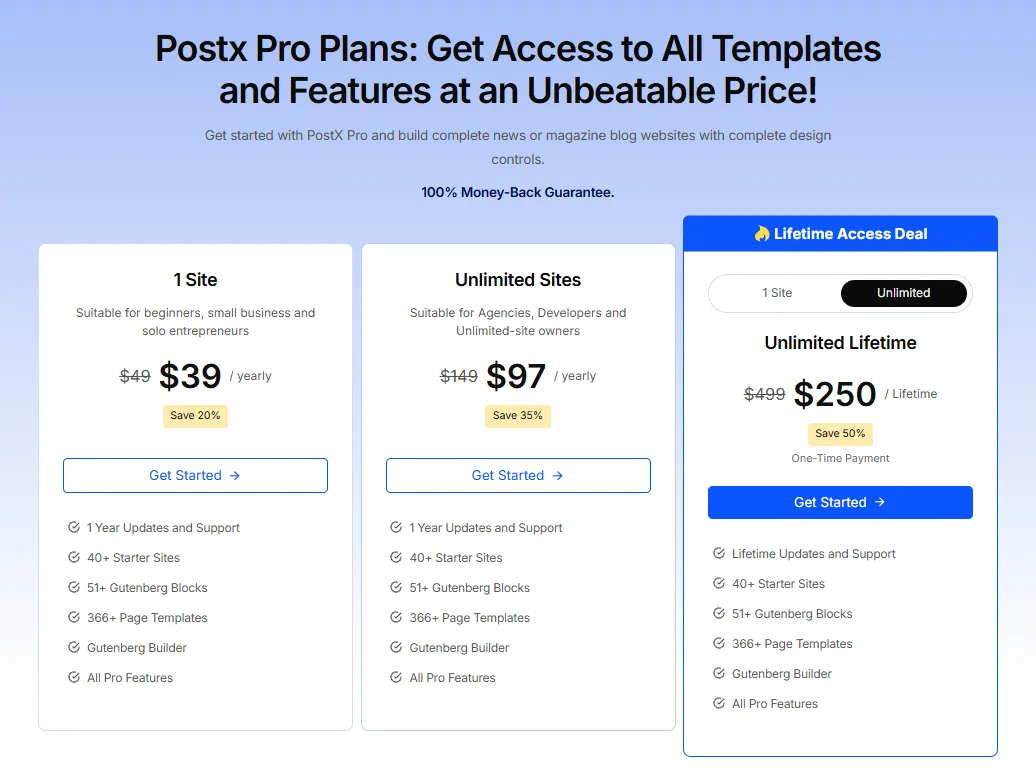
PostX lists its 1 Site yearly plan at $39, discounted from a listed $49. Its 1 Site Lifetime plan is $119, discounted from a listed $149. PostX includes a 14-day money-back guarantee.
Smart Post’s Single Site yearly plan is $39. Its Single Site lifetime offer is $139, discounted from a listed $278 price. Smart Post also has a 14-day money-back guarantee. The one-site annual entry price is effectively equal.
Smart Post gives paid users 60+ Gutenberg blocks, a wide range of post-display formats, live filters, advanced queries, global styles, website-building blocks, and 250+ Ready Patterns.
PostX’s pricing page lists 51+ Gutenberg blocks, alongside 40+ Starter Sites, 366+ Page Templates, 250+ patterns, Dynamic Content, frontend submission, advanced filtering, and wider dynamic-site controls.
For users focused mainly on post-display variety, Smart Post offers plenty at the same yearly starting price. PostX becomes more attractive when the lower lifetime price, Starter Sites, page templates, and broader publishing features are part of the decision.
8. Which Plugin Has Better Support and Updates?
👑 Verdict: PostX Edges Ahead on Public Review Footprint
PostX edges ahead on public review footprint with a 4.8 out of 5 WordPress.org rating from 265 reviews versus Smart Post’s 4.7 from 209, while both plugins show active 2026 development and their Trustpilot ratings belong to their parent companies rather than the individual plugins.
Support and Update Records Compared
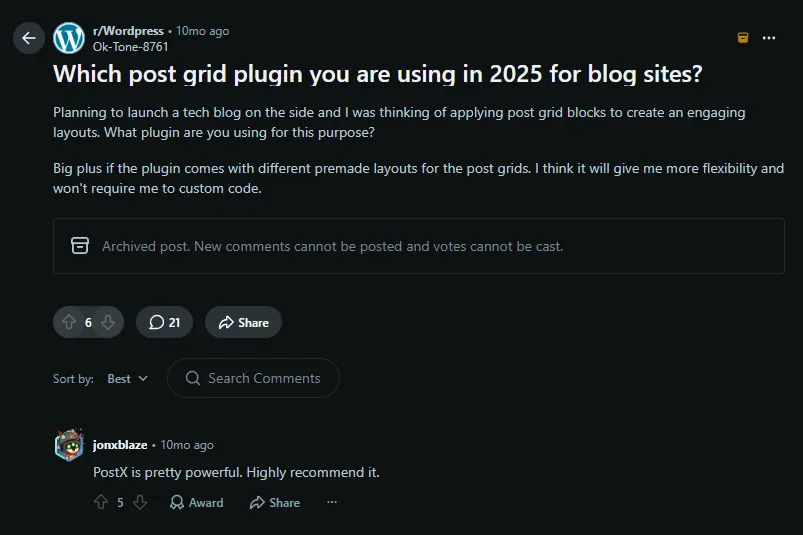
PostX has a 4.8 out of 5 WordPress.org rating from 265 reviews. WordPress.org lists version 5.0.41, released on September 16, 2026, following other fixes and compatibility releases during the year.
WPXPO’s Trustpilot profile shows 4.9 out of 5 from 446 reviews. That rating belongs to WPXPO as a company rather than to PostX alone.
Smart Post has a 4.7 out of 5 WordPress.org rating from 209 reviews. Version 4.0.8 was released on September 2, 2026. That release patched two security issues reported by WPScan, while the larger version 4.0 rebuild earlier in 2026 added 18 new dynamic blocks and six page-builder integrations.
Smart Post has no Trustpilot profile of its own. The 4.9 out of 5 rating shown on its site comes from ShapedPlugin, the company that develops Smart Post along with several other plugins, and that company profile currently shows 173 reviews.
Both Trustpilot ratings are company-level profiles rather than plugin-specific ones, so they reflect vendor support reputation more than any single product.
The public evidence favors PostX on review footprint, while the release histories show that both plugins remain actively maintained.
How We Evaluated PostX and Smart Post
We compared PostX and Smart Post using the same criteria that matter when choosing a WordPress post-display plugin. The comparison starts with their primary job, building and managing post layouts, then considers how far each product extends beyond those layouts.
The post-display comparison covers grids, lists, sliders, carousels, modules, timelines, filtering, pagination, query controls, and premade designs.
Editor and page-builder compatibility matters because both products are Gutenberg-first. We considered how their layouts can also be reused inside Elementor, Divi, Bricks, Beaver Builder, Oxygen, and WPBakery.
Template depth and site-building scope cover patterns, page templates, Starter Sites, archive and single-page building, headers, footers, and other publishing-site controls.
Advanced publishing features, pricing, support, and recent maintenance complete the comparison.
Feature comparisons in this article reflect each plugin’s paid tier, since both products are compared at their paid entry price. Free versions of both plugins ship a reduced feature set. Four of Smart Post’s 19 dedicated post formats are Pro-only: Post Grid 04, Post Slider 02, Post Thumbnail Slider 02, and Post List 02. On PostX, the advanced query options, front end submission, AI integration, mega menu, reading progress bar, search block, and video popup are Pro-only, and the free version includes 3 starter sites, 24+ patterns, and 30+ templates against 40+, 250+, and 366+ in Pro.
Features that Smart Post still explicitly marks as Upcoming, including Dynamic Data & Fields, were not counted as active capabilities or used to determine a winner.
FAQs About PostX vs Smart Post
Q: Are PostX and Smart Post Both Gutenberg Plugins?
Yes. Gutenberg is the primary editing environment for both. PostX’s pricing page lists 51+ Gutenberg blocks, while Smart Post lists 60+ blocks. Both can also reuse saved layouts in several external page builders.
Q: Which Plugin Has More Post Display Types?
It depends on what you count. Smart Post has more distinct formats, including grids, lists, carousels, sliders, thumbnail sliders, timelines, and a news ticker. PostX has more layout depth inside its core Grid, List, and Module families, plus 50+ premade grid styles, the 2 composite Post Module blocks, and 366+ page templates you can reuse as finished pages.
Q: Can I Use PostX or Smart Post With Elementor?
Yes. Both support Elementor through saved or reusable template workflows. They also support Divi, Bricks, Beaver Builder, Oxygen, and WPBakery.
Q: Do Both Plugins Support Custom Post Types?
Yes. Both plugins can query and display custom post types. Smart Post’s post blocks support custom-field filtering, while PostX’s Advanced Query Builder handles custom post types, taxonomies, authors, exclusions, and related-post logic.
Q: Can Both Plugins Build Single Post and Archive Templates?
Yes. Smart Post has live Single Page and Archive Page Builders. PostX supports single and archive templates and extends its Dynamic Site Builder to categories, tags, authors, search, date archives, headers, footers, and 404 pages.
Q: Which Plugin Has More Ready-Made Designs?
PostX has the larger published full-site and page-template library with 40+ Starter Sites, 366+ Page Templates, and 250+ patterns. Smart Post promotes 250+ Ready Patterns and a Smart Design Library, but it does not publish a starter-site or page-template library of its own.
Which Post Grid Plugin Should You Choose?
The choice comes down to whether you want more formats or more depth inside the formats you use. PostX provides deeper publishing and site-building tooling around its grids, lists, sliders, and modules, while Smart Post covers more distinct display formats.
Choose PostX if you want 7 Grid blocks, 4 List blocks, 2 Sliders, 2 Post Modules, 50+ premade grid styles, 40+ Starter Sites, 366+ Page Templates, advanced querying, AJAX filtering, Dynamic Content, and a Gutenberg site builder that reaches across much of a publishing website.
Choose Smart Post if you need more distinct display formats, including dedicated grids, lists, carousels, sliders, thumbnail sliders, timelines, and a news ticker, alongside 60+ Gutenberg blocks, advanced queries, frontend filtering, and global styles. Its header, footer, and mega-menu builders are still unreleased.
Smart Post has become a closer PostX competitor since its 2026 Gutenberg rebuild. It now competes directly on layouts, queries, filtering, patterns, and live archive and single-page building. PostX still goes further when the goal is to connect post layouts to a broader Gutenberg publishing workflow with live site-wide template controls.


