

You do not need a premium B2B system just to start wholesaling with WooCommerce. Several free wholesale plugins can handle pricing, customer roles, registration, access controls, and other parts of the B2B buying process.
The difference is how much of that workflow each free version actually covers.
Some of the best free WooCommerce wholesale plugins are WholesaleX, B2BKing, Whols, Wholesale Suite, and Wholesale for WooCommerce by WPExperts.
In this guide, we compare these five plugins based on the core operations needed to run a basic wholesale store. Then, we show how to set up that workflow for free using WholesaleX.
What Do You Need to Run a WooCommerce Wholesale Store for Free?
Wholesale pricing is only one part of running a B2B store. A practical wholesale setup usually needs four core capabilities:
- Wholesale pricing discount: Give eligible customers different product prices or discounts.
- Customer segmentation: Separate distributors, retailers, resellers, VIP buyers, or other customer groups.
- B2B customer onboarding: Let business buyers register and approve them before giving access when necessary.
- B2B purchasing and access controls: Adjust how wholesale customers interact with payments, shipping, taxes, coupons, products, or private areas of the store.
A useful way to think about the workflow is:
Wholesale Pricing → Customer Role → Registration → Approval → B2B Purchase
Features such as bulk order forms, request-a-quote systems, subaccounts, wallets, and sophisticated quantity rules can become important as a wholesale business grows. But you do not necessarily need all of them to start serving B2B customers.
That is the standard we use below: how much of the basic wholesale customer journey can you operate with the free plugin?
Best Free WooCommerce Wholesale Plugins Compared
| Plugin | Wholesale Pricing | Multiple Roles/Groups | B2B Registration | B2B Purchasing Controls | Restricted/Private Access |
|---|---|---|---|---|---|
| WholesaleX | Yes | Unlimited roles | Yes | Payment, shipping, tax, coupon and role controls | Yes |
| B2BKing | Yes | Yes, customer groups | Limited in Free | Payment, shipping, discounts and customer controls | Advanced private-store features require Premium |
| Whols | Yes | One core wholesale role in Free | Yes | Tax, coupons, free shipping, quotes and saved order lists | Yes |
| Wholesale Suite | Yes | One wholesale role | Dedicated registration requires paid suite | Basic coupon/tax/display controls | Basic catalog/private-store mode |
| Wholesale for WooCommerce by WPExperts | Yes | One wholesaler role in Free | Yes | Basic pricing and visibility controls | Full private wholesale store requires Pro |
The table already shows an important distinction. Some free plugins concentrate primarily on wholesale pricing, while others cover more of the B2B customer journey.
WholesaleX — Best for a Complete Basic Wholesale Workflow
WholesaleX is particularly useful when you want the free plugin to handle more than discounted product prices.
Its free functionality covers the main stages of a basic wholesale operation:
- assigning wholesale pricing,
- creating B2B roles,
- registering and approving customers,
- controlling payment and shipping availability,
- applying tax or coupon rules, and
- configuring private-store access.
That makes it possible to manage both the commercial side of wholesaling and much of the customer-access workflow without immediately adding several separate plugins.
Learn more about the comparison between WholesaleX and Wholesale Suite.
What You Get with WholesaleX Free
Some of the most relevant free capabilities include:
- Unlimited B2B user roles
- Role-based wholesale pricing
- B2B registration form
- Automatic or manual registration approval
- Payment-method availability by role
- Shipping-method availability by role
- Tax rules
- Coupon restrictions
- B2B, B2C, or hybrid store modes
- Private-store and login-based access controls
- Product-, category-, and customer-level pricing options
What Requires WholesaleX Pro
You will need WholesaleX Pro for more advanced B2B workflows such as:
- Bulk Order Form and Bulk Order Table
- Purchase Lists
- Request a Quote
- Conversations
- Subaccounts and order approval
- Wallet/store credit
- tiered pricing discount
- Order quantity and order value restrictions
- Advanced role-based product and price visibility restrictions
So the free version is not intended to replace every advanced B2B feature. Its advantage is that the basic wholesale workflow is already broad enough to operate without paying first.
Other Free WooCommerce Wholesale Plugins Worth Considering
B2BKing
B2BKing Free is a strong option for stores focused on customer groups, wholesale pricing, and role-based purchasing rules.
Free highlights:
- Wholesale pricing for simple and variable products
- Customer groups
- Group-based payment and shipping methods
- Percentage discounts through dynamic rules
- Customer approval and account management tools
Main limitation: More advanced B2B registration, custom registration fields, wholesale order forms, private-store functionality, and tiered pricing require Premium.
Whols
Whols offers a broad free feature set that combines wholesale pricing, customer onboarding, and several buyer-facing tools.
Free highlights:
- Wholesale pricing for simple and variable products
- Global discounts and minimum quantities
- Wholesale registration and manual approval
- Price and product visibility controls
- Tax exclusion and free shipping
- Request a Quote
- Save Order List
Main limitation: Multiple wholesale roles and role-specific pricing for different wholesaler groups require Premium.
Wholesale Suite
Wholesale Suite‘s free Wholesale Prices plugin is best suited to stores that mainly need simple, established wholesale pricing.
Free highlights:
- One Wholesale Customer role
- Separate wholesale prices for simple and variable products
- Retail-price visibility controls
- Coupon restrictions
- Basic catalog/private-store behavior
Main limitation: Multiple wholesale roles, registration and approval, advanced pricing, product visibility, minimum-order rules, and the dedicated wholesale order form require paid extensions.
Wholesale for WooCommerce by WPExperts
Wholesale for WooCommerce by WPExperts provides a capable free setup for wholesale pricing, tier discounts, and customer registration.
Free highlights:
- Fixed or percentage wholesale pricing
- Pricing for product variations
- Quantity-based tiered pricing
- Wholesale registration
- Automatic or manual approval
- Price visibility controls
- Wholesaler role management
Main limitation: Unlimited roles, bulk-order tables, Request a Quote, private-store functionality, advanced registration fields, and role-based tax, shipping, payment, and minimum-order controls require Pro.
How to Set Up a WooCommerce Wholesale Store for Free
WholesaleX is best suited to WooCommerce stores that want an all-in-one B2B and wholesale solution, bringing customer roles, wholesale pricing, registration, and role-based purchasing controls into one workflow – without the setup complexity of other plugins in market.
You can set up the basic wholesale workflow with WholesaleX Free in six steps:
Install & choose store type → Set pricing → Create customer roles → Configure buying conditions → Set up registration → Test the workflow
Step 1: Install WholesaleX and Choose Your Store Type
Install and activate WholesaleX from your WordPress dashboard.
Then go to WholesaleX → Settings → General Settings and choose your store type:
- B2B: Wholesale-only store
- B2C: Retail-only store
- B2B & B2C: Run retail and wholesale from the same store
If you already have a retail WooCommerce store and want to add wholesale selling, choose B2B & B2C.
Step 2: Create Your Wholesale Pricing
Start by deciding what wholesale customers should pay.
Go to WholesaleX → Wholesale Price and create your wholesale pricing rule.
Depending on your pricing strategy, you can:
- Apply percentage discounts
- Apply fixed discounts
- Set a fixed wholesale price
- Target specific products, categories, or eligible customers/user roles.
For example, you could offer a 20% wholesale discount across a product category or set specific wholesale prices for selected users.
Keep the first pricing structure simple. You can introduce more advanced pricing conditions later when your wholesale operation requires them.
Step 3: Create Your Wholesale Customer Roles
Next, define which customers should receive your wholesale pricing and purchasing conditions.
Go to WholesaleX → User Roles and create the customer groups you need.
For example:
- Regular B2B
- Distributor
- VIP Wholesale
If all wholesale customers receive the same prices and conditions, one role may be enough. Create multiple roles only when different customer groups need different pricing or buying rules.
You can then connect the appropriate wholesale pricing and conditions to each role.
Step 4: Configure Role-Based Buying Conditions
After creating the roles, define how each type of wholesale customer can purchase from your store.
From the user-role settings, configure the relevant conditions, such as:
- Available payment methods
- Available shipping methods
- Tax rules
- Coupon restrictions
- Registration approval method
For example, your Distributor role might receive wholesale pricing, bank-transfer payment, specific shipping methods, and different tax settings.
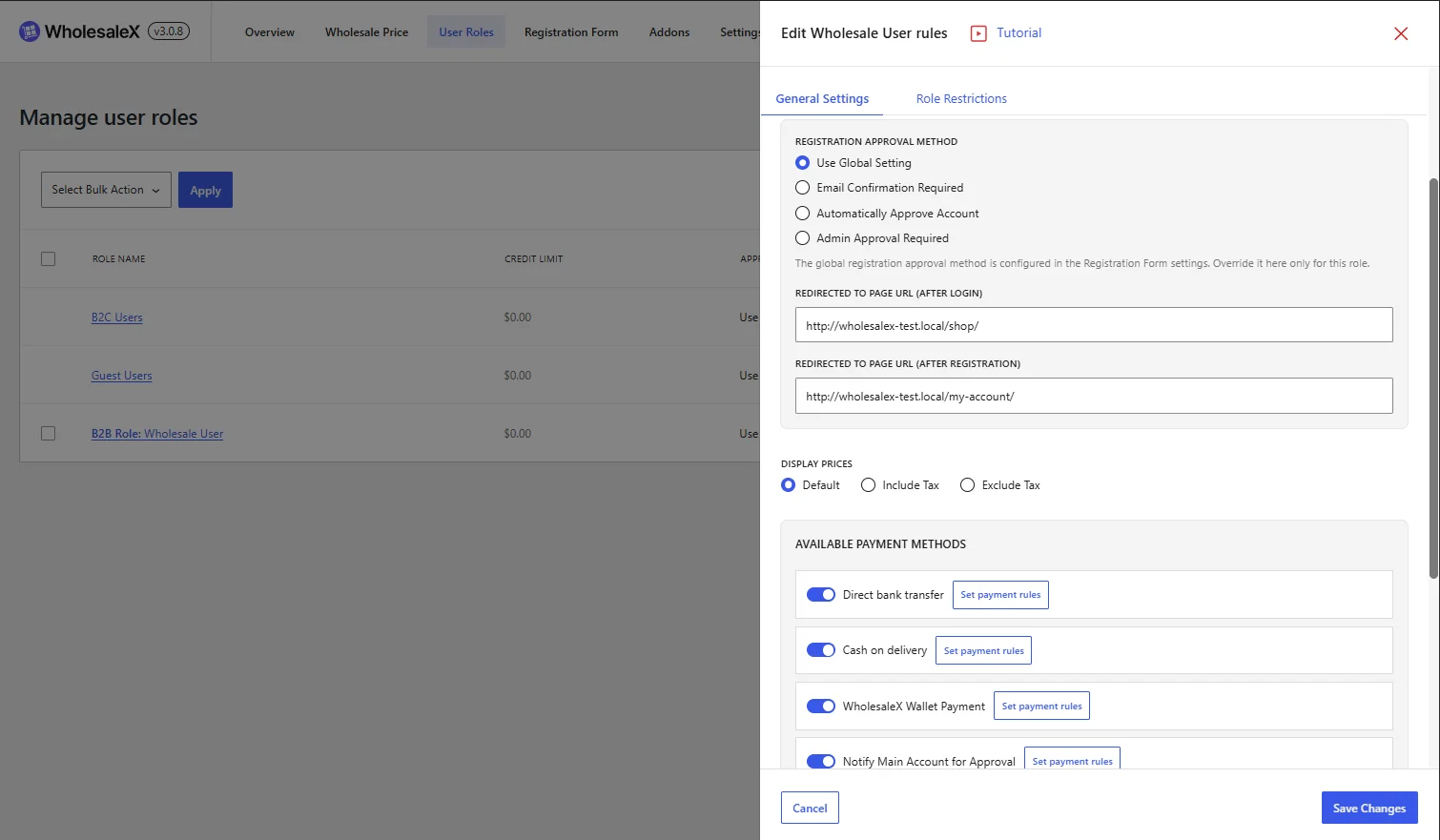
This is where the wholesale role becomes more than a customer label. It controls the buying experience for that customer group.
Step 5: Set Up B2B Registration and Customer Onboarding
Once your wholesale pricing, roles, and buying conditions are ready, configure how new B2B customers enter the system.
Go to WholesaleX → Registration Form and set up your B2B registration process.
You can configure:
- Registration fields
- Customer role selection
- Registration approval
- Login behavior
- Redirects after registration
- Registration form visibility
If you want to review wholesale applications before giving access, enable Admin Approval Required.
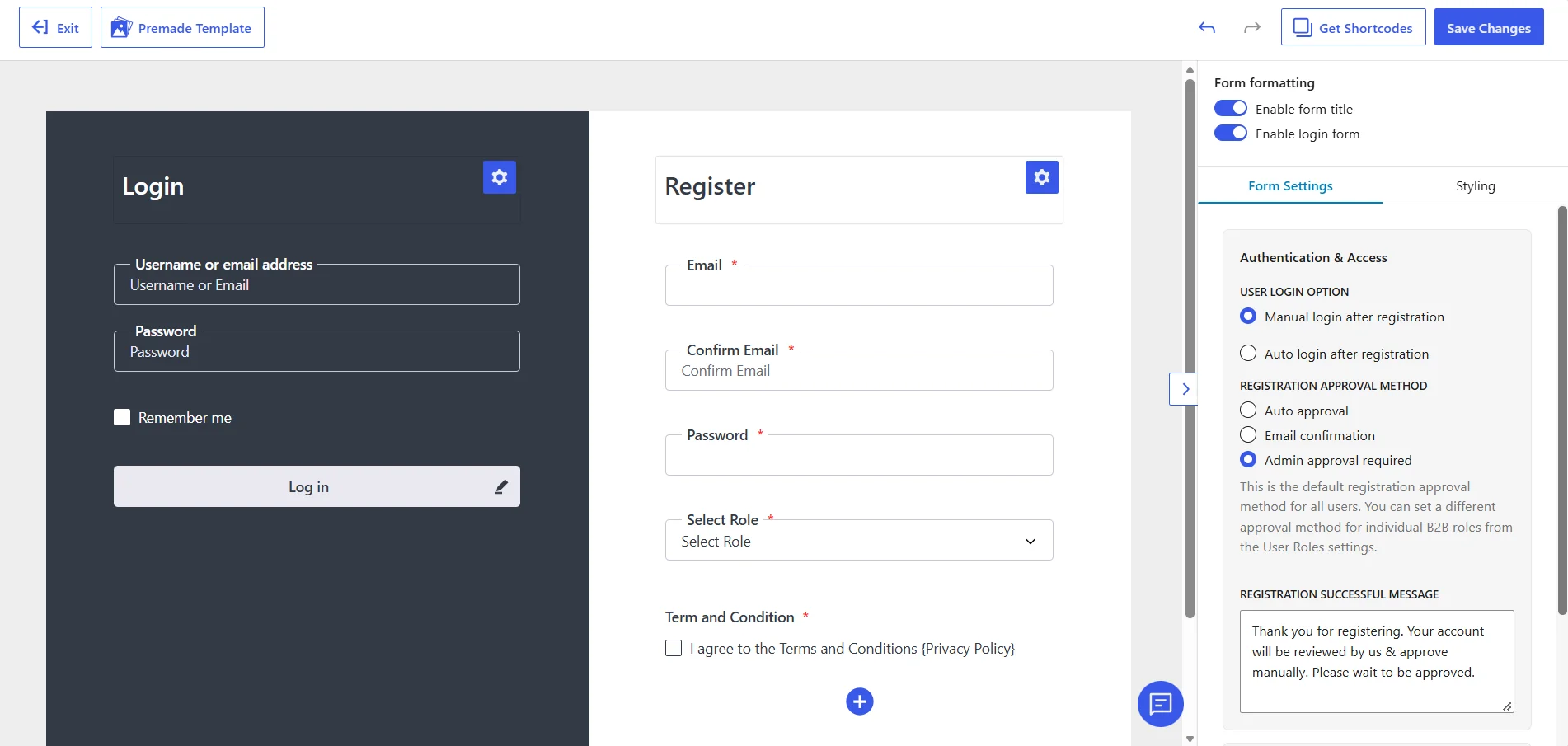
The basic onboarding flow then becomes:
Customer registers → You review the application → Customer receives the appropriate wholesale role → Wholesale pricing and buying conditions apply
Step 6: Test the Complete Wholesale Customer Journey
Before opening the workflow to real customers, test it from the buyer’s perspective.
Run through the complete process:
Register → Approve account → Assign/confirm role → Log in → Check wholesale price → Check payment and shipping options → Place a test order
Verify that:
- The correct wholesale price appears
- The customer has the correct role
- Payment and shipping methods match the role settings
- Tax and coupon rules behave as expected
- Restricted content or store access works correctly
If the test customer can move through the complete journey with the intended pricing and purchasing conditions, your basic wholesale setup is ready.
Which Free WooCommerce Wholesale Plugin Should You Choose?
| If you need… | Choose… |
|---|---|
| A complete basic wholesale workflow in one free plugin, including B2B registration, approval, multiple customer roles, wholesale pricing, role-based purchasing controls, and private-store options | WholesaleX |
| Customer groups, wholesale pricing, and payment/shipping rules, without needing a complete free B2B registration workflow | B2BKing |
| Wholesale registration, pricing, visibility controls, Request a Quote, and saved-order functionality in the free version | Whols |
| A simple and established way to give one wholesale customer role separate wholesale prices | Wholesale Suite |
| Wholesale pricing, tiered discounts, and registration approval, with more advanced B2B controls available through Pro | Wholesale for WooCommerce by WPExperts |
If your goal is to build the core wholesale customer journey without paying first, WholesaleX provides the broadest fit for the workflow covered in this guide: pricing → customer roles → buying conditions → registration and onboarding.
When Is a Free Wholesale Plugin No Longer Enough?
A free plugin can be sufficient for getting a basic wholesale operation running, but the workflow usually becomes more demanding as order volume and customer complexity grow.
You may need additional functionality when buyers expect to:
- Order many products from a dedicated bulk-order interface
- Request and negotiate custom quotes
- Create multiple company users or subaccounts
- Save reusable purchase lists
- Pay with store credit
- Follow sophisticated minimum, maximum, or tiered quantity rules
- Use more granular product, price, checkout, or account restrictions
At that point, the decision is no longer simply “Which plugin is free?” It becomes “Which paid system best supports the way our B2B customers actually buy?”
For WholesaleX users, features such as Bulk Order, Request a Quote, Conversations, Subaccounts, Wallet, and advanced pricing/restriction rules are available through WholesaleX Pro.
Conclusion
You can build a functional WooCommerce wholesale store without purchasing a premium B2B plugin on day one.
The key is to cover the complete basic workflow: set wholesale pricing, create customer roles, configure role-based buying conditions, and set up B2B registration and onboarding.
WholesaleX Free is particularly well suited to that approach because those core stages can be managed within the same plugin.
Start with the free workflow, test it with a real wholesale customer journey, and add advanced B2B functionality only when the operation genuinely requires it.


