

If you have a WooCommerce store, you have probably realized that the default order confirmation email is not enough. Customers need proper invoices for accounting, tax compliance, and refunds. Without the right plugin, you would have to create every PDF manually – and that does not scale.
Also, you may want to add VAT details, attach packing slips, or let customers download documents from their account page. But without a dedicated invoice tool, these workflows are hard to standardize.
That is where plugins like WowInvoice and WebToffee PDF Invoices come in. Both plugins generate PDF invoices and attach them to WooCommerce emails. But they take different approaches and features when it comes to document types, pricing, and compliance.
While WebToffee has been a popular choice for many WooCommerce stores for years, WowInvoice brings a more comprehensive approach – particularly if you need more than just invoices in a single plugin.
Here is the head-to-head comparison between these two plugins:
Quick Comparison: WowInvoice vs. WebToffee PDF Invoices
I tested both plugins and noted the core differences that matter most when choosing an invoice solution. Here are the comparison factors you should take note of:
| Feature | WowInvoice | WebToffee PDF Invoices |
|---|---|---|
| Document Types | 6 document support in one plugin (Invoice, Packing Slip, Picklist, Shipping Label, Delivery Note, Credit Note) | 5 document support in one plugin (Invoice, Packing Slip, Shipping Label, Dispatch Label, Delivery Note) |
| EU VAT Compliance | Yes – VAT checkout field + integrations with Germanized, EU VAT Assistant, EU VAT Guard, and more | Yes – populates standard tax meta-keys (_billing_vat, _billing_eu_vat_number) and works with Aelia EU VAT Assistant |
| Pricing Model (Yearly) | 1 Site: $69 Unlimited Sites: $149 (introductory discount available) | Single Site: $69 /year; Up to 5 Sites: $99 /year; Up to 25 Sites: $199 /year |
| Lifetime License | Yes – 1 Site: $299; Unlimited sites: $599 (introductory discount available) | No – recurring yearly subscription only |
| Template Customization | Premade templates + fully customizable builder included | Visual/code editor included; drag-and-drop customizer is a separate paid add-on ($39/yr) |
| Bulk Export / Print | Yes | Yes |
| Email Automation | Yes – order status based | Yes – order status based |
| My Account Download | Yes | Yes |
| RTL Support | Yes (Arabic, Hebrew, Persian, Urdu) | Yes |
| UBL / XML Invoicing | Yes – UBL 2.1, PEPPOL, Austrian, Italian, Dutch, Spanish, Romanian | Yes – PEPPOL, Austrian, Italian, Dutch, Spanish, Romanian |
| Cloud Backup | No | Yes – Dropbox auto-backup |
| Barcode / QR Code | Yes | Yes – but needs a separate plugin |
From this comparison table, it can be seen that WowInvoice provides a broader set of document types and fulfillment tools in a single plugin, while WebToffee excels in cloud backup, remote printing, and payment link features.
What is a WooCommerce Invoice Plugin?
A WooCommerce invoice plugin automatically generates PDF invoices and related documents for every order. Instead of creating each file manually, the plugin pulls order data such as customer name, products, taxes, totals – and formats it into a professional, print-ready document.
These plugins are essential for stores that need:
- Legal compliance – EU VAT invoices, tax IDs, and sequential numbering requirements make manual documents risky.
- Accounting accuracy – itemized tax breakdowns and totals simplify bookkeeping and tax filing.
- Customer professionalism – branded invoices with your logo and terms build trust.
- Fulfillment clarity – packing slips, picklists, and shipping labels keep warehouses running smoothly.
Real-life examples:
- An EU-based store generating VAT-compliant invoices with the customer’s VAT number displayed.
- A clothing brand attaching packing slips and picklists so warehouse staff can pick and pack without errors.
- A dropshipping store adding shipping labels and delivery notes automatically when an order is placed.
Finding the Right WooCommerce Invoice Plugin for Your Store
There are dozens of WooCommerce invoice plugins available. But here is the truth: not all of them offer the same scope, especially when it comes to document types and pricing models.
Some plugins cover only invoices and packing slips. Others require you to buy separate add-ons for shipping labels, picklists, or credit notes. And if you are on a budget, recurring yearly payments for multiple add-ons can add up fast.
In this post, let us compare two popular choices:
- WowInvoice – an all-in-one invoice plugin with multiple document types, EU VAT support, and a lifetime license option.
- WebToffee PDF Invoices – a widely used plugin focused on invoices, packing slips, and credit notes.
What Features We Put More Importance on for this Comparison
Here are the key factors to consider when choosing the best WooCommerce invoice plugin for your store:
Document Coverage: Do you only need invoices, or do you also require packing slips, shipping labels, delivery notes, picklists, and credit notes? The fewer plugins you need, the simpler your workflow, the fewer compatibility issues, and the less money each year on multiple tools.
Template Customization: Can you brand the documents with your logo, colors, and layout? Does the builder allow you to make changes in real time, and is it interactive, or does it require code? A polished template saves time and looks professional to customers.
Automation and Triggers: The plugin should generate documents automatically when an order reaches a specific status. It should also attach them to the correct WooCommerce emails without manual work.
EU VAT and Tax Compliance: If you sell to the EU or UK, your invoices must display VAT numbers, apply reverse-charge rules, and meet country-specific formatting rules. The plugin should either handle this natively or integrate cleanly with dedicated VAT tools.
Pricing and License Model: Yearly subscriptions are common, but lifetime licenses can offer better long-term value. Also check whether the price covers all document types or if you need to pay extra for add-ons.
Detailed Comparison Between WowInvoice and WebToffee PDF Invoices
You have already seen the quick comparison table and got an idea of how each plugin performs. But if you want to explore more about each feature, this section will provide a detailed explanation.
# Document Types and Scope
While many PDF invoice plugins need you to use different plugins or paid upgrades to create document types such as packing slips and picklists, WowInvoice takes a consolidated approach. In one plugin, you get PDF invoices, packing slips, picklists, shipping labels, delivery notes, credit notes, and UBL invoices.
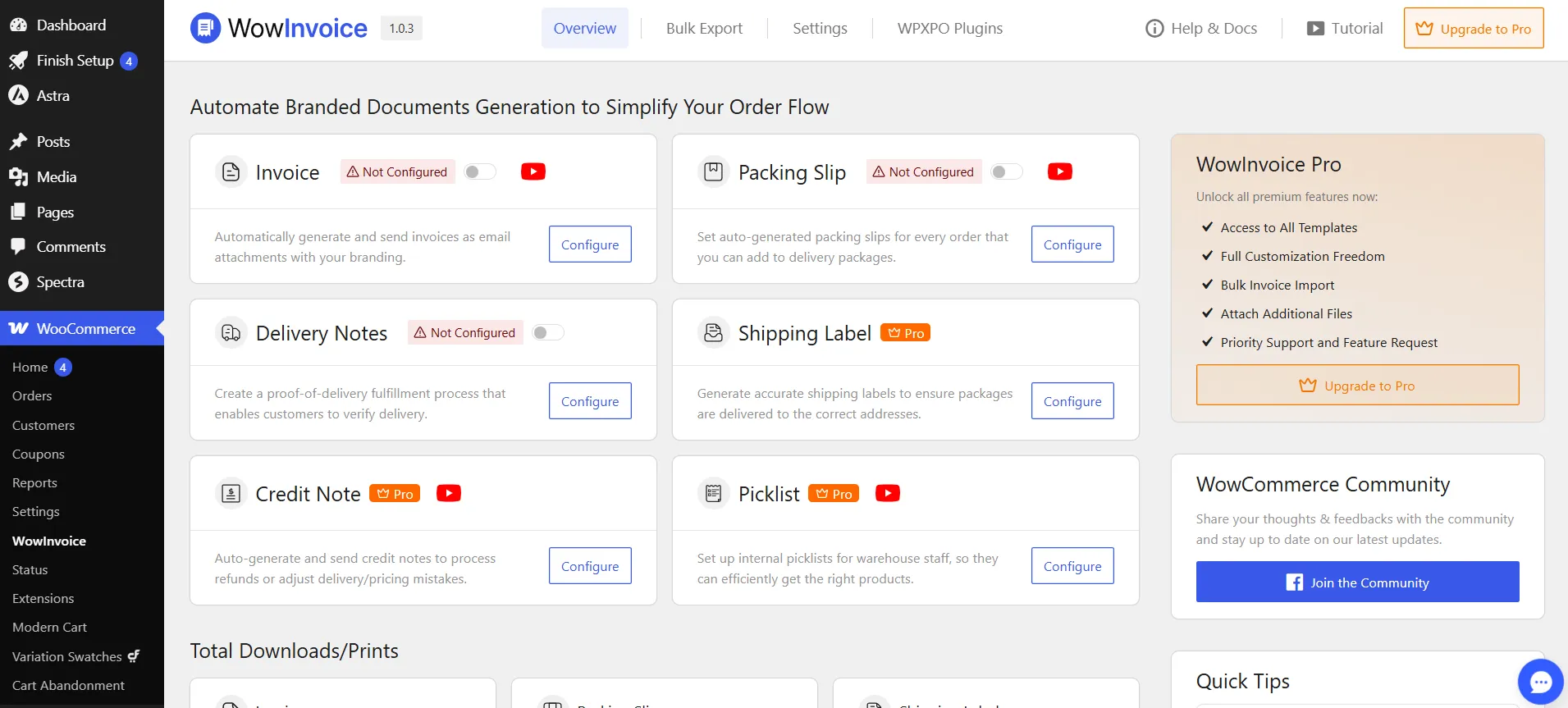
No upsell pages, no extra paid addons, no switching between support tickets across five vendors. For stores that process physical goods, this flexibility changes the entire workflow.
On the other hand, WebToffee’s Invoice plugin supports 5 types of documents in one plugin – close to what WowInvoice offers. It lets you create an invoice, packing slip, shipping label, dispatch label, and delivery note.
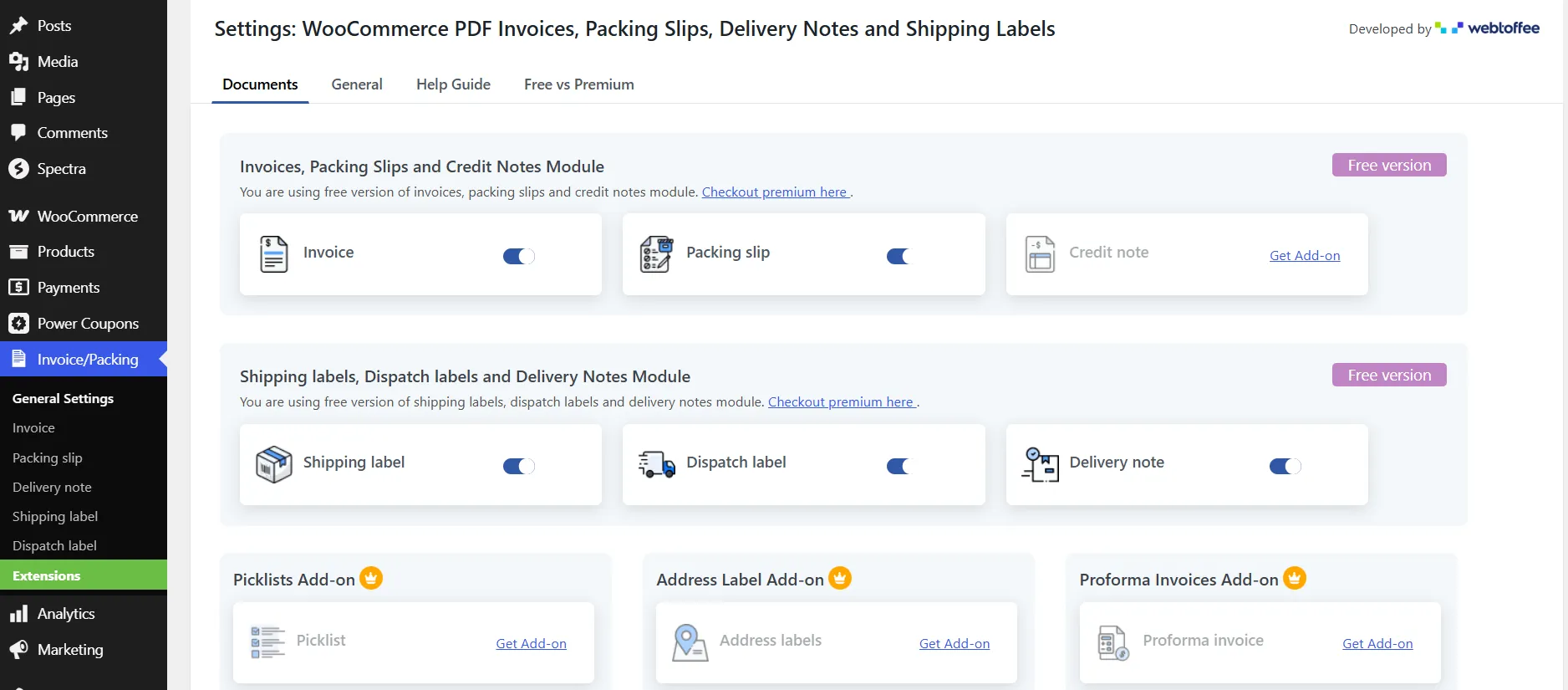
While both plugins support multiple document types – if you need picklists and credit notes without requiring a separate plugin or paid add-on, WowInvoice should be the choice.
# Template Customization
Both plugins offer premade templates and a user-friendly invoice builder. I found both of their builder to be interactive – meaning you can click on a specific element of the invoice and make changes to it from the settings very easily.
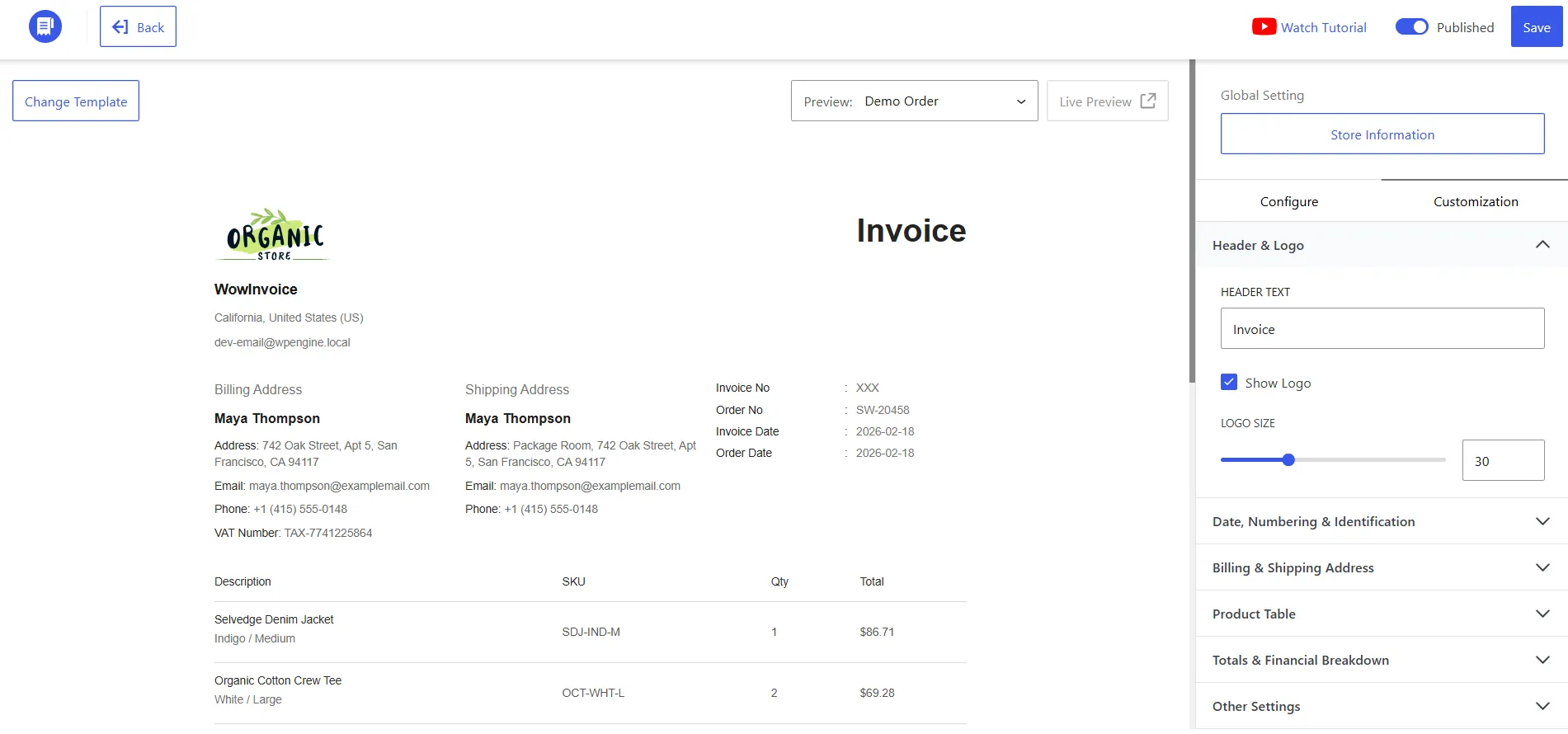
WowInvoice includes a customizable invoice builder with premade designs out of the box. You can change logos, colors, layouts, product table columns, tax display, and watermark text without writing code.
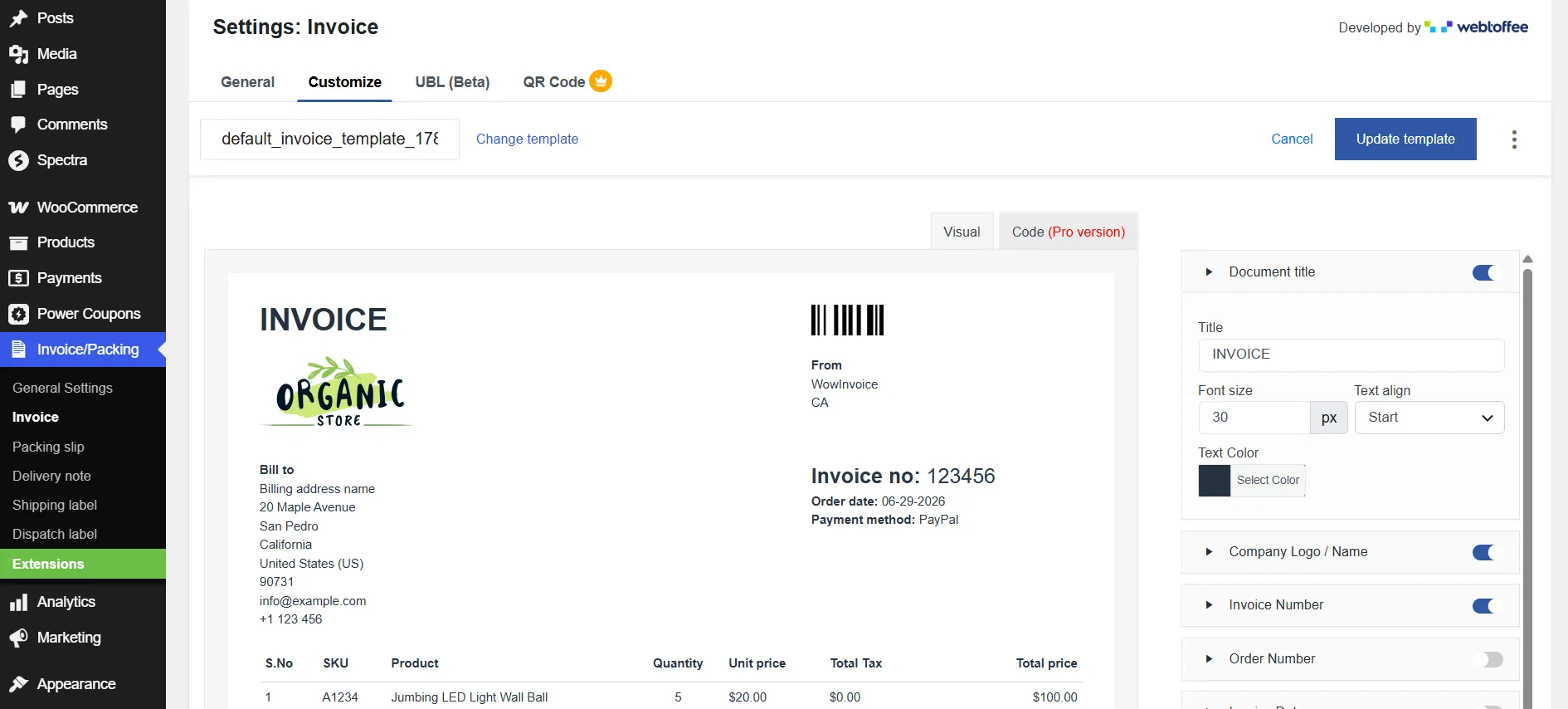
WebToffee’s invoice plugin also offers interactive features. Similar to WowInvoice, it lets you customize the document title, company logo, product table, and so on. For custom coding and other customization, the plugin offers a separate paid add-on ($39 per year).
# VAT and Tax Compliance
European VAT rules are strict and non-negotiable for cross-border sellers.
WowInvoice answers this by collecting the VAT information through a custom checkout field. Also, it integrates with popular VAT plugins like Germanized for WooCommerce.
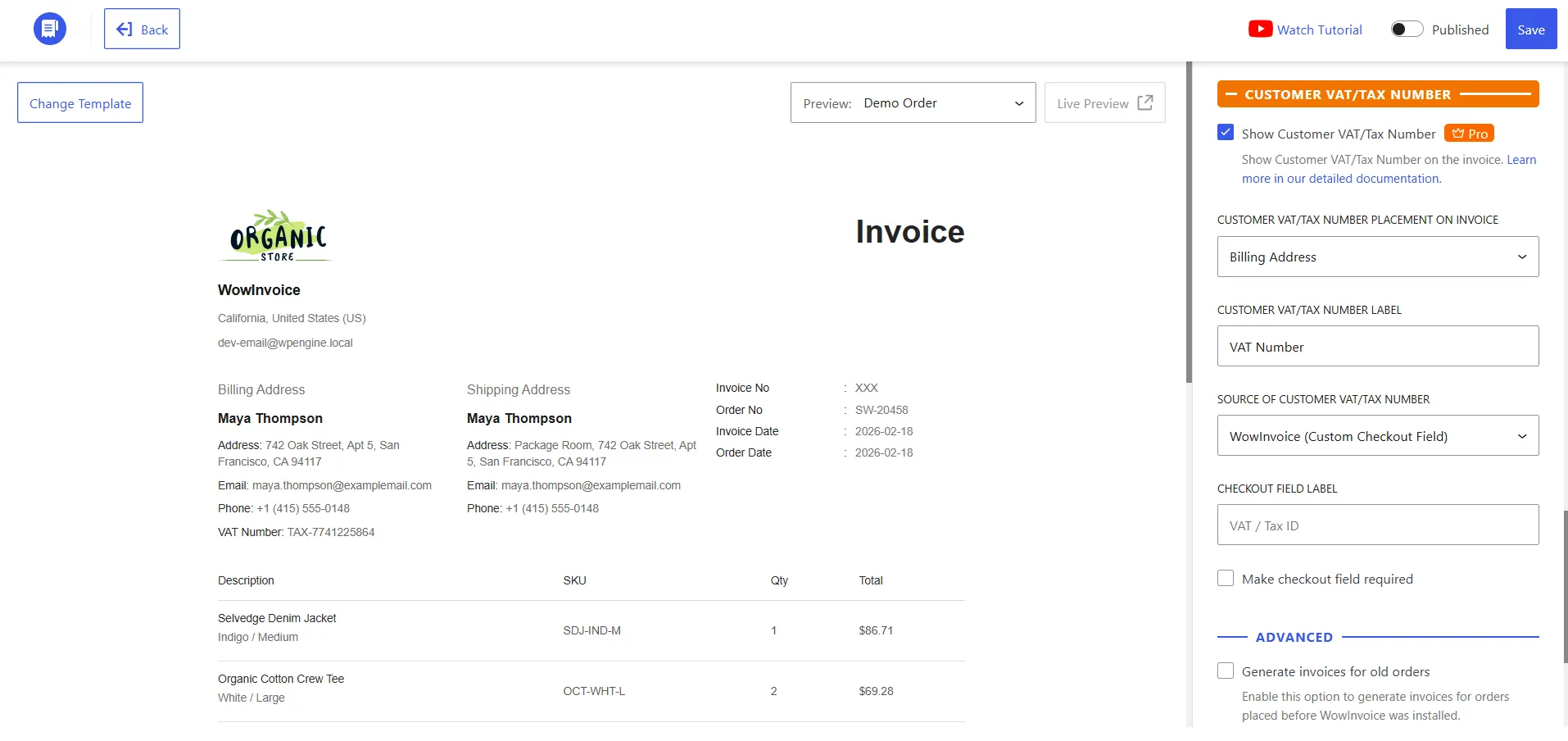
So, if you already use a dedicated VAT plugin, WowInvoice pulls that data directly onto the invoice. In addition, if you are using a custom solution, you have the option to use an Order Meta Key to retrieve the VAT information.
On the other hand, WebToffee handles tax by populating standard WooCommerce meta-keys such as _billing_vat and _billing_eu_vat_number. It is compatible with Aelia EU VAT Assistant and WooCommerce’s own EU VAT extension.
For stores already deep in the Aelia or Germanized ecosystem, either approach works; for stores that want the VAT field built into the document plugin itself, WowInvoice has an added advantage.
# Automation and Fulfillment Features
Both plugins automate document generation based on order status, attach PDFs to customer emails, and allow bulk printing and downloading. However, with a few caveats.
For example, in the free version of WebToffee, you can only send email attachments for invoices. You will need the PRO version to send attachments for Packing Slips or Credit Notes.
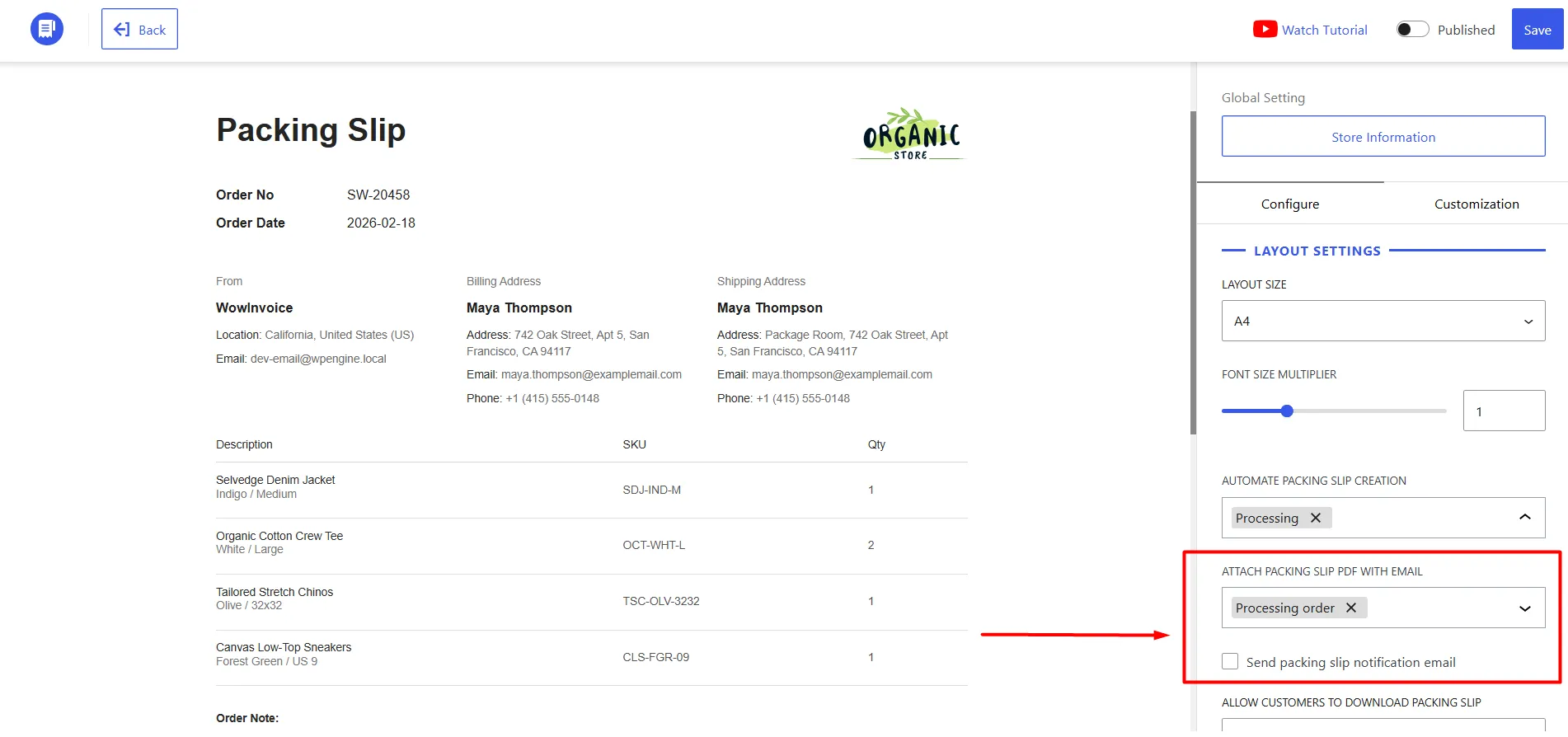
On the other hand, WowInvoice lets you add attachments to email for invoices and packing slips without a paid upgrade.
WowInvoice includes barcode and QR code generation, a paid watermark, email notifications to warehouse staff, and built-in RTL support for Arabic, Hebrew, Persian, and Urdu.
WebToffee offers Dropbox auto-backup for document archiving, PrintNode integration for remote printing the moment an order is placed, and a Pay Now link that can be embedded directly on the invoice PDF to speed up collections. The plugin also supports QR codes, but it requires installing an extra plugin.
# Pricing and License Model
WebToffee charges yearly: $69 for a single site, $99 for up to five sites, and $199 for up to twenty-five sites. There is no lifetime option, so every renewal is a new budget decision.
WowInvoice offers yearly plans as well – $69 for a single site, and $149 for unlimited sites. But it also sells lifetime licenses: $299 for a single site and $599 for unlimited sites. All pricing plans have an introductory discount.
Over a three-year period, WowInvoice’s unlimited lifetime plan becomes significantly cheaper than renewing WebToffee’s five-site plan repeatedly.
So, WowInvoice vs. WebToffee PDF Invoices: Which One Should You Choose?
Both WowInvoice and WebToffee PDF Invoices are capable WooCommerce invoice plugins that automate PDF document generation and help streamline your order management workflow. The better choice ultimately depends on what your store needs.
If your primary requirement is generating PDF invoices and you already rely on WebToffee’s ecosystem, such as Dropbox backups, PrintNode integration, or embedded payment links – it remains a solid option. It has been in the WooCommerce space for years and offers reliable document automation for many store owners.
However, if you’re looking for a complete document management solution that delivers greater long-term value, WowInvoice stands out.
With support for six essential document types (including Picklists and Credit Notes), built-in invoice customization, VAT field support, barcode and QR code generation, UBL invoicing, RTL compatibility, and a lifetime license option, WowInvoice gives you more functionality without requiring multiple add-ons or recurring costs year after year.
It is particularly well-suited for:
- Growing WooCommerce stores that need invoices, packing slips, shipping labels, picklists, and credit notes from a single plugin.
- Agencies and developers managing multiple WooCommerce sites who can benefit from the unlimited-site license.
- Store owners who prefer a one-time investment instead of paying annual subscription fees.
In short, both plugins will generate professional WooCommerce invoices, but if you want a broader feature set, more document coverage, and better long-term pricing, WowInvoice offers the stronger overall package for most WooCommerce businesses.
Frequently Asked Questions
Does WowInvoice replace WebToffee completely?
If you need invoices, packing slips, picklists, shipping labels, delivery notes, credit notes, and UBL in one plugin, WowInvoice covers everything WebToffee does and more. If you specifically want Dropbox backup or PrintNode integration, WebToffee still has unique strengths.
Can I use both plugins at the same time?
Technically, you can install both, but it is not recommended. Running two invoice generators can cause duplicate PDFs, conflicting email attachments, or numbering clashes. Pick one plugin and keep your workflow simple.
Does WebToffee offer a lifetime license?
No. WebToffee sells only recurring yearly subscriptions. If you prefer a one-time payment, WowInvoice offers lifetime deals.
Which plugin is better for EU VAT compliance?
Both handle VAT well, but through different methods. WowInvoice uses a native VAT checkout field to collect and show VAT information. It also integrates with popular VAT plugins to pull essential insights.
WebToffee relies on standard WooCommerce tax meta-keys and compatibility with tools like Aelia. Choose WowInvoice if you want to show VAT from customers with a super easy setup.
Is WowInvoice suitable for large stores with high order volume?
Yes. WowInvoice supports bulk export, automated email attachments, and order-status triggers. The unlimited lifetime plan also makes it cost-effective for agencies or multi-site owners.


