
The PostX heading blocks allow you to customize the header of a post or page.
With the PostX Gutenberg heading blocks, you can:
- Work with the different styles of headings
- Change the typography, border and, padding properties
- Enable or disable subheadings
- Add custom CSS properties
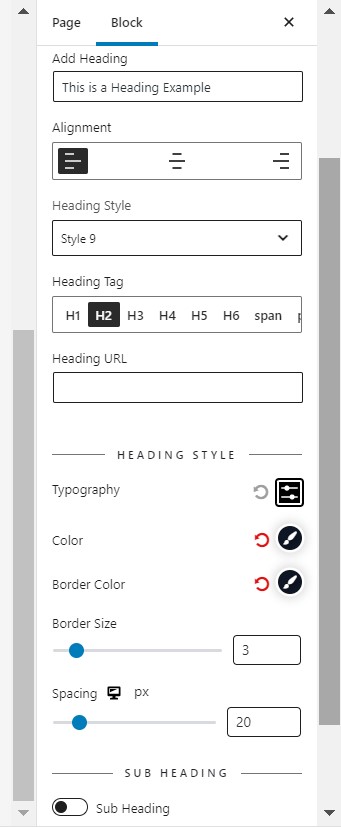
Block Syntax
- Add Heading: Use this field to add the heading text of the block.
- Heading URL: Use this field to add links in the heading.
- Alignment: Use this field to align the heading.
- Heading Style: Use this field to indicate the style number of the heading. There are a total of 15+ types of heading styles available in PostX
- Heading Tag: Use this field to change the HTML heading tag.
- Button Text: It works for Heading Style 11. Change the text of the button.
Styling
- Typography: To change font family, font weight, font size, line height, letter, spacing, transform, text-decoration. It supports responsive settings.
- Color: Use a color picker to choose the heading color.
- Background: Use a color picker to select the heading background color.
- Border Color: Use a color picker to choose the border color.
- Border Color 2: Use a color picker to choose the border color.
- Border Size: Use this slider to change the heading border size.
- Button Typography: To change font family, font weight, font size, line height, letter, spacing, transform, text-decoration. It supports responsive settings.
- Button Color: Use this color picker to pick a fill color.
- Button Hover: Use this color picker to pick a hover color.
- Spacing: Use this slider to change the spacing.
Sub-Heading
You can also add a sub-heading to make your main heading more precise and understandable.

Advanced Tab
- General
- ID: Use this field to add an ID to the block.
- Z-index: Use this field to change the z-index of the block.
- Margin: Use this field to change the margin of the block.
- Padding: Use this field to change the padding of the block.
- Background: Use this color picker to pick a background color.
- Border: Use this group field to change border width, style, and color.
- box-shadow: Use this group field to select shadow, inset & color in this option.
- Border Radius: Use this field to change the border-radius.
- Custom CSS: Add Custom CSS via this field.
- Advanced
- Additional CSS class: Add CSS class to the block.

